


Introduction
As a primary branch of Artificial Intelligence (AI), Machine Learning (ML) is increasingly applied in design practice to empower tangible intelligent products. For example, ML capabilities such as human voice recognition and text to speech are often used to enhance products like the smart speaker (Polyakov et al., Reference Polyakov, Mazhanov, Rolich, Voskov, Kachalova and Polyakov2018). ML is defined as a series of computer programs that learn from data or experience and improve performance without using predefined rules when performing a specific task (Mitchell, Reference Mitchell1999). ML is a vast research field, and this paper only discusses the typical ML systems of data-driven supervised deep neural networks.
ML is quite different from previous technologies such as electronics and the Internet of Things (Miorandi et al., Reference Miorandi, Sicari, De Pellegrini and Chlamtac2012) because of the uncertain and ever-changing characteristics caused by its lifecycle. These prior technologies have fixed technical characteristics because they are based on predetermined rules, making their capabilities and interaction consequences predictable. On the contrary, the capability of ML derives from the learning of large-scale data (Alpaydin, Reference Alpaydin2020), making the attributes of ML vary over its lifecycle. The lifecycle of ML (Zhou et al., Reference Zhou, Sun, Zhang, Liu and Gong2020) refers to the iterative data-enabled learning process, which includes data annotation, model training, model updating, and other steps. During the lifecycle, the performance of ML continually changes and is uncertain as the training data and ML model update, making it hard for designers to anticipate the interaction consequences of a not-yet developed ML-enhanced product (Yang et al., Reference Yang, Steinfeld, Rosé and Zimmerman2020). For example, the way an ML-enhanced smart speaker responds to user instructions might change in unexpected ways as the ML system continues to learn during the process of being used.
To address the challenges caused by the abovementioned characteristics of ML, prototyping is a core stage to which designers attach great importance. By building functional prototypes, designers are able to make an approximate representation of the final product (Camburn et al., Reference Camburn, Viswanathan, Linsey, Anderson, Jensen, Crawford, Otto and Wood2017) to identify potential issues that ML could cause and collect feedback from real users (Yang et al., Reference Yang, Steinfeld, Rosé and Zimmerman2020). Through crafting, introducing, modifying, or interacting with the prototype, the design proposal is shared, assessed, and iteratively improved (Yang et al., Reference Yang, Steinfeld, Rosé and Zimmerman2020; Lim et al., Reference Lim, Stolterman and Tenenberg2008; Camburn et al., Reference Camburn, Viswanathan, Linsey, Anderson, Jensen, Crawford, Otto and Wood2017).
However, designers find it difficult to prototype with ML (Dove et al., Reference Dove, Halskov, Forlizzi and Zimmerman2017), mainly because they lack the basic ML literacy required to actually build a functional ML prototype that reflects the characteristics of ML (Long and Magerko, Reference Long and Magerko2020). ML literacy refers to an understanding of the capabilities and limitations of ML as well as the skillset needed to critically make design choices related to ML and work with ML during design activities (Yang et al., Reference Yang, Banovic and Zimmerman2018a, Reference Yang, Scuito, Zimmerman, Forlizzi and Steinfeld2018b; Long and Magerko, Reference Long and Magerko2020). To improve ML literacy, designers need to learn about the ML lifecycle so that they can make sense of ML from the perspectives of how ML works and what ML can do. On the basis of this understanding, the designers gain the competence to reshape the performance of ML through essential changes to the key steps (e.g., data annotation and model training) of ML lifecycle, thus prototyping specific ML-enhanced products. Note that ML literacy for designers is not the same as the professional competence requirements for developers. Designers are not required to develop an ML system from scratch, but are expected to use ML as a design material.
Several tools have been developed for creating functional prototypes of ML-enhanced products. For example, programming tools like TensorFlow provide diverse functions for creating ML projects and expose all the details of the entire ML lifecycle. However, such tools are designed for professional developers and are too challenging for designers to use without a technical background in ML. Meanwhile, low-code tools like Google AIY (Google, 2019) and non-programming tools like the Delft AI Toolkit (van Allen, Reference van Allen2018) are friendly enough for designers without ML literacy, but they only provide several applications with relatively limited extendibility and barely introduce the ML lifecycle to designers. Designers can only implement rudimentary prototypes with such tools, which may hinder designers from practically prototyping diverse ideas and incorporating human feedback into the ML lifecycle (Choudhury and Kiciman, Reference Choudhury and Kiciman2018). Above all, existing tools are not primarily developed for improving the ML literacy of designers and they do not engage designers much in the ML lifecycle when creating functional prototypes.
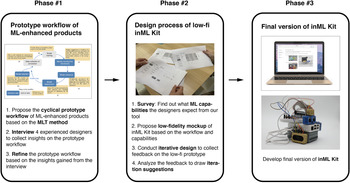
Our goal is to provide a toolkit that involves designers in the essential steps of the ML lifecycle, thus helping designers to improve their ML literacy and build functional prototypes. To achieve this goal, we conducted a three-phase participatory design process (Muller and Kuhn, Reference Muller and Kuhn1993), as shown in Figure 1. The process started by determining the prototype workflow of ML-enhanced products. Then, we formulated and iterated the design of inML Kit, which is a toolkit to help designers improve ML literacy and prototype ML-enhanced products.
Co-design procedure for formulating the design of inML Kit.

Phase #1: Prototype workflow of ML-enhanced products. We proposed a cyclical workflow for prototyping physical ML-enhanced products based on a design method called Material Lifecycle Thinking (MLT; Zhou et al., Reference Zhou, Sun, Zhang, Liu and Gong2020). The MLT method regards ML as a constantly evolving material with an iterative “lifecycle” and involves designers in the lifecycle of ML. To ascertain the first-hand requirements of designers, we invited four experienced designers in this field to be co-designers in a group interview so that we could gain insights for refining the workflow.
Phase #2: Design process of the low-fidelity (low-fi) prototype. Through a series of surveys, we identified the ML applications that designers expect from our tool. On the basis of this workflow, we proposed a low-fi mockup of our toolkit inML Kit that encompasses the expected ML applications. The low-fi mockup served as a probe in the co-design process, where the co-designers brainstormed more suggestions for refining the toolkit in the following design iterations.
Phase #3: Final version of inML Kit. We refined the low-fi mockup and developed inML Kit, aiming to implement the workflow and facilitate designers’ participation in the ML lifecycle. The inML Kit consists of a prototype toolkit composed of a software integrated development environment (IDE) and a set of hardware components. Following the MLT method, inML Kit helps designers participate in the critical stages of the ML lifecycle (such as data collection and model training) with a friendly graphical user interface (GUI) and simple operation. The inML Kit hides unnecessary technical details that are too complex for designers while preserving the ML specifics that are necessary to create functional ML prototypes, thus lowering the barrier for designers to get started with ML.
After the three phases mentioned above, we evaluated our work by conducting a design workshop where inML Kit was compared with Google AIY. The quantitative and qualitative results both show that our toolkit helps designers improve their ML literacy and performs well in terms of ease of use, flexibility, process, and understanding.
This paper makes three major contributions: (1) We propose a cyclical prototype workflow tailored to the background of the designers and the characteristics of ML. In contrast to the traditional ML development workflow that requires professional programming skills, our workflow lowers the barrier to getting started with ML technology following the MLT method. This workflow helps improve designers’ ML literacy by introducing the necessary ML specifics such as the difference between ML models and basic requirements for data annotation, instead of frustrating them with the many technical details such as the training parameters that pertain to ML. (2) We present an integrated toolkit (inML Kit) based on the cyclical prototype workflow. It involves designers in the ML lifecycle to enable them to build functional ML prototypes. It also offers a graphical low-code IDE and a set of reconfigurable hardware components that complement each other (see Fig. 1, Phase #3), enabling designers to implement the MLT method. (3) We summarize the implications and lessons we learned when developing, iterating, and evaluating the toolkit, which we hope will inspire future research on prototyping ML-enhanced products.
Background
Prototyping is a promising approach to supporting designers in exploring and verifying the proposed designs of products (Verlinden and Horváth, Reference Verlinden and Horváth2009; Kleinsmann and Bhömer, Reference Kleinsmann and Bhömer2020). To develop a toolkit that helps designers create functional ML prototypes, we identify the challenges in prototyping ML-enhanced products and gain insights from prior work.
Challenges in prototyping ML-enhanced products
ML can automatically identify patterns and extract information from data (Richert and Coelho, Reference Richert and Coelho2013), contributing to its widespread use in a range of fields (Domingos, Reference Domingos2012). However, ML is distinct from traditional technologies (Dove et al., Reference Dove, Halskov, Forlizzi and Zimmerman2017) because its ability evolves through the data-enabled learning process (Yang et al., Reference Yang, Steinfeld, Rosé and Zimmerman2020). Because of its ever-changing and evolving nature, designers often struggle to manage the user experience (UX) of ML appropriately (Amershi et al., Reference Amershi, Inkpen, Teevan, Kikin-Gil, Horvitz, Weld, Vorvoreanu, Fourney, Nushi, Collisson, Suh, Iqbal and Bennett2019), increasing the difficulty of prototyping and iteratively improving ML prototypes.
The prototyping process of ML is distinct from that of traditional technologies because the two types of technology are essentially different. For traditional technologies like electronics and the Internet of Things, designers usually build the prototype after the initial design proposal has been determined (Cerejo and Carvalhais, Reference Cerejo and Carvalhais2019). This is because these technologies are based on predetermined rules, and their capabilities are predictable. However, the capability of an ML system iteratively changes in a never-ending manner and does not always reach the optimal performance (Grecu and Brown, Reference Grecu and Brown1998). Unless designers make constantly evolving prototypes of ML-enhanced products, they cannot easily predict/simulate the final performance of ML in the initial design stages and cannot optimize the design ideas in depth.
The above challenges mean that designers must have a high level of ML literacy to make design decisions and build functional ML-enhanced prototypes. Some designers might only have a rough idea about how ML operates, and they tend to treat ML as a completely black box system (Patel et al., Reference Patel, Fogarty, Landay and Harrison2008). They barely know the capabilities, working mechanism, limitations, and other characteristics of ML (Cerejo and Carvalhais, Reference Cerejo and Carvalhais2019), which hinders them from using ML as a design material (Yang, Reference Yang2018) for making functional ML prototypes.
Prior work facilitating the prototyping of ML
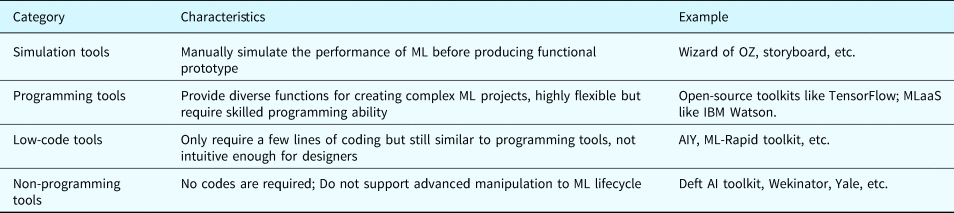
Prior practice made several attempts to facilitate the process of prototyping ML-enhanced products in different fidelity (see Table 1).
Characteristics of existing tools

The simulation tools for producing low-fidelity prototypes, including Wizard of OZ (Kelley, Reference Kelley1984) and storyboard (van der Lelie, Reference van der Lelie2006), allow designers to manually simulate the performance of ML through nontechnical approaches before producing a functional prototype. However, such tools neither really make use of ML nor go further into the inner mechanism of ML. As a result, designers can not verify the effectiveness of ML models or gain ML literacy through using these tools.
To further facilitate the prototyping process of functional ML-enhanced products, there are some programming tools for developers, including open-source toolkits like TensorFlow (Abadi et al., Reference Abadi, Barham, Chen, Chen, Davis, Dean, Devin, Ghemawat, Irving, Isard, Kudlur, Levenberg, Monga, Moore, Murray, Steiner, Tucker, Vasudevan, Warden and Zheng2016) and MLaaS (ML as a Service platform) (Ribeiro et al., Reference Ribeiro, Grolinger and Capretz2015) like IBM Watson. These tools provide diverse functions for users to create and deploy complex ML systems but require skilled programming ability, making it hard for designers to get started with them. On the other hand, low-code tools like AIY and ML-Rapid toolkit (Sun et al., Reference Sun, Zhou, Wu, Zhang, Zhang and Xiang2020) only require rudimentary programming skills. However, they do not provide sufficient guidance and introduction about ML, and their programming interfaces are not intuitive enough for designers to participate in the ML lifecycle.
Additionally, there are several non-programming tools like Delft AI Toolkit, Wekinator (Fiebrink and Cook, Reference Fiebrink and Cook2010), and Yale (Mierswa et al., Reference Mierswa, Wurst, Klinkenberg, Scholz and Euler2006). These tools significantly lower the barrier of ML and are friendly to designers without ML literacy. Still, they hardly support advanced manipulation to the ML lifecycle, such as annotating data and retraining models. As a result, designers can only make limited prototypes using the provided functions.
Above all, current prototyping tools somehow fail to improve ML literacy by involving designers in the ML lifecycle in a friendly way. Some existing research might potentially make up for the defects of the above tools. For example, interactive ML (Fails and Olsen, Reference Fails and Olsen2003; Amershi et al., Reference Amershi, Cakmak, Knox, Kulesza and Lau2013) allows users to provide data and answer domain-related questions. The method named Value-Sensitive Algorithm Design would incorporate stakeholders’ tacit values, knowledge, and insights in the early stages of algorithm creation (Zhu et al., Reference Zhu, Yu, Halfaker and Terveen2018). Besides, the MLT method (Zhou et al., Reference Zhou, Sun, Zhang, Liu and Gong2020) inspired by interactive ML could involve designers in the essential steps of ML lifecycle with the consideration of co-creators related to the UX of ML-enhanced products. In this way, designers with little ML literacy can bring worthwhile improvements over initial prototypes (Grecu and Brown, Reference Grecu and Brown1998) and participate in the human–ML interaction (Amershi et al., Reference Amershi, Cakmak, Knox and Kulesza2014).
Overall challenges
Design challenges in prototyping ML-enhanced products mainly come from the ML lifecycle, in which the performance of ML is constantly changing. Designers usually lack ML literacy and cannot participate in the lifecycle of ML. Existing tools for designers pay little attention to involving designers in the ML lifecycle in a friendly way, illustrating the necessity to develop a toolkit that can assist designers in creating a functional prototype following a method like MLT.
Our work
Our goal: improve ML literacy
Our work aims to help designers to improve their ML literacy, by which we mean their overall understanding of ML and the ability to make use of ML viably in design. To this end, inML Kit offers designers several opportunities to participate in the ML lifecycle, such as data annotation and model training, so that designers can constantly update ML models to cultivate diverse functional prototypes. It should be noted that, for designers, the core of ML literacy is an overall understanding of ML so it can be used as a design material, rather than an understanding of the algorithm structure and technical details for devising ML models. The latter type of understanding is often beyond the ability of designers and is the mission of developers.
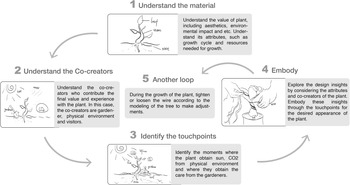
The design of our toolkit is inspired by the MLT method, a design method that regards ML as a constantly evolving material with a never-ending iterative lifecycle. The MLT method involves designers in the essential ML process by considering the needs of the co-creators (ML, users, and scenarios) that cooperate in creating UX (Zhou et al., Reference Zhou, Sun, Zhang, Liu and Gong2020). MLT has been used to support a conceptual design tool called the ML Lifecycle Canvas. Figure 2 illustrates the MLT method using an example of how a potted plant would be cultivated.
MLT method (using a potted plant as an example) (Zhou et al., Reference Zhou, Sun, Zhang, Liu and Gong2020).

Ideally, designers would apply the MLT method when prototyping an ML-enhanced product using the following steps: (1) Understand the characteristics of the material (in our study, the material refers to ML), including the capability and input/output of each ML model. (2) Identify the co-creators of the ML-enhanced product, such as users, scenarios, and data, and understand their technical as well as interactive characteristics. (3) Identify touchpoints where the co-creators exchange resources/information with each other and impact the evolution of the ML performance. (4) Envision possible UX by considering the trade-offs between co-creators with various characteristics to gain prototype insights. Embody the insights through the touchpoints to generate a functional prototype. (5) Another loop. Monitor the performance of the completed ML prototype, and if it is not satisfactory, repeat the steps of the process again to improve the performance of the ML model (e.g., by retraining the model or restructuring the dataset).
Through this cyclical process, MLT can address the prototype challenges caused by the characteristics of ML. To enable designers to practice MLT in the prototyping stage, we carried out the following three phases to design and develop the toolkit called inML Kit, thus facilitating the prototyping of ML-enhanced products and improving the ML literacy of designers. How the MLT is implemented in our toolkit is discussed in the section “MLT implementation in inML Kit.”
Phase #1: prototype workflow of ML-enhanced products
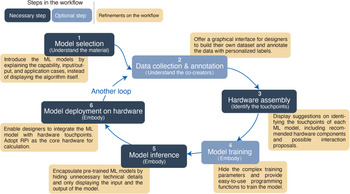
ML prototype tools for developers usually adopt the professional development workflow. However, prior research and design practice (Sun et al., Reference Sun, Zhou, Wu, Zhang, Zhang and Xiang2020) implied that professional workflow is not consistent with the knowledge background of designers. To tailor the workflow enabling designers to participate in the ML lifecycle, we proposed a cyclical prototype workflow of ML-enhanced products (Fig. 3) derived from the abovementioned MLT method in this phase.
The prototyping workflow and the refinements.

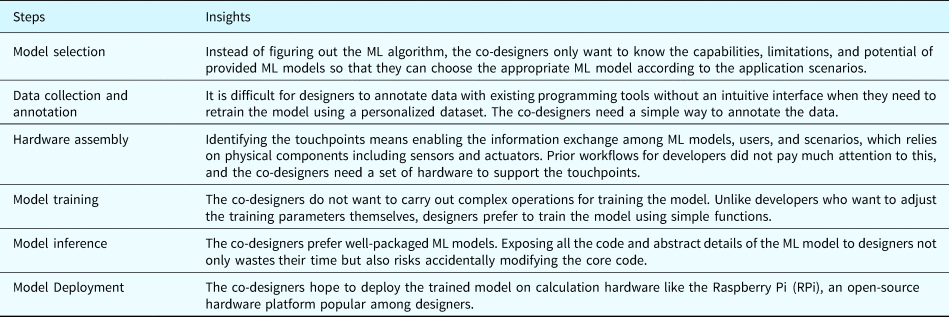
Based on the MLT method and the professional development workflow, we first proposed a preliminary workflow (see the inner cycle of Fig. 3), a data-enabled cyclical workflow that supports iteration of ML-enhanced prototype. Each step in the workflow corresponds to a step in the MLT method. For example, in the Model selection step (see Fig. 3), the designer will understand the characteristics of ML (see Fig. 2).
To enrich the workflow and gain insights for eliciting the design scheme of our toolkit, we invited four expert designers as the co-designers to a semi-structured interview. The co-designer selection started with an open call via web media and personal connections to the designer community, and all the co-designers have experience in prototyping ML-enhanced products. Three criteria guided the selection: (1) a strong motivation to know more about the prototype of ML-enhanced products and being comfortable with sharing insights; (2) the design professionals with formal design training and had been exposed to ML as part of their education; (3) the design practitioners with at least 3-year experience in designing the digital device and is currently working on design projects of ML-enhanced products. The four selected co-designers include two intelligent product designers, a design educator focusing on AI-empowered products, and a data scientist with a cross background in design and ML. They all have hands-on experience with ML-enhanced product design. They were rewarded with monetary compensation after the workshop.
The group interview lasted for 4 h, and the co-designers were free to interact with each other. One of the co-authors who is experienced in the design of ML-enhanced products guided the discussion. First, the co-designers recalled the conventional workflows that they adopted when prototyping ML-enhanced products. They were encouraged to illustrate the workflows explicitly through specific design projects and visualize these workflows using paper and pencils. The reported workflows ranged from MLaaS to open-source frameworks (e.g., TensorFlow). By recalling the successes and difficulties encountered in previous projects, they reflected on the merits and demerits of these workflows. Then, our preliminary MLT-based workflow was introduced to the co-designers and placed together with their abovementioned workflows. By juxtaposing each workflow's common steps and reflecting on those different steps, they discussed whether and how our workflow can meet their needs of prototyping ML-enhanced products. On this basis, they put forward specific requirements for each step of our workflow, which leads us to enrich the MLT-based workflow and outline the rudiment of our toolkit. For example, almost all the workflows start with the Model selection. However, without friendly explanations on the functions of ML models, the designers struggled to collect enough information by themselves to understand what different ML models can do. They hope that the toolkit can explain what the ML model can and cannot do from the designers’ perspective.
After the interview, the other two co-authors with an interdisciplinary background in design and ML reviewed the requirements proposed by the co-designers and removed the unimportant or inappropriate requirements, respectively. For example, a designer mentioned using cloud servers for model training, which was regarded as an unnecessary requirement. One reason is that the computing resource of personal computers is already sufficient to meet the needs of designers for making functional ML prototypes. Another reason is that using cloud servers requires technical skills such as deploying network devices. Another designer expected the tool to support automatic annotation of large quantities of data, which is beyond what an initial exploration of the toolkit can achieve. Later, the co-authors reached a consensus on different decisions through discussion. At last, they summarized the insights (see Table 2) from the requirements. Requirements for the same step of workflow were synthesized together. For example, the requirements of “skipping the tuning process” and “train the ML model with simple operations” both fell under the Model training step. Most of the co-designers expressed their preference for an intuitive graphical interface rather than a technical document or program code. Such overall requirements provided inspiration for the whole workflow and were reflected in multiple steps of the workflow. Refinements (the yellow blocks shown in Fig. 3) were made based on these insights to make the workflow more comprehensive and practical.
Insights on the prototype workflow

Phase #2: design process of the low-fi inML Kit
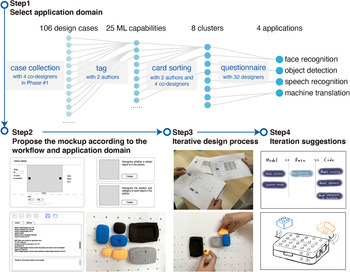
Building off the prototype workflow produced in Phase #1, we conducted a participatory design process (see Fig. 4) to formulate the low-fi inML Kit. The process started with a series of surveys to determine what ML capabilities the designers expect from our tool. Then, we proposed a low-fi prototype encompassing the expected ML capabilities and collected feedback from the co-designers for iterating the prototype.
The participatory design process of low-fi inML Kit.

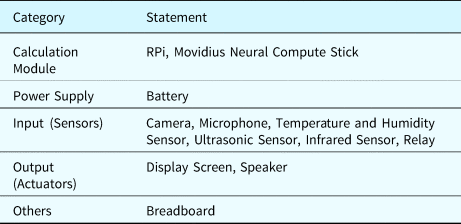
Step1: To agilely develop the toolkit without committing to a costly implementation, we conducted a series of surveys as follows (see Fig. 4, Step1) to select the four most popular ML applications as the application domain of our toolkit, namely, to find out what ML capabilities the designers expect from our tool. (1) The four co-designers mentioned in Phase #1 collected 106 design cases covering the most common types of ML-enhanced products; (2) two co-authors tagged these cases with the ML capabilities (e.g., tag Siri with the “speech recognition/generation”) and got 25 ML capabilities. (3) The two co-authors and the four co-designers categorized the 25 capabilities into 8 clusters using the card sorting method (Spencer and Warfel, Reference Spencer and Warfel2004). (4) Thirty-two designers with design experience of ML-enhanced products were invited via social media to select the four most commonly used applications out of the eight clusters. All the participants have signed informed consent and were rewarded with monetary compensation. The final ML application domain comprises four ML applications: face recognition, object detection, speech recognition, and machine translation. Based on these ML applications, we identified the hardware components to enable the information input/output, as shown in Table 3.
Hardware components of inML Kit

Step2: Built off the refined workflow and application domain, we developed the low-fidelity mockup (see Fig. 4, Step2) of inML Kit using approaches like wireframe and clay model. Based on the consideration of existing tools (see Table 1), we adopted the form of low-code to ensure the ease of use and flexibility of inML Kit, and enable designers to participate in the ML lifecycle. The hardware components were labeled with different colors according to the sensory channels. For example, the camera and display screen are often used in visual-related prototypes, and the same is true for the microphone and speaker in auditory prototypes.
Step3: Collect feedback on the low-fidelity mockup (see Fig. 4, Step3). The four co-designers took part in an iterative design. We used the prototype as probes to elicit participants’ reactions and encourage them to brainstorm more ideas that could improve their experience when using the tool and help them to explore ML capabilities.
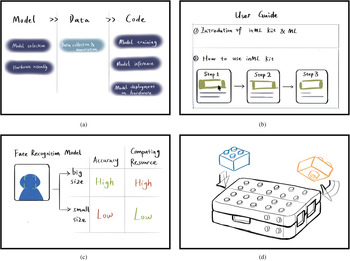
Step4: Consolidate the iteration suggestions (see Fig. 4, Step4). We consolidated the following iteration suggestions (see Fig. 5) through the iterative design with four co-designers: (1) The steps in the workflow are not concise enough. According to the focus of each step, we subsumed the six steps into three modules called Model, Data, and Code sequentially (see Fig. 5a). (2) To help designers gain an overview of ML and the tool at the beginning, we added a User Guide module (see Fig. 5b) to illustrate the mechanism of ML and the usage method of the tool. (3) We provided different ML models for each ML application. We subdivided the models according to their size (see Fig. 5c) because designers often have different emphases on ML models’ accuracy and computing time. How to choose ML models depends on factors like computational resources and interaction. On the premise of the same computing resources, the accuracy of the inference results is positively correlated with the size of the ML model. However, a larger ML model requires more computing resources and more time for inferencing. (4) We adopted a modular reconfigurable design to make it easier to assemble and rearrange the hardware components (see Fig. 5d). Each component was packaged with a cuboid shell on which there are interlocking convex and concave structures. In this way, the designers can flexibly design the particular layout of hardware components according to the design proposal.
The iteration suggestions from the iterative co-design.

Phase #3: final version of inML Kit
Introduction of inML kit
Following the suggestions obtained in the previous phase, we refined the low-fi mockup and developed the final version of inML Kit, which is a combination of a software IDE and hardware components (see Fig. 1, Phase #3). The toolkit is highly compatible with flexible but straightforward prototype platforms such as RPi and Arduino that are familiar to designers. We introduce the details of our toolkit in terms of the software and hardware.
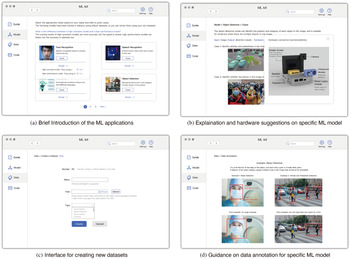
Software: The software is an IDE developed in the Qt environment using pretrained TensorFlow ML models, enabling it to work with Linux, Mac, and Windows systems. It is a low-code IDE consisting of a GUI and a coding interface. The entire inML Kit itself is a standalone IDE rather than an add-on package to an existing platform or IDE. The GUI of the software (see Fig. 6) helps designers with nontechnical backgrounds understand the necessary ML specifics. For example, the interface of the Model module (Fig. 6a) explains the difference in the inference results and running speed of ML models of different sizes. The interfaces of a specific ML model (Fig. 6b) explain the functions of the ML model using plain language, describe the input and output of the model, and gives concrete examples. The functions that might confuse designers without an ML background, for example, face detection versus face recognition, are specifically explained. The interfaces of the Data module (Fig. 6c,d) explain the points to consider when creating and annotating new datasets. The coding interface of the Code module was inspired by the IDE of Arduino.
Interfaces of the software IDE.

With the provided ML models, designers can enhance the product using ML applications like object detection and speech recognition with a few lines of code. They can also participate in the lifecycle of ML to personalize new ML capabilities by building their own datasets and retraining the model. Because inML Kit is a cross-platform toolkit, designers can transfer the trained models to different platforms. For example, a designer can annotate the data (in the Data module), select the model (in the Model module), and train the model (in the Code module) on a computationally powerful computer and then deploy the trained model on a RPi.
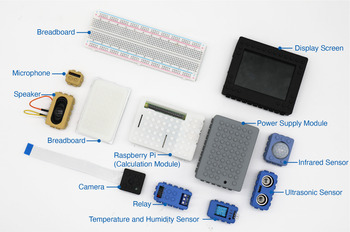
Hardware: Based on the RPi platform, the hardware of inML Kit includes various functional components such as calculation modules, and input/output modules (see Fig. 7). We developed the hardware components using the RPi platform because it is one of the most common single-board computer platforms used by designers when making electronic product prototypes (Raspberry Pi Foundation, 2021). To reduce the inference delay caused by the insufficient computing performance of the RPi, the Movidius neural compute stick (Intel, 2018), a tiny ML device with a low-power architecture, was loaded to deploy the ML inference applications. The components, including a temperature and humidity sensor, infrared sensor, speaker, camera, and microphone, are embedded in the reconfigurable shell, enabling designers to connect them in various ways like building blocks. The interlocking structure is compatible with LEGO blocks so that designers can easily expand the prototype with LEGO bricks of various sizes.
Hardware components of inML Kit.

MLT implementation in inML Kit
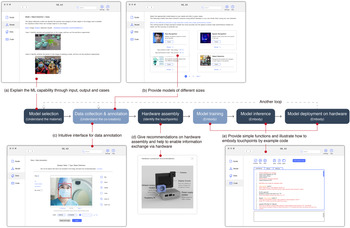
Our final inML Kit enables designers to implement the MLT method (see Fig. 8) by following the workflow (see Section “Phase #1: prototype workflow of ML-enhanced products”) when prototyping ML-enhanced products.
(1) Model selection (Understand the material): In this step, designers learn the capabilities, limitations, and potential of various built-in ML models (the design material) and choose the appropriate model. The Model module of the IDE simplifies the technical details and explains each ML application by illustrating its input/output and giving example cases (Fig. 8a). This frees designers from the need to understand technical terms and complicated programs so that they can focus on prototyping the design idea itself. Moreover, each ML application provides different options according to the size of the ML models (Fig. 8b). For example, the capability of face recognition offers two options, one has higher accuracy but requires more computational power, and the other consumes fewer computing resources but has a lower accuracy rate. These options remind designers to consider factors such as interaction speed and computing resources.
(2) Data collection and annotation (Identify the co-creators): The inML Kit would enable designers to understand the factors related to co-creators, such as the technical and interactive characteristics of users and scenarios. The Data module of the IDE allows designers to collect the information of users (only when approved by the users) or scenarios as the data for retraining the ML model. For example, to retrain the face recognition model, designers need to place the collected face images in a folder and then upload the folder to the Data module. Using the data annotation interface (Fig. 8c), the designers can personalize labels and annotate the dataset in a visible way. In this way, designers learn to pay close attention to data-related factors such as data sources and labeling rules, thus improving ML literacy.
(3) Hardware assembly (Identify the touchpoints): After preparing the dataset, inML Kit helps designers determine the touchpoints at which the ML models exchange information with the other co-creators (e.g., the users and scenario). For a physical prototype, the implementation of the touchpoints depends largely on the hardware components, and hence, inML Kit helps designers choose and assemble the appropriate hardware components. The Model module of the IDE offers suggestions for selecting and assembling the hardware components for different ML models (Fig. 8d), for instance, using a camera as the input module to collect images for object recognition or using a screen as the output module to display the results to users.
(4) Model training, Inference, Deployment (Embody): The inML Kit enables designers to envision possible UX by considering the trade-offs between co-creators (e.g., the ML and user) to gain potential prototype insights. The Code module of the IDE offers a coding interface (Fig. 8e) for designers so that they can embody prototype insights via model training, inference, and deployment through the abovementioned touchpoints. First, designers transform the insights into a few lines of code that logically implement the prototype idea. To clearly illustrate how to integrate all the touchpoints and control the hardware, the Code module offers a project with executable code as a demo. If designers want to train the ML models on a computer with a powerful GPU, they could type the function called Model.train(dataset_index) in the coding interface (see Fig. 8e) of the IDE installed on the computer. For example, to train the face recognition model with the dataset indexed with “03”, designers could use the function as follows: Face_recog.train(03). After the “Run” button is clicked, the IDE captures the written code, sends it to the default Python compiler in the given system (e.g., Windows), and then executes it using our customized library as well as other installed libraries and drivers. Because the ML model and dataset are customized and perfectly adapted to each other, the training process would use the default parameters (e.g., batch size and learning rate). The trained models are frozen and automatically transformed into a computing graph file that can be directly applied to the Movidius Neural Compute Stick. In the final step, the designers deploy the trained and transformed models on the RPi and the Movidius Neural Compute Stick. The function Model.infer(“input data”) enables an ML model to make an inference based on the input data. The abovementioned steps can also be completed on the RPi but it will consume much more time, so we suggest that designers (and the participants in the experiment) complete the model training using a computationally powerful computer.
(5) Another loop: This is not a specific function or button within the IDE but a process where designers are encouraged to repeat the steps in the ML lifecycle once again. The data-enabled cyclical workflow of inML Kit means that designers are free to participate in a new ML lifecycle iteration, thus updating the prototype. After deploying the ML model and building the functional prototype, designers monitor the performance of ML models and make multiple adjustments to the prototype. Designers can refine the prototype by making flexible changes when participating in another iteration of the ML lifecycle. For example, when the performance of the ML-enhanced prototype does not meet designer's expectations, the designer can consider switching to another ML model via the Model module. If more data are available for training the model, a designer can update the dataset via the Data module and retrain the model via the Code module. Refinements to the human–ML interaction can be implemented by reassembling the hardware.
Implementation of MLT in inML Kit.

Evaluation
To understand how inML Kit can help designers improve their ML literacy and facilitate the prototyping process, we conducted a controlled user study. We chose Google AIY (Google, 2019), a do-it-yourself toolkit that contains a voice kit and vision kit, as the comparison (Ledo et al., Reference Ledo, Houben, Vermeulen, Marquardt, Oehlberg and Greenberg2018) of inML Kit. We chose AIY because its target users (makers) are similar to those of our tool (designers). Users without professional programming skills can complete ML projects using AIY. Moreover, AIY is a low-code tool that includes hardware components and a programming environment powered by the RPi, which is similar to inML Kit.
Participants
We recruited the participants via social media groups of UX designers. We employed a prescreen to select the participants who had experience with UX design and basic programming skills like Arduino. Finally, 18 participants (10 females and 8 males, range from 20 to 34 years old) were invited to participate in our study. Six of them (A2, A4, A7, M3, M5, and M7, marked with * in Table 4) have participated in designing ML-enhanced products, whereas the others have hardly been exposed to ML before and barely understand ML technology. As shown in Table 4, the 18 participants were divided into six groups, each with three participants including one participant who has some ML experience. Groups 1–3 completed the task with AIY and Groups 4–6 completed the same task with inML Kit. In return for participating in the evaluation, participants received monetary compensation.
The group organization of the participants

Procedure
Instructions
We introduced the workshop procedure to the participants and provided them with short instructions introducing the usage method of the AIY/inML Kit. Participants could ask questions freely if they did not understand the usage of the tool.
Workshop
In the workshop, each group used AIY/inML Kit to complete a prototype task based on the ML application of flower recognition, a specific example of object detection. We selected object detection because it is a typical application shared by AIY and inML Kit, and one of the most popular ML applications mentioned in the section “Phase #2: design process of the low-fi inML Kit.”
The task included the compulsory part and the open-ended part. In the compulsory part, the participants were required to build a physical prototype that can (1) take photos of flowers using the camera, (2) automatically recognize the category of flowers and display the flower name on the screen. In the open-ended part, participants were encouraged to freely explore the prototyping process, such as expanding the application based on flower recognition and iterating the interaction. The task lasted for 90 min, and videos were recorded with the consent of participants.
Measures
To present the prototypes each group produced in the workshop, we provide photos and describe the functions of each design case in the next section.
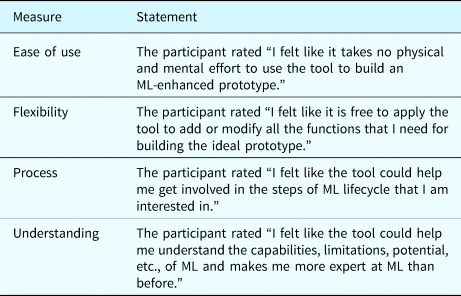
We used three quantitative measures for the evaluation: effectiveness and completion time from the objective perspective, and a subjective Likert scale encompassing four criteria. The effectiveness of both tools was evaluated by whether the participants completed the compulsory task. The completion time of each step in the prototype workflow was recorded to find out specific differences between the two tools. After the workshop, the participants completed a seven-point Likert scale (1 = strong disagreement, 7 = strong agreement) to report their perception of the toolkits in terms of four evaluation criteria: ease of use, flexibility, process, and understanding. The statements for the four criteria are shown in Table 5.
Seven-point Likert scale statements for the four evaluation criteria

The four criteria are derived from the prior literature and the discussion among an expert focus group (Krueger, Reference Krueger1998) consisting of three co-authors of this paper. We selected the four criteria for the following reasons: (1) Ease of use: This criterion would influence designers’ decision on whether to use a tool (Davis, Reference Davis1985), which is considered to be a prerequisite for prototyping tools (Patel et al., Reference Patel, Fogarty, Landay and Harrison2008; Yang et al., Reference Yang, Scuito, Zimmerman, Forlizzi and Steinfeld2018b). (2) Flexibility: This criterion is essential for designers to create various prototypes and freely adjust the prototype (Patel et al., Reference Patel, Fogarty, Landay and Harrison2008; Yanget al., Reference Yang, Scuito, Zimmerman, Forlizzi and Steinfeld2018b), which supports the frequent iterations in the prototyping process (Camburn et al., Reference Camburn, Viswanathan, Linsey, Anderson, Jensen, Crawford, Otto and Wood2017). (3) Process: One of the goals of our toolkit is to enable designers to participate in the ML lifecycle during the design process, and this criterion could verify whether we achieve the goal (Zhou et al., Reference Zhou, Sun, Zhang, Liu and Gong2020). (4) Understanding: This criterion reflects the increment of participants’ ML literacy (Yang, Reference Yang2017; Long and Magerko, Reference Long and Magerko2020), which is one of the objectives of inML Kit.
As for the qualitative measures, we conducted a semi-structured interview with each group in terms of the four criteria, which helped to determine the reasons behind the scoring of the Likert scale. We asked laddering questions in the following way: (1) “Why do you feel that the tool is (or is not) easy to use/flexible?” or “Why do you think the tool increased (or did not increase) your understanding of ML?” (2) “What elements do you think are important for an easy to use/flexible tool? Why?” or “What are the critical aspects of the tool that help you understand ML? Why?” The laddering questions were adjusted according to the participants’ answers. Participants were allowed to express their comments about the tool and ask questions freely.
Case study
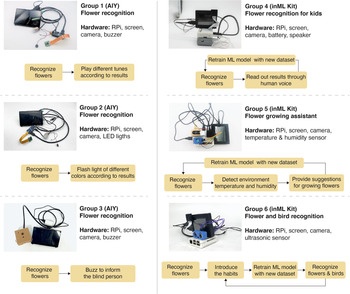
The design cases of six groups are shown in Figure 9. All of the six groups completed the compulsory parts of the prototype, which preliminarily proved the effectiveness of both AIY and inML Kit. Group 1 and Group 2 (AIY Groups) respectively added buzzer alarms and LED lights as feedback of flower recognition results. Group 3's prototype could recognize flowers and buzz to inform the visually impaired. However, they all failed to realize and verify other ideas like voice broadcast because the vision and voice kit of AIY could not be bridged and integrated into one prototype. As for inML Kit, Group 4 prototyped a product that could recognize flowers and read out the results for kids through human voice. An intelligent assistant for growing flowers was prototyped by Group 5. It can provide suggestions for growing flowers according to the detected environment temperature and humidity. Group 6 added a new dataset of different kinds of birds, coming up with a prototype for outdoor explorers to recognize flowers and birds in the wild, as well as introduce their habits. When comparing the design cases of AIY groups with inML Kit groups, prototypes made by AIY groups (Groups 1–3) could only provide ambiguous feedback since the hardware components provided by AIY are relatively limited, which somehow restricted the flexibility of the prototype. By contrast, prototypes by inML Kit groups (Groups 4–6) could provide adequate feedback using the diverse hardware components to cater to different targeted users.
The final design cases of the six groups.

To further illustrate the design process and outcome, the case of Group 5 will be specifically introduced as an example. (1) Model selection: Firstly, the participants went through the User Guide and selected the small-size pretrained object detection model in the Model module. (2) Data collection and annotation: They figured out co-creators, including the scenarios (e.g., home, garden) and users (e.g., the novice of flower growing, gardener). To save time, they collected photos of flowers online and annotated the data using the GUI of the Data module. (3) Assemble hardware: According to the suggestions provided in the Model module, Group 5 adopted a camera as the input component and a screen as the output component of the touchpoints. (4) Model training, Inference, Deployment: Following the instructions and referring to the example code, they completed the model training and inference steps in the Code module, and then deployed the model on the RPi hardware. After completing the compulsory task, Group 5 envisioned design opportunities and integrated them into the final functional prototype. If users buy a new plant that is not included in the training dataset, the photo of the new plant may be used as new data for retraining the ML model, thus extending the capability of the ML model. So, Group 5 started Another loop in the open-ended part of the task. The inML Kit supports them to prototype design proposals flexibly: (1) Training the ML model with a new dataset. Considering that most people grow various flowers and green plants, Group 5 tried to use a dataset covering diverse plants to enable the ML model to recognize more types of plants. (2) Identifying new touchpoints to help the prototype get more information from the external environment. Group 5 expected the prototype to advise growing flowers according to the temperature and humidity, so they used the temperature and humidity sensor to detect the desired information.
Quantitative results
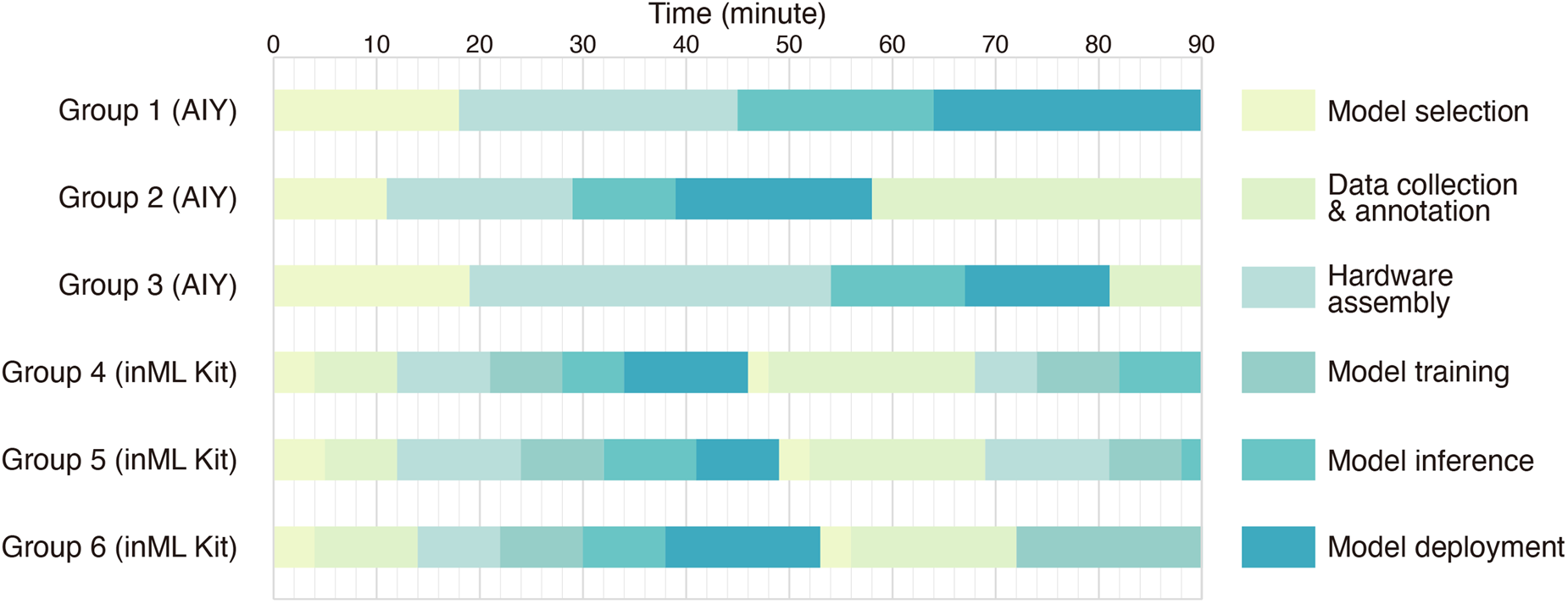
The time each group spent in each step of the prototype workflow is shown in Figure 10. Overall, all groups went through the prototype workflow and completed the compulsory task after the Model deployment step. All the prototypes could correctly recognize the given flowers including daisy, windflower, and dandelion, which preliminarily showed that the performance of models could satisfy the participants. However, some participants found that the variety of recognizable flowers was not enough. The existing models were not able to recognize other kinds of flowers such as rose and orchid. Therefore, most groups started another loop in the open-ended part to iterate their prototypes except Group 1. However, groups using inML Kit completed the compulsory task, namely the first loop (M = 49.3 min), faster than AIY groups (M = 76.3 min), so that they had more time left for iterating the prototype. In the first loop, the average time Groups 1–3 spent is longer than Groups 4–6 in steps of Model selection (M AIY = 16 min, M inML = 4.3 min), Hardware assembly (M AIY = 26.7 min, M inML = 9.7 min), Model inference (M AIY = 14 min, M inML = 7.7 min), and Model deployment (M AIY = 19.7 min, M inML = 11.7 min).
The completion time of each group.

Some differences between inML Kit and AIY could be illustrated by connecting the design cases to the completion time. When completing the compulsory part, all the AIY groups used the pretrained models to recognize the flowers and skipped steps of Data collection and annotation and Model training. When the open-ended part started, however, the AIY groups found it difficult to refine ML models because it required professional knowledge related to TensorFlow. Figure 10 shows that both Group 2 and Group 3 were stuck at Data collection and annotation step. Group 2 had spent up to 32 min attempting to collect and annotate data but failed to finish it, which has frustrated the participants. It seemed that AIY only allowed participants to collect data from a given website, making it difficult for participants to customize the dataset. For data annotation, AIY offers a Python annotation library that draws overlays on the Raspberry Pi's camera preview, which is quite challenging for designers without much programming experience. As for inML Kit, all three groups completed the second round of Model selection (M = 2.7 min), Data collection and annotation (M = 17.7 min), and Model training (M = 11 min). The participants could flexibly adjust prototypes with inML Kit by collecting new datasets, restructuring the hardware components, etc. In particular, the GUI of inML Kit reduced the difficulty of data annotation, because users can draw the annotation box directly on the picture with the mouse, rather than using the Python libraries that require coding. More reasons why the completion time varies with the tools were elicited from the interview results and we discussed them together in the section “Discussion.”
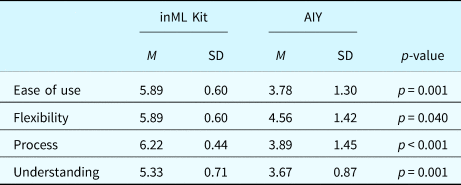
Concerning the scoring of the tools in the four criteria, the score was not normally distributed according to the Shapiro–Wilk test (Shapiro and Wilk, Reference Shapiro and Wilk1965). Thus, we applied the Mann–Whitney U test (Nachar, Reference Nachar2008) to compare AIY and inML Kit in terms of the four criteria. In the test, H 0 is the null hypothesis, indicating that there is no difference between the inML Kit participants and the AIY participants, whereas H 1 is the alternative hypothesis, indicating that there are statistically significant differences between the two types of participants. The significant level was set as 5% (0.05). The Mann–Whitney U test results are shown in Table 6, showing support for the alternative hypothesis (H 1) in terms of all the four criteria.
The Mann-Whitney U test results

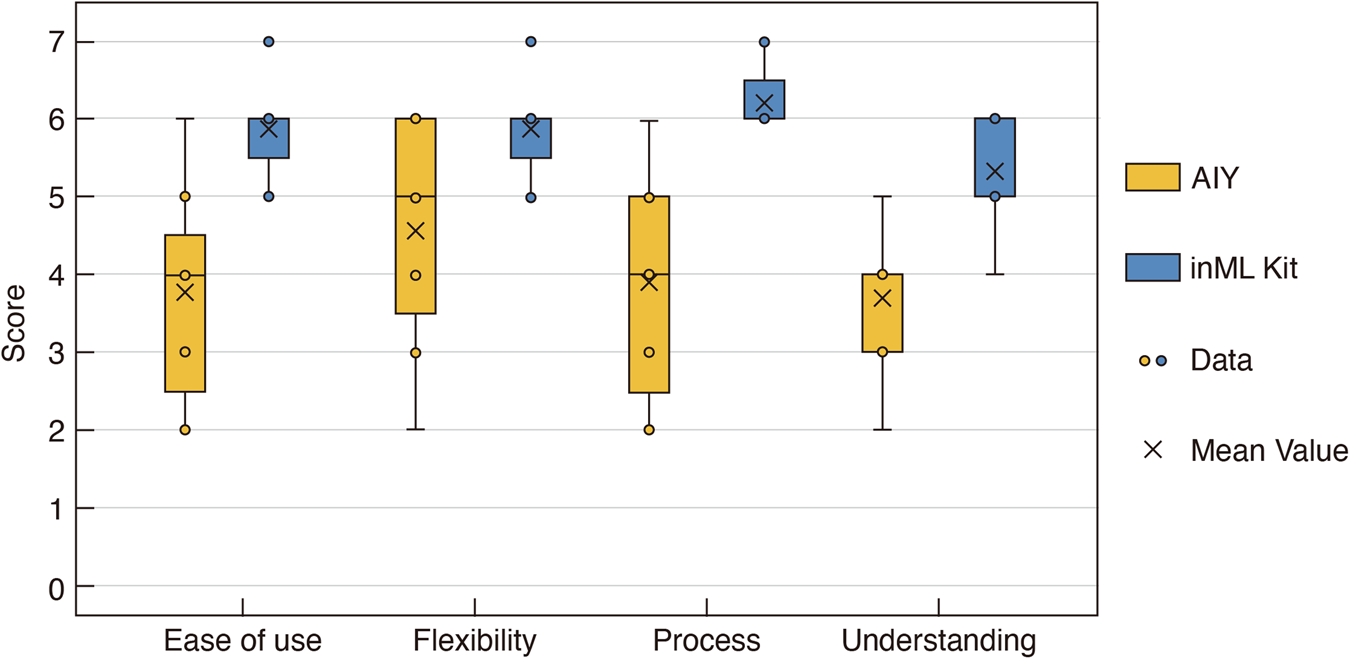
To display the results more intuitively, the boxplot is presented in Figure 11. We would probe the reasons for the differences between inML Kit and AIY through by the qualitative results in the following section.
Comparison between inML Kit and AIY across the four criteria.

Qualitative results
The qualitative data collected from the interview were analyzed through a hybrid process of deductive and inductive thematic analysis (Swain, Reference Swain2018). First, the interview audio was transcribed into text and two coders (the co-authors of this research) acquainted themselves with the interview data. The four criteria served as predefined codes. The first coder assigned one of the four predefined codes to each statement in the transcript. For example, the statement “this toolkit helps save much work in the early stage” (M7) was assigned the code “ease of use,” whereas “I understand the capability of ML better” (M8) was assigned the code “understanding.” The second coder reviewed the assignment and resolved disagreements via discussion with the first coder. Next, the two coders independently searched for meanings in the interview and created a series of subcodes under each criterion/code. Taking flexibility as an example, a subcode called “hardware reconfigurability” was created for the statements such as “it's convenient to change the spatial layout of the hardware components” (M2). The coders refined the subcodes as they read through the interview data and summarized the participants’ responses. Third, they discussed the results and reached an agreement on the subcoding of the data. We report the final results in terms of the four criteria.
Ease of Use
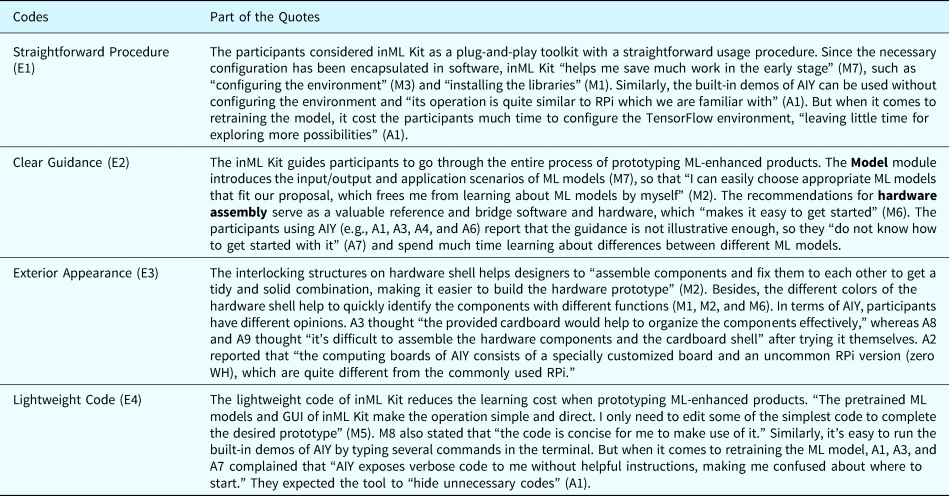
Because of the built-in pretrained models, both inML Kit and AIY have the advantage of a plug-and-play design. However, inML Kit supports data annotation and model training better. Detailed advantages and disadvantages of the two tools are listed in Table 7, where “E1” refers to the first code of Ease of Use.
The qualitative results – Ease of Use

Flexibility
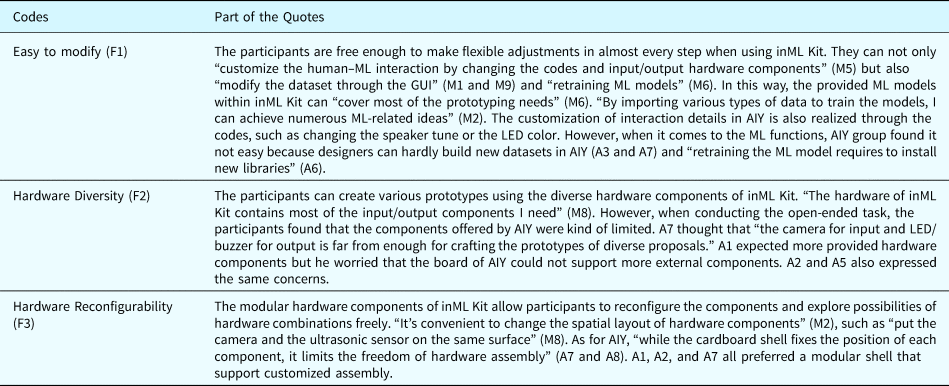
The participants in inML Kit groups commented that the toolkit helped them to realize diverse ideas, especially when they wanted to customize new ML models through retraining. The flexibility of AIY is mainly reflected in the output components such as the LED and buzzer. The detailed reasons are listed in Table 8, where “F1” stands for the first code of Flexibility.
The qualitative results – Fllexibility

Process
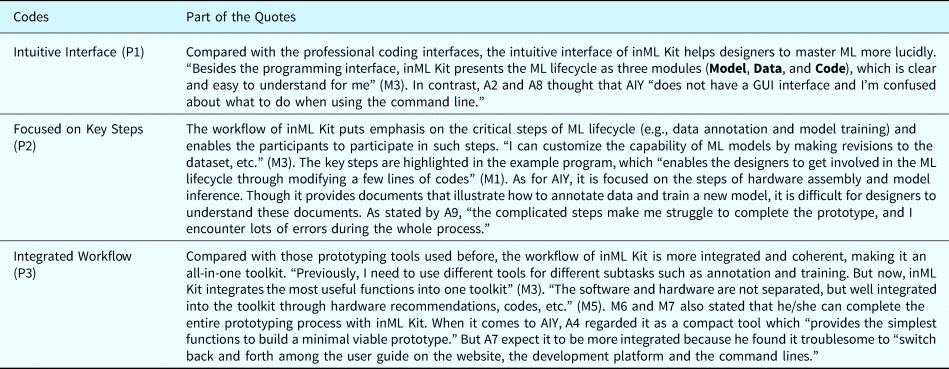
Many participants in inML Kit groups thought that the prototype workflow was clear and integrated, involving them in the key steps (e.g., data annotation and model training) of the ML lifecycle. Some participants of AIY regarded it as a compact tool that performs well in steps such as model inference. A detailed analysis of the results is listed in Table 9, where “P1” stands for the first code of Process.
The qualitative results – Process

Understanding
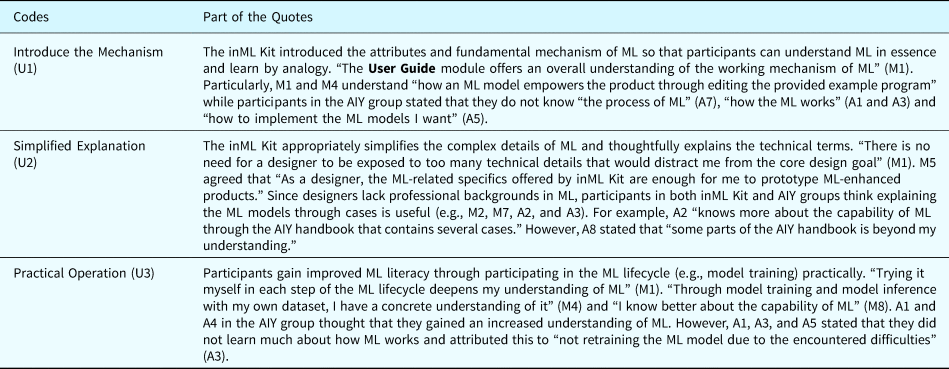
Participants in both inML Kit groups and AIY groups reported that they learned more about the capabilities of ML models through using the two tools. However, inML Kit helped participants more deeply understand the mechanism that affects the performance of ML models. The detailed analysis is presented in Table 10, where “U1” stands for the first code of Understanding.
The qualitative results – Understanding

Summary
The evaluation suggests that inML Kit effectively assists the prototyping of ML-enhanced products and improves designers’ ML literacy. The design cases illustrate that inML Kit supports designers to make various physical prototypes. The task completion time reveals that inML Kit supports designers to participate in more steps of ML lifecycle in a more rapid manner when compared with AIY. As for the Likert scale, the p-values of the four criteria are all less than the defined value (0.05), showing supports for the alternative hypothesis (H 1) and demonstrating that inML Kit performs better than AIY in terms of ease of use, flexibility, process, and understanding. The qualitative feedback collected from the interview further explains why the participants thought inML Kit performs well in these four aspects. It implies that inML Kit is an easy-to-use tool that supports a flexible prototyping process and improves designers’ understanding of ML through involving them in ML lifecycle.
Discussion
The evaluation results presented above provide enlightening comments and summative insights into our work, which are further discussed in this section. In addition, we identify the limitations that need to be refined in future work. We refer to the evaluation results when discussing the implications of our work and potential limitations of inML Kit.
Implications of our work
Our research started with a focus on involving designers in the ML lifecycle, which is a prerequisite to effectively improve the ML literacy of designers. Considering that the designers lack technical backgrounds, packaging ML into a black box seems one of the simplest ways to make an ML prototype. However, this approach can hardly support the frequent iteration on prototypes and improve designers’ ML literacy, which is not conducive to the long-term development of designers. Since refinement is one of the core objectives of prototyping (Camburn et al., Reference Camburn, Viswanathan, Linsey, Anderson, Jensen, Crawford, Otto and Wood2017), an ideal prototype tool should support designers to adjust the prototype easily. By implementing the MLT method that involves designers in the ML lifecycle, inML Kit promotes the designers’ freedom to adjust the key steps of ML lifecycle, thus improving designers’ ability to work with ML as a design material.
Compared with prior work, our toolkit is specially developed for designers with little or no experience in ML-enhanced products rather than professional developers. Developers are used to interacting with the programming interface displaying complex and detailed codes, while designers prefer intuitive illustrations and reconfigurable hardware. To better understand designers’ expectations of ML prototyping tool, we involved design practitioners in the co-design process of inML Kit. The co-designers’ suggestions and insights helped us to refine the prototype workflow, select the ML application domain, and iterate the low-fi toolkit. The friendly software and modular hardware of our toolkit are proved to be effective in a controlled study, offering design and implementation recommendations for future development of ML-related prototype tools.
We summarized the features that reflect the advantages of inML Kit and AIY in terms of the four criteria. Also, we identified some internal connections among these features. We would cite the codes like E1 or U1 from Tables 7–10 when referring to the qualitative results.
1) The data-enabled cyclical workflow derived from the MLT method enables designers to participate in the ML lifecycle (echoing P2 and P3). In this way, designers can freely extend and customize the functionality of ML models, thus improving the flexibility of inML Kit (echoing F1). For example, the object detection model will gain different recognition abilities when trained with different datasets, ranging from cat/dog classifier to pedestrian/vehicle classifier. As for AIY, the various built-in ML models such as face detection and image classification support users to conduct model inference and save much time for model deployment. However, it is more like packaging the ML model into a black box that automatically gives inferences based on the input. The operation becomes difficult for designers. Taking model training as an example, designers need to use TensorFlow, which is demanding and far beyond their ability when it comes to changing the ML models’ performance by participating in the ML lifecycle.
2) The intuitive interface of inML Kit offers clear guidance in line with the designers’ cognitive characteristics and knowledge background, making it easy to use for designers. Though AIY provides instructions using pictures and text on its website, users still have to conduct specific operations such as model selection and model inference through coding in the terminal rather than the GUI. Compared with the coding interface, GUI could display more information in a well-organized and hierarchical way, guiding designers to get started with this unknown technology (echoing E2). On this basis, designers would gain the ability to intervene in the ML lifecycle (echoing P1), thus achieving various prototype goals. This may explain why it takes less time for inML Kit groups in almost all the steps than the AIY groups (see Fig. 10).
3) By hiding unnecessary technical details (echoing U2) and integrating key steps of ML lifecycle into the workflow (echoing P3), inML Kit demonstrates ML-related information in an easy-to-understand way. Due to the lack of programming experience, designers prefer low-code or non-programming tools to programming tools. The inML Kit simplifies the professional development process of ML into lightweight code, lowering the learning cost for designers (echoing E4). When it comes to AIY, there are some practices that can inspire future work. For example, AIY offered a built-in Joy Detector demo that can detect whether the face is smiling. The demo would run by default after the components are assembled and powered on, thus providing a pleasant experience for first-time users. When using the built-in demos, users just need to type a few lines of code in the terminal and do not need to know about the technical details of the ML models, which is friendly to novice makers.
4) The two tools have different emphases on Hardware assembly. The AIY provides exquisitely designed foldable cardboard to compacted all the components in a handy little cardboard cube. Furthermore, the AIY offers a customized board that contains a special chip designed to run ML models. This board can be connected to the RPi board (zero WH) which is smaller than the RPi board used by inML Kit, making the built prototype small and exquisite. However, the compact structure of AIY requires users to follow the instructions carefully, which adds difficulties to the assembly process. Another drawback is that designers do not commonly use the customized board and the zero WH board of AIY. These two factors might explain why the AIY groups spend more time on Hardware assembly than the inML Kit groups as shown in the completion time (see Fig. 10). Considering the time constraint of the workshop, two of the AIY groups (Groups 1 and 2) skipped the step of building the cardboard box and only assembled the electronic components. On the contrary, the inML Kit pays more attention to the flexibility (echoing F3) of hardware assembly. Hence, it employs modular design and reconfigurable structure of hardware to reduce the cost of iterating physical prototypes. One disadvantage is that the assembled hardware structure is not as compact as that made with AIY. Nevertheless, the modular design reserves more space for adding new hardware components to inML Kit in future improvement. More ML models and hardware components can be added to extend the capability of inML Kit, supporting the prototyping of diverse design ideas.
Potential limitations and future improvements
The current inML Kit has several limitations that will require further improvements in the future.
1) Compared with the supporting resources of AIY, that of our toolkit is not sufficient. As a mature commercial product, AIY has a comprehensive support ecosystem. The user guide is provided through a website from which users can access other platforms, including the AIY project forum and a GitHub page that provides updates for the latest bug fixes and features. For connecting the toolkit to a Wi-Fi network, AIY provides an app that can work on Android smartphones. We will also consider extending inML Kit to a platform where developers can upload their own pretrained ML models and designers can share their prototypes made with these models. This platform will offer design inspiration and promote communication between designers and developers.
2) The current version of inML Kit only provides the most basic and commonly used functions necessary to build a functional ML prototype. In the Data module, annotation for the audio and video is not supported yet. In the future, we will enable the annotation of more kinds of data and access existing public datasets. Besides, the current toolkit only supports the training for supervised learning models. More ML models such as unsupervised learning and reinforcement learning are not discussed in our work. On the contrary, the AIY has preinstalled a Python API library in the kit's system so that users with technical experience can explore the toolkit on a higher level. Last but not least, our current work is focused on the design of physical ML-enhanced products, so the prototyping of mobile or web applications are now beyond the scope of our work. Future efforts could be made to help designers integrate ML models into mobile/web applications.
3) Although our ML models are introduced according to their application scenarios, some designers could not match the models to specific design proposals. For example, some designers have no idea that gesture recognition is a branch of our object detection models. So, we will offer a detailed introduction of the scenario segmentation of each ML model and offer detailed guidance to expand the capability of the ML model through training it with various datasets.
4) In its current version, our work only covers the prototyping stage. However, the challenges caused by the never-ending ML lifecycle exist in other stages of the design process. Designers need various tools to address those challenges and apply ML in design stages ranging from conceptual design to product launch. Future work could explore a set of tools for these other stages.
There were also some potential limitations in the evaluation process.
1) The sample size is relatively small for drawing rigorous conclusions. But the conducted user study only aimed to provide a preliminary validation, proving that inML toolkit is generally usable and useful.
2) To collect feedback on as many functions as possible, the workshop task in the evaluation was designed to cover all the necessary and optional steps in the workflow. In real-world design projects instead of the experiment, not all the steps in the workflow need to be carried out within the given task. If the ML model provided in the toolkit performs well for building the prototype, the optional steps including Data collection and annotation and Model training would be not necessary.
3) Moreover, we only compared inML Kit with AIY, but there are actually other representative prototyping tools besides AIY. This might be beyond what one paper can achieve. In the future, we would conduct a more comprehensive evaluation involving more participants to compare our work with more available tools, facilitating the iterative optimization of the future toolkit.
Conclusion
Inspired by the MLT method, our work aims to facilitate the prototype of ML-enhanced products and improve the ML literacy of designers. The developed inML Kit provides a data-enabled cyclical workflow that involves designers in the never-ending ML lifecycle. We adopted a participatory design process with designers to design, iterate, and implement the toolkit. Through a controlled user study, the evaluation results imply that inML Kit helps designers effectively produce and iterate functional ML prototypes by involving designers in the critical steps of the ML lifecycle. During this process, the ML literacy of designers has been improved, making them competent to address the prototype challenges. Although our work has some limitations in expandability and the evaluation process, it is a solid step toward lowering the barrier of prototyping ML-enhanced products.
Acknowledgments
This is paper is funded by National Key R&D Program of China (2018AAA0100703) and the Provincial Key Research and Development Plan of Zhejiang Province (No. 2019C03137). The authors are also thankful to the designers involved in the participatory design process and the workshop.
Lingyun Sun is a professor at Zhejiang University. He is the Deputy Director of the International Design Institute, Ng Teng Fong Chaired Professor and the director of ZJU-SUTD Innovation, Design and Entrepreneurship Alliance, and a deputy director of the ZJU-Beidou Joint Innovation Design Engineering Center. His research interests include Design Intelligence, Innovation and Design, and Information and Interaction Design.
Yuyang Zhang is a mater candidate of the International Design Institute of Zhejiang University. She graduated from Zhejiang University with a bachelor's degree in Industrial Design and is currently a HCI researcher. She is interested in AI and Design, exploring how to address the issues of designing AI-empowered products. Her prior work includes the design challenges of AI-empowered products as well as design tools for AI-empowered products.
Zhuoshu Li is a master candidate of the International Design Institute of Zhejiang University. Stemming from her background in user experience design and interests in AI, she is dedicated in addressing the interaction design challenges brought by AI as well as exploring novel tools and methods for designing human-AI interaction. Her prior work includes the prototyping tools for designers and researches about the transparency issues of AI-empowered products.
Zihong Zhou is a Ph.D. candidate studying at the International Design Institute of Zhejiang University. With the background of electronic science and technology in the undergraduate period, his PhD research focuses on embedded AI technology and smart product design, aiming to develop green and low-carbon AI technologies with embedded devices and apply these technologies into practice.
Zhibin Zhou is a Ph.D. candidate attached to the International Design Institute of Zhejiang University. With a background in user experience design and artificial intelligence (AI), his PhD research focuses on capturing the interaction between humans and AI and gaining an increased understanding of AI as a design material. His prior work aims to bring together knowledge in the fields of design and AI as well as help the next generation of designers to foster AI literacy to understand its nature and thus creatively ideate and practically prototype ML-enhanced products.