

Introduction
There is a growing interest in virtual reality (VR) and the possibilities to develop immersive content, such as 360° videos. Viewers can watch 360° clips with head-mounted displays (HMDs) or directly from a flat screen on a smartphone or computer. In these videos, the viewers have the freedom to look around and explore the virtual scenarios that are presented to them. YouTube, Facebook, Jaunt VR, and The New York Times VR are some of the companies that are developing immersive experiences for their audience via online platforms. According to a report issued by the European Broadcasting Union (EBU, 2017), 49% of its members are exploring and devoting efforts into the production and development of immersive content and services, respectively. EBU members believe that immersive content presents a clear potential for broadcasters and content creators because it offers the opportunity to provide more interactive and engaging storytelling. For content creators and filmmakers, one of the main challenges when developing immersive content is the lack of control over the main focus of the video. Therefore, intelligent and effective strategies to present the content, attract and keep audience's attention and assist users' need to be explored and adopted. Nonetheless, interactive and immersive content creation development are still at an early stage and research is ongoing (Dooley, Reference Dooley2017; Mateer, Reference Mateer2017; Rothe et al., Reference Rothe, Heinrich and Mathias2017; Sheikh et al., Reference Sheikh, Brown, Watson and Evans2017). The main lines of research are focused on storytelling; for example, how to attract viewers’ attention or the creation of a new screen grammar for 360° content.
Apart from open challenges in terms of high-resolution content, interaction, and storytelling formats for immersive media, a key issue needs to be taken into account: accessibility. It is not acceptable to consider accessibility as an afterthought, but it instead must be addressed in the specification and deployment of end-to-end immersive systems and services. Such an objective involves overcoming existing limitations in current technologies and systems to enable truly inclusive, immersive, and personalized experiences, adapted to the needs and/or preferences of the users. Studies on access to audio-visual content can be found in the field of media accessibility (Remael et al., Reference Remael, Orero and Carroll2014; Greco, Reference Greco, Matamala and Orero2016). The main access services under research have been subtitling for the deaf and hard-of-hearing, audio description, or sign language interpreting. Most studies have been carried out in the context of traditional audio-visual media, such as TV or cinema (Perego et al., Reference Perego, Del Missier and Bottiroli2015; Romero-Fresco, Reference Romero-Fresco2015). In these cases, accessibility has generally been considered as an afterthought. However, some researchers have raised their voices in favor of including accessibility in the creation process (Romero-Fresco, Reference Romero-Fresco2013).
Although immersive technologies and content are on the rise, research studies on, and thus solutions for, accessibility in immersive media are limited so far. This hinders the interaction of part of the population with VR experiences. Proper technological solutions, interfaces, and recommendations need to be sought to ensure a proper narrative, interpretation of content and usability, regardless of the capacities of the users, their age, language, and/or other specific impairments. This will contribute to a global e-inclusion, offering equal opportunities for access to the whole consumers’ spectrum, while ensuring compliance with regulatory guidelines (e.g., human rights obligations).
Many efforts must be devoted to providing efficient solutions and meaningful insights to, among others, the following research questions in this field:
• What are the requirements to enable truly accessible and inclusive immersive services?
• How current (immersive) technologies and systems can be augmented to seamlessly integrate and support accessibility services?
• What kind of assistive technologies can contribute to better accessibility in immersive media?
• Which presentation modes for accessibility content are better suited for specific content types?
• What personalization features should be provided to meet users’ needs and preferences?
• What benefits are provided (e.g., in terms of usability, content comprehension, level of immersion, and engagement)? How to properly evaluate and define them?
By comparing with traditional audio-visual content, the integration of access services (i.e., subtitles, sign language interpreting, and audio description) faces two main challenges. First, there is more information to process, and users can feel overwhelmed. Second, the presentation is no longer purely time-based, but it involves a spatial dimension, determined by both the user's field of view (FoV) and the direction where the main actions are taking place.
This also applies to subtitles, which is one of the most mainstreamed access services, being provided by major TV channels, like BBC (Armstrong et al., Reference Armstrong, Brown, Crabb, Hughes and Sandford2015), and Video on Demand platforms, such as Netflix, HBO, or Amazon Video. Subtitles are not only beneficial for viewers with hearing impairments but also for users with visual impairments if their presentation format can be customized, for non-native speakers, to support the comprehension of content, and in noisy/public environments where the audio cannot be listened or cannot be turned on. For example, up to 85% of Facebook videos are watched muted with the aid of subtitles (Patel, Reference Patel2016). Beyond contributing to overcome audio-visual barriers, the applicability of subtitles enters the realm of other forms of social integration, can have an impact on education and on therapy, and can contribute to increase the engagement and Quality of Experience (QoE).
This article focuses on two essential issues in this research area: how to present subtitles in 360° videos without breaking immersion and how to guide the users for a more effective and a non-intrusive interaction and storytelling comprehension. The research tasks are being devoted after having conducted user-centric activities to gather requirements from which the proposed solutions have been derived (Agulló and Matamala, Reference Agulló and Matamala2019; Agulló et al., Reference Agulló, Matamala and Orero2018). Two strategies are proposed and assessed for subtitle rendering modes: (1) always-visible – the subtitles are anchored to the FoV, always in the same bottom center position, regardless of where the user is looking at within the 360° and (2) fixed-positioned – the subtitles are anchored to the 360° video, being rendered in three fixed positions, evenly spaced every 120° around the 360° sphere. Likewise, two strategies are proposed and assessed for guiding methods (in order to guide the viewer to the speaker), when making use of the always-visible rendering mode: (1) arrows – a visual element (arrow) is displayed next to the subtitle to indicate the viewers where they need to look at to find the target speaker and (2) auto-positioning – an intelligent strategy that consists of automatically adjusting the FoV to match the position of the targeted speaker(s)/main action(s), by smoothly and automatically rotating the camera, as in Lin et al. (Reference Lin, Chang, Hu, Cheng, Huang and Sun2017). Both strategies have been developed and tested in a pilot study. Their integration in an end-to-end platform, paying special attention to the content consumption part, the followed evaluation methodology, and the obtained results regarding the impact on immersion and the participants’ preferences are reported in this article.
The rest of the article has been structured as follows: In the “Related work” section, the state of the art in this field is reviewed. In the “End-to-end platform for immersive accessibility” section, an overview of the developed end-to-end platform for the integration of accessibility services in immersive media is provided. This platform has served as the framework for conducting the pilot study. Next, the evaluation setup, methodology and obtained results are reported. Finally, the results and their scope are discussed, and some ideas for future work are provided in the “Conclusions and future work” section.
Related work
VR as a form of entertainment, especially in the form of 360° content or cinematic VR (Mateer, Reference Mateer2017), has attracted the interest of the research community and industry from different perspectives. There are several studies on narrative in VR (Aylett and Louchart, Reference Aylett and Louchart2003; Dooley, Reference Dooley2017; Gödde et al., Reference Gödde, Gabler, Siegmund, Braun, Chen and Fragomeni2018), mostly focused on better understanding the complexities of this new medium. Other studies are tackling the specific topic of focus and attracting attention in VR (Mateer, Reference Mateer2017; Rothe et al., Reference Rothe, Heinrich and Mathias2017; Sheikh et al., Reference Sheikh, Brown, Watson and Evans2017). In addition, some researchers have carried out studies on the impact of cinematic VR on immersion (De la Peña et al., Reference De la Peña, Weil, Llobera, Giannopoulos, Pomés, Spanlang, Friedman, Sanchez-Vives and Slater2010; Cummings and Bailenson, Reference Cummings and Bailenson2016; Jones, Reference Jones2017) and engagement (Wang et al., Reference Wang, Gu, Suh, Nah and Xiao2018).
However, research on subtitling in immersive content is limited. There are few exceptions. The study carried out by the BBC (Brown et al., Reference Brown, Turner, Patterson, Schmitz, Armstrong and Glancy2017) was the first considering this topic and proposing some solutions. The main challenges identified by the BBC research team when developing subtitles for immersive content are as follows (Brown et al., Reference Brown, Turner, Patterson, Schmitz, Armstrong and Glancy2017):
• there is no area in the scene that is guaranteed to be visible to the viewer, so it is not possible to control what will appear behind the subtitle;
• immersion is important in this medium, so subtitles should not disrupt the experience;
• if subtitles are located outside of the FoV, then the effort to find them should be minimum; and
• including subtitles should not worsen the VR sickness effect.
Based on these premises, the BBC developed four solutions for subtitle rendering (Brown et al., Reference Brown, Turner, Patterson, Schmitz, Armstrong and Glancy2018):
a) Evenly spaced: subtitles are equally spaced with a separation of 120° in a fixed position below the eye line;
b) Follow head immediately: subtitles follow the viewer as he/she looks around, displayed always in front of him/her;
c) Follow with lag: subtitles appear directly in front of the viewer, and they remain there until the viewers look somewhere else; then, the subtitles rotate smoothly to the new position in front of the viewer; and
d) Appear in front, then fixed: subtitles appearing in front of users, and then fixed until they disappear (in this case, the subtitles do not follow the viewer if they look around).
They tested the different rendering modes with several clips (different durations: from 1 to 2 and a half minutes), and they concluded that “follow head immediately” (in our study, always-visible) was the most suitable, according to users’ feedback. The reasons were that the implementation was easy to understand and subtitles easy to locate. Also, it gave viewers the freedom to navigate around the 360° environment without missing the subtitles. However, users complained about the blocking effect, that is, subtitles were blocking important parts of the image and were considered obstructive.
Following the above results, Rothe et al. (Reference Rothe, Kim and Hussmann2018) also carried out a user study comparing two rendering modes: static subtitles (similar to always-visible in the present study) and dynamic subtitles (subtitles fixed in a dynamic position in the 360° sphere). They also tested speaker identification methods based on each mode and included name tags for each speaker. Participants did not state a clear preference for any of the methods. However, the results regarding key aspects of the VR experience (presence, sickness, and workload) favored the dynamic subtitles (Rothe et al., Reference Rothe, Kim and Hussmann2018). In both studies, there is no clear solution and further testing is encouraged.
It is important to highlight that in each study a different terminology has been used. There is no consensus at this point on how to refer to the different types of rendering modes because this is an ongoing research and there is a lack of standardization. BBC terminology used “evenly spaced” and “follow head immediately” subtitle. Rothe et al. (Reference Rothe, Kim and Hussmann2018) used “dynamic subtitles” and “static subtitles”. In this study, a new terminology was tried to be defined in order to provide an intuitive solution to understand these concepts because the solutions for the three studies are slightly different. Therefore, the following terms that have been used in standardization forums (ISO, W3C, and MPEG) were suggested: “fixed-positioned” subtitles for those that are burnt-in in different fixed positions in the 360° sphere and “always-visible” subtitles for those that are anchored to the FoV and, therefore, always-visible for the viewer at a bottom centered position.
To shed some light on these open issues, we decided to test these two methods with longer and different content. We also decided to measure presence with the igroup presence questionnaire (IPQ)Footnote 1 to compare the impact of each method on viewers’ presence if any. As explained in the methodology, IPQ is suitable for this type of content, and the measurements provided are accurate for our purpose. In other studies, presence questionnaire (Witmer and Singer, Reference Witmer and Singer1998) was used, such as in Rothe et al. (Reference Rothe, Kim and Hussmann2018). This questionnaire includes a range of questions about interaction and control in the virtual world, which is not suitable for a 360° video with a passive observer. In the BBC study, only one question was asked regarding immersion “I felt immersed in the scene, like I was there” (Brown et al., Reference Brown, Turner, Patterson, Schmitz, Armstrong and Glancy2018). This study contributes to provide more information about the impact of the different subtitle rendering and presentation modes on presence.
To the best of our knowledge, no guiding methods for subtitles have been tested so far. This feature is especially important if subtitles are aimed at viewers with hearing impairments, or when the audio cannot be listened (e.g., noisy or public environments). When the audio cue is missing, support on how to locate the speakers and the main actions in the 360° scene is necessary. There are some studies, though, that tested different guiding methods for assisting focus in 360° videos, which are somehow related to, or have an impact on, guiding methods for subtitling. Some studies have tested different types of transitions and their impact on immersion and motion sickness. The preliminary results from the study by Men et al. (Reference Men, Bryan-Kinns, Hassard and Ma2017) concluded that the transition techniques being tested (Simple Cut Transition, Super Fast Transition, Fade Transition, and Vortex Transition) do not cause much sickness, contrary to what could be expected. The study carried out by Moghadam and Ragan (Reference Moghadam and Ragan2017) concluded that each transition technique tested (Teleportation – involves an instant change in current FoV or rotation that is not perceived by the viewer; Animated Interpolation – smooth FoV transition from one state to another, which can be seen by the viewer; and Pulsed Interpolation – the pulsed view is faded in and out to different intermediate points from one state to another) had a different impact on the levels of presence and different techniques should be used depending on the desired effect. Lin et al. (Reference Lin, Chang, Hu, Cheng, Huang and Sun2017) conducted an extensive study comparing two techniques to guide users to the focus of the 360° video: Auto Pilot – a method that takes the viewer directly to the intended target and Visual Guidance – a visual indicator that signals where the users should direct their view. The goal of this study was to establish which technique was better suited for the viewing experience when focus assistance is necessary. They concluded that both guiding methods were preferred by participants than no guiding method at all for focus assistance. They also argued that the specific content scenario and environment have an impact on which techniques are preferred by users. These insights are relevant for and support the importance of the research conducted in this work.
In the present study, the first goal was to gather participants’ feedback (preferences and impact on presence) about two subtitle rendering modes (always-visible and fixed-positioned). In this regard, the limitations pointed out in previous studies (Brown et al., Reference Brown, Turner, Patterson, Schmitz, Armstrong and Glancy2018) were tried to be overcome, by using longer content (clips are longer than 2 min) and different genres. It was decided to use travel documentaries where the main goal was to have a look at the landscapes and listen to the narrator (voice-over), and thus become a suitable genre to test these research aspects. The following reasons support the decision on choosing this content genre: participants would have the freedom to look around without the main focus; no narrative complexities were introduced to avoid confusion; and there were no speakers on screen. Due to the fact that there were no speakers (only the narrator in some scenes), the variable (rendering modes) could be isolated, without introducing any guiding methods, tested in the second part of the experiment. The second goal of the study was to gather participants’ feedback (preferences and presence) about two guiding methods (arrows and auto-positioning) to determine their acceptability by end users, in terms of presence, suitability, or preferences.
End-to-end platform for immersive accessibility
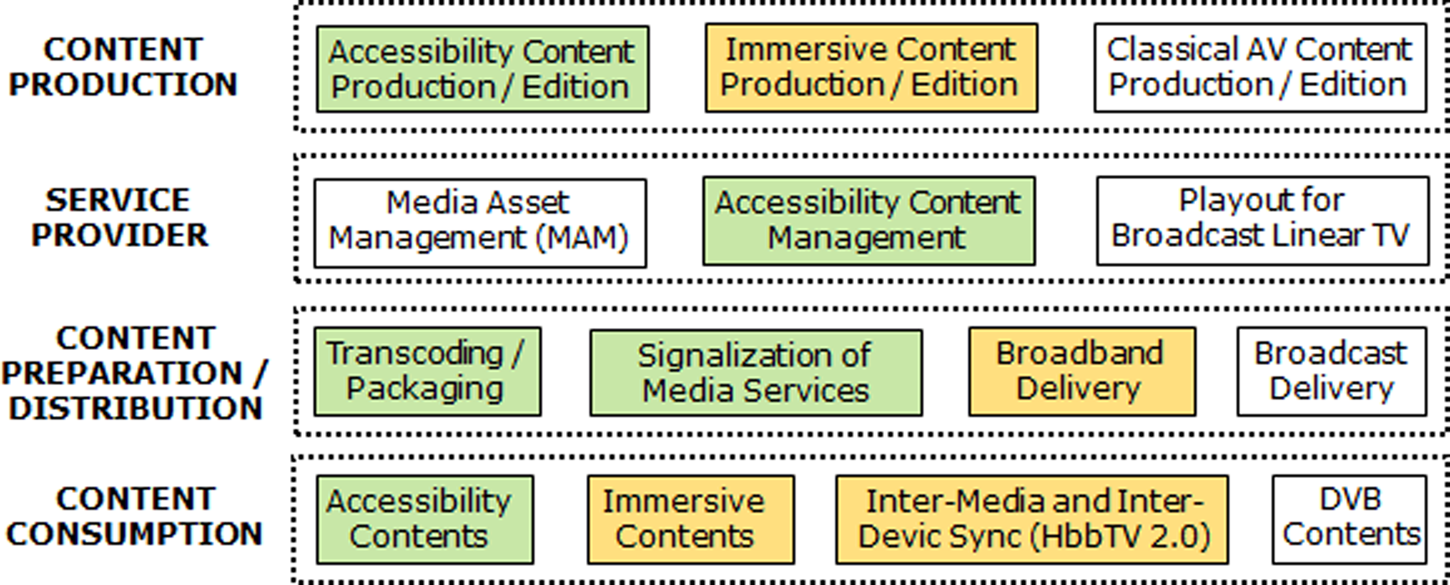
This research work has been conducted within the umbrella of the EU H2020 Immersive Accessibility (ImAc) project (October 2017–March 2020, http://www.imac-project.eu/). By following a user-centric methodology, ImAc is exploring how accessibility services (subtitling, audio description, and sign language interpreting) can be efficiently integrated within immersive media (360° video and spatial audio) while enabling different interaction modalities and personalization features. To achieve the targeted goals, ImAc is developing an end-to-end platform comprised of different parts where production, edition, management, preparation, delivery, and consumption of (immersive and accessibility) content take place. Figure 1 provides a high-level overview of the logical layers or main parts of the ImAc platform, which adhere to current-day media broadcast and delivery workflows. In this figure, green color is used to identify components being developed within the ImAc project, orange color is used to identify components that are relevant for ImAc but that have been developed in other related projects, and white color is used for components that exist in typical broadcast workflows but that are either not part of or not essential for ImAc. Next, an overview of each one of the platform parts is provided to better understand the context – and potential impact – of this work.
Main layers or parts of the end-to-end platform.

Content production
The content production part of the platform includes a set of (web-based) tools for the production and edition of access services (including subtitles, audio description, and sign language interpreting), and their integration with immersive media content. The subtitles production/edition tool enables the creation of subtitles for 360° videos. Unlike existing editors that mainly allow the production of subtitles frames with specific timing attributes (i.e., start and end times), the ImAc editor provides a set of additional features targeted at contributing to better accessibility (and engagement):Footnote 2
– It allows setting different styling effects (e.g., colors and font) for different speakers.
– It allows indicating spatial attributes to set the region of the 360° area to which the subtitle frames refer. The spatial information consists of the latitude and longitude angles (although only the latitude ones are considered in this work). This is relevant, as the associated action(s)/speaker(s) can be placed in different parts of the 360° area and can even dynamically move. However, it is possible to indicate that no spatial information is linked to specific subtitle frames (e.g., for off-camera commentaries).
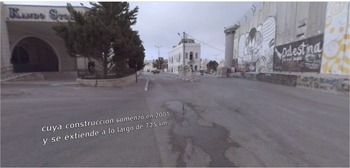
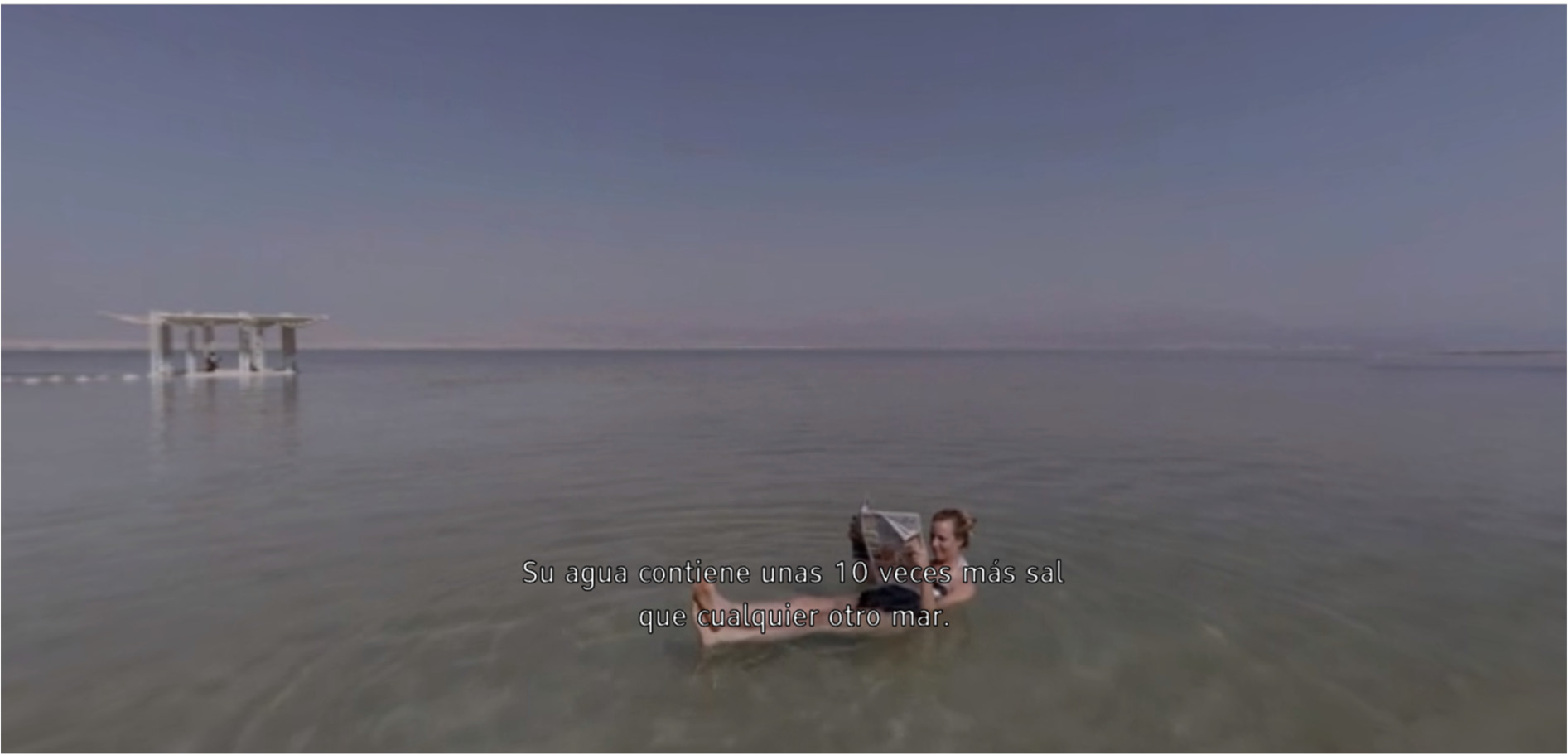
– It allows specifying two options for subtitles rendering (in flat format). The first option consists of using the 360° sphere as the rendering reference (see Fig. 2). This is called fixed-positioned, as subtitles are attached (i.e., statically placed) in a fixed region of the video sphere. Using this mode, subtitles will not be visible if the user's FoV is outside the subtitle's region. To overcome this, subtitles can be presented evenly spaced every 120° in the 360° sphere, ensuring at least one of them will be visible at any time, regardless of the current FoV. The second option consists of using the current FoV as a rendering reference (see Fig. 3). This is called always-visible, as subtitles are attached to the FoV, and thus positioned in the center at any moment, regardless of where the user is looking at.
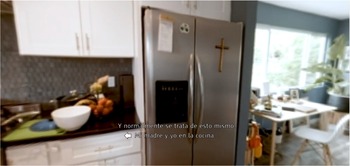
– When using always-visible subtitles, it allows specifying different guiding methods to assist the users in finding the action(s)/speaker(s) associated with the subtitles in the 360° area. A first option consists of adding arrows to the left/right of the subtitle frames, indicating the direction toward the associated audio-visual elements in the 360° area (see Fig. 4). When this position is inside the user's FoV, the arrows are hidden. A second option consists of automatically adjusting the FoV based on the position of the associated action(s)/speaker(s). This auto-positioning mechanism is applied to every subtitle frame with spatial information if explicitly indicated in the editor.
Fixed-positioned: subtitles attached to the video sphere.

Always-visible: subtitles attached to the camera or FoV.

Subtitles with arrows as a guiding mechanism.

All these rendering and presentation features are signalized as metadata extensions to the Internet Media Subtitles and Captions (IMSC) subtitles format, being used in ImAc. IMSC is a subset of the Timed Text Markup Language (TTML) for distribution of subtitles, which is drawing the attention of, and being adopted by, many standardization bodies.
Service provider
This part of the platform includes components for Media Asset Management (MAM), linking of additional content to main TV programs, and scheduling playout. In the context of ImAc, it additionally includes the Accessibility Content Manager (ACM), which is the component where the immersive content is uploaded, the creation of accessibility content is managed, and the preparation of content for their delivery is triggered.
Content preparation and distribution
This part of the platform includes components for preparing the content for their appropriate distribution via various technologies. These components are in charge of encoding the content in multiple qualities (to adapt to the target consumption devices and available bandwidth), segmenting the content for an efficient quality adaption and re-transmission (e.g., in case of packet loss), signaling their availability, and describing them. The project focuses on the delivery of the content via broadband content delivery networks (CDNs), by making use of dynamic adaptive streaming over HTTP (DASH) as the media delivery technology. However, it is also envisioned to make use of DASH in the coordination of digital video broadcasting (DVB) services, as supported by the worldwide adopted hybrid broadcast-broadband TV (HbbTV) standard. This will enable augmenting traditional TV services with more interactive and personalized multiscreen experiences, enriching the traditional TV content with extra immersive and accessibility content presented on companion devices, like smartphones or even HMDs.
In this context, ImAc is exploring the specification of standard-compliant extensions to media formats and technologies [e.g., within the framework of Moving Picture Experts Group (MPEG)] to accommodate the envisioned immersive accessibility services and features.
Content consumption
The ImAc player is a core component of the ImAc platform, as it is the interface through which end users will consume the available immersive and accessibility content in an interactive and personalized manner. The design and implementation of the player face many challenges due to several facts, such as the nature and combination of media content to be consumed, the heterogeneity in terms of access networks and consumer devices to be employed, and the diverse needs and/or preferences of the target end users.
The player has been developed by exclusively relying on standard(-complaint) web-based technologies and components. This will guarantee cross-network, cross-platform, and cross-browser support, and eliminate the need for any installation or software updates. The use of web-based components also facilitates the embedding of the player within the web services of broadcasters and/or service providers, ensuring interoperability and scalability.
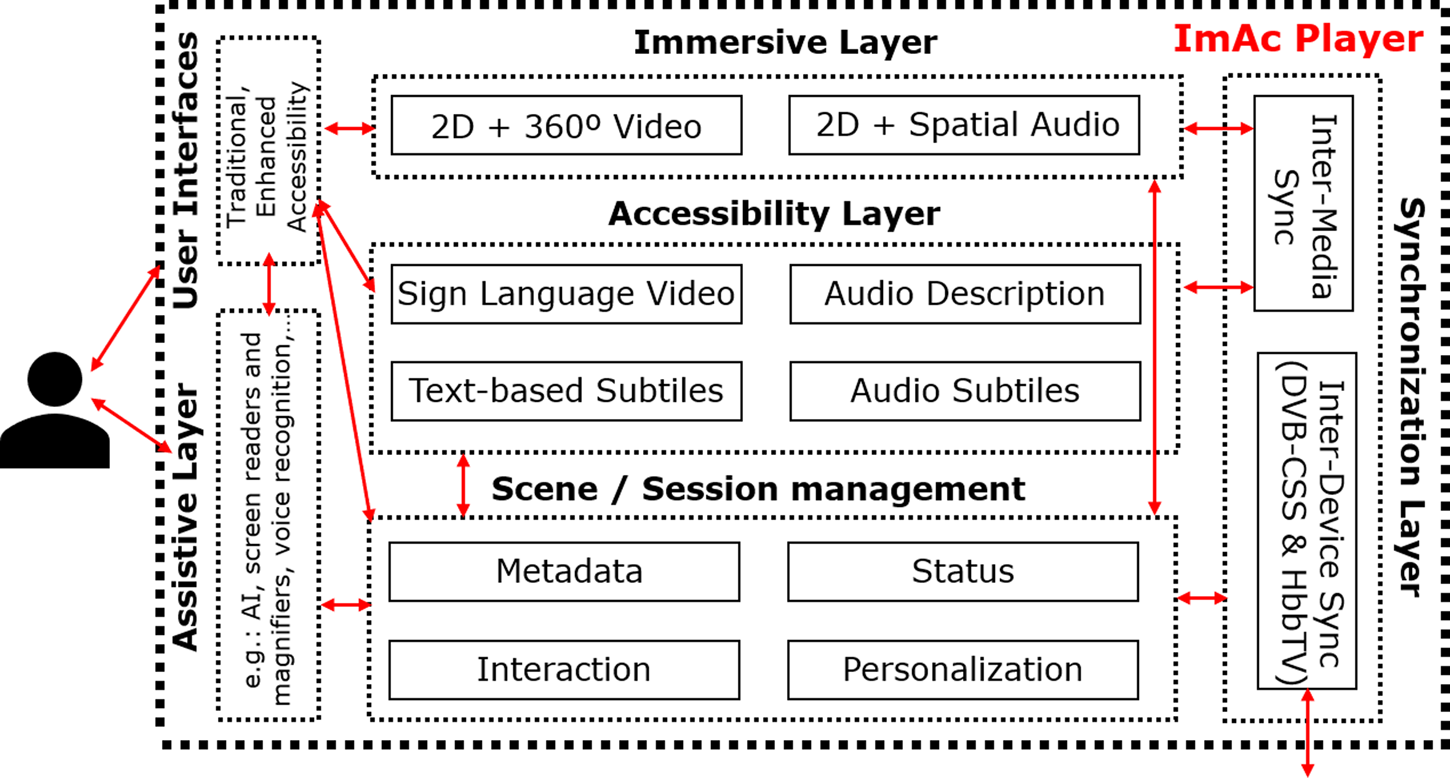
Figure 5 illustrates the main layers and modules and libraries that make up the player, together with the relationships and interactions between them. All these components are mainly targeted at enabling the presentation of content, to enable different interaction features, and to dynamically set the available personalization options.
Layers and modules making up the ImAc player.

Three main layers are in charge of the presentation of content in the player. These include:
• The Immersive Layer: it is responsible for the presentation of both traditional and immersive audio-visual formats. For immersive media, it includes 360° videos and spatial audio (Ambisonics).
• The Accessibility Layer: it is responsible for the presentation of accessibility content considered in the project, namely audio and text subtitles; audio description; and sign language video.
• The Assistive Layer: it includes relevant features to assist the users for a more effective usage of the player. Some examples are voice control (recognition and synthesis) and augmentation/zooming capabilities.
Likewise, the Media Synchronization Layer is in charge of ensuring a synchronized consumption of content, both within each device (i.e., Iocal inter-media synchronization) and across devices in a multiscreen scenario (i.e., inter-device synchronization).
In addition, two main modules in the ImAc player can be highlighted:
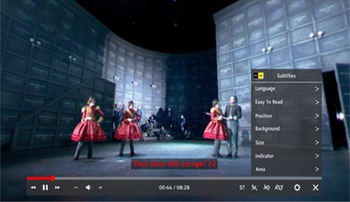
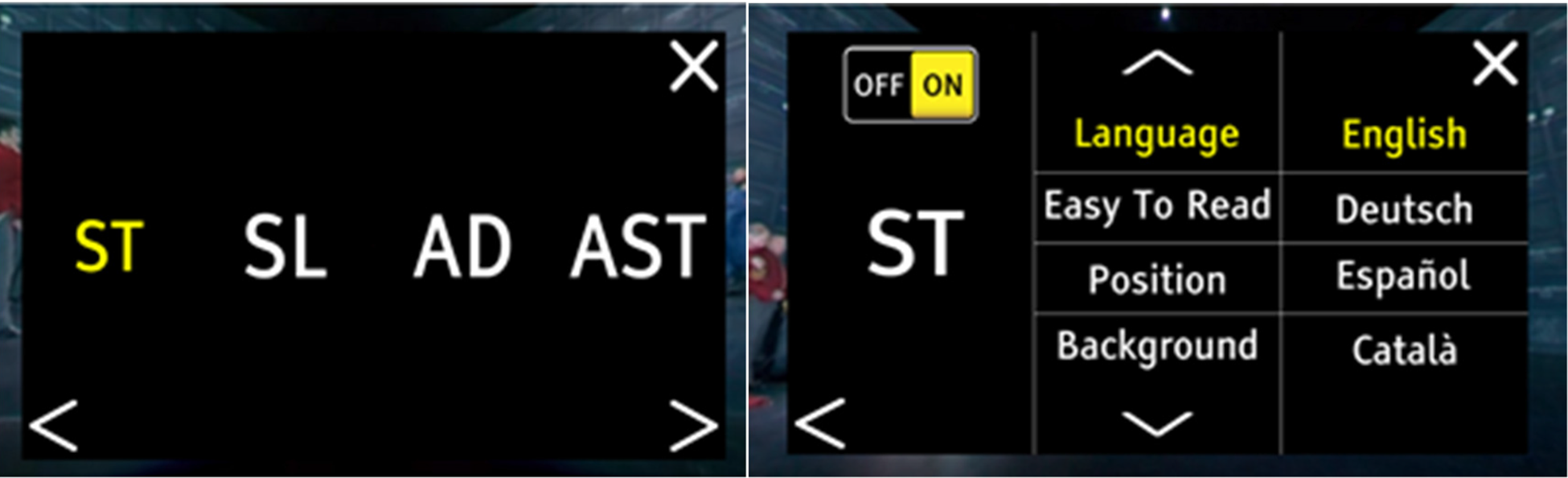
• The User Interface (UI): it is the module through which users enable the presentation of content, interact with the player and set the available personalization features. Indeed, two UIs have been designed and implemented: (1) a traditional UI but adapted to 360° environments (see Fig. 6) and (2) an enhanced accessibility (also known as low-sighted) UI, which occupies most part of the screen (see Fig. 7).
• The Session Manager: it is the module responsible for interpreting and selecting the list of available assets from the content provider, keeping an updated status about the content being presented and the active devices in multiscreen scenarios, and keeping track of the available personalization options together with the current settings.
Screenshot of the traditional UI of the player.

Screenshots of the enhanced accessibility (or low-sighted) UI of the player.

Personalized presentation of accessibility services
The player provides support for a personalized presentation of access services, including subtitles, audio description, and sign language video (see UIs in Figs. 6, 7). Most interestingly for this work, the player allows dynamically setting the following personalization features for presentation of subtitles:
• language selection;
• three sizes for the subtitle font (large, medium, and small);
• position (top and bottom);
• three sizes for the safe area or the comfortable FoV where to place graphical elements on the screen. Although the screen size and resolution of the device in use is automatically detected, users can have different preferences regarding this aspect;
• background (semi-transparent box for the subtitles frame, outline);
• normal versus easy-to-read subtitles (i.e., more simple and shorter subtitles); and
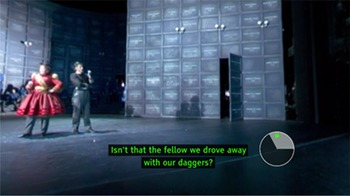
• guiding methods: (1) none; (2) arrows indicate where the associated speaker is; and (3) auto-positioning: the FoV is automatically adjusted based on the location of the speaker. An additional method is available, which consists of using a dynamic radar to indicate where the associated speaker or main action is (see Fig. 8). However, this method has not been tested in this work, as pretests have indicated a preference toward the arrows.
Use of a dynamic radar as a guiding method.

Apart from the user-level personalization features, the rendering mode for subtitles and different styling effects (color and font) for each speaker can be set during the production/edition phase (at the content production part).
Evaluation
An experiment to test two different aspects of subtitles in 360° content (rendering and guiding methods) was conducted. The goal of this experiment was to clarify which options are preferred by users, as well as which ones result in higher levels of presence. This section describes the selected and created stimuli for conducting the tests, the evaluation scenario and setup, the followed evaluation methodology and then presents the obtained results.
Evaluation stimuli
An acclimation clip was introduced at the beginning of the test so that participants could become familiar with the HMD and the type of content, assuming that most participants did not have an extensive experience with the use of HMD and VR experiences. This was later confirmed by the replies to the demographic questionnaire. All clips included sound (voice-over in English) because it was considered that sound is an important part of the immersive experience and presence was being measured as part of the test. Subtitles for the deaf and hard-of-hearing were produced in Spanish, a language spoken and understood by all participants.
For the first condition (rendering modes), two videos from the series The Holy Land created by RyotFootnote 3 jointly with Jaunt VR were used. Creators gave their permission to use these videos in the study. Specifically, the episodes 4 (duration of 4 min and 13 s)Footnote 4 and 5 (duration of 4 min and 58 s)Footnote 5 were chosen. The clips are travel documentaries depicting Israel and surrounding territories. Different locations and landscapes are featured. In the clips, there is only one speaker and most of the script is voice-over (narrator), except for some scenes where the hostess can be seen. The videos were considered suitable for testing the subtitle rendering modes because viewers could concentrate on reading subtitles and watching the scenes without the added effort of having to look for the speakers or any other narrative complexities.
For the second condition (guiding methods), the clip An American Classic: GuelaguetzaFootnote 6, also created by Ryot, was used. In this case, the video was split into two parts, in order to have two comparable clips. The total duration of the clip is 7 min and 58 s (first part from 00:00 to 03:46 and the second part from 03:46 to 07:16 – credits start). This short documentary narrates the story of a family from Oaxaca that decided to migrate to Los Angeles and opened a restaurant there. In the video, the two generations of owners (mother and daughter) explain their experiences and what the restaurant and their food mean to them. The clip combines scenes with different locations and a voice-off narration with scenes were Bricia (daughter) and Maria (mother) appear explaining their experiences. This video was suitable for the test because it includes different people in different locations. Therefore, participants had to look for the speakers. Moreover, the speakers in the video were easy to find (they are mostly located in the same area, standing or sitting), which was also desirable for the test to avoid confusion among viewers, especially for those ones not being familiar with any of the guiding methods or with VR technology in some cases.
Evaluation setup
The evaluations were conducted in a local scenario with of a PC with an Apache web server (no high computational resources are required) to host the player resources and the media assets (360° video and subtitles), a conventional 802.11b Wi-Fi network and a standalone VR Oculus GO (32GB) as a consumption device. The Oculus GO accessed the player via its Wi-Fi connection and by typing the target URL pointing to the server resources. Note that the web server and clients could have been placed in remote locations and that other types of consumption devices, and other HMDs, could have been used.
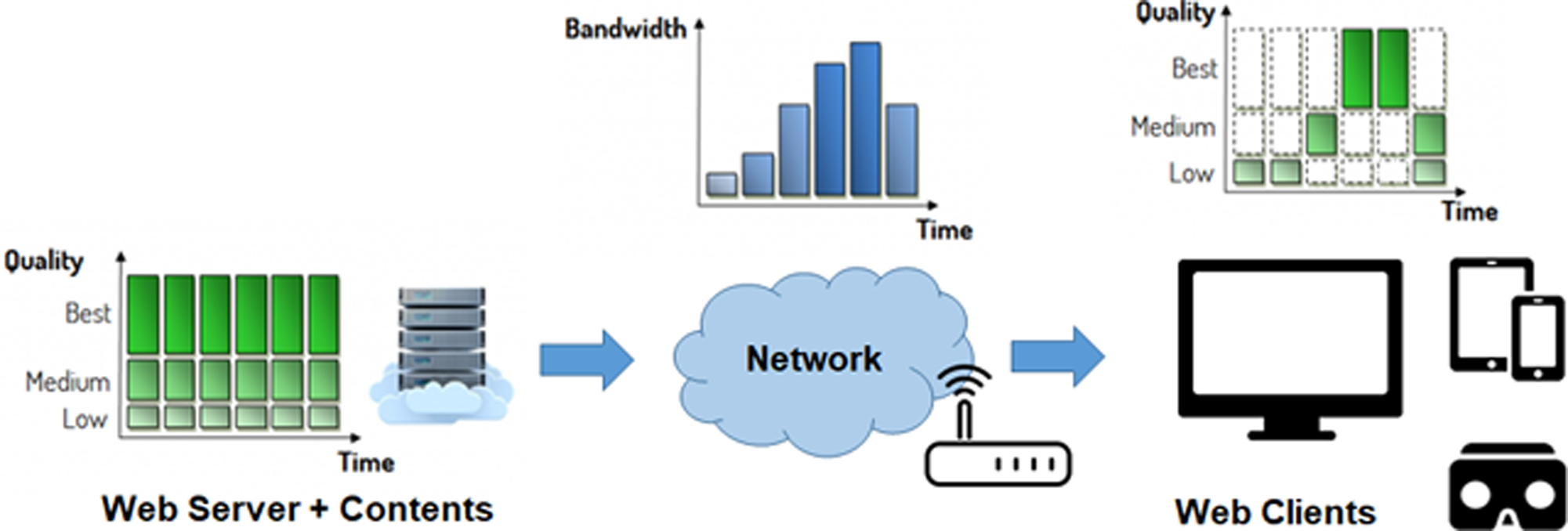
The 360° videos were converted into the DASH format, being encoded in multiple qualities (with bit rates ranging from 8 to 2 Mbps) and segmented in chunks of a duration of 3 s. This allows an efficient quality switching adaptation, based on the network and consumption devices conditions. The subtitle files were delivered independently to the video segments, but they were signalized as part of the video metadata files. An overview of the evaluation scenario and setup can be seen in Figure 9.
Overview of the evaluation scenario and setup.

Evaluation methodology
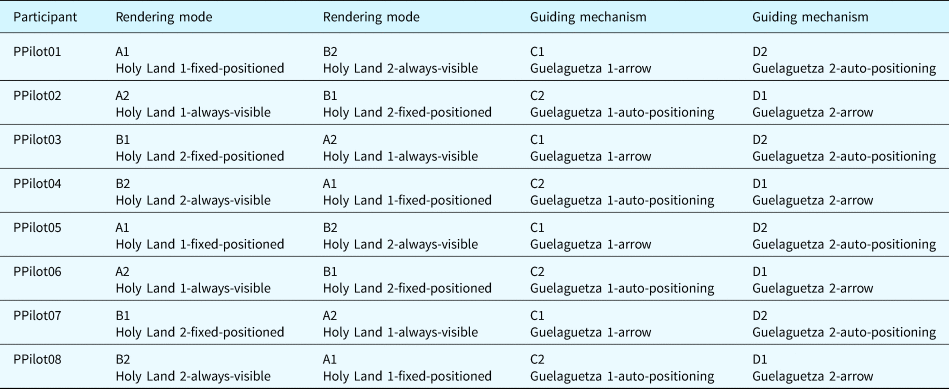
A within-subject design was used to test the different subtitle presentation conditions. Each participant watched four clips (plus the acclimation video), being each of them presented with a different variable (fixed-positioned, always-visible, arrows, and auto-positioning). The four clips and four conditions were randomized using a Latin square (see Table 1), to avoid the order of presentation affecting the results. The Holy Land clips were independent and, therefore, could be watched in a random order without affecting the narrative. The clip An American Classic: Guelaguetza, however, was always shown in chronological order, otherwise the participants would have not been able to understand the story.
Latin square used in the tests

The experiment was organized in one session divided into two parts: Part 1 – rendering modes and Part 2 – guiding methods. The experiment was focused on assessing users’ preferences and presence. One of the main goals of immersive content, such as 360° videos, is to create an immersive experience. Therefore, it was paramount to design subtitles that would enhance the experience making it more accessible rather than disrupting it. Likewise, an additional goal of the test was to gather feedback from the users. This would allow deriving potential requirements for improving the provided functionalities or even incorporating additional ones, thus following the user-centric methodology being used in ImAc. To gather this feedback, questionnaires were used.
For presence, a translation into Spanish of the IPQ questionnaire was used. After a review of different presence questionnaires, such as Slater-Usoh-Steed presence questionnaire (Slater and Usoh, Reference Slater and Usoh1993), presence questionnaire (Witmer and Singer, Reference Witmer and Singer1998), or ICT-SOPI (Lessiter et al., Reference Lessiter, Freeman, Keogh and Davidoff2001), IPQ was chosen for different reasons. First, it includes questions from different questionnaires and it specifically differentiates between presence, spatial presence, involvement and realness. The questionnaire has been validated in different virtual environments (users of VR or CAVE-like systems, desktop VR, and players of 3D games). Also, unlike other questionnaires, such as the presence questionnaire by Witmer and Singer (Reference Witmer and Singer1998), the questions in IPQ do not involve interaction with the virtual world. This was important because the 360° clips that were chosen for the test are not interactive.
For preferences, an ad-hoc questionnaire in Spanish for this test was created for each part (rendering and guiding methods). The questionnaires included closed questions to assess which system users preferred and questions related to subtitles’ blocking or distracting effects. Also, open questions were used to gather feedback about the reasons to choose one method over the other, and 7-point Likert-scale questions were added to determine how easy it was to find or read subtitles, as well as to find the speaker in the video.
After watching each clip, participants were asked to fill in the IPQ questionnaire so that the level of presence could be later compared between the two options. The impact of the different subtitle strategies on presence, if any, could then be measured and reported. After each part, participants were also asked to fill in the preference questionnaires so that they could report on their experience with both options for rendering and guiding methods.
Participants
Eight participants took part in the test (three female and five male), with ages ranging from 26 to 59 (mean = 35.5; standard deviation = 13.18). Two participants were deaf. Our aim was to include different profiles of subtitle users to gather relevant feedback in this preliminary study. To that end, users from different ages and hearing abilities were included. As explained before, subtitles are not only beneficial for the deaf audience but also for hearing audience with different needs (non-native speaker and noisy environments). This is due to the fact of the wide applicability of subtitles, as discussed in the “Introduction” section. Despite the fact that not a high number of users participated in the study, a bigger sample will be used in future work in order to support the significance of the obtained results, even when considering different users’ profiles. The followed methodology has been chosen for achieving continuity of results.
Evaluation results
The results from the different questionnaires are reported in this subsection.
Demographic information
Some more demographic information about participants was gathered. Five participants had a university education, two had professional training, and one had primary education. Two participants were familiar with VR content (one participant stated to use VR once a week and another participant once a month). Five participants were interested in VR content and three were neutral. Three participants owned VR equipment: one had cardboard, another had a PlayStation VR, and the last one had a Google Cardboard and a PlayStation VR. Two participants claimed that they never use subtitles, four participants claimed to use subtitles sometimes (depending on the content, the language and the context – noisy room, other people watching the content at the same time, etc.) and two participants always used subtitles. When asked about the reasons to use subtitles, one participant said to learn languages, four said that they used them because subtitles helped them to understand the content, one participant claimed that subtitles are the only way to access the dialogs and two said that they never use subtitles.
IPQ and preferences
Participants’ self-assessed experiences were analyzed based on two types of questionnaires: IPQ to measure and compare the levels of presence and ad-hoc questionnaires to gather feedback about participants’ preferences regarding the considered subtitle presentation modes. Preferences results have been analyzed using a Wilcoxon Signed Rank test. The results for the IPQ test aimed at detecting differences in levels of presence between always-visible and fixed-positioned subtitles and between subtitles with arrows and auto-positioning, and the existence of significant differences between the tested conditions has been also analyzed using a Wilcoxon Signed Rank test (with a threshold value of 0.05). The IPQ is divided into four main blocks: presence, spatial presence, involvement and realness, and the results are reported below based on that classification.
Always-visible versus fixed-positioned
All participants preferred the always-visible subtitle rendering mode. According to the participants, the main reasons for having chosen this option is that with the always-visible subtitles they had more freedom to look around without missing the subtitle content and the video scenes. When asked about how easy it was to find the always-visible subtitles based on a 7-point Likert scale (7 being the easiest and 1 being the most difficult), six participants (75%) replied 7, one (12.5%) replied 6, and one (12.5%) replied 5. When asked the same question about fixed-positioned subtitles, three participants (37.5%) replied 2, two (25%) replied 3, two (25%) replied 4, and one (12.5%) replied 5. Then, according to these results, always-visible subtitles (mean = 5.78) were considered easier to find than fixed-positioned subtitles (mean = 3.12). This difference is statistically significant (Z = −2.555, p = 0.011, ties = 0). When asked about how easy it was to read always-visible subtitles based on a 7-point Likert scale (7 being the easiest and 1 being the most difficult), three participants (37.5%) replied 6, two (25%) replied 2, one (12.5%) replied 7, one (12.5%) replied 5, and one (12.5%) replied 3. When asked the same question about fixed-positioned subtitles (7 being the easiest and 1 being the most difficult), two (25%) replied 6, two (25%) replied 5, two (25%) replied 2, one (12.5%) replied 7, and one (12.5%) replied 3. Therefore, according to these results, always-visible subtitles (mean = 4.62) were considered slightly easier to read than fixed-positioned subtitles (mean = 4.5). However, this difference is not statistically significant (Z = −0.086, p = 0.031, ties = 1). When participants were asked whether subtitles were obstructing important parts of the image, five participants (62.5%) replied “no” and three (37.5%) replied “yes” for always-visible subtitles, and seven participants (87.5%) replied “no” and one (12.5%) replied “yes” for fixed-positioned subtitles.
The comparison of results from IPQ between the always-visible and fixed-positioned are as follows: For the presence scale, the test indicated that the difference between results is not statistically significant (Z = −1.000, p = 0.317, ties = 7). For the spatial presence scale, the test indicated that the difference between results is not statistically significant (Z = −1.103, p = 0.270, ties = 1). However, for the realness scale (Z = −2.060, p = 0.039, ties = 3) and the involvement scale (Z = −2.384, p = 0.017, ties = 1), the test reported that the difference between results is statistically significant. This means that the fixed-positioned subtitles had a negative impact on the involvement of participants and their perception of realness. According to their comments in the open questions, this could be because they felt less free to explore the 360° scene and claimed to have missed parts of the subtitles content. Moreover, as reported above, participants found more difficult to find subtitles in this mode. Therefore, this extra effort could have caused a negative impact on involvement and realness.
Arrows versus auto-positioning
Seven participants (87.5%) preferred the arrows over the auto-positioning method. Participants who favored the arrows argued that this guiding method is more intuitive and comfortable. Three participants suggested that the arrow guiding mechanism should also include indications for the vertical axis (up, down), not only for the horizontal one (left, right). The participant who preferred the auto-positioning considered that it was more comfortable because there was no need to move or look for the speaker. One participant also argued that she would like to have a focus assistance technique not only for speakers but also for the main action in the videos. For example, if a specific event is happening in a part of the video (even if no one is speaking), she considered that it would be useful to have an indicator to avoid getting lost. When asked about how easy it was to find the speaker with the arrow guiding method, based on a 7-point Likert scale (7 being the easiest and 1 being the most difficult), three participants (37.5%) replied 6, two (25%) replied 7, two (25%) replied 4, and one (12.5%) replied 5. When asked the same question about the auto-positioning (7 being the easiest and 1 being the most difficult), three participants (37.5%) replied 7, three (37.5%) replied 1, one (12.5%) replied 6, and one (12.5%) replied 3. The different results in the latter could be because some participants reported feeling dizzy and disoriented with the auto-positioning system and others did not have the same experience. According to the results, arrows (mean = 5.62) were considered more effective to find the speaker than auto-positioning (mean = 4.12). However, the difference is not statistically significant (Z = −1.476, p = 0.140, ties = 2). When asked whether the guiding methods distracted participants from the story, seven participants (87.5%) replied “no” and one (12.5%) replied “yes” for the arrows, and five participants (62.5%) replied “yes” and three (37.5%) replied “no” for the auto-positioning.
The comparison of results from IPQ between arrows and auto-positioning methods are as follows: For the spatial presence scale, the test indicated that the difference between results is not statistically significant (Z = −0.256, p = 0.798, ties = 1). For the involvement scale, the test indicated that the difference between results is not statistically significant (Z = −0.412, p = 0.680, ties = 3). For the realness scale, the test indicated that the difference between results is not statistically significant (Z = −0.850, p = 0.395, ties = 2). However, for the presence scale, the test reported that the difference between results is statistically significant (Z = −2.000, p = 0.046, ties = 4). This means that the auto-positioning method had a negative impact on the presence in the virtual world. According to comments in the open questions, some participants stated that auto-positioning caused dizziness, and had an impact on immersion, and resulted in confusion for some users.
Conclusions and future work
This article has investigated the suitability of different rendering modes and guiding methods for subtitles in 360° videos. The considered options have been integrated in an end-to-end platform being developed in the ImAc project. An overview is such a platform has been provided to better understand the context of this work and its potential impact. According to the obtained results, it can be concluded that always-visible subtitles are more appropriate than fixed-positioned subtitles. These findings are in line with the ones from the study carried out by BBC (Brown et al., Reference Brown, Turner, Patterson, Schmitz, Armstrong and Glancy2018), but we have tried to overcome some limitations of that work (such as the duration of the content). Even if the content is longer, always-visible subtitles seem to be the most suitable of the rendering modes explored so far. Moreover, in our case, participants did not complain about the blocking effect of the subtitles, as it happened in the BBC study. This could be due to the fact that we did not use a background box in the subtitles, and therefore, they were less intrusive. As explained in the “End-to-end platform for immersive accessibility” section, the use of a background box or an outline can be dynamically set in the developed 360° player. Also, the results from the IPQ have shed some light on the potential impact of rendering modes on presence levels reported by participants. Fixed-positioned subtitles might have a negative impact on presence, while always-visible subtitles seemed to be more adequate in that sense.
Regarding the two analyzed guiding methods, it can be concluded that the use of arrows is more intuitive and effective than auto-positioning. Even if previous studies argued that auto-positioning methods are accepted by users (Lin et al., Reference Lin, Chang, Hu, Cheng, Huang and Sun2017), in our study it can be concluded that auto-positioning can provoke dizziness (as reported by participants) and might have a negative impact on presence, at least for the considered content types.
The scope of this preliminary study was to test several subtitle modes with a limited number of participants. Including diverse profiles was sought to clarify the different needs of subtitle users. The selected content might have had an impact on preferences and presence results that is not directly related to the different subtitle modes. For the rendering modes options, two travel documentaries were used. In this type of content, the aim is to look around and, then, it is desirable to have the freedom to move. However, if the video features a conversation between two people in a bar, perhaps the fixed-positioned solution would be more accepted. A similar content (two people talking and sitting next to each other) was tested in the study by Rothe et al. (Reference Rothe, Kim and Hussmann2018) and the results favored fixed-positioned subtitles. Also, some participants argued that the videos were not first-person and, therefore, were less immersive. Others thought that the quality, scales and type of scenes also had a negative impact on immersion. For the guiding methods, we used a content where the speakers were mainly in a fixed position and did not rapidly move. Perhaps, if the content includes speakers moving fast, an improved auto-positioning system could assist viewers keeping the focus of the video. These hypotheses are worth testing in future studies. Likewise, a wider sample of participants, with different profiles, will be considered to test these conditions, maybe with some variants, in the near future.
Different ideas for future work are planned. Regarding rendering modes, it could be interesting to compare the appropriateness/effectiveness of always-visible and fixed-positioned subtitles depending on the type of content (static scenes vs. action-based scenes), by analyzing whether the type of content has a direct impact on the viewers’ preferences and levels of presence. Combining the two rendering modes in a content with different types of scenes (static and action-based) and measure the reaction of participants is also an option worth exploring. Regarding guiding methods, auto-positioning strategies could be refined to reduce the VR sickness effect and test it with other types of content (action-based). Likewise, the use of a dynamic and intuitive radar (as introduced in the “End-to-end platform for immersive accessibility” section) could be explored in future tests. In addition, the Assistive Layer of the player (see Fig. 5) will be further developed to integrate Artificial Intelligence and signal processing techniques, as well as automatic adaptation strategies, with the final goal of maximizing the perceived QoE and accessibility.
Finally, the feedback from the participants will be considered to explore the suitability of refining the adopted solutions and/or adopting extra alternatives (e.g., including guiding methods not only for speakers but also for main actions).
Acknowledgments
The authors thank ImAc partners, for their technical contributions in preparing the end-to-end platform, from production to consumption of immersive and accessibility content; Irene Tor-Carroggio for her help analyzing the results in this research; Ryot for the content; and all users for participating in this research.
Financial support
This work has been funded by the European Union's Horizon 2020 program, under agreement no. 761974 (ImAc project). Belén Agulló is a member of TransMedia Catalonia, an SGR research group funded by “Secretaria d'Universitats i Recerca del Departament d'Empresa i Coneixement de la Generalitat de Catalunya” (2017SGR113). This article is part of Belén Agulló’s PhD in Translation and Intercultural Studies at the Department of Translation, Interpreting and East Asian Studies (Departament de Traducció i d'Interpretació i d'Estudis de l’Àsia Oriental) of the Universitat Autònoma de Barcelona. The work by Mario Montagud has been partially funded by the Spanish Ministry of Economy and Competitiveness (MINECO), in the project with reference IJCI-2017-34611.
Belén Agulló is a predoctoral researcher in the Department of Translation, Interpreting and Eastern Asian Studies at the Universitat Autònoma de Barcelona, where she works on the Horizon 2020-funded project Immersive Accessibility (ImAc). Her PhD focus is subtitling for the deaf and hard-of-hearing in immersive media. Her research interests include game localization, audiovisual translation, and media accessibility.
Dr. Mario Montagud is a senior researcher at i2CAT Foundation (Barcelona, Spain) and a part-time professor at the University of Valencia (Spain). He received a PhD degree in Telecommunications (Cum Laude Distinction) at the Polytechnic University of Valencia (UPV, Spain) in 2015. His topics of interest include Computer Networks, Interactive and Immersive Media, Synchronization and QoE. Mario is (co-) author of over 70 scientific and teaching publications and has contributed to standardization within the Internet Engineering Task Force (IETF). He is a member of the Editorial Board of international journals and has been a member of the Organization Committee of the many international workshops and conferences. He is also lead editor of “MediaSync: Handbook on Multimedia Synchronization” (Springer, 2018) and Communication Ambassador of ACM SIGCHI (Special Interest Group in Human–Computer Interaction). He is currently involved in three EU H2020 projects, being WP leader in two of them: VR-Together, ImAc, and 5G-Picture.
Mr. Isaac Fraile is a network engineer by the Polytechnic University of Catalonia (UPC, Spain) and is currently studying an MSc degree in Multimedia Applications at the Universitat Oberta de Catalunya (UOC, Spain). He works as a Project Engineer in the Media Unit of i2CAT Foundation. His work is focused on the design and implementation of immersive media platforms, paying special attention to delivery and synchronization techniques, and to web-based components. Previously, he has worked for a year and a half for the CCMA, the public regional broadcaster in Catalonia. He has participated in three EU projects: TV-Ring, ImmersiaTV, and ImAc.