

I am a composer, producer, pianist and part-time music lecturer at a Further Education college where I teach composing on Music Technology courses at levels 3 (equivalent to A-level) and 4 (Undergraduate/Foundation Degree). A ‘Music Technology’ course, distinct from a ‘Music’ course, often attracts applicants from diverse musical backgrounds; it is not uncommon for a typical class to contain a majority that cannot read staff notation and have taught themselves to play their instrument. Sometimes the student's only experience of music-making prior to the course has been sequencing beat patterns using computer software. Potential students are drawn to music technology courses for many different reasons – perhaps their individual interests lie in sound engineering, acoustics, live sound reinforcement, computer programming or software application design. As a teacher of composing in this context, I am faced with a challenge: how to bridge the knowledge and confidence gaps that exist between students with more and less formal musical experience? I believe that music technology applications can help in this area, particularly with fostering confidence and motivation in less-experienced students. What follows is a student profile and a case study of one assessment task in composing, which will illustrate how such strategies can work.
Typical student prof ile
The entry requirements for our Level 3 courses in Music and Music Technology are at least four GCSEs grade A to C of which English must be one. A Music GSCE is also desirable; though students who have shown us creative musical ability in other ways (for example in bands outside of school, self-taught scenarios and using computers to make music) have been allowed on the course provided all of the other requirements have been met.
For our Foundation Degree in Music Technology (Level 4), our students need 120 UCAS points to be considered for enrolment, with a background or experience in music-making or music technology desirable.
Generally speaking, the students on our courses learn best by listening, collaborating and doing – a disposition identified through diagnostic testing at enrolment and confirmed through teacher observations. Quite often these students have struggled in the past with music literacy; in a few cases I have witnessed displays of genuine distress and fear of ever having to read music in a classroom setting. Of the students that are self-taught musicians, most play ‘band’ instruments (guitars, bass and drums) or identify as ‘bedroom’ DJs/producers, using their computers to create beat-driven music or combine existing recordings into ‘mixes’ to share with others.
I have found in Level 3 students who fit this profile that their motivation at college is often linked to gaining mastery of skill areas that apply to their ‘scene’ and individual musical interests. At Level 4, these types of students are more focused on developing vocational skills and enhancing employability; there is a lot of anxiety about the availability of jobs in an uncertain industry, and these anxieties are intensified by the expense of higher education courses and possibly even pressures from family and friends to seek a career that one might earn a living from.
A common, powerful motivating factor is the ability to create something that sounds impressive. If I can gently guide these students towards an end result that sounds impressive and that they would want to their friends to hear, then I will gain their attention and trust; they will work with me in exploring different styles and techniques of music-making, perhaps overcoming their fears and misconceptions along the way.
My classroom contains a suite of iMacs loaded with various music technology software applications; however, I most often use Logic Pro in teaching composing. Each iMac has a MIDI keyboard attached, and we have Mboxes (audio interfaces) available for students who wish to plug in and record audio sources from microphones and guitars.
Designing the assessment
When designing assessment tasks, the typical student profile is at the forefront of my mind. The BTEC qualifications have been designed to allow for some flexible approaches to delivery; each individual must pass the assessment criteria, but the way in which they get there is down to the way I design the unit delivery and assessment. On the Foundation Degree, I enjoy even more freedom to design the curriculum including the assessments. For both groups of students, the assessment must remain within the spirit of the course design, learning aims and specific criteria – but in addition to these requirements the following points are important to me in designing assessment for music composition:
An aim to broaden the students’ experience of music by listening to, understanding and creating it.
To help students learn and use skills that are vocationally relevant to the ‘industry’.
To embed music theory where appropriate and possible.
To embed sonic theory (acoustics and psychoacoustics) and critical listening.
Allowing for flexible approaches to learning.
Allowing for the continuing development of a personal musical language.
Using technology applications in a strategic way to help bridge the knowledge and confidence gaps that exist between students with more or less experience creating music.
Student case study
Ben W.
Ben was a student on one of our Level 3 music technology courses from 2009/11. A self-taught guitarist, Ben was a budding singer-songwriter when he joined us. Being self-taught he had limited but basically functional notational literacy: an awareness of note names, some diatonic chord relationships and keys. Ben's motivation was strongly linked to his own areas of musical interest within the indie-pop style and local singer-songwriter scene. While completing his Level 3 course with us, his professed vocational interest was to become a recording artist, performing and producing his own original pop music.
The assessment: piano solo in the style of Philip Glass’ ‘Opening’
With this task I want to introduce the first-year Level 3 students to the work of Philip Glass, the world of minimalist music. My aim is for them to compose an original piece for piano solo that bears similar musical and sonic hallmarks, using their critical listening skills to analyse the elements that define the style. Embedded within the task's completion are lessons about harmony and arrangement, polyrhythm, articulation, sound world emulation (focusing on timbre and environment), and score writing. Initially, the students are required to critically listen to the referenced example (‘Opening’ from Glassworks) and analyse the elements, in particular the harmony choices and voicing, the structure of the work and the articulation of the performance.
Sometimes students have a natural resistance to engaging with the world of ‘classical’ or art music, often citing it as too difficult to understand. The suggestion that I may require them to compose in such a style and produce a score concerns many and becomes a barrier to their motivation and engagement. The key to making this learning experience successful is in breaking it down to easily understandable tasks where technology can be used as an aid. Another important aspect of this assessment task that will foster motivation and confidence will be in making it sound effective – getting the performance right so that the end result does not sound flat and robotic like many MIDI realisations do (for example, when produced in software such as Finale and Sibelius), but rather a nuanced performance with appropriate articulation, set in a sound world/mix that is warm and reverberant. I want the students to be inspired by the potential that technology has to extend their ability as a musician; by composing and realising an effective original work for solo piano that they themselves might never be able to play, they not only produce a professional sounding demo of the work, but also a score that is accurate and playable.
The criteria assessed by this task included learning outcomes from both Composition and Working with Software Notation Packages modules from the BTEC Nationals specification. In grading the assessment I was specifically looking for evidence of the following learning outcomes:
Appropriate use of harmony for the style.
Appropriate structure for the style.
Understanding how to write and notate complex rhythm.
Producing a playable, publishable score.
Producing a work that will form part of a varied composition portfolio.
Ben's learning strategy
While guiding Ben through this task, at all points I would try to allow him to learn through discovery; where I needed to introduce new concepts directly, I would always try and build new knowledge from something he was already confident doing – for example, with composing a chord progression, I would encourage him to use his instrument in the way he knows how rather than struggle with the MIDI keyboard in front of him. This careful approach comes from years of experience in working with students that lack confidence with notational literacy and styles of music they are not familiar with; sometimes all it takes is a task that feels too complex or ‘impossible’ to achieve for a student to disengage completely. Once disengaged it is really difficult to get them on board with the task again. If the student feels confident at each step of learning, which leads to the completion of the task, not only might they surprise themselves with what they achieve but they will have experienced a positive experience of music-making and take the newly learned skills and a heightened sense of confidence forward to their next assessment task. Keeping students motivated and enthused about the creative tasks I give them is always a high priority in my teaching, and something that I think is vital when successfully teaching composition in a Further Education setting.
Step 1: Critical listening to ‘Opening’ and other pieces that have been written in a similar style, such as the piano works of Max Richter
From this listening, the signature elements of the style are identified; this was initiated by whole-class discussion followed by a worksheet that students completed either individually or in pairs. It is important that Ben and his peers discovered these ideas by themselves; given that the style of music was unfamiliar to him, it could have been intimidating due to sounding ‘classical’ and complex. It was important that Ben got a sense of deconstructing the work and came up with his own ideas about how he might be able to construct something similar with the resources that he had available to him. With some gentle guidance we agreed on a sequence of tasks that needed to be done, almost like a recipe to follow, and we began with the chord progression.
Step 2: Diatonic harmony in 4 part arrangement
Away from his guitar, at first Ben struggled to understand chord building and arrangement using any other method. We devised a system using major and minor 3rds, counting up the semitones (3 semitones apart for a minor 3rd, 4 semitones apart for a major 3rd interval) and used this method on the MIDI keyboard to build different types of chords: major and minor triads, extended chords (7ths, 9ths and 11ths).
I challenged Ben to compose a progression of 4 chords that had a similar flow to the chords Philip Glass used in ‘Opening’, using his guitar in the first instance. Ben made a note of the chords he had chosen, listing out the individual notes of each triad (for example, D minor: D F A). Through a whole class discussion we looked at the idea of inversions and using Logic's piano roll (MIDI editor) to arrange triads in 4 note inversions that might sit well under a pianist's hands, and how to move from one chord to the next so that each note or ‘voice’ moves to the nearest note. The group then arranged their chord progressions in the Logic Pro piano roll by inserting the appropriate notes in with their mouse, one chord per measure.
Step 3: Understanding the use of polyrhythm (2 against 3)
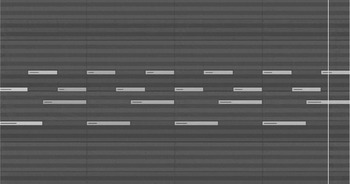
This was one important element of the Glass piece that Ben identified: the gentle polyrhythm at work between the right and left hands. As a group I asked them to come up with ideas on how to create a polyrhythm in Logic's piano roll interface – something they had not yet done or covered in their sequencing module. Eventually, the group realised that by setting the ‘division’ of the grid to 8ths or 12ths, and using the scissor tool set to snap at ‘divisions’ they could easily cut their chord into quavers or quaver triplets. We listened to ‘Opening’ once more and the students identified which hand was playing triplets and which was playing straight quavers. They chose whether or not they wanted to copy this configuration exactly, swap hands over, or just employ it periodically amongst other accompaniment styles.
A measure, F Major triad arranged for 4 notes, with oscillating polyrhythms (left hand in quavers, right hand in quaver triplets), as it appears in Logic Pro's piano roll MIDI editor.

Step 4: Performance nuance and the timbre/ambience of the performance environment and mix (sound world emulation using virtual instruments, velocities, reverbs and compression)
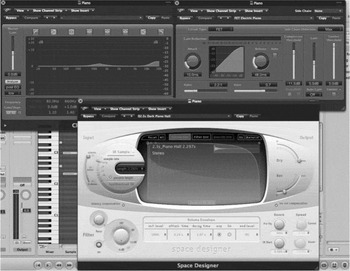
Shifting the focus away from the notes, chords and rhythms, I asked Ben to think about the sound world of ‘Opening’ and how he might be able to achieve the illusion of a realistic piano performance without capturing or recording a pianist playing his music. He identified lightness of touch as an important element and adjusted the velocities of his MIDI notes accordingly, until a gentler articulation was achieved, placing accents, emphasis and swells where appropriate. We added the sustain pedalling, tweaked the EQ curve on the piano sample instrument so that mid-range frequencies are slightly boosted, and applied gentle compression to the output – each action giving a warmer quality to the piano sound. Finally, Ben placed the piano sound in a reverberant space, using the Space Designer application.
From left and clockwise – channel EQ is used to add warmth and ‘air’ (extreme high frequency boost) to the tone of the piano; compression settings to achieve a similar dynamic control as heard on the Glassworks recording of ‘Opening’; Space Designer convolution reverb plug in, to position the piano sound in the 3D listening space.

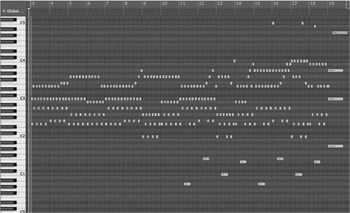
By then the piano solo was sounding rather beautiful and Ben was inspired to extend the work by incorporating melodic movement within the chord progression and adding low bass notes and a lingering high melody in the second half of the composition. This was an important breakthrough for Ben, as the composition had now grown from a mere sound-a-like exercise to something closer to a personal expression. At this point I allowed him a bit of extra time alone to work, and I left him to it while I went and worked with other students in the group who needed assistance.
Ben's finished composition as it appears in Logic Pro's piano roll MIDI editor.

Step 5: Using Logic Pro 9's score editor to notate and publish a playable and accurate score for solo piano
Logic Pro has an integrated score editor that uses the data from the piano roll MIDI editor to create a staff notated version of the musical material present. Because of this, the students do not have to input notes directly into the score editor like they do in programs like Sibelius or Finale. This could be seen as a shortcut that circumvents some important learning opportunities, and I will discuss these ‘areas for concern’ later on.
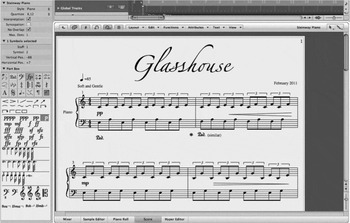
On its own, the data do not translate to a readable or correct score for solo piano. In a dedicated lesson, I showed the students how to format the information: separating the hands into discrete MIDI channels, applying triplets, key and time signatures, phrasing, pedal markings, dynamics and expression. Once the notation was correct, the students looked at some piano scores and made note of the use of white space, necessary text and general formatting. Ben edited and formatted his score to his liking. He exported the score as a PDF document and added a title page and back cover to make a booklet. The final test is in giving the score to a pianist to perform.
The moment when the pianist performs Ben's score feels significant to me, as if the music has finally crossed the threshold from the technology world into the real world and the composition has suddenly become a legitimate composition for piano and not just a series of software tricks. I shared this thought with the students and I hope that they can appreciate the sentiment and sense it themselves also. Composition using technology opens up worlds of possibility, both musically and sonically; if you know the right techniques, there are no limits to what you can create – case in point, you don't have to be an accomplished pianist to write a beautiful piano solo.
The score editor in Logic Pro, showing the first 4 bars of Ben's score to ‘Glasshouse’.

Conclusion
Benefits and concerns
I studied piano and music theory from a young age, taking my studies through the graded exams system and continuing on to a 4-year B. Mus. degree and further on to postgraduate study. I have spent a lot of time learning about how music works and there is a dissonance that I feel in my own teaching practice between wanting to foster confidence, enthusiasm and inclusion by creating assessment tasks that allow students of various levels to achieve great results quite quickly, and a lingering sense that the composing students that leave my classroom might not be adequately equipped to go on and work professionally one day due to my teaching them technology shortcuts.
Music technology applications have been designed and developed to speed up the process of creation. This is great for professionals who are working to tight deadlines but the problem for educators is that increasing development in speed and usability can make certain skills and knowledge redundant. From typesetting to sampling, transposing instruments to synthesis, when there is a button that solves a problem when you click it, it becomes difficult to enthuse students about learning how to do things ‘the long way’. When technology provides shortcuts to quick and impressive results, can this discourage the seeking of a deeper understanding of process, craft and expression? When an entire vocation becomes reliant on rapidly evolving technology such as this, does theoretical knowledge lose currency, and if so, what effect might this have on culture?
Technology grants access to music and sound worlds that are exciting and creatively gratifying to work in; where once it would be the lucky few that got the chance to hear a symphony orchestra perform their work, now this situation can be simulated relatively easily and convincingly. If you can show a composition student how to make a musical idea sound great, you will see them employing that technique over and over again; once confident with the required skills, students are usually highly motivated by the potential to achieve impressive sounding results. You will see them bouncing down mp3s of their work to put on their iPods, and posting their work online on social music networks such as SoundCloud or ReverbNation to show their friends.
Working this way provides a different framework from traditional staff notation within which to understand harmony rhythm, melody, tonality, texture and metre. This is useful in engaging with and fostering confidence in students who have had discouraging experiences learning music the usual Western way, who might be fearful of the (perceived or imagined) complexities of music theory. Within the piano roll, one can learn about harmony, melody, rhythm, structure, voice leading and arrangement in a way that might not seem so intimidating, confusing or foreign. The piano roll editor also helps to level the playing field: since most students are inexperienced with such software applications when they come to us, all of a sudden the student who has been taking piano lessons since the age of 8 doesn't have such a strong advantage over the student that has never read or written music before.
These approaches to teaching composing also acknowledge the importance of sonic elements such as timbre, texture, space, orchestration/sound combinations and sound design; some of these areas are difficult to define in score-based music writing and are sometimes overlooked in traditional composition curriculum. Ben understood that the writing of the actual notes was only half of the work, giving careful consideration to how those notes were articulated and positioned in his production. This two-sided approach to music-making, where the musical and sonic elements are given equal importance, helps composition students achieve better sounding results and provides interesting crossover into the areas of critical listening, sound engineering, performance and production. Composers seeking careers in writing music for media (film, television, advertising and games) need all of these skills in order to be remain competitive and employable. Music technology applications such as Logic Pro/Garage Band, Cubase, ProTools and Ableton Live favour this inclusive approach and in my opinion are better applications for facilitating creative music-making than mere score editors such as Sibelius and Finale.
As technology evolves, applications become more flexible in terms of being able to create and share files using touchscreen devices such as smartphones and iPads (for example, Apple's GarageBand app creates files that can be directly opened in Logic Pro). These capabilities, in addition to easy file sharing, can facilitate spontaneous learning, creativity and collaboration. In this article I have only focused on one technology application, and a single case study of an assessment task; there are a multitude of programs, applications and interfaces that facilitate music-making in a satisfyingly tactile and intuitive way, making music composition accessible to everyone. In the classroom, this technology is a valuable asset in providing alternative strategies to learn about how music works, to foster confidence and creativity and bridge the knowledge gaps that inevitably exist between students with more or less musical experience.