
Introduction
The Bar Council of Ireland Law Library is a private library owned by the barristers of Ireland and funded by their individual membership subscriptions. It serves the day-to-day information needs of about 2,500 practitioners, based mainly in Dublin but also working on the various circuits throughout Ireland. The print collection runs to some 130,000 volumes and the Library & Information Service employs 33 staff.
The Web 2.0 revolution has brought new ways of looking at the relationship between users and content, developments that many libraries have been following closely. From the literature on the subject it can almost seem as though institutions which are not making use of these new, mostly free, technologies are somehow lagging behind.
For the Law Library the biggest obstacle was the firewall and the nature of our business. Law is a highly competitive sector, where an important part of the information professional's job is to keep our users ahead of the curve on legal information: to provide it quickly, intuitively and on a 24/7 basis. Web 2.0 is ideal for this kind of activity but, for us at least, having it out on the public web in a Web 2.0 application was never an option. All content must be kept exclusive to fee-paying Law Library members.
So why bother?
The easiest option is just to ignore it all and to continue on a Web 1.0 basis and leave Library 2.0 to the academic and public libraries. The Law Library has a decades-long commitment to online materials and makes a variety of subscription databases available to members. We have been getting by and there were no direct push factors to change the way we do business online.
Except… there are clear advantages to adopting certain aspects of Web 2.0. In our case, we were facing a crisis of space. There was a time not long ago, perhaps a dozen or so years, when every practising barrister could be accommodated at an assigned desk on the Library's Main Floor. This was more than a fondly remembered golden age. When the Bar numbered only a few hundred members and they all worked in the same room, it served a vital function in the dissemination of legal expertise. A younger or more inexperienced barrister had immediate access to the acknowledged experts in any field of law. Everything a practitioner needed in their working life, including the interaction amongst peers and the advice of elders, was immediately to hand.
Of course, this is simply not practical today. Physically, the Law Library has expanded to incorporate two extra satellite libraries in Dublin and another in Cork and the members themselves are even more spread out. The Main Library can hold about a quarter of them, but most work from other Law Library buildings, from private rented offices nearby or entirely from home, coming to headquarters only to use the Library service and attend the courts nearby.
It was noticed that the all-important collegiality of the Bar was at risk, with a knock-on risk to the overall quality of service which the Bar offers its clients. If Barristers are not communicating with each other, they are not sharing expertise.
Also, the Four Courts facilities themselves, still the epicentre of the Law Library's information services, have become congested as more and more members try to cram in to use them, all carrying the many kilos of paper that their work now requires. With 100-200 new members arriving each year, it is very much a growing challenge.
Web 2.0 offered the possibility of making the Library environment virtual: an assigned space on the web which recreates the old-fashioned Law Library user experience, with a design centred on the individual practitioner and their day-to-day needs.
There are many Web 2.0 applications available that we could have used: Facebook groups, or collaboration tools like MediaWiki and Google Docs, but we hit the firewall problem again and with the various third-party databases we subscribe to, members already had more than enough accounts and passwords to keep track of.
Next we looked at out-of-the-box solutions, Microsoft Sharepoint being perhaps the best known. But, as general workplace-based utilities, these did not quite do what we needed. The kind of user community we wanted, made up of independent sole-traders, was not the same as the top-down employee-based model on which these utilities seemed to be centred. The barristers are not the staff of our organisation, nor really are they our customers. The big software developers did not seem to have a solution that suited our way of working and we did not want to end up shaping our business and our clients' expectations around what the software is designed to do.
It became clear that the solution would have to be created new from whole cloth rather than assembled from free or purchased readymade. The issues of over-crowding and potential loss of collegiality in an ever-expanding Bar provided the leverage I needed to secure some funding and approach a software developer with a view to a bespoke solution.
I think it is a lot easier when seeking investment like this to sell it as addressing an overall organisational issue, rather than just a library matter. New ways of creating and sharing information are all well and good, but innovation is always more attractive when it addresses the goals of the whole company. This was foremost in my mind when pitching my idea to the funding authorities and it definitely influenced the way I presented it.
Forward to the Old Days
“Forward to the Old Days” was the tagline: a comparison of how the Law Library worked in the past, and how Web 2.0 can be used to restore the important features which are now under threat. To reflect the user-centred approach, we named the suite of utilities “Barrister's Desktop”.
Just as the real-life Library has a single point of access, Barrister's Desktop, available from any computer with an internet connection, authenticates users for all the resources and services they are entitled to. No additional passwords are required at any point.
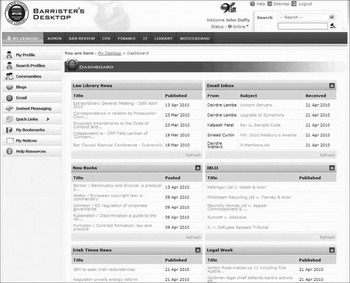
The main body of the landing page (Figure 1) consists of widgets which are fed in from other sources, mostly by RSS. At the top-right, by default, is the user's e-mail inbox. Each widget is movable, customisable and deletable, except the one at the top left: this is the official notices from the Law Library and Bar Council and we have taken the decision to bolt them to the desktop permanently. Mass communications with the membership is a regular issue in the Law Library, and Barrister's Desktop gives us one more weapon in the war against “Nobody Told Me”.
Barrister's Desktop - Dashboard

All the other widgets are at the barrister's discretion. We provide a default set, with a list of other possibilities, but any site which has an RSS feed can be turned into a widget and appended to the desktop. We also included a facility for creating widgets from internal data, like the New Books feed which is generated internally, linked to the catalogue, and various other places we have peppered with the syndication logo to denote a feed is available.
Databases
In the old days, all the legal publications that a barrister needed were physically housed in the library and were within easy reach. That is still largely true, though it is becoming harder and harder to accommodate everything on our shelves and even as we remove material from general circulation to free up space, we are facing greater numbers of members demanding to use that material.
Digital access has long been seen as one useful approach to dealing with this: the high-use law reports, legislation and many journals and loose-leafs are commonly available on the databases to which we subscribe.
What Barrister's Desktop does here is smooth the path of access, while ensuring that the licensing conditions of the publishers are complied with. Some of our resources came with particular terms and conditions relating to usage: some only work on specific PCs, or within specific buildings. The single-sign on system behind Barrister's Desktop handles all of this. Even though the user can log on from anywhere, the system knows which PCs are permitted access to specific resources and which are not and gives access or produces an instruction as appropriate.
Communication and collegiality
Beyond the services provided by the Library directly, Barrister's Desktop also seeks to revitalise the peer-to-peer communication which was once a hallmark of practice at the Bar.
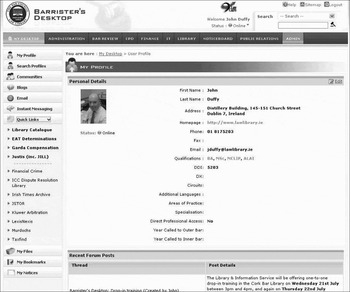
The most basic element of this is the profile (Figure 2). This gives the member's name, their contact details, the all-important year of their call to the Bar, which circuits they work on and, if they wish, what their particular area of legal interest and expertise is. If a user is looking for an expert to help with a specialised case, they can search the directory for someone with a suitable profile and make contact with them just the same as they would if they were in the same room but via e-mail, telephone or by instant messenger.
Barrister's Desktop - Profile

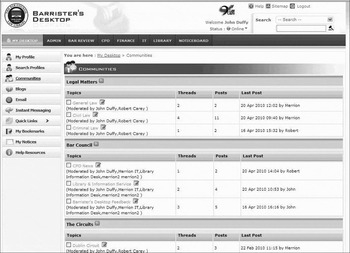
On top of the one-to-one contact, there is a replication of the general conversation that happens around the library in the form of a web-based discussion forum (Figure 3). The topics here are divided out by areas of law and also by geographical circuit. This is where the acknowledged experts in a field can share their expertise with the widest possible audience of other barristers. This is the core of the whole collegiality issue which the Bar is fighting to preserve. As mentioned above, we have included an RSS option so users can subscribe to topics or threads and have them appended to their desktops.
Barrister's Desktop - Communities

We have added a bookmarking utility so members can keep track of sites that interest them and given it a Web 2.0 twist by allowing users to share their bookmarks. Once a bookmark is tagged as Public, it becomes part of their profile and, once again, members can use the widget facility to subscribe to the bookmarks being added by any other user. By subscribing to the items bookmarked by the leading expert in a field of law, there is knowledge to be gained without the expert having to take any time to share it.
We have also put together a blogging suite and have recruited members to contribute. The Library & Information Service also uses the blogs to keep members apprised of service developments as they happen.
Shop window sites
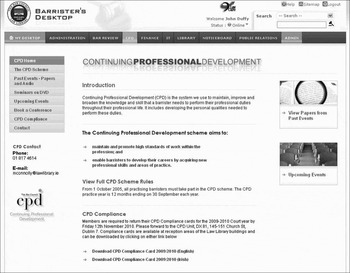
We have wanted to keep our more traditional brochure-style web content as well and we have approached this by dividing it up into mini-sites for the different sections: Continuing Professional Development, for instance (Figure 4), and the all important IT help pages. The mini-site model allows us to give each individual section complete control over their own site, to design it, structure it and update it as they like and there is a user-interface for that.
Barrister's Desktop - Continuing Professional Development

Back-end
The system is designed to be scalable, adjustable and adaptable so we can easily add more modules as we think of and develop them, or remove others that are not being used. The cross-compatibility of using XML standards, and RSS in particular, is very important, as it makes developing new add-ons very simple and users can create their own. It utilises Microsoft's .NET framework which aids mobile compatibility and contains a lot of open-source code, meaning there is no need for expensive third-party licensed software: all the intellectual property in the application belongs to us, something I felt very important to emphasise when demonstrating the system to our funding authorities.
The network architecture of this version 1.0 is quite straightforward, consisting of two virtual Windows servers: a back-end SQL database and a web server in a DMZ at the front.
It was developed by a Dublin-based company, Merrion IT, whose programmers are based in India. Obviously there are pros and cons with using an outsourced development company and having a chief software developer on a different continent with the time delay and the minimal personal contact, but the cost differential has outweighed all of that and, most importantly, we are happy with their work and trust them with our vision.
Where we are
Barrister's Desktop was launched officially by the Chairman of the Bar on 12th July and had almost 500 users within three weeks. Feedback so far has been very positive, though there has been no shortage of suggestions for enhanced functionality.
It is possible that many members will be entirely apathetic towards the service and may never log in at all. This is fine: traditional library services will continue as ever. However, as the age profile of the membership gets younger and younger each year, I think Barrister's Desktop will become seen by most of the Law Library's members as a normal part of what the Library offers.
Conclusion
The main point I wish to get across in this article is that Web 2.0 technologies are not self-purposing. It sometimes seems as though librarians are being pressured into using them simply because they are there and everyone is talking about them.
For many of us this is not practical and for some it is not relevant either. Adding some Web 2.0 applications to our services is not going to solve most of the day-to-day challenges we face as information service providers.
It can be well worth taking a step back and looking at what your organisation does and look especially at what it used to do that is no longer possible for whatever reason and then see if there are any solutions out there in the Web 2.0 world. I am sure that we in the Law Library are not the only ones facing challenges from increasing numbers of users and few additional resources to deal with this. It is in these areas that user-centred, interactive online technologies can be particularly helpful.
When carrrying forward this kind of project it is vitally important to have a clear vision of how the end product will look and work: design models, mock up some screenshots and keep referring back to your organisational goals and the specific issues you are seeking to address.
Web 2.0 is everywhere these days, promising all sorts of new ways of working. However, the librarian still needs the attributes we are good at including the focus and the drive to make it work for us and our users, both on the free and open World Wide Web and inside our own networks.