

1. INTRODUCTION
Architecture, engineering, and construction (A/E/C) teams and individuals involved in the design process often collaborate with team members with broad experience gained from previous projects in the firm. They attempt to share and reuse their knowledge. The collaborative knowledge reuse from past experiences involves exploration of design content stored in corporate project design archives either in digital or paper format. However, these design archives do not capture the entire design process thereby resulting in loss of contextual information. These archives tend to store large amounts of rich content (blueprints, pictures, calculations, etc.). The process of collaboration in such a setting entails participants looking at large amounts of decontextualized design data over limited physical and visual space with team members' often making inaccurate assumptions about past design process decisions and justifications.
In this paper, we identify issues that limit the process of collaborative exploration of these project archives and broadly classify them into three categories: content-based limitations, context-based limitations, and visualization limitations. We introduce two technologies, Corporate Memory (CoMem; Fruchter & Demian, Reference Fruchter and Demian2002) and interactive Room (iRoom), that address these limitations as integrated systems. CoMem is a collaborative technology developed by the PBL Lab at Stanford University to support the process performed by a single user to reuse knowledge stored in corporate project design databases. iRoom has been developed through the Interactive Workspaces Project by the Human Computer Interaction (HCI) Group at Stanford University (Johanson et al., Reference Johanson, Fox and Winograd2002; Johanson & Armando, Reference Johanson and Fox2002) that investigates human interaction in ubiquitous computing environments comprising large displays. We further hypothesize that an integration of these two technologies results in a workspace that is ideally suited to the process of collaborative exploration. It addresses the need for all participants to explore and manipulate rich content concurrently and effectively in support of knowledge reuse. We describe the details of this integration process and discuss the benefits of the CoMem–iRoom system through an observed usage scenario and user evaluation.
2. STATE-OF-PRACTICE, STATE-OF-THE-ART, AND POINTS OF DEPARTURE
We performed in the last decade extensive ethnographic studies focusing on the state-of-practice of teamwork in the A/E/C industry. More specifically, our observations related to knowledge exploration and retrieval identified a number of affordance limitations that constrain the process of collaborative exploration and decision making through knowledge reuse.
• Content-based limitations: Current archives tend to be large, incomplete, and disjoint, making retrieval and exploration difficult and time consuming. Designers have difficulty finding and retrieving content from past projects from an enterprise archive. This becomes even more difficult if relevant content resides in projects the current team members did not participate in and are not aware of. The digital age holds great promise to assist in content archival and retrieval. Nevertheless, most digital content management applications today offer few solutions to assist designers to find, explore, and understand content in context. State-of-practice document management solutions are limited to digital archives of formal documents logged by discipline, project phase, date, and originator. A typical corporate archive grows as the firm works on more projects. Consequently, it becomes increasingly challenging for users to search and (1) have an overview of all the corporate projects with flags to relevant past project information pertinent to specific problems on which they work and (2) explore specific items in context for future reuse.
• Contextual limitations: Archives of past designs do not retain sufficient context within which design decisions were reached. Little information about the design process or intermediate design versions is retained, thereby leading to decontextualized design data. Designers have difficulty exploring the company's entire project archive, and thereby end up retrieving decontextualized information from a past project with key steps in the design decision process missing. This study builds on the notion of knowledge in context (Fruchter & Demian, Reference Fruchter and Demian2002). Knowledge in context is design knowledge as it occurs in a designer's personal memory: rich, detailed, and contextual. For knowledge to be reusable, the user should be able to see and explore the context in which this knowledge was originally created and interact with this rich content. A repository of such knowledge in context is defined as a corporate memory. Knowledge reuse is a step in the “knowledge life cycle” (Fruchter & Demian, Reference Fruchter, Demian, Anumba, Egbu and Carrillo2005). Knowledge is created through dialogue among practitioners who collaborate on projects. It is captured, indexed, and stored in an archive. At a later time, it is retrieved from the archive, explored, understood, and reused. Finally, as knowledge is reused it is refined and becomes more valuable.
• Visualization and interactivity limitations: Limitations on direct manipulation and visualization of rich content as most of these designs occupy large display spaces (digital or physical) and allow for limited manipulation resulting in a constrained interaction process. Such a constrained interaction process poses difficulty to compare retrieved documents and identify the relevance of those retrieved documents to the problem at hand. It also leads to constrained knowledge exploration as participants manipulate and explore partial information as many documents from intermediate phases are not archived and the parts of the retrieved documentation are not linked.
Related work done by different research groups has focused on knowledge management, that is, capture and retrieval of content, and on interactive ubiquitous workspaces in the enterprise settings. Vannervar Bush's paper (Bush, Reference Bush1945) was one of the inspiring articles published at the middle of the last century. It envisioned a “memory extender” device called “memex.” This vision has not yet been realized in corporate environments. A group of researchers at FX Palo Alto Laboratory (Hilbert et al., Reference Hilbert, Billsus and Denoue2006) studied and implemented recently the ProjectBox system as a smart appliance for automatic presentation and capture. It is intended to support automatic capture and retrieval of useful corporate information. Key questions common to this area of research try to address issues related to the size and complexity of corporate memories, capture, contextual retrieval, and visualization.
Bright and Vernik (Reference Bright and Vernik2004) explore in their LiveSpaces model new forms of operating environments to coordinate and manage interaction among people, space, devices, and services. The i-Land project group at the Fauenhofer Institute in Germany studied interactive workspaces and interactive roomware (e.g., furniture, doors, walls) as part of the Workspaces of the Future Vision (Streitz et al., Reference Streitz, Geissler, Holmer, Konomi, Müller-Tomfelde, Reischl, Rexroth, Seitz and Steinmetz1999). They explored the notion of “cooperative buildings.” It offers valuable examples of integrated design of real and virtual spaces that allow dynamic configuration and flexible allocation of resources for project teams. For instance, DynaWall is an interactive wall, InteracTable is a prototype for interactive tables, and CommChair is a model for computer enhanced chairs.
The theoretical points of departure of this research are rooted in design theory and methodology, knowledge creation and management, and human–computer interaction. This research builds on Donald Schön's (Reference Schön1983) concept of the reflective practitioner paradigm of design. Schön defines the process of tackling unique design problems as knowing-in-action. To Schön, design is an action-oriented activity. However, when knowing-in-action breaks down, the designer consciously transitions to acts of reflection, termed reflection-in-action. Schön argues that, whereas action-oriented knowledge is often tacit and difficult to express or convey, what can be captured is reflection-in-action. This concept was expanded into a reflection-in-interaction framework to formalize the process that occurs during collaborative team meetings (Fruchter & Swaminathan, Reference Fruchter and Swaminathan2005).
Reflection-in-action of single practitioners and reflection-in-interaction of project teams are part of the knowledge creation and capture phase of what we call the “knowledge life cycle” (Fruchter & Demian, Reference Fruchter, Demian, Anumba, Egbu and Carrillo2005). As Davenport and Prusack (Reference Davenport and Prusak1998) indicate, knowledge is created through dialogue. Similarly, it represents an instance of Nonaka's knowledge creation cycle “socialization, externalization, combination, and internalization” (Nonaka & Takeuchi, Reference Nonaka and Takeuchi1995).
The scenario-based design approach (Rosson & Carroll, Reference Rosson and Carroll2001) is used as a methodology to study the current state-of-practice, describe how people use technology, and analyze how technology can support and improve their activities. The scenario-based design process begins with an analysis of current practice using problem scenarios. These are transformed into activity scenarios, information scenarios, and interaction scenarios. The final stage is prototyping and evaluation based on the interaction scenarios. The process as a whole from problem scenarios to prototype development is iterative.
3. CoMem–iRoom APPROACH
This paper presents a framework that addresses the needs and limitations in the process of collaborative teamwork for knowledge exploration and reuse. We present a working prototype, called CoMem–iRoom, that leverages and integrates two software environments, CoMem and iRoom. CoMem is a collaboration technology that facilitates context-based reuse of corporate knowledge in a single-user setting (Fruchter & Demian, Reference Fruchter and Demian2002) for the A/E/C community. CoMem allows for context based visualization and exploration of large hierarchical project design databases. The iRoom architecture (Johanson et al., Reference Johanson, Fox and Winograd2002) is a technology that enables communication between discipline-specific control applications running on multiple machines. By making CoMem the nodal application of the iRoom architecture, we extend the contextual visualization and exploration functionality provided by CoMem from a single-user to a multiuser interactive setting, thereby enabling collaborative exploration in project group meetings and knowledge reuse discussions.
3.1. CoMem
To design CoMem we conducted ethnographic studies to understand the internal knowledge reuse process applied by human domain experts. We identified two reasons for the effectiveness of internal knowledge reuse:
1. Even though the expert's internal memory is very large, he/she is always able to find relevant designs or experiences to reuse.
2. For each specific design or part of a design he/she was reusing, he/she is able to retrieve a lot of contextual knowledge. This helps him to understand this design and apply it to the situation at hand. When trying to understand and reuse contextual knowledge, the human designer explores two contextual dimensions: the project context and the evolution history.
Based on these observations, CoMem prototype offers an external reuse system that enables designers to do the following:
1. find reusable items in large corporate archives,
2. explore the project context of these items in order to understand them, and
3. explore the evolution history of these items to understand them.
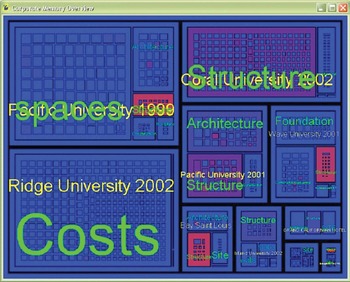
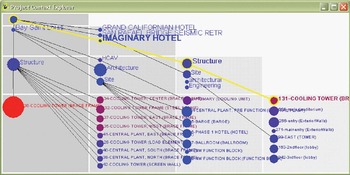
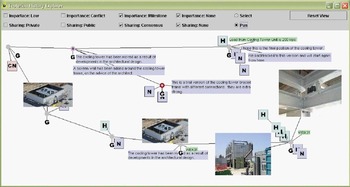
The three identified reuse steps—find, explore project context, explore evolution history—are implemented in CoMem as three corresponding modules: an Overview, a Project Context Explorer (PCE), and an Evolution History Explorer (EHE; Fig. 1), For each module, we investigated radically new metaphors. Metaphors are used here in a human–computer interaction sense. Metaphors increase the usability and user interaction experience by supporting understanding by analogy. Modern operating systems use the desktop metaphor.
The Map Overview CoMem Module provides a succinct snapshot of the entire corporate memory. [A color version of this figure can be viewed online at www.journals.cambridge.org]

CoMem uses a map metaphor for the overview. The CoMem Map Overview Module provides a succinct “at a glance” view of the entire corporate memory (Fig. 1). Corporate memories are usually hierarchical, where the corporation contains multiple projects, each project consists of multiple disciplines or building subsystems (structural, electrical, etc.), and each discipline contributes multiple components. This hierarchy can become very large. For example, consider a small design practice that has worked on 10 projects, each project involving 10 disciplines, each discipline contributing 20 components, with each object versioned 50 times over the course of the project. The total number of objects in the corporate memory is close to 105. Conventional techniques for visualizing hierarchies using nodes connected by links are inappropriate, given that the overview needs to show the entire corporate memory in a single display. CoMem uses the “squarified treemap” algorithm to display an overview of the corporate memory in which the hierarchy is visualized as a series of nested rectangles. The area on the map allocated to each item is based on a measure of how much knowledge this item encapsulates, that is, how richly annotated it is, how many times it is versioned, how much external data is linked to it. Each item on the map is color coded by a measure of relevance to the designer's current task. Currently, this relevance measure is based on textual analysis of the corporate memory using the latent semantic indexing (LSI) algorithm (Landauer & Dumais Reference Landauer and Dumais1995; Demian & Fruchter, Reference Demian and Fruchter2005).
The CoMem PCE module enables the designer to explore the project context of any item selected from the overview (Fig. 2). This item becomes the focal point of the interaction. CoMem uses a fisheye lens metaphor for the PCE (Furnas, Reference Furnas and Card1981; Lamping & Rao, Reference Lamping, Rao, Card, Mackinlay and Shneiderman1995). A fisheye lens balances local detail with global context. This metaphor is used here to suggest that the designer is initially concerned only with the item of interest, but begins to explore the context “outward” as necessary. Given a user-specified focal point, CoMem uses the fisheye formulation to assign a degree of interest to every item in the corporate memory.
The Project Context Explorer CoMem Module allows the user to explore related items in the corporate memory to better understand the item being reused. [A color version of this figure can be viewed online at www.journals.cambridge.org]

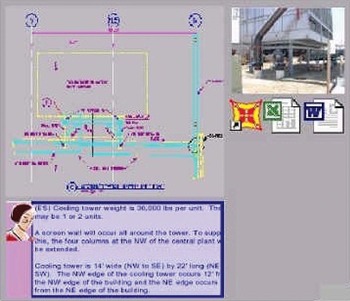
The CoMem EHE module enables the designer to explore the evolution history of any item selected from the overview, from an abstract idea to a fully designed and detailed physical component, discipline subsystem, or even entire project (Fig. 3). Our observations show that one of the most effective means of transmitting knowledge from experts to novices in A/E/C design offices is through the informal recounting of experiences from past projects. Stories convey great amounts of knowledge and information in relatively few words. CoMem EHE module implements a storytelling metaphor. Any item in the EHE or PCE can be viewed in detail in the Content Viewer of CoMem (Fig. 4).
The Evolution History Explorer CoMem Module allows the user to explore the evolution of an item before reusing it. [A color version of this figure can be viewed online at www.journals.cambridge.org]

The Content Viewer CoMem Module displays the item being reused. [A color version of this figure can be viewed online at www.journals.cambridge.org]

Preliminary pilot test beds in the industry indicate that CoMem allows a user to visualize large hierarchies at a glance and provides the functionality to explore local context for any part of that large hierarchy. Hence, CoMem addresses the content and context based needs in the process of knowledge reuse.
3.2. iRoom
iRoom was developed at Stanford University as a part of the Interactive Workspaces Project started in Reference Baeza-Yates and Ribeiro-Neto1999 in the HCI Group in the Computer Science Department (Johanson et al., Reference Johanson, Fox and Winograd2002). The objective of the project was to investigate “fluid human interaction” with large resolution displays embedded in ubiquitous computing environments that could sustain realistic interactive use. Specifically, the iRoom environment
• provides the ability to map a single defined physical location to an underlying systems infrastructure,
• emphasizes the use of large interactive walk-up displays with touch interaction,
• provides a framework for “nodal” applications that can be integrated in the iRoom architecture and emphasize the additional interactivity functionality obtained through the iRoom, and
• controls processes running on different PCs to ensure seamless and smooth interaction.
The original prototype of the iRoom included a number of touch-sensitive white-board displays along sidewalls. This environment was made available to other research groups at Stanford University that collaborate with the HCI Group such as the PBL Lab.
The iRoom facilitates tasks with the following three characteristics:
1. Moving data: Multiple users in the room are able to move data among the various visualization applications running on different devices such as PCs with large screens or laptops.
2. Moving control: To minimize disruption during collaboration sessions, any user is able to control any device from his or her current location/device.
3. Dynamic application coordination: Embedded nodal applications that communicate with modules on other screens (machines). These applications have communication modules that integrate with the iRoom communication functionality.
The software infrastructure supporting the iRoom architecture is called Interactive Room Operating System (iROS). It is a meta-OS that ties together devices each having their own low-level OS. iROS has three subsystems: Data Heap, iCrafter, and Event Heap that address the three user modalities of moving data, moving control, and dynamic application coordination, respectively.
3.3. CoMem–iRoom system architecture
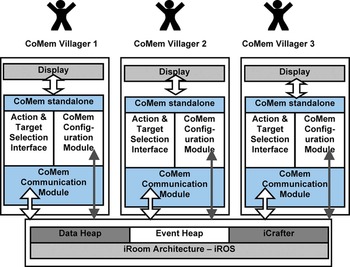
CoMem is embedded as a nodal application to iROS to address the visualization and interactivity limitations constraining the collaborative knowledge reuse process discussed in Section 2. To help visualize the system architecture, we introduce the CoMem–Villager metaphor with the rationale being that individual CoMem–Villagers communicate just as villagers coexisting in a village community exchange information. Each CoMem–Villager resides on a networked host that is a part of the iRoom architecture. In the following we describe the implemented and integrated CoMem–iRoom system components.
3.3.1. iROS Event Heap
The CoMem–Villagers communicate with the Event Heap subsystem of iROS. The Event Heap (Johanson & Fox, 2002) is a coordination infrastructure for iROS derived from a tuple space model that offers inherent decoupling. It stores and forwards messages known as events. Each event is a collection of name-type-values fields. Examples of such fields in a message can be application_name, addressed_from, or addressed_to. The Event Heap provides a central repository to which all CoMem–Villagers in the interactive workspace post events. A CoMem–Villager can then selectively choose to pick events from the Event Heap that are addressed to it and execute actions that are performed locally. In general, iROS applications (e.g., CoMem–Villagers) do not communicate directly with one another but instead communicate through the Event Heap as it helps avoid highly interdependent application components that could cause each other to clash. The Event Heap further allows decoupling of applications referentially with information being routed by attributes rather than by application name, that is, applications are referred to by attribute values and not names, thereby allowing grouping and ungrouping of applications sending messages.
CoMem–Villager consists of a CoMem–Standalone application that has a wrapper composed of an (1) Action–Target Selection module and (2) Configuration module that are coupled with the (3) Communication module. These enable the logging in/registration into the iRoom and Event Heap and communication with the Event Heap and other registered CoMem–Villager in the iRoom through the Event Heap. The CoMem–Standalone is the single-user prototype described in Section 3.1 (Fruchter & Demian, Reference Fruchter and Demian2002). It communicates with the CoMem Database.
Action–target selection module
The CoMem–Villager has an Action–Target Selection module with a graphical user interface (GUI) that contains a set of functions and menus that have the format action–destination, for example, actions are open CoMem module (e.g., EHE, PCE), destinations are the CoMem–Villagers registered with the iRoom and can be the originator or a receiver host. These Action–Target Selection functions allow a user to select a given action and the CoMem–Villager on which to execute those actions. The list of actions available is dynamic, and varies depending on which of the three CoMem modules this interface is invoked from as the set of accessible components in each module vary. For instance, the list of actions invoked from any item displayed on the CoMem Overview Map give the user a choice to open a PCE or EHE, and the list of actions invoked from the EHE give the user a choice to open a graphic application, hyperlink, note, notification, and so forth, for any selected item in the EHE. Each of these menu action selections “open CoMem module” is coupled with the available list of destination hosts registered with the Event Heap.
Configuration module
This module allows the user to configure the local preferences and network communications on a specific CoMem–Villager. More specifically, the configuration module allows users to modify the usage and availability preferences for their CoMem–Villager:
1. Maintenance of public/private status of the CoMem–Villager corresponding to send and receive actions. Specifically, a CoMem–Villager that established a private status will ignore all actions and components directed toward it from other villagers and allow only one-way outgoing communication. This is necessary if a user on a private CoMem–Villager wants to explore a given CoMem module at length while letting other participants continue to collaborate.
2. The configuration module is also responsible for maintaining a registry of other CoMem–Villagers currently logged into the iRoom.
Communication module
The communication module acts as an interface between the Event Heap in iROS and CoMem–Standalone module of a CoMem–Villager. The following interaction sequence illustrates the communication process between two CoMem–Villagers, which is CV1 and CV2 being used by users A and B, respectively:
• Select: User A finds item_X to be of interest on the CoMem Overview Map that runs on CV1. User A wants to further explore it and send the PCE of item_X to user B using CV2. To accomplish this action, user A selects item_X on the CoMem Overview Map running on CV1. A menu displays possible actions of invocation from the Overview Map, and possible destinations for display in the iRoom, that is, CV1 and CV2. This is controlled by the Action–Target Selection module that, in turn, receives information about other villagers from the System Configurations Module.
• Send: User A sends PCE with item_X on CV2 as the action to be executed on target villager CV2. The format of the command is execute CoMem_moduleY with item_X on destination CV_Z. This command is decomposed into two components, for example: (1) an action that performs the task execute CoMem_moduleY with item_X–Execute PCE with item_X and (2) destination CV_Z, that is, Destination villager–CV2. These two components are then packaged into an Event Heap readable tuple format—application_name, addressed_from, addressed_to—by CV1's communication module, and sent to the Event Heap, where addressed_from is CV1 and addressed_to is CV2.
• Receive: The communication module of CV2, which is continuously polling the Event Heap for messages directed toward itself, identifies the new tuple with destination CV2. The communication module of CV2 picks up the tuple and reconstructs the packaged Action: Execute PCE with item_X.
• Execute: This reconstructed action is then internally sent to the CoMem–Standalone module of CV2 and executed by retrieving the corresponding data from the CoMem database. The PCE with item_X is displayed on CV2.
The integrated CoMem–iRoom environment is a collection of CoMem–Villagers communicating with each other in the networked iRoom architecture (Fig. 5).
Integrated CoMem–iRoom system architecture: CoMem–Villagers integrated with an iRoom operating system (iROS) exchanging information through the Event Heap. [A color version of this figure can be viewed online at www.journals.cambridge.org]

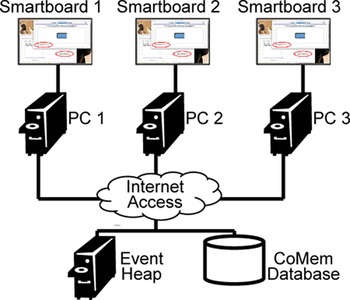
Figure 6 illustrates a configuration that includes the following devices: three PC clients connected to large displays that can be SmartBoard for direct manipulation and or projection screens, an Event Heap PC, and a CoMem database PC. The Event Heap and the CoMem Database reside on separate PCs connected to the network.
An example iRoom layout: three large displays each connected to a PC on the network. [A color version of this figure can be viewed online at www.journals.cambridge.org]

4. CoMem–iRoom IN ACTION
The following describes the specific interactions among an architect, an engineer, and a construction manager observed in the deployed CoMem–iRoom workspace during a real-world project test case. The CoMem–iRoom interactive workspace deployed for this project test case included: public display areas consisting of three PCs connected to interactive SmartBoard displays to support direct manipulation of the digital content, one shared Tablet PC emulating the interactive table area, and a laptop used by the construction manager as private workspace. The CoMem–iRoom exploration and decision workspace images on the three SmartBoards in Figures 7 through 12 show actual screen snapshot taken from these computers during the observed team meeting from the pilot project. The image used in Figures 7–12 represents the implemented CoMem–iRoom interactive workspace and allows us to abstract away the real identity of the actual participants. The CoMem corporate database consisted of an archive of 64 projects captured and stored in real time over a couple of years.
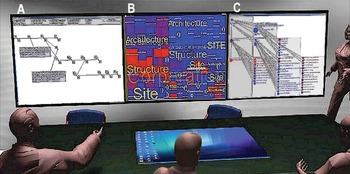
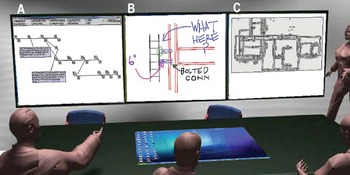
• Bill the architect, Joe the engineer, and Anna the construction manager meet to discuss the HVAC issue. Anna retrieves from her memory the exposed ductwork system used in the Coastal University project—one of the firm's projects on which she worked 2 years ago. Bill has several questions: What was the impetus for switching from a plenum to exposed ductwork system? What impact did this have on the architectural design? How did the designers account for the other implications of this decision? Were any other potential solutions explored? To answer these questions, Anna opens a CoMem–iRoom Villager in the conference room and searches for the Coastal University project and its HVAC system by entering the keyword “HVAC” in the open CoMem Overview Map on center screen B (Fig. 7). She finds several items in the Corporate Map that are shaded red, indicating high relevance. She finds a component she would like to explore and selects it. A menu appears that displays the choice of opening an EHE, PCE, or Unversioned Modeling Component (UMC). Anna has the option to open any of these modules on any of the Villagers in the CoMem–iRoom. She decides to open the Map component's EHE on the CoMem–Villager running on the left display (display A, Fig. 7), and its PCE on the CoMem–Villager controlling the right display (display C, Fig. 7).
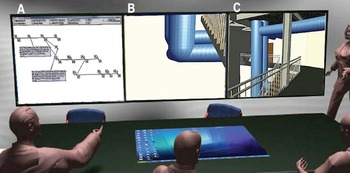
• The EHE displays the HVAC component that evolved in three primary stages during its design, and documents the points at which critical decisions were made to switch from one version to another. The documents include notes, drawings, images, and URLs from various stages in the design process. Bill decides to explore two of the versions: one before a critical decision, and one after the decision. On the EHE, he opens notes associated with them (display A, Fig. 8), and then opens an image associated with the first version on the center screen (display B, Fig. 8) and an image associated with the second version on the right screen (display C, Fig. 8). From these notes and images, the group determines that the HVAC system design was altered to include exposed ductwork because of height limitations in the Coastal University project's program. Joe is interested in determining how the installation of the ductwork was designed and how it evolved. Using the CoMem–Villager on the left display, he opens a sketch link on the EHE representing an early version on the center screen (display B, Fig. 9) and a detail from the final version on the right screen (display C, Fig. 9).
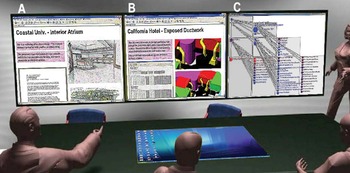
• To determine how the architectural concept and other aspects of the building design were impacted by this change, Bill refers back to the PCE of the original HVAC component (display C, Fig. 10). The hierarchical structure and color coding of the PCE display indicates that there are two other components that have a high relevance to the HVAC design: the interior atrium of the Coastal University project, and an exposed ductwork system in the California Hotel project. Bill decides to explore both of them. He opens a CoMem UMC for the atrium on the left screen (display A, Fig. 10). The UMC displays all components—images, drawings, notes, and URLs—that have been associated with the atrium, regardless of version. He also opens a UMC for the California Hotel project on the center screen (display B, Fig. 10).
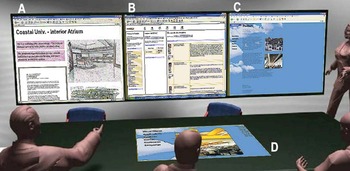
• The atrium UMC displays an architectural rendering of the atrium with the exposed ductwork. It also contains a link to a message board that the team used. Bill opens the link to the message board discussion from the EHE HVAC design evolution history (display B, Fig. 11), in which the team members describe the many implications and design options for the exposed ductwork system, such as noise considerations and the architect's concerns over the detailing of the ductwork's exterior. Bill discovers that the architect chose to embrace the exposed ductwork as an expression of functional transparency, which was a theme of his design. The architect also decided to use the ductwork's ribs to echo the crenellated walls of the atrium's interior. As their current project is an engineering building, Bill had also chosen to use functional transparency as a primary theme. He does not like the ribs on the ductwork; however, and wants to know if there are other options. Joe finds a link on the UMC to the ductwork vendor, and opens it on the right screen (display C, Fig. 11). He locates a system that is available with a smooth surface, and opens a detail of the system on the screen in the tablet PC in the center of the table (display D, Fig. 11).
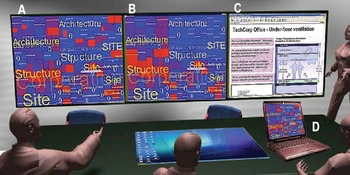
• While Joe and Bill explore the ductwork system, Anna opens a new Overview Map on her laptop, which is registered as a CoMem–Villager. She searches for “floor height limitations” (display D, Fig. 12). In comparing it with the Map on which the original HVAC search was conducted (display B, Fig. 12), she finds that there are several projects in addition to the Coastal University and California Hotel projects in which floor height limitations appear to have been an issue. She opens a copy of the new Map on the left screen (display A, Fig. 12) and a UMC for a component with high relevance in the Bay St. Louis project on the right screen (display C, Fig. 12). This component details an underfloor HVAC system. They explore the evolution of that option using the EHE, PCE, and details in the CoMem–iRoom. Anna proposes that the group explore it as another potential solution that they can compare with the exposed ductwork option. They all agree to present all these alternatives to the client to assist in making an informed decision regarding the HVAC solution.
Anna opens CoMem Villagers on all three hosts in the iRoom and searches for the Coastal HVAC design. Displays A, B, and C are the CoMem Evolution History Explorer, Overview Map, and Project Context Explorer, respectively. [A color version of this figure can be viewed online at www.journals.cambridge.org]

Bill uses the Evolution History Explorer (display A) to explore two different CAD versions of the HVAC component's design development (displays B and C). [A color version of this figure can be viewed online at www.journals.cambridge.org]

Joe opens images from the Evolution History Explorer (display A) to compare a sketch of the initial exposed ductwork installation design (display B) and a detail of the final installation (display C). [A color version of this figure can be viewed online at www.journals.cambridge.org]

Bill views the Project Context Explorer (display C) and explores content related to the atrium of the Coastal University Project (display A) and the exposed ductwork system of the California Hotel Project (display B). [A color version of this figure can be viewed online at www.journals.cambridge.org]

Bill opens a discussion topic from the Coastal University design team (display B). Joe follows a link to the ductwork vendor Web site (display C), and opens a detail of the vendor's smooth ductwork product (display D). [A color version of this figure can be viewed online at www.journals.cambridge.org]

Anna opens a new Overview Map and searches for height limitations on her laptop (display D). She finds the results interesting, so she sends the Map on a large display (display A) and a UMC for an underfloor ventilation solution in the TechCorp Office Project (display C). [A color version of this figure can be viewed online at www.journals.cambridge.org]

5. DISCUSSION AND EVALUATION OF CoMem–iRoom
A preliminary evaluation of the CoMem–iRoom environment focused on the three issues addressed in this study: content, context, visualization, and interactivity. The aim of the assessment was to identify specific circumstances under which innovative environments like CoMem and CoMem–iRoom provide genuine added value in comparison to traditional tools. The first two issues, content and context, are addressed by CoMem and relate to the capability of finding and understanding reusable items in large corporate archives. CoMem affordances were compared to two traditional tools and interface styles to search and explore archives (1) a Web search engine style and (2) a Windows Explorer style that lists files and folders using a tree organization representation of documents to demonstrate effective finding and understanding (Demian & Fruchter, Reference Demian and Fruchter2005). The variables considered for the evaluation were “type of finding task” that is, retrieval and exploration, and “size of archive.” Retrieval occurs when the user looks for a specific item in the corporate archive. Exploration occurs when the user does not know what to look for, only that it should be a relevant item to the problem at hand. CoMem–iRoom is developed with large repositories in mind, as this is where traditional tools typically fail.
Effective finding was assessed according to quantitative measures such as
• time required to complete a retrieval task;
• recall score for exploration tasks, where recall represents the fraction of useful items successfully identified by the user; and
• time required to explore the entire repository for a specific exploration task.
Effective understanding was measured according to the quantitative measure related to the ability to answer contextual questions related to explored items in the repository.
Twenty participants took part in the preliminary evaluation. The protocol took the participants through the brief of the project, a warm-up period to familiarize themselves with the CoMem modules and the interactivity in the iRoom. Each participant was given a series of retrieval tasks and exploration tasks to complete with CoMem–iRoom and the other two prototypes. To close, all participants were given a questionnaire and had a short informal interview debrief to provide qualitative feedback related to their experience with CoMem. Questionnaire questions had a scale from 1 to 7 (1 = strongly disagree, 7 = strongly agree). The questionnaire included questions such as the following:
• I would like to use this system frequently.
• I found the system unnecessarily complex.
• I thought the system was easy to use.
• I think people would learn the system very quickly.
• I felt confident using the system.
• I would feel very confident reusing content I found using the system.
• In the exploration task I felt I had a good understanding of the items explored.
• In the exploration task I felt I am able to find all potentially reusable items in the given time.
• If I had the system I would reuse content from previous project more frequently and more appropriately.
• Overview Map, PCE, EHE would be very helpful in my work.
The following is a summary of the preliminary evaluation results.
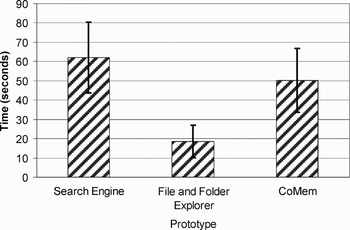
• The best performance in terms of time to complete a retrieval task was achieved by the File and Folder Explorer tool similar to Windows Explorer (Fig. 13). It is more effective for retrieval in the same way that binary search is effective for sorted arrays. CoMem allowed retrieval tasks to be completed in the next shortest time despite the fact that it was not designed with retrieval tasks in mind.
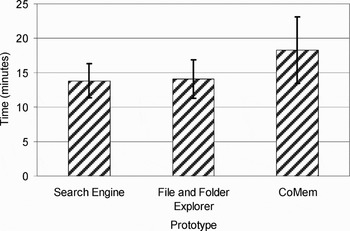
• The time to complete an exploration task was comparable for all tools (Fig. 14).
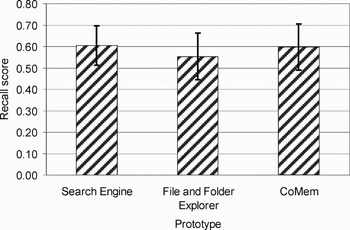
• CoMem performed well in exploration recall (Fig. 15), that is, the fraction of relevant items successfully recalled by the participants during exploration tasks (Baeza-Yates & Ribeiro-Neto, Reference Baeza-Yates and Ribeiro-Neto1999, give a discussion of the measurement of recall). The File and Folder Explorer tool had the poorest performance in exploration recall. This can be explained by the fact that in most cases reusable items were buried deep inside the hierarchy and left very little information scent at the higher levels that appear initially in the tree hierarchy. Information scent is the user's perception of the value, cost, or access path of information sources (Pirolli & Card, Reference Pirolli and Card1999).
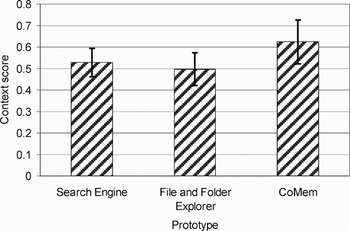
• In terms of the fraction of contextual questions answered correctly by participants about the items they retrieved, CoMem performed better than the traditional tools (Fig. 16). Most of the contextual questions were based on interactions between the designers, and the resulting version history of the item in question. The CoMem EHE was rated very highly by participants. It was used during exploration tasks much more extensively than the PCE, and was repeatedly praised by the participants during the debriefing interview. The participants indicated that the EHE helped them better understand the rationale behind the explored items.
Time to complete a retrieval task using the three prototypes (with 90% confidence intervals).

Time to complete an exploration task using the three prototypes (with 90% confidence intervals).

Fraction of useful items recalled during exploration tasks using the three prototypes (with 90% confidence intervals).

Fraction of contextual questions correctly answered about items found during exploration tasks using the three prototypes (with 90% confidence intervals).

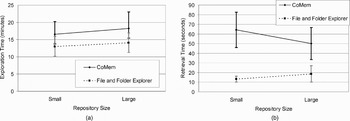
Figure 17 shows the effect of increasing the repository size on the time taken to complete an exploration or retrieval task. In the case of exploration (Fig. 17a), the size of the repository seems to have little effect. A more subtle aspect such as the amount of text that needs to be read to complete the task is more likely to have an effect on exploration time than the relatively simple count of the number of items in the repository. In the case of retrieval (Fig. 17b), the results are more similar to the hypothesized effect. As the repository size is increased, the performance of CoMem is assumed to stay approximately constant, whereas that of the File and Folder Explorer begins to deteriorate (takes more time for the larger repository). By simple extrapolation, it can be imagined that a point would be reached beyond which CoMem outperforms the File and Folder Explorer.
The effect of repository size on time to complete (a) exploration tasks and (b) retrieval tasks using CoMem–iRoom and a traditional File and Folder Explorer (with 90% confidence intervals).
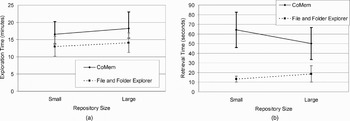
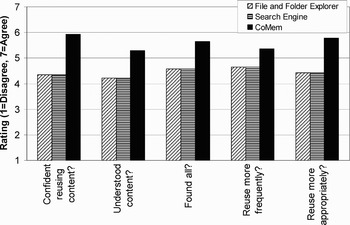
Figure 18 shows a selection of questionnaire results from the evaluation of CoMem–iRoom. These results support the claim that CoMem–iRoom addresses content and context limitations of traditional tools, and facilitates more effective finding and understanding of content through exploration.
A selection of questionnaire results from evaluation of CoMem–iRoom.

The following is the qualitative feedback from the questionnaire responses that were measured on a scale from 1 to 7.
• Regarding general usability characteristics (learnable, complicated, cumbersome), CoMem–iRoom attained comparable scores to traditional tools, which was 5.8 on a scale from 1 to 7, even though CoMem–iRoom uses radically different interaction techniques, whereas the traditional tools with which any average computer user would be very familiar and experienced.
• The main metric that looks at the “the extent to which external reuse is effective,” that is, does the user feel that if he/she had that prototype in his/her work, he/she would reuse designs more frequently and more appropriately, attained a score of 6 on a scale from 1 to 7.
• The measure of the user's perceived ability to find and understand: a high score was awarded to CoMem in these questions, which was 6.2 on a scale of 1 to 7. This supports the higher recall and understanding performance measures achieved by the participants when using CoMem for exploration tasks.
• The highest rated module was the CoMem Map Overview, which was 6 on a scale from 1 to 7, which validates the claim that providing a succinct overview of the entire corporate memory is extremely valuable. The EHE was rated very high at 5.8 and the PCE was rated 5.1 and was considered for more complex scenarios.
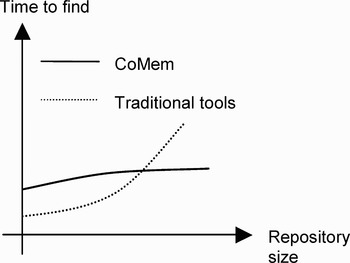
The results emphasize that traditional tools do not support the ability to find and understand and do not lead to effective reuse. CoMem supports the ability to find and understand that lead to effective reuse. The evaluation related to the type of task: exploration versus retrieval indicates that CoMem performs better in exploration scenarios rather than retrieval. The other variable that was introduced into the evaluation is repository size. Figure 19 shows the hypothesized effect of repository size on the performance of CoMem and traditional tools. CoMem's performance improves significantly in comparison with traditional tools as the size of the repository increases.
A diagrammatic representation of the hypothesized effect of repository size on the performance of information tools.

The third issue, visibility and interactivity, is addressed by the CoMem–iRoom interactive workspace. CoMem–iRoom architecture facilitates the following:
• efficient exploration of an extensive content repository, for example, the considered testbed consisted of 64 projects archived over a number of years;
• communication of contextual information for design components and decisions;
• the ability to easily explore multiple pieces of rich content simultaneously through utilization of numerous interlinked and interactive display areas;
• the ability to compare side by side multiple CoMem Overview Maps, or alternative solutions for a specific design detail;
• provide visibility of explored content to multiple participants, increasing the opportunities for group learning and chance discovery;
• dynamic adaptability to any number of users and number of machines used by the group; and
• a seamless transition between private and public workspaces. For example, in the work scenario described in Section 4 the construction manager is able to first explore in her private workspace on her laptop some issues and once she is confident she found something of high relevance to the discussion she can share it in the public workspace on one of the three Smartboards for further discussion with the team.
5. SUMMARY
Knowledge reuse involves a process of interactive knowledge exploration and visualization of alternative design solutions by A/E/C team members. We have identified limitations that constrain the current process of knowledge reuse during collaborative A/E/C teamwork to be related to large amounts of content, decontextualization of content, limited information and knowledge retrieval, and difficulties to visualize rich content. The CoMem–iRoom interactive workspace and architecture presented in this paper addresses these limitations, that is, content, context, and visualization. We introduced the concept of nodal applications CoMem–Villagers that can communicate content over a set of networked hosts in a given iRoom architecture. We demonstrate CoMem–iRoom as an effective workspace that mediates the collaborative teamwork in support of knowledge reuse. We deployed a pilot CoMem–iRoom at Intel's Arizona headquarter, and have received positive feedback about its successful pilot implementation and affordances:
[CoMem–iRoom] provides great benefits . . . [having] the actual context that the information was created and stored with the information makes reuse so much more powerful. It is very powerful in its presentation of complete knowledge within context!
—Chris Michaelis, Project Manager, IntelThe evaluation of CoMem–iRoom validates the integrated innovative environment that supports effective exploration of large corporate archives. The results of the evaluation of the CoMem–iRoom environment focused on the three issues addressed in this study: content, context, visualization and interactivity. The assessment results indicate that innovative environments like CoMem and CoMem–iRoom provide added value in comparison to traditional tools. Finally, the results show that the performance, that is, time to find an item in a corporate archive, improves significantly in comparison with traditional tools as the size of the repository increases.
Renate Fruchter is the Founding Director of the Project Based Learning Laboratory, Lecturer in the Department of Civil and Environmental Engineering, and Senior Research Engineer thrust leader of collaboration technologies at the Center for Integrated Facilities Engineering at Stanford University, which she joined in 1990. She received her engineering Diploma from the Institute for Civil Engineering in Bucharest, Romania (1981) and MSc (1986) and PhD (1990) from Technion–Israel Institute of Technology. Dr. Fruchter leads a research group that develops collaboration technologies for cross-disciplinary, geographically distributed team work, and e-Learning. Her interests focus on research and development and deployment of collaboration technologies that include team building, synchronous and asynchronous knowledge capture, sharing and reuse, and mobile solutions for global teamwork and e-Learning. In addition, her research group studies the impact of technology on learning, team dynamics, and assessment. She is the leader and developer of the Computer Integrated Architecture/Engineering/Construction Global Teamwork course launched in 1993 at Stanford, which engages universities from Europe, Asia, and the United States.
Kushagra Saxena is a graduate student in the Department of Management Science and Engineering at Stanford University. He is a Research Assistant in the Project Based Learning Laboratory, where his main interests are collaboration technologies, knowledge management, visualization, and interactive workspaces.
Matt Breidenthal is a graduate student in the Department of Civil and Environmental Engineering at Stanford University. He is a research assistant in the Project Based Learning Laboratory, where his main interests are knowledge capture and sharing, mobile applications, and collaboration technology applications in the A/E/C industry.
Peter Demian has been a Lecturer in construction management in the Department of Civil and Building Engineering at Loughborough University since Reference Demian and Fruchter2005. He completed his undergraduate studies in structural engineering at the University of Cambridge and attained his MSc and PhD in civil engineering at Stanford University. As a Research Assistant in the Project Based Learning Laboratory while working toward his PhD, he focused on the development of the CoMem system. His main research interests are knowledge management and human–computer interaction in construction, design–construction integration, and capturing and reusing tacit and informal design knowledge in the construction industry.