

WHERE WE WORK VS. HOW WE WORK
In what we do, political scientists are revolutionaries. Ideally, we pioneer at the very peripheries of human knowledge in an effort to explain the science of politics. Employing cutting-edge data gathering and analysis techniques, we often reject both conventional and prior scholarly wisdom in our efforts to provide iconoclastic and paradigmatic theories that truly parse out the underlying causes of political behavior. Yet, when it comes to how political scientists work—how we research and archive previous literature, link that scholarship to our analysis, share our inchoate projects with collaborators, and ultimately write up our results—we remain the staunchest of traditionalists.
To better illustrate our point, we have to place you within the following ridiculous hypothetical: after hours of painstaking coding, the results of the content analysis of your interviews with all nine current Supreme Court justices prove astonishing. Further quantitative probing using only the most sophisticated formulae (think something Bayesian) provides unequivocal support for your qualitative findings. Shockingly, it seems that the decisions of the justices are partially politically motivated! You rush to your office to type up these results before another academic can beat you to the punch for what will surely be a future Eulau Award-winning APSR article. Fingers flying, you quickly hammer out introduction, results, discussion, and conclusion sections. After inserting a couple of tables, you now just need to put together a quick literature review. But, where did you put that important article on the dry cleaning habits of the justices, and that one on how they gamble on election results,Footnote 1 or the one that finds having Justice Clarence Thomas on the Court is essentially the same as giving Justice Antonin Scalia two votes? Clock ticking, you pore through all your index cards, fight through the pile of papers on your desk, and speedily print, annotate, and file every article you can find in JSTOR relating to the behavior of the justices. Three weeks later, literature review and reference list finally intact, you send your article off to the APSR … only to find that Professor SwanstromFootnote 2 had sent her very similar results in two weeks earlier, and that your article is no longer cutting edge, and therefore no longer warranted. Swanstrom!!! But cursing the good professor misplaces your ire; your archaic research organization is really to blame. And now your plans to use the Eulau Award stipend to upgrade to the far superior tenth version of Stata are for naught … and somewhere Professor Swanstrom is laughing.
You are far from alone, though you are increasingly becoming more so.Footnote 3 While statistics on the number of social scientists who archive their reference libraries electronically are difficult to come by, one survey found that 36% of the social science faculty in the College of Liberal Arts at the University of Minnesota (University of Minnesota Libraries 2006) use reference managers (as opposed to only 8% of their humanities colleagues). Though most social scientists still archive their references on paper, the report notes that graduate students are 50% more likely than faculty to use electronic reference managers, an indication that the faculty adoption rate may soon increase.
Contrast how you organize your references with how you conduct your research: which is the anachronism? Political scientists have readily adapted from card catalogs and microfiche to Internet searches like Google Scholar and electronic databases like JSTOR. They have likewise dropped their slide rules and TI-81s for statistical packages like Stata and SPSS. When it comes to choice of attire or, perhaps, music, political scientists have never shown much concern for the avant-garde; in fact, we are occasionally rewarded for our recalcitrance when, for example, bellbottoms came back into style in the late 1990s. But in terms of research technology, old methods will not come back into style, and clinging to them may well drag on your career.
We explain here what reference managers are and how they have the potential to revolutionize how academics research, collaborate, and write. We then provide a thorough description of one of the newest reference managers, Zotero, before contrasting it with its staunchest competition. Though this article focuses most closely on Zotero, we believe strongly that reference managers as a class are an important tool political scientists should add to their research toolbox; choice of a particular reference manager will depend on an individual's needs and preferences.
WHAT ARE REFERENCE MANAGERS?
Put most simply, reference managers (also called reference management applications, software, or tools) archive and organize the works we cite. Reference managers' most widely used features are those that pull citation information from a reference library, place it in the document in a chosen citation format, and automatically generate a complete bibliography or reference list at work's end. While these features are incredibly useful in that they eliminate the tedious process of constructing a complete and properly formatted reference list, reference managers' capabilities and promise run far deeper.
Using reference managers as personal electronic research databases begins to scratch the surface of their potential as academic research tools. Electronic databases like JSTOR gather most academic journal articles into one ready treasure cache for easy keyword exploration. Reference managers can serve the same purpose, differing only in their scope: instead of archiving an entire universe of scholarship, they can archive that of a scholar's personal galaxy. Say, for example, that you are a first-year American politics graduate student writing a paper on how an individual learns to identify with a particular political party. Such an essay would rely heavily on the political socialization findings of Voting (Berelson, Lazarsfeld, and McPhee Reference Berelson, Lazarsfeld and McPhee1954) and on the findings on the indelibility of partisan identification in the American Voter (Campbell et al. Reference Campbell, Converse, Miller and Stokes1960). Using a reference manager, you manually enter (or, better yet, download from a university's online library catalog) the citation information into your reference manager and then click the “insert citation” button at the proper place in the text of your article. The properly formatted in-text citation appears in that spot, and when you later click the “build bibliography” button, the full reference citation appears properly formatted and in its correct alphabetical position in the reference list. Now you can go about completely forgetting about those two works, for what are the odds that you will have need to cite them again?Footnote 4 Yet, inexplicably, a year later you find cause to cite these obscure works again whilst preparing to take your comprehensive exams. Understanding that you might find these works useful to cite in answering a political behavior comp question, you created a subfolder of political behavior citations, or, if not, a simple keyword search easily locates the stored citations. In this way, the growth of your reference manager's library mimics that of your own physical library; the more you research and read, the more both libraries grow.
Let's repeat this process for archiving references to journal articles, but this time we will download instead of manually enter the citation information. The designers of reference managers work with many electronic databases and search engines to ensure that the valuable citation metadata are flawlessly transferred into a user's reference library. Such metadata—also called semantic information—often include, for journal articles, the article's title, author(s), journal, and page numbers, and the journal's volume and issue number and year of publication. Other metadata typically available for download, particularly the article's abstract, can be quite valuable; quickly scanning article abstracts can provide an initial foundation of important articles for literature reviews. Many programs can also download a copy of the journal article to your library and store it with the reference so you can easily bring it up while the reason for including the cite in your paper is still fresh. This easy download process also holds for other forms of scholarship. Book metadata are easily downloaded from, for example, the Web sites of Amazon.com or, and perhaps better, academic libraries. Metadata from these latter sites are particularly robust, often containing call numbers and Library of Congress keywords in addition to the typical identifying information.
Books and journal articles may occupy the pith of political scientists' promotion and tenure portfolios, but they are but one subset of writing on politics. Reference managers allow users to enter or download citation data from newspaper and magazine articles, legislation, statutes, conference papers, reports, interviews, podcasts, radio broadcasts, hearings, court cases, images, and the list goes on. Special note here must go to how reference managers archive Web sites and blog posts. Web page archiving enables the user to forever view these items as they were at the moment they were archived, not as they are later redacted, cleansed, and reposted.
REVOLUTION! THE IMPACT OF REFERENCE MANAGERS ON ACADEME
Change, though slow, is coming to how social scientists research and write, and reference managers are an agent of that change. Use of a reference manager has greatly impacted how we conduct our own research, but support for the notion that it changes how other political scientists research is as yet limited. At their most basic, reference managers free up more of that most precious of academic commodities: time. Not having to compile a reference list saves hours of tedious labor; these we can put instead into improving our papers or finding more work for our beleagured TAs and RAs. We find that having easy access to our reference libraries, replete with notes and links to like articles, leads to literature reviews that go beyond the requisite cites to the classics; deeper literature reviews provide a fuller picture of the state of the scholarship on a particular topic. The ability to organize articles according to our own needs, rather than by a journal's provided keywords, leads to more innovative article associations. A folder on representation may now include literature on such topics as Congress, public opinion, political theory, and urban politics, to name a few. New ways of organizing our research will hopefully lead to new thinking within our research. And, since adding new work to a particular folder is an almost one-click process, our libraries and, by extension, our literature reviews benefit from the latest scholarship.
Slated updates to reference managers have enormous potential to change how academics research well into the future. Trevor Owens, one of the creators of Zotero, believes that future additions aimed at increasing collaboration among users will impact how academics share what they know:
Consider the scholarly monograph, thousands of hours of research goes into every project, and resulting publications really only represent about 10% of that work. There is a wide assortment of notes, assessments, and organizational structure that never makes its way out to the public. When Zotero users can share their collections they will have the ability to share much of this work and effort. They will be able to contribute their notes to the collective pool of notes about items and Zotero's recommendation model will allow their everyday research activities to refine the searches for future users.
(Morrison Reference Morrison2007)This final point deserves further emphasis as it cuts right to the heart of the utility of literature reviews. A literature review provides a springboard for further research by bringing a scholar current with the work that has gone before. But what if that jumping-off point can be pushed even further forward through the sharing of the thought processes that went into that work? Such a cognitive map of preceding work might well lead to greater leaps in understanding.
Reference managers are also changing how journals and publishers operate. PS has long been one of only a few political science journals that does not publish abstracts. In recognition that online scholars and reference manager users rely more heavily on abstracts to determine if an article merits a closer read, PS will, beginning with this issue, print article abstracts.Footnote 5 As part of the rollout of their Web 2.0 project, which allows online readers to comment on journal articles (including those found in PS), APSA has asked Cambridge University Press to look at how their online component to the association's journals meshes with Zotero and other reference managers. Cambridge was already working to better integrate their journals' metadata to export to social bookmarking sites like del.icio.us, Digg, and Reddit, as well as with programs like Crossref that create linked references to other articles.Footnote 6
In addition to better structuring their libraries' metadata for export to reference managers, universities are moving to gain easier access for their faculty and students to reference managers. The library system at our institution, the University of Maryland, recently took advantage of a university-wide grant to subscribe to RefWorks. Diane Harvey, undergraduate studies librarian at the university, noted that “RefWorks was selected because it was web-based, because it was available to users across various platforms (including Windows and Mac), and because it provided unlimited site-wide access. No downloading or installation was needed. RefWorks was chosen for its ease of use and flexibility specifically for undergraduates.”Footnote 7 Nancy Matus of EndNote finds that “it is not uncommon to find multiple products in use at a given university.” Additionally, she sees potential generational components to who uses which reference manager; more senior faculty began building their electronic reference libraries years ago with one of the seasoned veterans of the industry, whereas undergraduates and graduate students might be more comfortable with newer online-only systems and with the features they share with many social bookmarking sites (and with the lower price of some newer systems).Footnote 8
As student and faculty interest in reference managers increases, so does the drive to provide training. Owens of Zotero notes that “in the last year over 100 libraries and institutions now recommend Zotero as a research tool to their students and faculty. Many of these institutions have developed their own documentation, and many of which now offer classes on using Zotero.”Footnote 9 Lisa Spiro, director of the Digital Media Center at Rice University, notes that Zotero support and training are offered at her institution on a regular basis.Footnote 10 So, if you are interested in starting with a reference manager, check to see if your institution already subscribes to a service you can use, or offers classes to help you get started.
Political scientists have successfully adapted how they conduct research to the new vestiges of the digital age, but have yet to adapt how they archive and write up that research to newly available electronic tools. Now is the time to revolutionize how we archive research and write; the following examination of three of the industry-leading reference managers can help you begin to decide which is right for you.
ZOTERO AND ITS BRETHREN
Zotero is the brainchild of the Center for History and New Media at George Mason University. Its creators bill the program as the next generation of reference managers.Footnote 11 Built as an extension of Mozilla's Firefox Web browser, Zotero is one of the newest reference managers to be released, which means that Zotero has had the benefit of learning from the successes and limitations of its predecessors. The creators of ZoteroFootnote 12 acknowledge that much of the research done today occurs over the Internet through online journals and databases, and that the resulting scholarship is composed on a word processing tool. The goal of the Zotero project is to build a bridge between these aspects of research.
For starters, Zotero retains one master library of all reference materials collected and stored in your personal database. As its Web site states, Zotero takes use of functionality found in applications like iTunes and del.icio.us, like tagging and advanced search capabilities, and applies it to the references stored in your personal library. Instead of storing references in folders, only to forget which folder the reference exists in, or worse, having to decide which of many folders is best suited for a particular reference, tagging allows users to simply attach an unlimited number of tags (think: categories or keywords) to a single reference. Now you can tag that wonderfully insightful article you read on Supreme Court confirmations with “Judiciary,” “Congress,” and “Amazingly Good Article,” all without creating additional iterations of the reference, and without hiding it away in a folder that tries to encompass all of these differing concepts. These tags are then searchable, so it is easy to bring up all of the references related to a particular tag—a helpful task when you cannot quite remember the title or author of the article you would like to cite, but you do remember that it had something to do with executive orders.
For those of you folder-freaks out there, don't worry—Zotero still lets you get your organizational fix on. We like to think of folders in Zotero as a project-level organizational tool, whereas tags are used more globally. You can create separate folders to contain all the references for each of your projects. The folder works as a restricted snapshot of your main reference library. A reference can exist in multiple folders, but still only appear in your main library once. All updates, changes, notes, tags, etc. made to a reference through either the main library or while in one of the folders gets made to the original record, and is thus seen throughout Zotero.
Probably the largest advantage Zotero has over programs like EndNoteFootnote 13 and RefWorksFootnote 14 is that it is free. While paying or subsidizing the costs of other reference management software may not necessarily hinder many researchers (especially those at the graduate and professional levels), Zotero's lack of cost will likely help increase its adoption rate within academe, especially once it becomes a bit more established. This, of course, is dependent on whether Zotero will continue to be free, an issue that its creators, to our knowledge, have never addressed.
Second to that advantage is that the program is completely housed (at least currently) on your own computer.Footnote 15 One only needs a 2.0 or later edition of Mozilla Firefox to run the Zotero extension. The application is run completely within Firefox, and all references, stored documents, notes, and other items associated with your references are stored on your computer. Because Zotero runs on your computer through your Web browser, the ability to “grab” information off the Internet and store it in Zotero is nearly seamless, much like the process of taking information from Zotero and inserting it into the Word or OpenOffice document you use for your research project.
But how do I get this information into Zotero in the first place, you ask? Zotero is able to recognize the information necessary for a citation on Web sites ranging from JSTOR to Google Scholar to YouTube, and to store that readily available information in your Zotero library. For many Web sites, Zotero goes beyond simply recording the semantic metadata; at JSTOR and other sites, Zotero can automatically download and link the reference record to associated PDFs and other files related to the reference available on the Web site. That information is then indexed within the program so that its contents are available while using Zotero's search function. Additionally, Zotero is able to store call number information for items grabbed from an online library catalog, and any keywords on the Web site associated with the particular citation. Within the record you are also able to attach an unlimited number of documents (Word, PDF, TXT, etc.), as well as create notes about the reference. If it is an item you found online, you can even archive a copy of the Web page and annotate the Web page directly. This feature allows users to place “sticky notes” anywhere on the archived Web page—the purpose of which is to inform (or remind) them of notes regarding specific items located anywhere on the Web page, thus creating an image of the Web site exactly as it was on the day the users added it to their libraries, as well as a friendly reminder of why they thought the Web page and the information on it was of particular note.
Zotero also offers the ability to link references within your library. While tagging and folders help to organize and manage your bibliographic goldmine, linking references together helps scholars associate references that relate to each other. As graduate students, one way we like to use this feature is to link references that were discussed together during a particular seminar session, helping to remind us that the series of articles shares a common theme.
As for integration with word processing, Zotero integrates with both Microsoft Word and OpenOffice. For both programs, Zotero can place citations and an auto-generated bibliography in a host of standardized formatsFootnote 16 directly into the document. For Word, Zotero can place fields in the document that reference the particular citation in your Zotero library. Any updates made to the entry in Zotero (e.g., a corrected publication date, the corrected spelling of an author's name, or the addition of missing information) are automatically updated in the field in the Word document. The same occurs with the bibliography, which can be generated after the entire document is created or generated at any time during the document's creation and then automatically updated as new citations are placed and revised within the document. In each case, Zotero creates the bibliography by referencing all citations in the document and then placing them in the correct bibliographic format.Footnote 17 For OpenOffice, or when not using fields in Word,Footnote 18 updates in Zotero are not transmitted back to the document, but other features remain the same. In keeping with its cutting-edge persona, Zotero also integrates with WordPress and other blogging software.
Backing up your Zotero reference library involves copying a folder from your computer (a process described on the Zotero Web site) and storing it on a flash drive or other external resource. The same process can be used to transport your library from an old computer to a new one, or to use your Zotero library on a different computer, although any changes made to your library on the second computer will need to be made on the original computer by replacing the original Zotero library with the updated Zotero library. Again, this process is described on the Zotero Web site.
While benefiting from the progress made by its predecessors, Zotero is still a fairly new program with some bugs and quirks. It can also be as unstable as any computer program. The potential exists for the program to crash or simply not open in Firefox (we have heard of at least one instance occurring at a particularly inopportune time), in which case a user's entire library could be lost—yet another reason to back up one's library. There is also the potential negative that the entire program and library are solely housed on a user's computer and are therefore susceptible to any computer crashes or glitches. Additionally, despite being based in a Web browser, there currently is no method for Zotero users to share data online, a frustration we encountered while authoring this article. Conveniently, this is an area where Zotero sees the potential for growth; they are currently working toward the release of a server-based edition where users can sync multiple copies of their libraries together (think of it as one master library synced between your work and home computers) as well as automatically back up their libraries to the Zotero server. In fact, Trevor Owens of Zotero lists this capability among their second-generation goals, along with “sharing [reference libraries], finding research recommendations, and joining groups built around research collaboration.”
This is another area of growth that many users feel is necessary for Zotero to gain a more loyal following. Greg Eow, Kaplanoff Librarian for American History and American Studies at Yale University and an active Zotero user, helps educate scholars at Yale about the program. Though a full convert, he sees Zotero's lack of a robust, fully functional server-based system as a potential barrier to increased adoption.Footnote 19 Additionally, while Zotero does have a large number of site translators (the functionality that allows Zotero to read the content of Web pages and download the information into your library), there are still some sites from which Zotero cannot download information. Zotero's active online support community works to alert the staff of sites that still need translators, and Zotero works to add them in due time.
While Zotero is looking into expanding into these areas, some of its competitors are already actively involved. EndNote, a giant in the reference management world, recently added to its suite the EndNote Web program, which allows users to share portions of their libraries online with other users, as well as to archive library information online. RefWorks, another highly utilized reference manager, is entirely Web-based, thereby offering many of the same browser-based benefits users find in Zotero. RefWorks, as a result of being entirely Web-based, already offers online library collaboration as well as server-based library archiving.
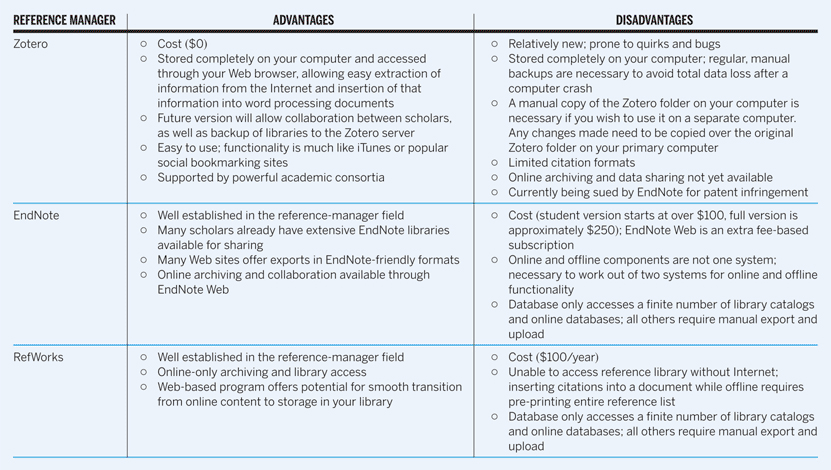
Zotero, as the newcomer, has had the benefit of integrating several of its predecessors' features, but there is also recent evidence that its competitors are working to add many of Zotero's advances in the field, particularly when it comes to streamlining the citation collection process. While Zotero can read bibliographic information directly from most Web sites and databases, many Web sites have responded to EndNote and RefWorks' powerhouse status in the reference management fieldFootnote 20 by offering exports or direct imports of citation information in formats friendly to both those systems. Zotero, however, still holds one key advantage over its closest competition: both EndNote and RefWorks require that their functionality be purchased. Some institutions subsidize the purchase price of these programs; absent such academic socialism, the cost of these programs is significant. (For more on the advantages and disadvantages of each program, see Table 1.)
The Pros and Cons of Three Reference Managers

Many of Zotero's features also exist in some fashion in its competitors. However, Zotero has come a long way in a short amount of time due to its success in building off the progress of its predecessors, the ability of its creators to jump into the reference manager game with a fresh approach to the field, and the program's freedom in not being wedded to backwards compatibility with years of previous releases. Zotero's Web site (http://www.zotero.org) lists an ambitious plan for feature expansion and product growth. This rapid progress and ability to build off of the experiences of programs that came before does not come without a price. Zotero is currently amidst a legal battle with EndNote over its ability to convert proprietary EndNote formats into Zotero library information (Noyes Reference Noyes2008).
CONCLUSION
Political scientists labor at the peripheries of their given fields to revolutionize current understandings about politics, yet the processes by which they store and share their knowledge remains firmly orthodox. No longer! Today the technology exists to change how we review past literature, how we save and organize our research, and how we share and collaborate on projects with our colleagues. Ready adoption of that technology will move us ever closer to resolving the existing duality between the revolutionary goals of our research, and its bourgeois processes. So, join our revolution comrades; you have nothing to lose but your (paper) chains! ■