

1. INTRODUCTION
Often without being aware of it, people make gestures with their limbs, sometimes even with their heads or full body. They nod in the direction of the person they are talking about, they gesticulate when angry behind their steering wheels and they use arms and hands when they tell stories enthusiastically. People even gesture when the intended audience cannot see their gestures, for example, when they are on the phone. It is interesting to note that these gestures are more useful than they seem at first instance. Gestures not only facilitate communication for both the speaker and listener, they also facilitate remembering and can lighten cognitive loads. Beyond the use of these everyday gestures, we are also interested in how gesture can be used in interaction with digital systems, known as gestural interaction. In particular, we explore the potential of combining gestures with tangible interaction.
Gestural interaction has focused on gesture as a means of communicating with a computer system. Gestures are expressive and can convey rich meaning. They can also provide a means of interaction that feels more natural, is easier to learn, and can be less constraining than conventional user interfaces. The rich spatial and temporal gesture patterns possible can allow designers to create a myriad of gesturing commands, while still leaving room for personalization. Yet capturing and analyzing unencumbered gestures in free space remains difficult, posing technical challenges that are still far from overcome. As a result, users often have to hold, wear, or touch artifacts, such as pens, three-dimensional (3-D) sensors, gloves, or tables to facilitate the detection of position, orientation, movement, and eventually the intended gesture. However, in most cases the surface touched or the artifact in hand is used as sensing input only and does not add to the meaning of the gesture, or facilitate the gesture in any way. In contrast, tangible interaction makes use of physical artifacts (tangibles) as embodiments of digital information. The physical form as well as the means of interaction is closely tied to the digital information these tangibles represent and control, thereby adding meaning through their physicality. In a sense, both gestures and tangible interaction stem from our physical interaction with the world, and it thus seems like a natural step to combine the two.
In this paper we look at the design opportunities that arise at the intersection of gesture and tangible interaction. We contribute to gesture interaction research in two ways. First, we survey research on gesture interaction in human–computer interaction (HCI), especially as it relates to tangible and touch interaction (Section 3). We also provide our observations and analysis based on this survey (Section 4). Second, we define the design space of tangible gesture interaction (Section 5) and outline design opportunities in this area (Section 6). However, we begin in the following section with a brief overview of gestures studies, looking especially at the classification and role of gestures.
2. THE STUDY OF GESTURE
Gestures have been studied for a long time and from many different perspectives. For example, as early as the first centuries B.C. and A.D., Cicero and Quintilian discussed gesture in the context of oratorical delivery, describing it as an important element of convincing rhetoric. They also considered gestures to be a universal language for all human beings (Fögen, Reference Fögen, Fögen and Lee2009), a view that extended through the writings of 16th and 17th century scholars, such as Montanus, Bonifacio, and Bulwer (Kendon, Reference Kendon2004). In the 19th century, de Jorio (Reference de Jorio2000) studied the continuity of gestures across time, and in the early 20th century, the seminal work of Efron (Reference Efron1941) examined the cultural differences in gesture. Over time, gestures have thus been studied by a diverse range of fields, including philosophy, psychology, and linguistics. Although a complete survey of gesture studies is beyond the scope of this paper, we provide a brief overview that focuses on how gestures are defined and classified (Section 2.1) and what role gestures serve (Section 2.2).
2.1. Defining and describing gestures
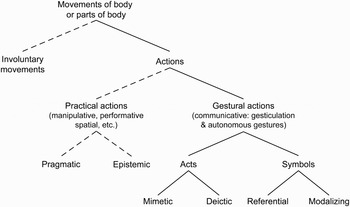
When defining gestures, one can look directly at what gestures are and what gestures are not. Quek (Reference Quek1995) did exactly that by distinguishing gestures from unintentional movements and describing the latter as those hand and arm movements that do not convey any meaningful information. In contrast, gestures are hand and arm movements that convey meaningful information. This is similar to dictionary definitions of gesture, for example, the Oxford English Dictionary defines gestures as movements of the body (or any parts of it, typically the hands, arms, or head) that express thought or feeling. Kendon (Reference Kendon, Nespoulous, Peron and Lecours1986) divided these into autonomous gestures, which do not depend on speech, and gesticulation, gestures that occur together with speech. More broadly, Kendon (Reference Kendon2004) describes gestures as visible bodily actions that are used as an utterance or part of an utterance, where an utterance is “any unit of activity that is treated by those co-present as a communicative ‘move,’ ‘turn,’ or ‘contribution’” (p. 7). However, he distinguishes gestural actions, such as waving goodbye, from practical actions that might be carried out in interaction, such as eating or drinking. He also notes that practical actions may at times take on the quality of gestures if their performance is embellished beyond mere practicality and if they become openly recognized as having an expressive quality. Grosjean and Kerbrat-Orecchioni (Reference Grosjean and Kerbrat-Orecchioni2002) distinguish gestures from actions, because they note that actions have a practical function, which is to change the physical world, but do not carry any meaning. Compared with actions, gestures have a more symbolic function, which is to change the cognitive world of the audience, and therefore gestures do carry meaning. However, some gestures are not intended to be communicative but serve a cognitive function in helping a person shape their thoughts (as discussed in Section 2.2). Kirsch and Maglio (1994) make a similar distinction between epistemic actions, which serve only to aid cognition, and pragmatic actions, which serve to bring a person closer to their physical goal. Another relevant gesture classification related to HCI (and hence to the focus of this paper) is provided by Quek (Reference Quek1995) and slightly improved by Pavlovic et al. (Reference Pavlovic, Sharma and Huang1997). This classification identifies two gesture categories, namely, communicative and manipulative gestures. Manipulative gestures are used to act on physical artifacts in the environment, such as the movement of an object, while communicative gestures have communication as the main purpose. However, in the context of HCI, manipulative gestures can be considered to be communicative as well, because they consist of hand or arm movements that are used to communicate action commands to a computer. For example, instead of directly clicking and dragging an object to rotate it around the vertical axis, a user might wave their hand sideways to tell the computer that they want the object to rotate. In other words, the user does not directly perform the action; instead, they make a (manipulative) gesture and the computer performs the action in response. In the real world, a person might similarly wave their arm at another person to get them to turn around or move to the side, and the other person will respond by performing the action they have understood from the gesture. What is important to notice is that in all of these descriptions and classifications of gestures (Quek, Reference Quek1995; Pavlovic et al., Reference Pavlovic, Sharma and Huang1997; Grosjean & Kerbrat-Orecchioni, Reference Grosjean and Kerbrat-Orecchioni2002; Kendon, Reference Kendon2004), there is a distinction between “action” or “manipulation” versus “gesture” or “communication,” even if the terms are used in different ways. For Grosjean and Kerbrat-Orecchioni (Reference Grosjean and Kerbrat-Orecchioni2002) “action” and “gesture” are separate, whereas for Kendon (Reference Kendon2004) the term “action” encompasses gestures, and for Pavlovic et al. (Reference Pavlovic, Sharma and Huang1997) gestures are either manipulative or communicative. A similar distinction is made by the semiotician Greimas (Reference Greimas1970), who differentiated between gestural praxis and gestural communication, stating that gestural praxis is behavior that intends to transform the world rather than communicate a message. According to all of these definitions, we conclude that it is important to make the distinction between hand/arm movements that are used for communicative versus manipulative purposes, and perhaps look at ways in which these two can be combined in the context of gesture interaction. Figure 1 shows a classification of hand/arm movements that illustrates this distinction. The diagram is based on those of Quek (Reference Quek1995) and Pavlovic et al. (Reference Pavlovic, Sharma and Huang1997) and incorporates elements from Kendon (Reference Kendon2004) and Kirsch and Maglio (1994).
Classification of movements of the body or parts of the body. Involuntary movements are first separated from actions. Practical actions are distinguished from gestural actions (Kendon, Reference Kendon2004), thus distinguishing manipulative from communicative movements. Practical actions, which can also be performative or spatial, can be considered pragmatic or epistemic (Kirsh & Maglio, Reference Kirsh and Maglio1994). Gestural actions include gesticulation and autonomous gestures (Kendon, Reference Kendon, Nespoulous, Peron and Lecours1986) and can be further divided into acts and symbols (Quek, Reference Quek1995; Pavlovic et al., Reference Pavlovic, Sharma and Huang1997). In acts the movements of the gesture relate directly to its intended interpretation and can be mimetic (imitating a practical action) or deictic (pointing acts). Symbols are gestures that serve a linguistic role, either symbolizing some referential action or serving as modalizers (often of speech). The solid lines indicate the focus of this paper on gestures.

One of the first to analyze discursive human gestures in detail was Efron (Reference Efron1941), who identified the following three phases comprising a gesture: the preparation phase, in which the hands are moved to the location where the gesture will take place; the stroke phase, in which the actual gesture is executed; and the retraction phase, in which the hands move away from the gesture position. McNeill and Levy (Reference McNeill, Levy, Jarvella and Klein1982) also analyzed gestures in terms of their physical properties including hand configuration, orientation of the palm, and direction of movement. Like Efron, they identified a preparatory phase, an actual gesture phase and a retraction phase.
Efron (Reference Efron1941) also came up with five gesture categories:
1. physiographics (a figural representation of the object mentioned),
2. kinetographics (representing action),
3. ideographics (movements follow the ideas in the head of the speaker),
4. deictics (pointing), and
5. batons (speech markers).
This classification was later adapted by McNeill (Reference McNeill1992), who combined physiographics and kinetographics into a new category called iconics, and added another category called metaphorics. He also used the term “beats” in place of “batons.” Kendon (Reference Kendon and Poyatos1988) looked at gestures in speech from the perspective of formality, creating a range from least to most formal: gesticulation, languagelike gestures, pantomimes, emblems, and sign languages. Nespoulous and Lecours (Reference Nespoulous, Lecours, Nespoulous, Peron and Lecours1986) looked at gestures related to speech from the semiotic perspective, seeing gestures as linguistic signs available at the following levels: substance of content, form of content, form of expression, and substance of expression. (For an overview of gestural classification systems, see Wexelblat, Reference Wexelblat1998, p. 4.)
All of these classifications focus on how speakers make and use gestures while speaking to someone else, which is a relatively narrow focus. It may thus seem like gestures are useful mostly for communication, which is not the case, as we will discuss in the next section.
2.2. The role of gestures
Gestures are used to improve and facilitate communication. For example, Graham and Argyle (Reference Graham and Argyle1975) found that speakers who are restricted in their gesturing use more words and give poorer directions. In addition, Rimé and Schiaratura (Reference Rimé, Schiaratura, Feldman and Rimé1991), when they successfully repeated this experiment, also found that the vividness of imagery was reduced when gestures were restricted. This suggests that gestures are related to the verbal encoding process, which Rimé and Schiaratura (Reference Rimé, Schiaratura, Feldman and Rimé1991) call “embodied thinking.” There is other evidence supporting this, which shows that gestures typically appear before the related words are spoken and not the other way around (e.g., Butterworth & Beattie, Reference Butterworth, Beattie, Campbell and Smith1978; Morrel-Samuels & Krauss, Reference Morrel-Samuels and Krauss1992). People independently come up with the same gestures for specific commands (Wolf & Rhyne, Reference Wolf and Rhyne1987; Hauptmann, Reference Hauptmann1989), and people are very good at learning new arbitrary gestures, needing only a short amount of training (Wolf & Rhyne, Reference Wolf and Rhyne1987; Hauptmann, Reference Hauptmann1989; Harwin & Jackson, Reference Harwin and Jackson1990). As these and other studies indicate, gestures are an integral part of language, both synchronous and coexpressive with speech, creating a dialectic of distinct and contrasting cognitive modes (McNeill, Reference McNeill2005).
Apart from these examples, which demonstrate the role of gestures in communication, there is also evidence suggesting that gestures are useful for more than just communication. The work of Rimé and Schiaratura (Reference Rimé, Schiaratura, Feldman and Rimé1991) shows that people gesture just as much when they know the listener cannot see them, as when they can. This indicates that gesturing is useful even when the gestures are not intended to be seen. This is further supported by a study conducted by Iverson and Goldin-Meadow (Reference Iverson and Goldin-Meadow1997), in which they found that even congenitally blind subjects gesture when speaking to other congenitally blind subjects. It seems that gesturing helps to shape our thoughts. For example, it has been shown that touching physical objects facilitates learning how to count in young children, by helping children keep track of their activities, but also allowing them to connect each physical object to a verbal number (Alibali & DiRusso, Reference Alibali and DiRusso1999).
When we look at how people learn gestures, it is interesting to note that many studies in developmental psychology have shown a codevelopment of language and gesture in children, and that their gestures increase in complexity and sophistication when their speech increases in the same respect (see Bates & Dick, Reference Bates and Dick2002, for a review). However, theories of the origins of gestures also link them to physical actions, for example, children's grasping and reaching appears to lead to pointing (Haviland, Reference Haviland and Brown2006). Even adults learn to turn movements, such as handling a physical object, into gestural routines or gestural grammar. Gestures are embedded in bodily skills and experiences, and these physical actions facilitate embodied thinking.
In summary, the field of gesture studies has focused on how gestures aid communication, more specifically, how gestures are used during speech. However, we see increasing evidence that another role of gestures is in facilitating our thinking and learning. It is interesting to notice that none of the above-mentioned studies have looked at gestures while holding objects, even though this is a common observation in everyday experience. In the next section, we focus on gestures in interaction with systems, and in this context there are many examples of digital systems that do consider gesturing while holding physical artifacts.
3. GESTURE IN HCI
There is a wide range and large amount of research relating to gesture in HCI. The focus has been primarily on the use of gesture as a means of interacting with computational systems, such as issuing commands and navigating through the digital space, often aiming at facilitating “natural” or “intuitive” interaction. In order for this to be possible, it is necessary to devise methods for computers to analyze or interpret gestures. This in turn requires a way for the gestures to be detected by the computer. Although the approaches for gesture detection/input have varied greatly, two overarching trends involve capturing gestures in 3-D space, or tracking gestures (strokes) made on two-dimensional (2-D) surfaces.
Some researchers have considered capturing gestures in free space as the holy grail of gestural interaction. To be able to gesture at the computer the way we do in conversation with others and have the computer interpret and respond to our gestures in an appropriate manner given the particular application context is a vision that has been popularized by science fiction movies like Minority Report (Spielberg, Reference Spielberg2002). In practice, however, gesture interaction in free space poses technical challenges on a number of levels from tracking the position and movement of the hand to modeling, analyzing and recognizing the gesture. Moreover, the greater the gestural vocabulary, the greater the difficulty to recognize each individual one and the greater the burden on the user who must remember all of these separate gestures (Hinckley, Reference Hinckley, Jacko and Sears2003a).
Many researchers have circumvented the gesture sensing or tracking problem by using flat surfaces to capture gestures in the form of strokes made with a mouse, stylus, or hand. From stylus-based interaction with early personal digital assistants to the growing area of multitouch tabletop computing, analyzing and interpreting gestures has been an important area of interest for surface-based interaction systems.
There are also many examples of research and commercial applications that involve gesture interaction while holding physical artifacts. One example is the recent trends in console video games that make use of gesture-based controllers like Nintendo's Wii Remote. To our knowledge, there is no comprehensive overview of the area of gesture interaction with physical artifacts, and so one of our goals with this paper is to provide one.
In this section we thus provide a survey of gesture interaction in three areas: 3-D space (Section 3.1), 2-D surfaces (Section 3.2), and with physical objects in hand (Section 3.3). It is important to note that we are especially interested in the interface devices and forms used for gestural interaction and their use in different application contexts, and we do not address the technical and mathematical approaches for modeling, analyzing, or recognizing gestures (a review of these areas, particularly for visually detected gestures, can be found in Pavlovic et al., Reference Pavlovic, Sharma and Huang1997).
3.1. Gestures in 3-D space
To gain a better theoretical understanding of our use of gestures in free space, many researchers have turned to gesture studies in the social sciences and have adopted or modified the classification schemes proposed. For example, Quek's (1995) taxonomy of gestures mentioned earlier has been widely accepted in HCI and builds on the categories of gesture described by Nespoulos and Lecours (1986) and Kendon (Reference Kendon, Nespoulous, Peron and Lecours1986). He first separates manipulative from communicative gestures, and then divides communicative gestures into acts and symbols, further distinguishing deictic from mimetic acts, and referential from modalizing symbols (Quek, Reference Quek1995). Although these taxonomies consider gestures made in both space and time, detecting the beginning and end of a moving gesture is difficult for a computer. Many systems have thus ignored the temporal element and focused only on mapping the hand posture and position/orientation in space to discrete actions. For example, Utsumi and Ohya (Reference Utsumi and Ohya1999) detect eight hand postures, using the open hand posture to detect the beginning and end of the intended gesture.
In terms of interaction technologies, early gestural systems often made use of special gloves equipped with sensors, whereas later approaches tended more toward unencumbered gestural interaction by making use of one or more cameras to capture the user's hand movements. A few approaches have used custom-built sensor systems, such as the electromagnetic field sensing system designed for the Gesture Wall (Smith et al., Reference Smith, White, Dodge, Paradiso, Gershenfeld and Allport1998), wristband-based capacitance, acceleration sensors for detecting hand and finger gestures (Rekimoto, Reference Rekimoto2001), and forearm electromyography for finger-based gesture interaction (Saponas et al., Reference Saponas, Tan, Morris, Balakrishnan, Turner and Landay2009). Already in the late 1970s, deictic (pointing) gestures tracked with a 6 degrees of freedom Polhemus sensor in the arm of a chair were used to disambiguate speech commands in the “put-that-there” system (Bolt, Reference Bolt1980).
3.1.1. Gestures with glove devices
For many years, the DataGlove (Zimmerman et al., Reference Zimmerman, Lanier, Blanchard, Bryson and Harvill1987) from VPL Research Inc. (Redwood City, CA), producers of virtual reality hardware and software, was a popular gestural input device in the research community. It made use of flex sensors to measure finger bending and magnetic flux sensors to measure position and orientation, and it provided tactile feedback with vibrators. Other glove devices included the CyberGlove from Virtual Technologies and Mattel's low-cost Power Glove used with Nintendo video games. Glove devices were also used for a broad range of expressive and practical applications, such as conducting an orchestra of synthesizers using gestures (Morita et al., Reference Morita, Hashimoto and Ohteru1991), controlling an expressive virtual puppet (Sturman, Reference Sturman1992), controlling slide presentations using symbolic gestures in the Charade system (Baudel & Beaudouin-Lafon, Reference Baudel and Beaudouin-Lafon1993), remotely directing machines and robots in a manufacturing cell using gestures (Wang & Cannon, Reference Wang and Cannon1993), and for gesture to speech synthesis in the GloveTalk system (Fels & Hinton, Reference Fels and Hinton1993). A survey of glove-based input is provided in Sturman and Zeltzer (Reference Sturman and Zeltzer1994). Some glove-based gesture interaction research has also taken place in the context of multimodal systems, such as Corradini et al.'s (Reference Corradini, Wesson and Cohen2002) navigation of shared maps that used a Flock of Birds tracker worn on the dominant hand to detect pointing and twisting hand movements, together with a PinchGlove from Fakespace Labs to trigger pen down/up events. Cassell (Reference Cassell, Cipolla and Pentland1998) also developed a framework for understanding gestures in the context of speech, which has been used to generate multimodal communicative behavior in embodied conversational agents, as well as for the interpretation of gestures during speech by making use of data gathered from CyberGloves, a body tracker, a gaze tracker and a microphone. Glove-based gesture interactions have also been used in combination with the virtual reality Responsive Workbench, for example, for medical and architectural applications (Krueger & Froehlich, Reference Krueger and Froehlich1994), and in the Surface Drawing system (Schkolne et al., Reference Schkolne, Pruett and Schroder2001). The drawbacks of gestural input using a glove device like those mentioned above include the need to be tethered to the machine and that the stiffness of the glove (due to the attached sensors) makes it difficult to do anything else with the hand, effectively dedicating the hand to the interface (Quek, Reference Quek1995). Gloves also limit the tactile sense of the hand wearing the glove. In addition, glove-based systems have tended to focus on one-handed gestural interaction. More recently however, gesture interaction with gloves can be wireless and two-handed, as in the Funky Wall (Lucero et al., Reference Lucero, Aliakseyeu and Martens2007) and Funky Table (Lucero et al., Reference Lucero, Aliakseyeu and Martens2008) systems that facilitate mood board creation by a team of designers. Designers favored not having additional interaction devices (e.g., needing to hold objects) and the gloves proved to be comfortable and unobtrusive and were perceived as a means to track hands and not as an interaction device. However, compared with other glove devices, these were fingerless gloves, which contained only a 6 degrees of freedom tracker in the palm, and were thus primarily used for gross hand/arm gestures like sweeping to the left or right.
3.1.2. Unencumbered gestures
Unencumbered gestural interaction typically relies on computer vision for detecting the gestures made by the user. Myron Krueger experimented with this concept as early as the 1970s, and his VIDEOPLACE system combined a participant's live video image with a computer graphic world, in which virtual objects and creatures react to the participant's movements and gestures, for example, jumping onto the hand of a raised arm or tumbling off a shaken hand (Krueger et al., Reference Krueger, Gionfriddo and Hinrichsen1985). Some vision-based gesture systems capture the user's whole body movements, such as the Alive II system, in which gestures made with the body, arms, and hands are used to control creatures in a virtual environment (Maes et al., Reference Maes, Darrell, Blumberg and Pentland1995). In this system, the kinematic information from a gesture is used as part of the control command, for example, to specify travel direction. Vision-based gestural systems have also been used in virtual reality applications such as piloting virtual terrain fly-throughs (Segen & Kumar, Reference Segen and Kumar1998), navigating virtual environments on large immersive displays (Sato et al., Reference Sato, Saito and Koik2001), manipulating 3-D objects on the Perceptive Workbench (Starner et al., Reference Starner, Leibe, Minnen, Westyn, Hurst and Weeks2003), and interacting with 3-D volumetric displays (Grossman et al., Reference Grossman, Wigdor and Balakrishnan2004). They have also been used for remote control of in-car devices (Westeyn et al., Reference Westeyn, Brashear, Atrash and Starner2003) or home appliances (Premaratne & Nguyen, Reference Premaratne and Nguyen2007). In some cases computer vision is integrated into wearable devices, such as a hat-mounted camera for recognizing American Sign Language (Starner et al., Reference Starner, Weaver and Pentland1998), the Gesture Pendant for controlling home automation systems using hand gestures (Starner et al., Reference Starner, Auxier, Ashbrook and Gandy2000), or more recently in the SixthSense system, which combines personal projection with gestural interaction (Mistry & Maes, Reference Mistry and Maes2009). In industry, video games are increasingly making use of gestural interaction in 3-D space, such as the Sony EyeToy for the PlayStation, and Microsoft's Kinect for the Xbox. Finally, Oblong Industries has developed g-speak, the real-world version of the spatial operating environment seen in the movie Minority Report (Spielberg, Reference Spielberg2002), which allows gestural interaction with large sets of digital media information. With g-speak, users can also use gestures to move digital media content between different display surfaces, for example, from wall to tabletop. In the following section, we look at gestural interaction on 2-D surfaces, such as walls, tables, and personal devices.
3.2. Gestures on surfaces
Gesture interaction on 2-D surfaces has a long history, rooted in the character and symbol recognition technologies in development since the 1950s (Sibert et al., Reference Sibert, Buffa, Crane, Doster, Rhyne and Ward1987). Early examples of 2-D gesture recognition for digital interaction include the light-pen gestures in the Sketchpad application (Sutherland, Reference Sutherland1963), the GRAIL (Graphical Input Language) system for the pen-based RAND Tablet (Ellis et al., Reference Ellis, Heafner and Sibley1969), and finger-based gesture interaction with graphical applications such as a logic-design system on a single-touch and force-sensitive screen at Atari Research (Minsky, Reference Minsky1984). The term gesture in all of these cases means hand-drawn marks (strokes) made on a 2-D surface with the intention of issuing a command to the computer.
One advantage of capturing gestures on 2-D surfaces compared with gestures in 3-D space is that the surface serves as a means of both constraining and sensing the gesture, which eliminates the need for cumbersome glove devices or complicated multiple-camera hand tracking systems. The beginning and end of gestures on 2-D surfaces are also easier to detect than in free space, because they usually correspond with the beginning and end of the strokes. In terms of form factors, surface-based gesture interaction can take place on small personal devices, on laptop or desktop machines, on tabletop displays, or on large electronic whiteboards and wall displays. The gestures can be made with special nonmarking pens called styluses, or with one or more fingers or whole hands. Although some gesture systems provide a coincident display, others separate the input from the display, for example, by using a graphics tablet and stylus as the means of gesture input. The benefit of the coincident approach is that users can see both the gestures they make and their results in one space at the same time. In this case, designers need to make sure that the gestures will not occlude or interfere with the displayed information they are intended to operate on. However, gesturing on a vertical display, such as a desktop monitor with touch-sensitive overlay, is not very comfortable, so a separate tablet with stylus can serve as a more ergonomic alternative. When the input is separate, users need to be able to make the gestures without looking, so that they can maintain their focus on the visual display; otherwise, the output needs to be provided through a different modality such as audio.
3.2.1. Gestures with stylus
Pen or stylus based interaction provides greater precision than finger touch (because of the small tip of the pen), which can be advantageous for tasks that combine gesture input with precise actions (e.g., drawing). In the 1980s, researchers from the University of Toronto used gestures made on a graphics tablet for entering commands in a drawing program (Buxton et al., Reference Buxton, Fiume, Hill, Lee and Woo1983) and notes in a musical score editor (Buxton et al., Reference Buxton, Sniderman, Reeves, Patel, Baecker, Roads and Strawn1985). Researchers at IBM used pen-based gesture input for editing operations in common applications such as a drawing tool, a spreadsheet, a music editor, and an equation editor (Wolf et al., Reference Wolf, Rhyne and Ellozy1989), and Rubine (Reference Rubine1991) created a toolkit for adding gestures to direct manipulation interfaces. However, pen-based gesture interaction was really popularized with the commercial release of pen-based personal digital assistants: the Apple Newton MessagePad in 1992, followed a few years later by Palm Computing's PalmPilot. The PalmPilot used a handwriting recognition system called Graffiti, in which single-stroke gestures were used to input characters and commands. Pen-based gesture interaction was also used in multimodal speech and gesture interfaces, for example, in the QuickSet system users could place entities on a map using a combination of speech, pen-based gestures and direct manipulation on a tablet PC (Cohen et al., Reference Cohen, Johnston, McGee, Oviatt, Pittman, Smith, Chen and Clow1997). A survey of multimodal speech and pen-based gesture applications can be found in Oviatt et al. (Reference Oviatt, Cohen, Wu, Vergo, Duncan, Suhm, Bers, Holtsman, Winograd, Landay, Larsen and Ferro2000). Gesture interaction on large displays includes pen-based whiteboard systems, such as the Tivoli application on the Xerox LiveBoard, which enabled groups of users to organize and rearrange material together (Moran et al., Reference Moran, Chiu and van Melle1997). Tivoli provided a pen mode to indicate whether strokes were literal ink or gestures to be interpreted. Pen-based gestures can also work across multiple displays, for example, Hinckley et al. (Reference Hinckley, Ramos, Guimbretiere, Baudisch and Smith2004) demonstrated an interaction technique that allows a stroke to begin on the screen of one mobile device and end on the screen of another.
3.2.2. Gestures with fingers and hands
With the recent progress in multitouch technologies for interactive displays, there has been an increasing interest in finger and hand-based gesture interaction on 2-D surfaces. The Apple iPhone has popularized the concept with its small multitouch display and use of simple gestures, like the two-finger zoom. However, multitouch gesture interaction is an especially attractive option for larger surfaces, on which gestures can be made with both hands, and even by multiple people. This was demonstrated already in the early 1980s by Myron Krueger on his VIDEODESK, an extension of the VIDEOPLACE system mentioned in the previous section (Krueger et al., Reference Krueger, Gionfriddo and Hinrichsen1985). VIDEODESK used a camera to track multiple hands on the surface of a desk and composited them into the graphics shown on a vertical screen. The system allowed users to interact with virtual objects using a variety of hand gestures, such as the pinch to scale/zoom that is now familiar to iPhone users. Although Krueger's pioneering work was mostly of an artistic nature, more recent projects have developed gestures for controlling wall displays from the table for practical purposes, such as workspace and document manipulation (Malik et al., Reference Malik, Ranjan and Balakrishnan2005). In Pierre Wellner's Digital Desk, the digital information was projected directly onto the desk's surface, where users could work with physical papers and materials, while at the same time using hand gestures (e.g., pointing) to interact with the projected information (Wellner, Reference Wellner1993). Other work on augmented desks includes a system that distinguished direct manipulation of content from symbolic gesture commands based on the position of the thumb (extended vs. folded) (Oka et al., Reference Oka, Sato and Koike2002).
A variety of work has also been done on multiuser tabletop gestural interactions, for example multifinger and whole-hand gestures like flicking and hand sweeps demonstrated with an interior design application on the DiamondTouch table (Wu & Balakrishnan, Reference Wu and Balakrishnan2003), and a multimodal speech and gesture engine that enables multiuser tabletop interactions with single user desktop applications such as Google Earth (Tse et al., Reference Tse, Shen, Greenberg and Forlines2006). On large wall displays and interactive whiteboards, hand gestures have been used to shuffle objects, throw them to other users at the opposite end of the display, or take objects and put them back elsewhere (Geißler, Reference Geißler1998), or to issue standard commands like copy and paste (Ringel et al., Reference Ringel, Berg, Jin and Winograd2001). Semitransparent wall displays like the Touchlight system are also suitable for gestural interaction with applications such as face to face video conferencing or augmented reality (Wilson, Reference Wilson2004). Hand gestures can also work across both table and wall displays together, for example, to fetch documents from or send documents to the wall from the table (Lee et al., Reference Lee, Lee, Kim and Kim2007). Because a large set of gestures becomes difficult for both the computer to recognize and users to remember, researchers are also looking at the reuse of gestures in different contexts. For example, modal areas allow different functional meanings to be assigned to the same gestures (Everitt et al., Reference Everitt, Shen, Ryall and Forlines2005), whereas cooperative gestures can give new or enhanced functional meanings to gestures when they are made by several users simultaneously (Morris et al., Reference Morris, Huang, Paepcke and Winograd2006). For example, in a tabletop collaborative drawing application, placing the hand on the table and rubbing it back and forth will erase the marks in the immediate area. However, if all users perform this gesture at the same time, the entire tabletop drawing area will be cleared.
Although the examples discussed so far have focused on the position, shape, or movement of the fingers or hand on the surface, some work has looked at the tactile qualities of 2-D gesture input to provide gentler surface-based gestural interaction, such as stroking or petting (Schiphorst et al., Reference Schiphorst, Lovell and Jaffe2002). In this case, a multifinger pressure sensitive tablet from Tactex Controls Inc. (Canada) was used to control virtual creatures in an artificial life environment using caressing gestures. Finally, the SmartSkin capacitive sensing architecture, which can recognize multifinger and hand gestures like panning, zooming, or scaling/rotating, can also be used to track tagged physical objects to enable tangible interaction on the display surface (Rekimoto, Reference Rekimoto2002). The following section looks more specifically at how tangible artifacts can play a greater role in gestural interaction.
3.3. Gestures with physical objects
In our physical-world interactions, we often make gestures while holding physical objects. It is also possible to use the combination of gestures and physical objects for interaction with digital systems. In the early 1990s, Hinckley and his colleagues at the University of Virginia explored this idea through the use of physical props for a neurosurgical visualization application (Hinckley et al., Reference Hinckley, Pausch, Goble and Kassell1994a). Users held a doll's head in one hand and a cutting plane in the other, while the computer tracked the gestures made with these objects and updated the corresponding on-screen visualization. The researchers contrasted their approach to the glove-based gesture input devices that were popular at the time, commenting that with an instrumented glove “the user does not experience the visceral kinesthetic and tactile feedback which comes from grasping a real-world object” (p. 452). Around the same time, researchers at the University of Toronto explored how a palmtop computer equipped a 6 degrees of freedom sensor could enable gestural navigation of information spaces (Fitzmaurice, Reference Fitzmaurice1993). In their Chameleon prototype, users could, for example, perform a downward tugging gesture with the device in order to make a 3-D tree hierarchy rotate along the x axis.
These works serve as early examples of what can be done with physical objects and gestures. Verplaetse (Reference Verplaetse1996) described these kinds of physical props and devices that have a sense of their own motions as inertial proprioceptive devices, and grouped them according to the human body parts they interact with (head, finger/wrist/hand, hand/arm/upper body, foot/leg). Although this is a useful way of thinking about device interaction, there are far more devices designed for the hands than for other parts of the body, because the hands are especially good for both manipulating objects and making gestures. Since these early examples, gesture interaction with physical objects has been explored in a variety of contexts and with different kinds of objects in hand. We look at: personal mobile devices; batons and wands; game controllers and remotes; dolls, toys, and play props; and custom tangible objects.
3.3.1. Gestures with mobile devices
In the previous section, we looked at how gestures can be made on the display surface of small hand-held devices using a stylus or finger touches. Given the small size of these devices and their displays, the ability to interact by gesturing with the device itself is an attractive alternative to surface-based gestures, especially because it requires the use of only one hand.
As personal mobile devices have become widespread, a number of groups have explored different possible gestures and their uses for mobile device interaction. Examples include tilting to scroll menus, navigate a map, and view 3-D objects (Rekimoto, Reference Rekimoto1996), squeezing to enable the tilt-to-scroll gesture (Harrison et al., Reference Harrison, Fishkin, Gujar, Mochon and Want1998), tilting and shaking to create sketches and animated graphics on a keychain computer (Levin & Yarin, Reference Levin and Yarin1999), and tilting and slower fanning gestures to navigate photo collections (Bartlett, Reference Bartlett2000). Researchers have also used gestures (e.g., shaking, swinging) to add emotional expression to text messages (Fagerberg et al., Reference Fagerberg, Ståhl and Höök2003), to control other devices in the area, such as a nearby stereo system (Pering et al., Reference Pering, Anokwa and Want2007), and in combination with vibrotactile feedback (Linjama & Kaaresoja, Reference Linjama and Kaaresoja2004). Synchronous gestures can also be used across multiple devices, and Hinckley demonstrated how bumping two or more tablet devices together can share information between them, for example, to make an image span across their displays (Hinckley, Reference Hinckley2003b).
Many of these and other interactions are now making their way into everyday use, as a number of devices on the market (e.g., Apple's iPhone) have built-in accelerometers. A recent study thus looked at the social acceptability of gestures with mobile devices, finding that highly acceptable gestures included not only subtle gestures that imitate everyday gestures, but also conversely enjoyable and visible gestures that serve to demonstrate their role as a means of interaction with the device (Rico & Brewster, Reference Rico and Brewster2010).
3.3.2. Gestures with batons and wands
Orchestra conductors make gestures with a baton to direct the overall flow of the music. Sensor-equipped batons have thus been explored as gestural controllers for digital applications. For example, in the 1990s, Marrin (Reference Marrin1997) built a special sensor-equipped baton to control computer music. The baton was equipped with an infrared LED for position tracking, piezoresistive strips for finger and palm pressure, and accelerometers for beat tracking. Around the same time, the WorldBeat exhibit designed for the Ars Electronica Center used infrared batons to allow novices to engage with music using gestural interaction (Borchers, Reference Borchers1997). In this case, the baton served as both a musical and a navigational (pointing) device.
Wands are basically the same as batons (thin sticks used to make gestures), except that the term is traditionally associated with magicians and wizards, rather than with music conductors. In the digital realm, the term “wand” has thus been associated with other applications beyond musical control. The VisionWand was a computer-vision tracked gestural remote control device for wall displays (Cao & Balakrishnan, Reference Cao and Balakrishnan2003). Possible gestures included pointing, tilting, flipping, rotating, pushing, and pulling the wand. For example, pushing and pulling the wand to/from the screen could be used to zoom the canvas or scale objects, whereas a flip of the wand worked as an undo gesture. In contrast to this passive device, the XWand was a sensor-equipped wand for gesture and voice control of devices in the living room, including media player applications and lighting systems (Wilson & Shafer, Reference Wilson and Shafer2003).
3.3.3. Gestures with game controllers and remotes
Although gestural interaction has been used in video games for a long time (e.g., the Mattel Power Glove and Sony EyeToy described in Section 3.1), recent developments involve special hand-held game controllers that are similar to the sensor-equipped wands and batons described in the previous section. These game controllers typically use a combination of infrared sensors and accelerometers to sense multiple degrees of freedom (position and orientation). The first of these devices was released by Nintendo for the Wii console in 2006, and is known as the Wii Remote. Sony's Move for the PlayStation, released in fall 2010, uses accelerometers and computer vision via the EyeToy camera, and Apple also holds a patent for a yet to be released 3-D remote (Kerr et al., Reference Kerr, Bronstein, Low and King2008).
The gestures made with the Wii Remote are typically mapped to physical actions in the game, as the Wii Remote becomes a tennis racquet or baseball bat for the player. However, since its release, the Wii Remote has also been adopted by many researchers, artists, and game designers for rich gestural interactions that go beyond the direct mapping to physical actions in video games. For example, Schlömer et al. (Reference Schlömer, Poppinga, Henze and Boll2008) developed a gesture recognition system for the Wii Remote that can be used for applications such as browsing or drawing. In addition to predefined gestures, their system also allows users to train and use individual gestures. The Wii Remote has also been used for collaborative gestural interaction with artistic applications, such as real-time video processing and drawing pieces that were part of the WiiArts project (Lee et al., Reference Lee, Kim, Gupta and Mazalek2008). Finally, gestural interaction with Wii Remotes was used in an educational context for children to learn concepts of motion and acceleration through body-based interaction (Price et al., Reference Price, Sheridan and Pontual Falcão2010).
3.3.4. Gestures with dolls, toys, and props
Another area of gesture interaction has focused on digitally augmented dolls, toys, and other kinds of props. Building on Hinckley et al.'s (1994a) prop-based neurosurgical visualization application mentioned above, Schkolne et al. (Reference Schkolne, Ishii and Schroder2004) have used raygun, lightsaber, and tong props for pointing, cutting, and grabbing gestures in a DNA molecule design application on the Responsive Workbench. More often, however, gesture interaction with toys and props has been used in the context of children's play. For example, the work on sympathetic interfaces at the MIT Media Lab made use of a plush doll (a stuffed chicken) equipped with sensors to control a virtual character in the piece called Swamped! (Johnson et al., Reference Johnson, Wilson, Blumberg, Kline and Bobick1999). The system used machine learning and gesture recognition techniques to provide a high-level form of control. In other words, although actions like walk or fly had associated gesture recognition models, the inputs were not mapped directly to the virtual character at a motor level, but rather were used to infer the user's intent and influence the character at a behavior level. Building on this idea, SenToy was a doll that was designed to be an affective sympathetic interface, allowing users to influence the emotions of a virtual character through gestures made with the doll (Paiva et al., Reference Paiva, Andersson, Höök, Mourão, Costa and Martinho2002). In a similar vein but not designed for children, Lew's video art piece titled Office Voodoo also enabled gestural control over the emotional states of the characters, consequently altering the course of events in an unfolding sitcom (Lew, Reference Lew2003).
In an educational context, researchers have used vision-tracked tangible props to engage children in collaborative storytelling activities (Stanton et al., Reference Stanton, Bayon, Neale, Ghali, Benford, Cobb, Ingram, O'Malley, Wilson and Pridmore2001). For example, by holding up props of different shapes and colors, children could navigate through a visual story shown on a projection screen. The researchers observed that the physical design of the props (e.g., the particular shape) made a difference in the way the children understood and used them. The tangible props also helped to slow down the interaction compared with body tracking alone, and varying the number of props altered the style of the collaboration (e.g., all playing at once vs. turn taking). Also used in an educational context, the curlybot toy acted like a kind of gesture-based physical LOGO turtle that would repeat any gestures or movements that the user made with it, including the velocity and acceleration as well as the trajectory (Frei et al., Reference Frei, Su, Mikhak and Ishii2000). Children could thus make physical gestures with the curlybot in order to program movement patterns or expressive behaviors. Finally, the Dolltalk system used sensor-equipped dolls in combination with audio analysis to interpret the narrative structure of the stories told by children as they gestured with the dolls (Vaucelle & Jehan, Reference Vaucelle and Jehan2002). More recent work has extended this idea to include video, resulting in an audiovisual performance system for children called Picture This! that captures children's gestures and play patterns in order to assemble video stories (Vaucelle & Ishii, Reference Vaucelle and Ishii2009). Vaucelle and Ishii call the system a “gesture object interface,” highlighting the combination of gestural interaction with physical objects.
3.3.5. Gestures with custom tangibles
Several researchers have explored custom physical devices or tools for gestural interaction. For example, the ToolStone is a small box-shaped input device that can sense physical manipulations such as rotating, flipping, or tilting, and provides gestural interaction primarily for the nondominant hand in bimanual interfaces (Rekimoto & Sciammarella, Reference Rekimoto and Sciammarella2000). Because the device is intended to be manipulated purely by touch, the designers included a raised bar along the edge of one face so that users can perceive its physical state (orientation and face direction) without having to look at the device. More recently, the Siftables are small compact tiles that can be used to interact with media content using physical gestures such as shaking, snapping, or moving them in a specific pattern (Merrill et al., Reference Merrill, Kalanithi and Maes2007). Siftables build on the idea of wireless sensor networks, and each Siftable is equipped with an LCD screen, as well as a three-axis accelerometer, three infrared transceivers, and an RF radio.
Other researchers have created small embedded devices that can be incorporated into physical objects in order to augment them with gestural interaction. Examples include the Smart-Its (Holmquist et al., Reference Holmquist, Mattern, Schiele, Alahuhta, Beigl and Gellersen2001) and SoapBox (Tuulari & Ylisaukko-oja, Reference Tuulari and Ylisaukko-oja2002) sensor platforms, which contain various sensors such as accelerometers and infrared sensors. The Smart-Its Friends prototype demonstrates how two devices can become connected when a user holds them together and shakes them. The SoapBox has been used to study gestural interaction with a design environment, and researchers found that the gestures made with the object worked well for simple commands with spatial association (Kela et al., Reference Kela, Korpipää, Mäntyjärvi, Kallio, Savino, Jozzo and Marca2006). Finally, Ferscha et al. (Reference Ferscha, Resmerita, Holzmann and Reichor2005) have developed a gesture library based on orientation sensors, which can be used to develop gestural interaction applications using embedded devices.
4. OBSERVATIONS AND DISCUSSION
In the previous section, we looked at gesture research from a digital interaction and interface perspective, and found a broad range of work spanning interaction in 3-D space, on 2-D surfaces, and with physical objects in hand. We synthesize this survey by looking at some of the trends, challenges, and opportunities we have found across these areas, with a particular view toward the fertile and largely unexplored area we call tangible gesture interaction. We look at the relationship of gesture theory to interaction research and some of the resulting technical challenges (Section 4.1), the differing roles of gestures in digital interactions (Section 4.2), how gesture and collaboration can work together in digital interaction (Section 4.3), and the role and potential of physicality (Section 4.4).
4.1. Gesture theories and technical challenges
The varying taxonomies of gestures discussed in Section 2 have revealed that categorizing gestures is in fact difficult to do. One reason is that, as others have pointed out as well (e.g., see Quek, Reference Quek1995; Wexelblat, Reference Wexelblat1995; Haviland, Reference Haviland and Brown2006), the way we understand gesture depends on the context. For example, a gesture that at one moment represents an object can later represent a tool for operating on it, the person using it, or an observer watching it (Haviland, Reference Haviland and Brown2006). As Quek (Reference Quek1995) writes, “Humans bring a broad range of contextual information, general knowledge, cultural background, linguistic capabilities, and general cognition to bear on the formation and interpretation of gestures” (p. 514). Context and often speech thus helps us as humans to distinguish between the different possible meanings of gestures, but it is difficult to separate them into distinct categories that work across all contexts.
The complex space of gesture translates into a variety of technical challenges when trying to use gestures for HCI purposes. If classifying gestures requires contextual knowledge about the environment and intentions of the gesturer (which are easily observed and understood by a human), to make use of gestural input the computer system too needs access to this knowledge (Wexelblat, Reference Wexelblat1995). Many of the systems we looked at in Section 3.1 (gestures in 3-D space) attempted to use gestures for communication purposes, and tried to imitate real-world gesturing in the context of HCIs (so far with limited success). As it turns out, this is very difficult to do (see Wexelblat, Reference Wexelblat1998). Even if context is provided to the computer (e.g., from the particular application system), there are still other technical challenges for gestures in 3-D space, such as distinguishing the intentional from the unintentional movements, and identifying the beginning and end of a gesture. As we saw in Section 3.2 (gestures on surfaces), the surface can provide solutions to some of these problems. For example, the beginning and end of a gesture can be identified by the beginning and end of a stroke made on the surface. However, there are still related challenges, such as understanding when a stroke is intended to behave as a command versus, for example, an ink stroke. Solutions can be found for these problems, but they are not always elegant and often require the user to perform additional steps, for example, the Tivoli whiteboard application provided a pen mode to switch between ink and commands, and the researchers experimented with different ways to change the mode such as buttons on the pen, buttons on the board, or double-tapping gestures (Moran et al., Reference Moran, Chiu and van Melle1997).
Gesturing with physical objects can also help to address some of the technical challenges, because the objects in hand can serve to provide a context for the gestures made. As far as we can tell, although gesture theories and classifications from the social sciences have not explicitly addressed gestures with objects in hand, we believe that holding objects while gesturing is common in our daily lives, for example, pointing while holding an object with a sharp tip to increase accuracy or waving an arm forward and back with objects in hand to express a comic kind of displeasure. Although many gestural systems (e.g., vision-based) try to hide away the technological constraints and limitations, gesturing with objects in hand provides a place to embed the necessary sensing technologies, as evidenced by the numerous wireless devices developed in the tangible and embedded interaction community.
4.2. Gesture, action, and meaning
In looking at such a breadth of research on gesture interaction, it becomes clear that there are different opinions about what constitutes a gesture in HCI and that gestures play a variety of different roles. In both the 3-D and 2-D contexts, many researchers use gestures for communication purposes, or even more specifically to issue commands to the computer. For example, Quek's (1995) taxonomy that is often used in HCI contexts focuses explicitly on communicative gestures and deliberately ignores manipulative gestures. However, Pavlovic et al. (Reference Pavlovic, Sharma and Huang1997) note that most applications of gesture in HCI use them as manipulators of virtual objects.
In some cases, there can be ambiguity between these two roles of gesture in HCI (communicative vs. manipulative), as many researchers use the term gesture interchangeably between the two with no distinction. In surface-based interaction, the term gesture is often used simply to mean the movements made with the hand on the surface of the display (e.g., Wobbrock et al., Reference Wobbrock, Morris and Wilson2009). From an application perspective, these gestures can thus in many cases be equated with what is typically called direct manipulation. So to shrink a virtual object with a two-finger pinch is called a gesture, just as to accept an edit by tracing a check mark on the display surface is a gesture. However, the first case is clearly direct manipulation because it acts directly on a (virtual) object, whereas the second case is a symbolic hand/finger movement used to issue a command and is thus communicative. In discussing their study of Wii Remotes in an educational context for teaching concepts of motion and acceleration, Price et al. (Reference Price, Sheridan and Pontual Falcão2010) note that in cases when the activity was designed to focus on bodily interaction, there was a mixture of manipulative and communicative gestural interaction, and that the interaction moved between being object centered and subject centered, as the children either acted with the Wii Remotes (e.g., using them like fishing rods) or reflected with them (e.g., to understand the effects of their body movements). Price et al. (Reference Price, Sheridan and Pontual Falcão2010) use Heidegger's (Reference Heidegger1962) concepts of ready-to-hand and present-at-hand to distinguish between these two modes.
With tangibles in hand (especially game controllers) we noticed a focus on gestures as actions, for example, swinging a Wii Remote to hit a golf ball. Bogost (Reference Bogost2009) comments on this as well in the context of video games, noting that game designers and players understand gestural control as actions but rarely use gestures as expressive and to convey meaning. Just as they mimic real-world actions in game play, gestures with objects are manipulative when they serve for remote control. In music and arts, however, we found a variety of examples that explore the expressive qualities of gesture, for example, in making music (Marrin, Reference Marrin1997) or in altering the emotional atmosphere, and hence the course of a story (Lew, Reference Lew2003). Even action-oriented gestures, like making a chicken walk, can become more interesting when they are abstracted from the virtual character they control and are instead used to drive a behavioral model (Johnson et al., Reference Johnson, Wilson, Blumberg, Kline and Bobick1999).
Finally, although gesture studies in psychology have shown that gestures play a role in thinking as well as in communication, this notion is not really addressed in gesture interaction within HCI. There is an opportunity to make use of this for gestural interaction in areas like education and design, because gestures help children learn, for example, mathematical concepts like counting as shown by Alibali and DiRusso (Reference Alibali and DiRusso1999), and also help designers think through their ideas, as discussed by Kim and Maher (Reference Kim and Maher2008). In this latter work, Kim and Maher (Reference Kim and Maher2008) studied tangible user interfaces in a design context, observing that designers using a graphical interface communicated ideas verbally, while those using a tangible interface tended to communicate by moving objects physically. They speculate that with these actions, designers used their spatial and kinesthetic senses to aid cognition. Gestural and tangible interaction can thus both be used to help cognition in design scenarios.
4.3. Gesture and collaboration
Although a lot of gesture interaction research focuses on communication with the machine, we also found many applications that made use of gesture in collaborative settings. This is not surprising, given the communicative role of gesture in regular human interaction. In collaborative settings, the gestures made by a user to issue commands to the computer or manipulate virtual objects are also performative. That is, beyond their effect in the digital space, they also serve to provide information in the physical space, for example, conveying a user's intentions or state to other users. Stanton et al. (Reference Stanton, Bayon, Neale, Ghali, Benford, Cobb, Ingram, O'Malley, Wilson and Pridmore2001) noted that this performative aspect is further helped by the use of tangibles, because tangibles help to slow the pace of the interaction, making it easier for observers to understand.
Beyond ordinary collaboration, we also found some work on what Morris et al. (Reference Morris, Huang, Paepcke and Winograd2006) call cooperative gestures, in which multiple users synchronize their gestures to elicit a (different) response from the system. The combination of tangibles and cooperative gestures provides interesting opportunities, because this can create relationships between the physical objects through the gestures. This has been demonstrated, for example, by shaking two objects (Holmquist et al., Reference Holmquist, Mattern, Schiele, Alahuhta, Beigl and Gellersen2001) or bumping them together (Hinckley, Reference Hinckley2003b) to create a communication link between them.
4.4. Gesture and physicality
Gestures in 3-D space (especially when detected using computer vision) often lack physical feedback. When the gestures are used for manipulative purposes, for example, to rotate a 3-D object, it becomes tricky for the user to align their actions in the real space with the virtual object in the digital space. So even though gesture interaction often strives to hide the technologies and provide unencumbered interaction, we actually find that physical objects are beneficial in many cases. For example, Hinckley et al. (Reference Hinckley, Pausch, Goble and Kassell1994b) found that giving users a flashlight to hold instead of making them wear a tracked glove allowed them to more easily position the corresponding virtual flashlight. They noted that the properties of the physical object helped the task by dampening the natural vibrations in hand motion, providing kinesthetic feedback due to its inertia and the force of gravity, and suggesting its own use through its physical properties.
In addition to these functional benefits, physical objects can have a rich variety of expressive properties, which stem from their varying forms and materials, for example, shape, weight, texture, elasticity. Both gestures and physical objects can thus be very expressive. Although some manipulative gestures with objects in hand may be limited in their expressive nature (like the game controller actions mentioned in the previous section), we believe the physical qualities of objects can be used to elicit more expressive gestures from users. It is also interesting to note that a number of design researchers have actually flipped this idea, using expressive gestures as a means to design expressive tangible interactions (e.g., Hummels, Reference Hummels2000; Ross & Keyson, Reference Ross and Keyson2007).
Tangibles have other advantages for digital interaction as well, because the designs make use of the physical world, human skills, and computation all together. An important property of tangible interaction is that the action and perception spaces overlap (Ullmer & Ishii, Reference Ullmer and Ishii2000). It is also possible to make use of strong specific designs instead of weak general ones (Buxton, Reference Buxton and Denning2001). Because tangible interaction devices contain computation, they can respond intelligently, or even adapt to their user.
We thus believe that the combination of gesture interaction and tangible interaction has benefits for both fields. Tangibles can eliminate some technical issues, leave more room for design and interaction design, and can be experienced as less obtrusive and more natural than wearing devices or being tracked by camera for visual analysis purposes. In contrast, tangible interaction can benefit from more attention to gestures because they facilitate interaction styles that are easy to learn; easy to do; and can facilitate communication, thinking, and learning.
5. TANGIBLE GESTURE INTERACTION
We define tangible gesture interaction as the use of physical devices for facilitating, supporting, enhancing, or tracking gestures people make for digital interaction purposes. In addition, these devices meet the tangible interaction criteria, for example, as stated by Ullmer and Ishii (Reference Ullmer and Ishii2000), which include an overlap in the action and perception space and an integrated digital and physical component. One can have multiple devices, each for a different functionality, as in families of tangible artifacts, and one can also support two-handed interaction, potentially while holding two or more artifacts simultaneously. Supporting gesturing by other body parts than the hands could also be considered. This means that all of the examples in Section 3.3 fall within our definition, not only the dedicated or custom devices but also the ones that are not specifically designed for gesturing but that might result in beneficial interaction while gesturing. Similar to the idea that tangible artifacts do not necessarily have to be new, at times it can be beneficial to use objects that people already have and use for other purposes (Hoven & Eggen, Reference Hoven and Eggen2004).
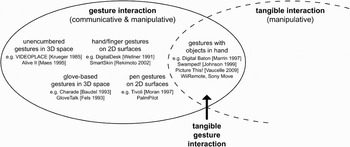
Tangible interaction makes use of physical objects as embodiments and controls of digital information. In most tangible systems, this is realized through the connection, movement, or placement of digitally enhanced physical interface objects, for example, placing and moving objects on the surface of a table as in the seminal Urp system (Underkoffler & Ishii, Reference Underkoffler and Ishii1999). The physical interactions used in tangible interfaces typically do not make use of rich hand and arm movements that are part of human gestures in the real world. Moreover, tangible interaction has focused more on manipulative than communicative functions, for example, performing an action with a physical object that directly changes the physical state of the interface and the digital state of its underlying representation. In this sense, the exploration of the gestural potential of tangible systems has been relatively limited. Nevertheless, we have found many examples of systems (or parts of systems) that could be characterized as tangible gesture interaction (as shown in Section 3.3). However, the only researchers we are aware of who explicitly mention the relationship between gestures and tangible interfaces are Vaucelle and Ishii (Reference Vaucelle and Ishii2008). They talk about and define a framework of what they call “Gesture Object Interfaces” as gesture recognition being done while people manipulate physical objects. They describe the objects as coming to life through the gestures the user makes and thereby creating some kind of language. This finding, which we did not see in other related work, seems to be the consequence of their focus on designing a storytelling application for children that builds on the idea that children naturally gesture and tell stories with their toys. In their Picture This! system, children hold dolls that are geared with small cameras, providing tools for video creation and storytelling through the manipulation of the dolls. Gesture recognition is used as a means for the computer to understand the story and automatically assemble the video. Of course, it is interesting to take into account the natural tendency for people to see anthropomorphic characteristics in (inanimate) objects, but this is not very appropriate for the majority of tangible gesture interfaces. In any case, Vaucelle and Ishii's (2008) gesture object interfaces can be seen as a part of tangible gesture interaction. Figure 2 provides a visual representation of how we conceptualize the area of tangible gesture interaction in relation to the gesture interaction research surveyed above and the field of tangible interaction.
A map of the design space of tangible gesture interaction. The design space of tangible gesture interaction brings together the separate areas of gesture interaction and tangible interaction. Tangible interaction makes use of hand/arm movements in a predominantly manipulative mode, whereas gesture interaction focuses more on the communicative function of movements. As the diagram indicates, gesture interaction can also be considered manipulative, because gestures are often used to issue commands that act on virtual objects (which is both a communicative and manipulative function in the context of human–computer interaction). Tangible gesture interaction thus combines communicative and manipulative movements done with tangible objects in hand.

6. DESIGN GUIDELINES FOR TANGIBLE GESTURE INTERACTION
In the previous section we described how we define tangible gesture interaction; next, we build on this to provide descriptive design guidelines, which can help to position the area and serve as inspiration for new tangible gesture interaction designs. We discuss the following topics: context of use, application types, target group, technology, physicality, design, and exploration.
We believe that one way to make the designed tangible gesture interaction successful is to fit it into the appropriate context of use and into everyday practice as described by the Embodied Interaction vision of Dourish (Reference Dourish2001). His vision concerns the embedding of tangible interaction into communities, evolving around technologies and being used over time. This will help make sure the interaction is not a separate activity but fits in a wider scheme of ongoing activity. The ultimate aim of embodied interaction is that the interaction with physical artifacts creates meaning for the user.
Of course, the context of use depends on the type of application one designs for. We see clear benefits for tangible gesture interaction in collaborative and communication applications, where the knowledge about how gestures facilitate speech and communication (Section 2) could be used. Because gestures also facilitate learning (Section 2), we see education as a potential application area. Designers also use gestures as a means to both think through and communicate their ideas, and Kim and Maher (Reference Kim and Maher2008) have shown that tangible interaction can play a positive role in collaborative design. Tangible gesture interaction designs could thus be explored as a means to support collaboration and cognition in collaborative design teams. For the most part, tangible gesture devices will need to be easy to hold, and perhaps even to carry around and take along. Another obvious area is thus mobile applications, as demonstrated by the examples discussed in Section 3.3.1. Entertainment and gaming are application areas that have already started to incorporate tangible gesture interaction and have been very successful with it so far. However, the mappings tend to focus on gestures as actions that are mapped literally from the physical space to the game space. There is a much potential to explore more expressive mappings between the tangible gestures made and the resulting effects in the game world, such as those explored in musical and artistic contexts.
There is not one specific target group that would benefit most from tangible gesture interaction. In general, one might say that any groups related to the selected application area will benefit. We know that people are very good at learning and using gestures quickly (Wolf & Rhyne, Reference Wolf and Rhyne1987; Hauptmann, Reference Hauptmann1989; Harwin & Jackson, Reference Harwin and Jackson1990), but people can train to become experts in skilled body movements, such as dancers, athletes, and musicians. Tangible gesture interaction can thus be appropriate for both novice and expert users, as well as for people from different age groups. Because tangible gesture interaction can potentially target a broad range of users, it will depend on the specific context and design to address the differences between individual users and user groups.
Depending on application context and user group, tangible gesture interaction designs have different technology requirements. Certain applications may require high precision in the gesture sensing, which is difficult to achieve with the current technologies. In many cases, however, accuracy is not essential. For example, most game controllers that provide gestural interaction are relatively imprecise, but they are still used to great effect because they make use of heavily simplified mappings. Other design requirements that should be considered from a technical perspective include weight, communication, and computational power. Low-weight devices are generally preferable, as are wireless devices that can easily communicate with a host computer or peer devices. This means that on-board computation will typically be necessary, and power (e.g., batteries) needs to be considered. In some cases, it may be possible to use passive devices that are tracked by other means (e.g., computer vision); however, this poses challenges for integrating into everyday contexts. One can imagine the devices being used at several distances from, for example, the selected feedback surface, such as the different proximity-based interactions with the Funky Wall system (Lucero et al., Reference Lucero, Aliakseyeu and Martens2008). Providing both input and output should also be considered. This could be done with embedded displays, lights, audio or tactile feedback, or also by adding sensors that detect the distance and angle to a surface along with a pico-projector that projects onto that surface (e.g., see the SixthSense wearable gestural system by Mistry & Maes, Reference Mistry and Maes2009). When incorporating sensing technology in a device that is placed on or near the body, one might consider how this could be used to distinguish users. For example, we can imagine that certain bodily characteristics can help identify people, such as sounds (speech and heartbeat), movements, tactile qualities (of skin or clothing), temperature, location, orientation, and more. This identification can be particularly interesting in collaboration or communication applications or when several tangible gesture devices are available and the system needs to know which one is in use.
As can be seen in the technology guidelines, physicality and how people interact with these physical devices is important. Leveraging the human senses and the physical world is an obvious point for consideration. Although typically not the case in the work we have found so far, gesture interaction research (and especially tangible gesture interaction research) can be greatly inspired by psychology, biology, engineering, arts, and design studies. Another interesting vantage point is to use the human body as a physical reference for the tangible device, for example, through proprioception. This can facilitate understanding the relationship between multiple tangible devices and between tangible devices and projection spaces. It can also serve as a reference for the user (such as designing for near or far as in Bakker et al., in press, or in hand-held windows as in Lindeman et al., Reference Lindeman, Sibert and Hahn1999).
When thinking about physicality as input for design, one could also take into account the actual position of the human body, for example, as McNeill and Levy (Reference McNeill, Levy, Jarvella and Klein1982), who described gestures by their physical properties, including hand configuration, orientation of the palm, and direction of movement. They identified a preparatory phase, an actual gesture phase, and a retraction phase. Djajadiningrat et al. (Reference Djajadiningrat, Matthews and Stienstra2007) show how movement can be incorporated in products resulting in bodily engagement and product expression. However, using movements of people can be beneficial, in particular for on- or near-body devices, such as the Choreography of Interaction framework by Klooster and Overbeeke (Reference Klooster and Overbeeke2005), who show that their choreography of interaction design approach has an impact on the design process. Another example is design for interactional embodiment by Höök (Reference Höök2009), who describes how movement creates an affective response as well.
Other design guidelines include that the device should be easy to hold or wear, and one should consider the strain on the body. The materials should facilitate holding, be comfortable to wear, and might even enhance the wearing experience, because the tactile characteristics are an important element of the user's experience. One could also consider the affordances, feedback, and feedforward of the device, in particular, which modalities to use, because the eyes are busy, and whether it should be located in or on the on- or near-body device or elsewhere (e.g., on a projected surface). This also relates to the ergonomics of the design, which is very specific for on- or near-body devices: they should fit the hand, arm or body part, which in the current examples is often not the case (e.g., the brick-shaped Wii Remotes).
For all of the above guidelines, there holds a more general comment: to explore. This field is new and has not benefitted from all of the knowledge summarized in this paper. We can think of creating tangible gesture interaction with bracelets, rings, clothing, objects that stick to a person's body without a need for holding, for example, with glue, magnets, or through electrostatic energy. One could explore different contexts of use (e.g., holding artifacts between the toes, behind someone's elbows or ears), playing with them with unpredictable results (e.g., soundscapes or vibration patterns), but all responding to the gestures the user makes with them.
7. CONCLUSIONS
In this paper we looked at gestures in HCI, and in particular, at gesturing with physical artifacts. There are many examples of systems that make use of gestures with physical artifacts, but so far there has been no comprehensive overview of work in this area. We have thus provided one here. As the designs in this area sit at the intersection of gesture interaction and tangible interaction and draw from their respective strengths, we call this emerging area tangible gesture interaction. As demonstrated by the range of existing examples discussed, we believe this is a fertile area that can leverage our ability to think and communicate with and through our bodies, as well as the skills we have at manipulating the physical world. We ended the paper by providing design guidelines that we hope will serve to inspire designers to explore the potential of tangible gesture interaction.
ACKNOWLEDGMENTS
The work described in this paper was carried out in the User-Centered Engineering Group of Industrial Design, Eindhoven University of Technology, and the Synaesthetic Media Lab, Digital Media Program, Georgia Institute of Technology.
Elise van den Hoven is an Assistant Professor in the User-Centered Engineering Group in the Industrial Design Department of Eindhoven University of Technology. From an MS in perception research, she continued with a Master's of Technological Design in HCI and a PhD in interaction design. Dr. van den Hoven's PhD work focused on tangible interaction for recollecting and was funded by Philips Research. Elise is interested in designing tangible, embodied, and physical interaction in different application areas, including games and memories.
Ali Mazalek is an Assistant Professor in the Digital Media Program at Georgia Institute of Technology, where she directs the Synaesthetic Media Lab at the Graphics, Visualization, & Usability Center. Her research interests include emerging physical sensing and tangible interaction technologies for media arts, sciences, and design disciplines. Dr. Mazalek has an MS and PhD from the MIT Media Laboratory's Tangible Media and Media Fabrics Groups, where she was a Samsung and Media Lab Europe Fellow.