

Introduction
Over the last two decades there has been continuing and growing interest in research that aims to understand more precisely the ways in which collaborative tasks and activities are coordinated in complex technology-mediated environments. Some such tasks in work settings involve fairly well circumscribed divisions of labor, with procedures known in advance, while others follow more unpredictable paths. Earlier wide-ranging work includes studies exploring how groups or teams in sociotechnical contexts coordinate talk and activities to complete predetermined goals, for example, in marine research (Goodwin Reference Goodwin1995), in an airline operations room (Suchman Reference Suchman1996), in the navigation of a ship (Hutchins Reference Hutchins, Jolene Galegher and Egido1990), or in the control room of the London Underground (Heath & Luff Reference Heath, Luff, Engeström and Middleton1996). In aviation in particular, given the inherent issue of safety, a number of studies have looked at the collaborative activity of pilots in the cockpit. This work has examined how pilots coordinate their talk and nontalk activities around the numerous cockpit controls and displays, and how they interleave and coordinate specialized work tasks within a relatively circumscribed division of labor between pilot and co-pilot (Hutchins & Klausen Reference Hutchins and Tove1998; Nevile Reference Nevile2002; Arminen, Auvinen, & Palukka Reference Arminen, Auvinen and Palukka2010).
More recently, this broad area of work is developing and evolving to also encompass noninstitutional contexts that are less constrained and more spontaneous, while still involving human collaborative activity in sociotechnical environments. One of the more established agendas, also because of its obvious implications for traffic safety, has been studied on mobile phone use while driving a car. For example, Haddington & Rauniomaa (Reference Haddington and Rauniomaa2011) investigated how the driver of a car prepares to respond to a mobile phone call while driving, and how in general terms people manage and coordinate multiple tasks simultaneously. Another study, by Keating & Sunakawa (Reference Keating and Sunakawa2010), looks at complex, online computer gaming and how participants in the game collaborate activity and coordinate. In such studies, the interactional mechanisms and processes that flow back and forth between the human collaborators and the artefacts have been identified. For example, Esbjörnsson, Juhlin, & Weilenmann (Reference Esbjörnsson, Oskar and Alexandra2007) argue that drivers draw on resources of interactional adaptation through which they are able to coordinate their talking and driving activities as traffic conditions change. Keating & Sunakawa (Reference Keating and Sunakawa2010:331) introduce the notion of participation cues “to explain how interactants are able to orient to, plan, and execute collaborative actions that span quite different environments.”
These more recent examples illustrate the ubiquity of sociotechnical collaborative contexts of technology use in the modern world, especially the use of computers and mobile phones. What these studies have in common is an interest not only on how talk unfolds moment-by-moment between participants, but how the talk is aligned to nontalk activities, such as manipulating controls or other equipment. Also increasingly apparent in these more recent works is an increasing awareness and interest in what is commonly referred to as multitasking, and the settings in which it is understood to take place.
Some authors have argued that the opportunities for multitasking have in fact intensified, particularly through increased access to multifunctional technologies such as the computer and the mobile phone (e.g. Baron Reference Baron2008; Kenyon Reference Kenyon2008). Of the many technologies now available, arguably the computer, phone and the like are particular in that they enable the user to multitask within the domain of a single device. This is made possible in large part by the screen and the visual space it provides for multiple windows to be opened simultaneously, each potentially serving a different purpose. Kenyon (Reference Kenyon2008) describes this as the technology's ability to enable the spatial and temporal co-presence of two or more activities. Multiple hyperlinks to resources, both within and beyond the current application, further amplify the options. The computer also allows current work to continue while signalling the arrival of new information. Unless the user actively prevents such unpredictable and potentially distracting interruptions, the working environment will permit them. Working at the computer also typically involves natural breaks in work (e.g. download times, activating and waiting for search results). This makes it relatively easy for the user to constantly switch back and forth between multiple tasks and activities more or less simultaneously; or, reciprocally, it can potentially become rather difficult for the user to sustain attention on a single task.
When two people are working at the same machine, similar factors are in play. Working at the computer involves a coordination of the real world and the screen/virtual world (Gardner & Levy Reference Gardner and Mike2010; Keating & Sunakawa Reference Keating and Sunakawa2010). The screen world and the real world are mediated through keyboard and mouse, and users are required to interact “across real space and technologically mediated space” (Keating & Sunakawa Reference Keating and Sunakawa2010:353). With two participants in front of a computer, switching between who has control of the mouse and keyboard, there needs to be coordination between their planning talk and what is being produced on the screen. Haddington & Rauniomaa (Reference Haddington and Rauniomaa2011:226) placed special emphasis on the “practices by which participants temporally and sequentially coordinate their actions…, suspend or disengage from one activity in favour of another, make the demands of the complex situation salient to others, and sometimes rely on the availability and assistance of others in that situation.” This moment-by-moment focus as events unfold is of relevance for the present study.
It is at this point where the broader context of these prior examples of collaborative work in technology-mediated environments in the workplace in the wider world, and multitasking with computers, have a bearing on the setting and the goals of this study, which deals with teenagers, multitasking, and collaborative work at the computer in school.
Context of the study
Young people have long been engaged in multitasking (Lenhart, Rainie, & Lewis Reference Lenhart, Rainie and Lewis2001; Foehr Reference Foehr2006; Kenyon Reference Kenyon2008). Of the general studies on the prevalence of media multitasking among young people, a study by Foehr (Reference Foehr2006) is one of only a few large scale studies that attempts to delineate activities on the same device, rather than treating them all as an undifferentiated whole (ie. the computer, the television, etc.). Six separate activities on the computer were identified in the study: games, instant messaging, email, websites, homework on the computer, and other computer activities. Foehr also referred to primary and secondary activities/media, calculated according to how much time was shared among media. The study found television was most prominent as a primary medium; it was also more likely to be shared with well-practiced routines, that is, secondary activities, like eating. Kenyon (Reference Kenyon2008) also makes a distinction between primary and secondary or routine tasks, and notes that during online activity (in this study, learning online) the secondary activity may not require a high degree of cognitive attention, possibly because of the pressure to complete the primary task in a given time, or simply because the technology facilitates multitasking so readily (see also Baron Reference Baron2008).
The notions of primary and secondary found an echo in the current study. When pairs of students were working collaboratively at the computer, they were able to talk fluently whilst performing simpler, more routine tasks. However, their talk was found to be disrupted in various ways when the computer tasks crossed a threshold of complexity. Thus the notions of routine and complex computer activity were not categorized a priori; rather we found empirically that computer actions requiring binary choices did not disrupt the flow of talk, whereas actions that required choices from more than two options did. This is discussed further below.
The multitasking literature also pays considerable attention to whether the tasks involved are truly simultaneous or whether they are in fact individual and discrete tasks performed quickly in succession. For example, in her definition of multitasking, Dzubak (Reference Dzubak2008) focuses on sequential tasks and task switching rather than simultaneous multitasking. Foehr (Reference Foehr2006:4–5) points out, “[i]n a great deal of media multitasking situations, young people are not attempting to process non-complementary messages simultaneously, but rather are switching back and forth between different activities.” Thus, care should be taken not to confuse multitasking, where genuine simultaneous processing of two or more tasks is being attempted, with simple, and the more straightforward switching between different activities sequentially. While neurological research has identified the portion of the brain responsible for switching activities (e.g. Sohn & Anderson Reference Sohn and Anderson2001; Wood & Grafman Reference Wood and Grafman2003; Wallis Reference Wallis2006), little is known about the effects of constant switching between media in a contemporary media environment in the real and embodied world of participants and the artefacts they are working with. On simultaneous or sequential multitasking, Foehr (Reference Foehr2006:21) concludes:
Future research should examine the nature of media multitasking during computer use. It is worth examining whether these are cases of serial use or of simultaneous use. For instance, the multitasking of computer activities is likely a serial process—switching between activities, while the multitasking of non-computer media such as music may be more “simultaneous.”
This question forms a major motivation for the current investigation also.
“Harnessing… small moments”
Even a cursory study of people working together at the computer will show that activity does not stall when the computer is occupied with responding to a command. One of the widely held myths about the computer is that its responses are instantaneous. This may be true in theory, but in practical terms, and certainly in many Australian school contexts, which is where this study was conducted, they are not. Students do a lot of short-duration-waiting as a result of the time it takes for the computer to fully respond to a command. For example, on many school intranet systems, basic commands like loading, saving, and searching take time—sometimes quite a considerable time because of slow connections—between the moment the command is issued by the keyboard or mouse and the time when the request is completed, for example, when the results of a Google search are presented on screen.Footnote 1 The data used in our study showed that while the computer is otherwise occupied, the students do not stop interacting. If working in pairs at the computer in a school environment, they may disengage with the computer temporarily—while typically keeping track of its progress—but they do not disengage with each other. The students use these periods when the computer is otherwise occupied proactively. They may spend the time thinking about the task at hand in some form; equally they may do something completely different, such as discussing some event at school or telling a story. Also, it should be noted, the duration of the computer wait times is often roughly known by the students based upon their prior experience; for example, students will often know how long it takes for the computer to conduct a Google search. Other times it is completely unpredictable. Also, once begun, the fact that the computer may complete its task does not mean that the students will necessarily cease what they are doing at the same time.
This phenomenon of students actively using the periods when the computer is otherwise occupied with a task has been widely noted in the literature relating to multitasking. For example, Lenhart, Madden, & Hitlin (2005:23) say that, “Teens have long harnessed [the] small moments during IM [instant messaging] conversations to enable them to accomplish other tasks while conversing.” This may of course also be true of nonteens.
In the current study, multitasking by pairs of students working collaboratively at the computer to create a webpage is the focal point.Footnote 2 Broadly speaking, we assume multitasking in this study to be engagement in more than one task that may be performed simultaneously or in quick succession at the computer. The primary and/or secondary task may be simple (routine) or complex, and the multitasking may be individual or collaborative. In addition, any collaborative talk that accompanies the activity is regarded as one element in any multitasking that occurs.
To include the talk as one element in multitasking reflects work completed in a number of studies, especially those that look at coordination of language and interaction in joint activities that include objects in the material world (see Goodwin Reference Goodwin2000; Clark Reference Clark2005). Complex activities like driving a car and having a conversation at the same time would be a good example (see Levy & Pashler Reference Levy and Pashler2008). Pashler (Reference Pashler1992:48) concludes that activities such as driving involve the selection of actions only intermittently, and notes, importantly for this study, “when delays on the order of hundreds of milliseconds do occur, they may simply go unnoticed, and the conversation is resumed.” One of the aims of our study is to notice just such delays, and how the participants' talk accommodates the performance of talk and task.
As Goodwin (Reference Goodwin2000) observed, it is not talk as such, but the coordination of talk and action that establishes the sense of the ongoing action. Be it a momentary computer display, a mobile phone call or an instrument reading, the artefacts in play have a major role in the precise timing and distribution of the talk between participants. Goodwin (Reference Goodwin2007:55) argues that human interactions alongside different media “mutually elaborate each other to create a whole that is different from, and greater than, any of its constituent parts.” Participants attend moment by moment to specific events or locations in the local environment. Goodwin (Reference Goodwin2007:57) continues:
[I]n order to construct relevant action the participants attend to the details of emerging talk, each other, and also relevant structure in their environment. Indeed, the environment is the focus of the activity they are engaged in… and talk… may be organized in ways that presuppose orientation to it. [And] the talk in progress is understood through the way in which it is tied to emerging courses of action, that is with reference to the sequential organization of talk in interaction.
This perspective is very helpful for the present study where two students are working at the computer and conversing at the same time. Typically, one student is in charge of the keyboard and mouse while together they are engaged in conversation while working on the task. We are particularly interested in how the talk relates to task requirements moment by moment, especially in terms of routine versus complex activities on the computer. For example, in very simple terms, does the talk stop momentarily when a complex action is being performed on the computer? Alternatively, is the student able to continue a conversation comfortably while performing more routine actions? What is occurring in moments of silence in the talk?
Small moments of multitasking at the computer
The examples of multitasking we present here are selections from a large corpus collected for a separate project (Australian Research Council funded Discovery Grant DP0344109). The data were collected in a secondary school in southeast Queensland, Australia. The students were given the task of creating a web page about the environmental impact of plastic bags. Some of these students worked in pairs, others individually. We chose the former because these students were talking to each other as they worked. The screen was captured with Camtasia, and the voices of the students were recorded. The clicks of the computer keyboard can be heard, and the mouse track and placement of the cursor can be seen on the screen. This enabled us to follow the coordination of student talk and on-screen activity. Permission to video was not granted, which can be considered a disadvantage. However, the level of precision and detail in the students' use of keyboard and mouse that we were able to capture enabled us to achieve a level of analysis that demonstrates the effects of talk and computer activity on each other while students were engaging in both simultaneously. We consider computer activity to be an excellent example of an environment in which multitasking regularly occurs, though of course other activities could have been chosen. Extended sections of a total of ninety-two minutes for two sessions for each of two pairs of students were fully transcribed using the Jeffersonian system. We have added some transcription conventions (see the appendix for a list of conventions used) to capture computer activity. Within these ninety-two minutes, we found twenty-five episodes of multitasking. The examples we have chosen to present here are particularly rich in demonstrating talk-computer action multitasking during an on-screen computer task.
Most of the multitasking activity in these sequences was serial, that is, switching back and forth between tasks, rather than simultaneous, which was found to occur when the computer task was routine and habituated. In contrast, what we found with serial multitasking is that the task requires a level of decision-making or choice. Speaking, of course, requires the production of unique utterances, some of which may be quite routinized and simple, others more highly wrought and complex. For computer tasks, we distinguished between selections and actions that require decisions or choices and those that were routine and habituated. The more complex selections involving choices were found to be: clicking to select an option from a range of options, such as choosing an item from a pull-down menu; selecting and highlighting sections of text; placing the cursor at a specific point in the text; removing formatting from selected text; and the extended decision-making and choices required when typing a text. By routine and habitual actions we mean: waiting for the computer to load a document or a new page; moving the mouse across the screen (even if it is to a specific end point, such as the head of a pull-down menu);Footnote 3 moving through a pull-down menu (prior to making a selection); and highlighting or deleting a whole text. When selections requiring choices from a range of options are made, or when one of the students was typing text (what we found to be the complex actions), we noted a break in the flow of talk. Such moments of choice are generally accompanied by silence, such as an intraturn pause.Footnote 4 When it comes to more extended activities requiring focus on a complex task, such as typing, the student at the keyboard mostly remains silent when she is striking keys.
Another factor we consider is whether one or both participants are involved in the multitasking. This may be when one student is performing a computer task with the keyboard and mouse while the other is talking, so that there are demands on the first participant to attend both to the computer task and to what the other student is saying. Very occasionally, both are performing a task while talk is going on. From this, it can be deduced that multitasking appears to occur on a continuum of multitasking complexity. At the routine end, there may be low-level demands of the two activities. This may be when one student is telling a story, while the other scrolls through images. At the complex end, one, or even both students collaboratively (i.e. one with the mouse, the other at the keyboard), may be fixing up a page while talking about changing spelling or planning what to do next. What our analyses showed was that when these students performed multiple tasks, there was an evident threshold below which they could perform routine tasks without disruption to their talk, and above which they were not able to perform the more complex tasks without their talk exhibiting pauses, restarts, and other hitches or perturbations. These we have called routine on-screen activity and complex on-screen activity. It is also needs to be noted that the students were remarkably similar in the kinds of environments in which they were able to multitask. However, we did find some differences. Only one student, Anna, showed evidence of being able to type at least some words while talking on a nonrelated topic, so she may have a slightly higher threshold in her ability to deal with complexity.
As an aid for the reader to orient to the screen layout, we include a screen shot of the toolbars at the top of the screen from the version of MS-FrontPage that was being used at the school (Figure 1). The pull-down menus and buttons that are most relevant to this report are on the lowest of the three bars: the font pull-down menu, the font-size pull-down menu, the three formatting buttons (bold, italics, and underline) and the three text alignment buttons (left align, center align, and right align).
Toolbars at the top of the computer screen.

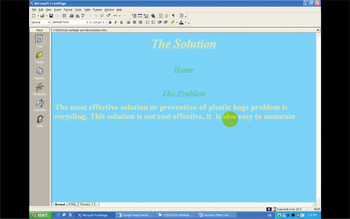
We also present a full screen shot from a point where the students are preparing their web page (Figure 2). The circle over also indicates the position of the mouse, and the cursor bar can be seen over the s of also under the yellow circle. In the analyses we also mention the Start button in the lower left corner, and the blue bar across the bottom of the screen.
Full screen shot of the web page in Microsoft FrontPage.

The first example we present is a relatively simple case in which serial multitasking occurs. Anna has the mouse, and she is formatting the Concept Map, which is a grid they are using for gathering ideas for their main web page. Towards the end of lines 2–3, she moves the mouse to the font-size pull-down menu (FS-PDM).

During the 6.6 seconds at the beginning of extract (1), Anna highlights the title row on the Concept Map grid. As she is highlighting, she starts singing, and then moves to and opens the FS-PDM: a simple, sweeping action followed by a click to open the menu, which she completes while singing. She then stops singing (line 4) and during the ensuing 1.1 second silence, scrolls down to 14pt on the FS-PDM and clicks. This is a more complex action, in that she has to move the mouse precisely to make a selection from a range of font-size options, and she accomplishes this in silence as a single task. She next produces a turn (line 5) that is a pre-announcement to the naming of a musical. This is followed by a pause of 0.4 seconds, which could be understood as a space she leaves for Suzanne to produce a go-ahead to her pre-announcement. But Anna is active during this pause: she changes her font-size selection, moving the cursor further down the FS-PDM to 18pt, which she then selects. The audible and visible moment of clicking is on the first word of her announcement in line 7, “It's”: that is, she completes the selection just as she begins talking, which can be seen as a point of transition from one activity—selecting a font size—to the next, quite unrelated, activity—announcing the name of the musical. Twice she makes a selection from multiple font-size options, and each of these occurs between or at the boundary of spates of talk, rather than while she is talking. The actions she completes during the silences are ones requiring complex choices from multiple options and the precise placement of the cursor arrow. These contrast with the more routine mouse movements undertaken during talk or singing, which are sweeping movements that end with simply opening a menu.
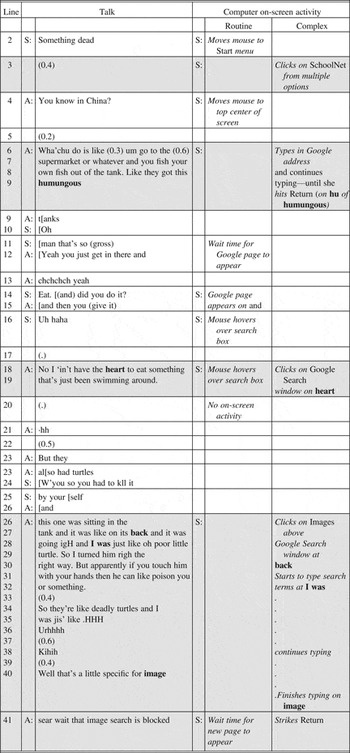
The second fragment occurs during an earlier phase of the task, when Anna and Suzanne begin to search for images for their web page. Suzanne again has control of the mouse and keyboard. Prior to this extract, the two students had been discussing the type of image to choose, and had the idea of a picture showing the detrimental effects of discarded plastic bags on the environment and animals. Suzanne suggests they find an image of a turtle caught in a plastic bag. In line 2 Suzanne says, “Something dead” as effective for their purposes. This touches off a recount from Anna about her experience of buying live fish and turtles from supermarkets in China, which were killed upon purchase. As Anna begins the story in lines 6 to 9, Suzanne types the Google address in the school intranet search engine, and when Google appears, she selects Images, and enters her search words. After a considerable wait time while the search engine searches for Google Images, they continue talking, until Anna notices (line 40) that Google Images is blocked by the school's internet protocols, which evokes reactions from both students.

What extract (2) shows particularly well is that when there is a change of activity, there is a concurrent change in the participation of the student with control of the mouse and keyboard. From lines 4 to 36, Anna is telling a story. The table for extract (2) shows visually that Anna is talking in monologue from lines 6 to 9, and then again from lines 26 to 40. In these two phases, Suzanne is silently typing. In contrast, when they are waiting for Google Images to open, from lines 10 to 18, Suzanne becomes a much more active participant in the talk.
Table 1 shows the alignment between the talk of the two students and the actions performed on the computer screen.Footnote 5 In the tables, the line number from the original extracts is in the first column. The second column shows the initials of the speakers, and the third shows their talk. The fourth column shows the initial of the participant who has control of the keyboard and mouse. In the fifth and sixth columns are the actions performed by the student controlling the mouse and/or keyboard. The fifth column has actions that do not require complex decisions or selections (routine on-screen activity), and the sixth column those that do (complex on-screen activity). The table makes visible that for routine activities, talk regularly accompanies the action. In contrast, with complex activities, the actions occur overwhelmingly without talk. Readers are reminded that the distinction between routine and complex was arrived at empirically. Analysis of the twenty-five extracts revealed a robust liminality or threshold between, on the one hand, actions such as sweeping selections of whole sections of text, and, on the other, actions that required fine mouse movements selecting sections of text or one alternative among multiple options. It was found that, for the mouse/keyboard user, she could talk fluently at the same time as she was sweeping the mouse across the screen, whereas she did not talk when making fine movements. In the tables, we have shaded the rows where the computer actions are completed in silence or accompanying talk by the other student.
Extract (2): PS2.2:103.

Suzanne's “Something dead” (line 2) is spoken at the same time as she performs the routine, sweeping action of moving the mouse to the Start pull-up menu at the lower left hand corner of the screen. She opens it, and in the silence that follows the completion of her utterance, she performs the more complex action of selecting the school intranet link, SchoolNet, from a range of options. At this point, Anna begins her story as Suzanne parks the mouse at the top-center of the screen. Suzanne then begins typing “Google” in the address box of SchoolNet, so that Suzanne is simultaneously typing and being a story recipient. Towards the end of this part of the story, at the “hu” in “humungous,” Suzanne finishes typing, and then hits Return to start the search for Google Images. Anna then reaches the last word of her turn (“tanks” in line 9), to which Suzanne responds, “Oh::, man that's so (gross),” showing that she is able to start her assessment response in terminal overlap, targeting the transition relevance place despite having been executing a complex computer action (cf. Schegloff Reference Schegloff1988/89). Suzanne does not speak when she is selecting the link to the school intranet from multiple options and typing an address in the search engine. In constrast, Suzanne's response to the story occurs after she has hit Return, that is, after she has completed her on-screen activity. It is also noteworthy that Suzanne's response to this story opening, “Oh man, that's so gross,” is a fitting assessment for the kind of story it is, demonstrating that she has at least picked up on its gist. She must have been able to switch back and forth between executing complex on-screen activities and listening to Anna's story.
From line 10, there is a stretch of lively interaction as they wait for Google to appear, which it does in lines 14–15 just as Suzanne is asking a question. Suzanne's mouse continues to hover over the Search window until line 18, when she clicks on it as Anna is answering. She continues to refrain from on-screen activity until line 26 (making a comment in line 24) when she selects Images, a choice between five options. This is an example of their talk delaying the resumption of computer activity: talk can affect activity, though most of our examples show activity affecting talk. At this point, the nature of the interaction changes markedly, with Anna producing an extended multi-unit turn from lines 26 to 41, during which there are no vocalizations from Suzanne. As Anna continues her story, Suzanne is typing her search keywords, which she finishes when she strikes the Return key just after the story completion (line 41).
What is striking here is that the two girls (though perhaps more so Anna) conduct their interaction as if it is possible to listen to a story and make entries on the computer at the same time. However, the evidence shows that verbal contributions by the story recipient, such as questions, continuers, or assessments, occur only when the recipient is not typing or making selections from multiple choices.
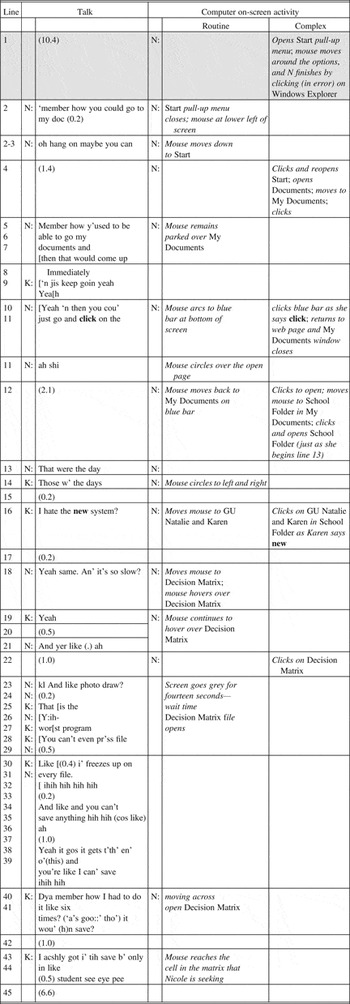
The next fragment involves two different students, Natalie and Karen. At the point where this extract is taken, Natalie is attempting to move to the Decision Matrix. This is a grid they use to plan their web page after they have entered ideas into their Concept Map, which is where they gather ideas. Natalie encounters several difficulties in navigating to this page. While trying to resolve these, they reminisce about the days when the school intranet was, they claim, faster, with fewer blocks and restrictions. At the beginning of the fragment, Natalie is attempting to open the Decision Matrix file from My Documents in the Start pull-up menu at the bottom left of the screen.

In this sequence, with Natalie controlling the keyboard and mouse, we see that, similarly to Suzanne, she does not talk when she is executing complex commands on screen. She selects Windows Explorer, Start, My Documents (twice), Decision Matrix, and the School Folder either during silences or at the moment she begins speaking, and she clicks on GU Folder as Karen is talking. During the silences in lines 1, 4, 12, and 22, she executes some complex selections, most of which involve selections from multiple options. In many of them, Karen also remains silent, and may also be attending to the screen, though this cannot be confirmed. At other times in this extract, however, Natalie remains an active participant in the talk, deftly executing her complex computer actions between her turns at talk. In contrast, routine actions regularly occur during Natalie's talk: during wait time, as she moves the mouse across the screen or to a destination, or as the mouse circles.
In one case, though, Natalie makes a choice while she is saying “Yeah and then you could just go and click on the-” (line 10) clicking on the blue taskbar to close My Documents, a selection from a range of open windows.Footnote 6 Note, however, her action of clicking occurs as she says “click.” This is eerily similar to what happens in another case of making a selection while talking, which is seen in extract (5) below, when Anna types the word “Chiller” (the name of a font) just before she says it. It seems that by saying something that converges with what she is doing or typing, she is able to multitask two complex activities.
Extract (3): PS3.3:191:4′55″

What stands out in extract (3) is that multitasking may occur episodically. From lines 2 to 18, Natalie makes a series of selections while engaging in talk with Karen, but all (bar the “click” example) occur during interturn silences or as Anna is talking. Then there is a fourteen second wait time as the Decision Matrix loads, and the nature of the interaction changes: it is filled with fluent and overlapping talk between the two girls (lines 23 to 39), during which they complain about a particularly slow and cumbersome application, while the eggtimer icon (signifying that the file is loading) and the mouse remain virtually stationary on the blank screen. Such extensive overlapping talk only occurs when neither is active with the mouse or keyboard. When the Decision Matrix file finally opens in line 38, as Karen says “I can't save” (referring not to saving the current file, but to her earlier experience with the school intranet), Natalie abruptly stops talking, as Karen continues as sole speaker. Natalie moves the mouse over the Decision Matrix grid, until it comes to rest over the cell she is targeting as Karen says “student CIP” in line 44. Shortly after this Natalie begins typing in the cell, and a very long silence ensues.
As we have already seen with the “click” example in extract (3), very occasionally one of the girls does simultaneously multitask during complex actions. Extract (4) is another such case, which shows Anna talking and typing at the same time. They are working on the title page of their web project, and have five dot points with information about some of the detrimental environmental effects of plastic bags. Anna proposes changing the font for these dot points from the Chiller font.

Just before the beginning of this fragment, Anna has highlighted some text on their home page, which is formatted with dot points, and then she moved to the font pull-down menu (F-PDM). She opens this, but then closes it again, and places the cursor in the small F-PDM window on the formatting toolbar to type in the name of the font, rather than select it from the list of fonts in the PDM. At this point she says, “Like we only just keep the (0.2) title in Chiller” (line 4). She types in “CHiller” in the window as she is saying “we only just keep the.” This demonstrates that she can make a suggestion at the same time as she performs the complex action of typing. Two points are worth noting. First, this is one of only three cases in our data set of someone simultaneously performing a complex task and talking. In this case it is the typing of a word accompanying nonroutine talk about planning a future action. Second, there is a hitch in the talk, with a cut-off on “the” just as the typing finishes, followed by a short pause of 0.2 seconds after completion of the typing. It may be that Anna's liminal point between routine and complex is slightly higher than Suzanne's or Natalie's. However, the word she is typing is also one she articulates during her utterance, albeit not simultaneously: but she is typing a word she is about to say. Again, action and typing converge during complex multitasking.
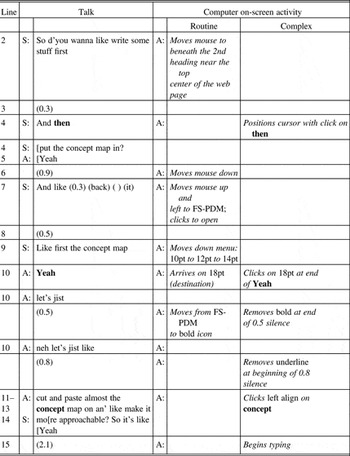
The hitches that we see in extract (4) occur frequently in our data, though more often as restarting abandoned turns. One place where hitches occur more regularly is when an action requiring a selection from a range of choices occurs simultaneously with talk. Extract (5) exemplifies this. Anna has control of the mouse and keyboard. At the beginning of this extract, the home page of the web site they are constructing is on screen, and Anna is formatting the page. Suzanne suggests that they refer to the Concept Map, which is on a different page.

As Suzanne makes her suggestion to “write some stuff first” (line 2), Anna is moving the mouse to a position below the headings that had previously been typed onto the page. She clicks the cursor into position just as Suzanne increments her suggestion with “And then put the concept map in” (line 4), to which she responds with “Yeah.” As we shall see, Anna is going to change the formatting before she starts typing from the position of the cursor. The settings are currently 36pt bold and underline style, and center align. Anna's “Yeah” has been delayed by 0.8 seconds after the first suggestion (0.3 in line 3 plus 0.5 seconds in line 4), which can be explained by her completing the on-screen action of selecting a precise position for the cursor (a complex selection). During the time it takes from Anna's “Yeah” in line 5 to the 0.5 second silence in line 8, Anna moves the mouse up to the FS-PDM, which she opens just before Suzanne's “Like-” in line 9. In this turn, Suzanne reiterates her suggestion of going to the Concept Map, as Anna scrolls down the FS-PDM by steps to prepare to change the font size. Upon completion of Suzanne's turn in 9 (“Like- fi:rst the concept map”), Anna has reached 18pt. She says “Yeah” (line 10) and just as she completes that word she clicks on 18pt. In other words, this selection is made at a point of transition from talk to on-screen action.
Extract (5): PS3.12:590.

Following this, Anna embarks on a substantial response to Suzanne's suggestion: “Yeah, let's jist, (0.5) neh lets jist like (0.8) cut and paste almost the concept map on an' like make it more approachable” (lines 10–13). This turn contains two hitches: a 0.5 second silence after the first “jist” (line 10), and 0.8 seconds after “like” (line 11). What Anna is doing is to make a series of formatting selections along the formatting toolbar at the top of the screen, moving right from the FS-PDM to the font style icons (bold, italics, underline), to the three alignment icons (left align, center align, right align). In turn she makes three selections from multiple options: she removes the bold selection, then removes the underline selection, and finally selects left align.
Anna's turn progresses by only two words (“let's jist”) before she cuts off her talk and pauses for half a second. It is during this silence that the first formatting change occurs, when she clicks on the bold icon (to unbold), after which she resumes talking. Anna now restarts her turn (repairing her talk with a prepositioned negator, “Neh let's jist like”), but she does not get much further into it before she again breaks off, this time for 0.8 seconds. Near the start of this silence, she clicks on the underline icon (to remove the underline formatting), before resuming her turn again, this time continuing from where she had left off, with “cut and paste almost the concept map on an' like make it more approachable?” (lines 11–13). There is one more formatting change that she makes, which is to left align. In contrast to the previous changes, this one occurs without any hitches in the talk. As she continues talking, Anna moves the mouse one icon to the right – from underline to left align, and clicks as she says “concept” in line 12. This is a selection from a range of three choices. Overwhelmingly in our data set such selections do not accompany talk, but note that left align is an icon immediately adjacent to the underline icon. This may explain why she was able to continue talking fluently. She only has to move the mouse pointer one icon to the right.
The selection of left align during fluent production of talk is one of the three clearest cases we have of complex on-screen selection occurring during fluent same-speaker talk. It comes after she has selected a font size from the FS-PDM on the toolbar, a selection that can only be made with multiple steps to reveal a concealed choice. This occurred without talk from Anna. Then there were two selections from the permanently visible toolbar (unbold, un-underline), both of which were associated with disruption in the talk. It is only the third selection from the visible toolbar, left align, which occurs simultaneously with undisrupted talk. Even in this most complex example of multitasking that we have in our corpus, actions are serial, shifting very rapidly between talk and on-screen action.
This distinction in ease of selection between permanently visible icons and hidden options from a PDM may constitute a boundary (at least for Anna) between actions that make greater demands and those that can be completed more easily. For someone with lesser computer skills than Anna, the boundary might be drawn at a different level of complexity.
Conclusion
In this article we have investigated talk accompanying computer tasks using the mouse and keyboard. We have found that for the participants in our study, routine tasks can be accomplished without disruption to the talk. More complex tasks are overwhelmingly accompanied by hitches in the talk or silence from the one controlling the mouse and keyboard. As one might expect, the participants can talk interactively while, for example, waiting for a web page to load or during the performance of a routine computer task not involving choices from multiple options, such as selecting whole texts or opening a pull-down menu. However, they are not able to talk fluently when engaging in a complex computer task that involves making a choice from multiple options, such as selecting a particular font size from its pull-down menu. If they are talking at such points, selections occur with hitches and intraturn silences. We found the threshold for the four students in our study to be similar. All were capable of talking while undertaking routine activities. However, Anna was a little different. On three occasions she talked at the same time as executing a complex task. What our evidence points to is that the ability of these girls to perform more than one task may be constrained by a multitasking threshold below which they are able to make routine choices and talk at the same time, but above which they are not able to undertake more complex activities and talk simultaneously.
We also found that listening when using the mouse or keyboard affects the interaction. There are cases in which the student who is not controlling the mouse and keyboard is producing an extended turn, such as telling a story. If they are waiting, for example, for a web page to open, the student with the mouse and keyboard engages interactively as a story recipient, producing questions, comments, assessments, and continuers. However, if the storytelling occurs while the other student is typing or making a complex selection, the occurrence of such recipient actions falls away dramatically. During such episodes, we only occasionally find appropriate and fitting responses from the recipient, suggesting that she is able to “switch on” to the story, at least intermittently. In one of these cases, while Suzanne may have been able to hear and understand enough of Anna's story about fish tanks (see extract (2)) to produce an appropriate response at the end, she did not produce any recipient actions during the telling. This may be another liminal point—this time on the receptive side of language and talk.
Establishing such liminal points can give us clues to how parties manage to perform more than one task. The disruptions to talk co-occurring with complex computer actions may take the form of short intraturn pauses as the task is performed, or they may result in the student stopping talking altogether. Such liminal points may well be different for parties with differing computer skill levels. What is routine for one may be complex for another. The intriguing evidence we have here is that Anna is the only one who shows evidence of being able to simultaneously type at least some words while talking on a nonrelated topic. But where she does, the talk and action converge in some way: she clicks on a selection just as she says the word “click” (extract (3)), she types the name of the font “Chiller” just before she names it (extract (4)). But there is also evidence, especially from extract (5), that for her too, selecting from multiple options is executed in silence. She pauses twice briefly in the middle of the utterance to click on an icon, but a third icon click is executed without any hitches in the talk. This icon is immediately adjacent to the one she had just clicked, so this can be seen as a binary choice, not a complex one. The disruptions to the talk occur for these girls as they switch rapidly from talk to task and back again, and only rarely do they perform complex tasks simultaneously.
While we have just four subjects in our study, it is striking that our findings are in accord with the psychological literature on multitasking. There are correspondences with the disruptions in talk that we find when our students multitask with the findings in that literature: that there is a limit on how much attention can be distributed between two tasks (Just, Carpenter, Keller, Emery, Zajac, & Thulborn Reference Just, Carpenter, Keller, Emery, Zajac and Thulborn2001). If the hitches, silences, and lack of response when these students are performing a complex task are evidence of performance being affected, this aligns with the findings in psychology that the lowered attention per task may cause poorer performance in the multitasking condition (Just et al. Reference Just, Carpenter, Keller, Emery, Zajac and Thulborn2001).
This study brings us a little closer to an understanding of the concept of multitasking when two participants are working collaboratively at the computer. The nature of the multitasking that occurs is shaped both by the opportunities and capabilities of the user interface and the performance constraints of the users at any particular time. Both the technology and the user are subject to constraints—especially within a school intranet environment. These ultimately shape what is accomplished moment by moment during the process of completion of an on-line task. In this study we have evidence of teens “harnessing small moments” (Lenhart et al. Reference Lenhart, Rainie, Lewis, Madden and Hitlin2005); we also have evidence of the impact of complex tasks on the flow of conversation when hitches in talk occur at moments of highly complex activity. In both senses, the smallest fragments of time may mark significant other-task activity. This observation is a key finding of this study and a feature of this kind of work that should be borne in mind in future research.
Finally, we believe such research could lead to deeper understandings of how multitasking works in interaction at the computer with potential benefits for education and the workplace. Such research could potentially inform the development and sequencing of tasks in educational settings. It could also help to further our understanding of human-computer interface design and task sequencing in the workplace such that the working environment is more effectively optimized and matched to the users' capabilities and the multiple tasks requiring their attention at any particular time.
Appendix: Transcription conventions
- (0.0)
silences measured in tenths of a second
- =
latching
- (( ))
characterizations of stretches of talk, vocalizations, and speaker/audience behavior or applause are described between double parentheses
- ?
“question” intonation (i.e. rising pitch)
- .
“period” intonation (i.e. falling pitch)
- ,
“comma” intonation (i.e. level pitch)
- ;
“semi-colon” intonation (i.e. slightly falling pitch)
- ¿
‘Spanish question mark” intonation (i.e. slightly rising pitch)
- underline
stretches of talk delivered with stress or emphasis by the speaker
- CAP
stretches of speech delivered more loudly than the surrounding talk
- °
stretches of speech delivered more softly than the surrounding talk
- ::
the lengthening of a sound is marked through colons (each colon represents approximately the length of a beat)
- ↑ ↓
shift in pitch that is particularly marked
- hh
audible aspirations
- ·hh
audible inhalations
- > words <
talk that is faster than its surrounding talk
- < words >
talk that is slower than its surrounding talk
- keyboard
↑ –C–H–i–l—l—e–r ↑
Letters correspond to the striking of a key on the keyboard; typed letters are lined up with the talk they occur with.
- mouse symbol
indicates mouse movements