
INTRODUCTION
Information Skills Advisers work within the Academic Liaison Department in the library at London South Bank University (LSBU). Our primary role is to provide information skills and referencing support for students usually via one-to-one appointments or group training sessions. As Information Skills Advisers for the School of Law and Social Sciences at LSBU, we are given a 50-minute lecture slot to introduce OSCOLA referencing to first year LLB undergraduates in the form of a PowerPoint presentation. Year on year the size of first year cohorts has increased significantly to the point where these sessions are being delivered to 100 students at a time in a traditional lecture theatre. This allows for very little flexibility in the learning environment and greatly reduces the ability to include group-based activities.
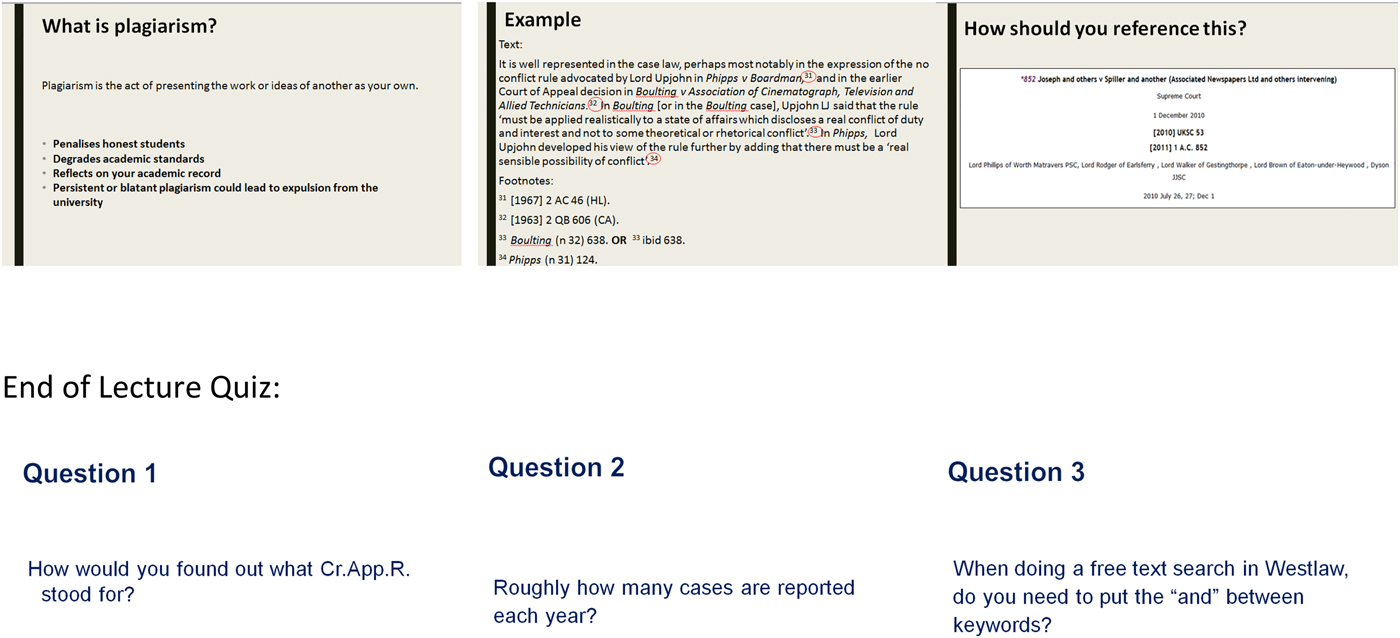
The PowerPoint would cover an introduction to referencing, and then demonstrate examples of how to reference a case law report, a piece of legislation, a journal article, a book, and a website. We would also introduce the concept of neutral citations, the hierarchy of The Law Report series, and the Cardiff Index to Legal Abbreviations. To try and gauge how much students had learned, there was a quiz at the end of the presentation comprising ten questions, which the students (mainly located in the front two rows of the lecture) would call out or raise their hands to answer.
There was always a feeling of frustration when delivering this lecture, as it was believed that this was not the most effective way to get students engaged with and understanding the complexities of OSCOLA referencing. It was impossible to engage all the students, nor to determine what they had learned.
We noticed that when students were writing their first assignments they would book one to one appointments with Information Skills Advisers for help with referencing. Feedback from lecturers at course boards or in person was that students were struggling with several aspects of referencing including neutral citations and knowing which law report to use when referencing case law. We wanted to not only make the lecture more interactive and engaging, but also to ensure students left with a deeper understanding of why referencing is important along with the basic mechanics of OSCOLA referencing. All the concepts and information were in the lecture so it was not the content that was lacking; it was how it was being delivered.
Due to timetabling constraints, it was not feasible to split the lecture into smaller workshops, which would have allowed for a more practical and manageable teaching environment. We needed to use the time and environment we had been given, and be more creative in how we engaged the students. We also wanted a simple way of assessing the learning outcomes within the lecture itself. These are common issues and concerns experienced by our colleagues in higher education who teach. In our research on how others within higher education libraries were adapting their training sessions to incorporate more active learning activates we saw in the literature, a trend to enhance session engagement using tools called audience response systems (ARS).Footnote 1 Footnote 2 Footnote 3 These tools go by many names: personal response systems, clickers, keypads, digital voting systems, digital response systems, classroom response systems, web-based response systems. Our investigation of these tools in different forms led to the pilot project we ran in 2016 with our third year LLB students.
OUR STARTING POINT
The standard didactic lecture did not encourage active learning. There was no conversation or discussion within the lecture, and any points raised during the quiz usually only involved the front two rows of students, as those further back were either not engaged or did not feel confident speaking up, so they were just passive observers. It was impossible to know whether all students were keeping up with the presentation, or if students needed anything explained or clarified. We usually delivered this lecture near the beginning of Semester 1, so the cohort was new and many of them did not feel confident enough yet to speak up in front of so many of their peers.
The lecture felt very leaden, and the subject matter was too dry for this style of lesson, which ideally would involve hands-on practical activities. We would often see students on their phones or devices at the back of the lecture; so engagement was a problem.
We knew we needed to break the lecture up to include activities for the students. We wanted to embed some form of assessment into the lecture so that we could see what they were retaining and what we needed to clarify and explain further. Moreover, we wanted to try to make an OSCOLA lecture enjoyable! One of our concerns was how law students would perceive the voting aspect of our sessions as well as how much time in lecture would be spent using the tool to enhance the didactic sections. We had seen in previous research paper by Habel and StubbsFootnote 4 that while the majority of law students who participated in this particular study enjoyed voting by mobile phone and found it engaging some students felt the over-use of the tool took too much time away from the content of the lecture sessions and felt it was a distraction. We kept this in mind when developing our session to ensure the technology was used to reinforce active learning and not merely a fun tool to break up the session.
THE TECHNOLOGY
The desire to engage with large audiences in lecture theatres is not new. Historically, audience response technologies have been in use in university classrooms since the 1960s.Footnote 5 Footnote 6 Starting first with the use of physical ‘clickers’ or keypads that were either handheld or built into the lecture theatre seating, there has been an evolution of form for this kind of tool.Footnote 7 Many universities have made use of changes in technology by moving away from physical devices to a web-based ARS. Students are more likely than ever to bring a smart device to class and more robust IT infrastructure on university campuses provides reliable Wi-Fi access to enable real time voting via connected websites. This allows educators to engage students on a platform they are already familiar with and thus encourages participation by the simplicity of the tool.
PowerPoint slides for introducing legal referencing.

The Library and Learning Resources Department at LSBU had previously used digital learning tools such as Padlet and Quizlet in small group training sessions and we felt these tools were useful for fostering collaboration and for gathering students’ opinions and brainstorming in one place that all students and staff could access. From experience, we knew digital aids in the classroom could enhance the learning environment, but we had not tested these tools on a larger scale. In the past, the department had used the clicker-based ARS Turning Point but we felt that this would be not be appropriate for a large lecture theatre. Time constraints would limit our ability to hand out the clickers and then retrieve them again at the end of the hour without being disruptive to the flow of the session, and there would be a limitation posed by the number of physical clickers available. Alternatives we explored were the use of coloured papers that students hold above their head to answer questions, but we felt this approach might alienate some of our shy learners who might be intimidated if asked to publically answer questions in this way. However, we also wanted to replicate the question element of the original lecture, so it was determined an ARS would be most appropriate.
In our research on using these tools in a large lecture style format it was clear that many librarians and lecturers implementing them in the classroom found that using an ARS increased engagement and resulted in students enjoying the sessions more than without the tools. In addition to the qualitative feedback we gathered from students and lecturers, there is some research to show that the use of audience response systems does increase engagement when employed alongside classroom discussion and peer learning.Footnote 8 Footnote 9 However, there is some research to indicate that ARS use does have a wear out effect if overusedFootnote 10 and that it works well in conjunction with formative assessments of subject matter that can be assessed through an answer framework that requires a correct answer versus a discussion of nuances.Footnote 11
Ideally, we wanted to make use of the students’ own devices, as it was clear from observing our previous lectures that many students use laptops for notetaking, and use smartphones and tablets during class. iPad minis were given to this particular cohort at the start of their course and the Law department was encouraging student use of digital tools to enhance their studies. We investigated several brands of online polling software available on the market with free trials and also looked at what tools were in use by other universities. Our department had previously used web-based ARS Poll Everywhere at other external events and had exposure to tools like Nearpod that operate with a smaller classroom pedagogical-focus. A member of our Digital Skills Training Team was already trialling Mentimeter in smaller workshops as the features could be easily integrated into presentations and there were no restrictions on the number of responses per presentation. Our department purchased four Mentimeter accounts to trial usage for a year allowing us enough time to evaluate our choice and use the tool in a wide range of classroom settings.
Mentimeter allows students to get involved with the session via their own digital technology, as it can be accessed using mobile devices. Using the technology builds on students’ digital literacy skills. The anonymous nature of Mentimeter removes the ‘answer anxiety’, which was a phenomenon we had observed during the quiz element of the original lecture when many students were unwilling to shout out answers that might be wrong in front of their peers. This barrier to learning for students has been observed by other educators and prevents some students from fully participating when given the opportunity to do so.Footnote 12 Footnote 13 Engaging with students in a way that is easily accessible but anonymous gets a larger percentage of them involved in the lecture. As no attention is drawn to them as individuals and their location in the room does not hinder participation as might be the vase with clicker-based ARSs. The variety of question styles moves beyond simple yes or no answers, which enables deeper learning and provides a range of formative assessment options seamlessly embedded in the lecture allowing for instant feedback on learner understanding.
THE PILOT
We were asked to deliver an OSCOLA refresher lecture to the third year LLB students, which was a smaller cohort than the first years, of about 50 students.
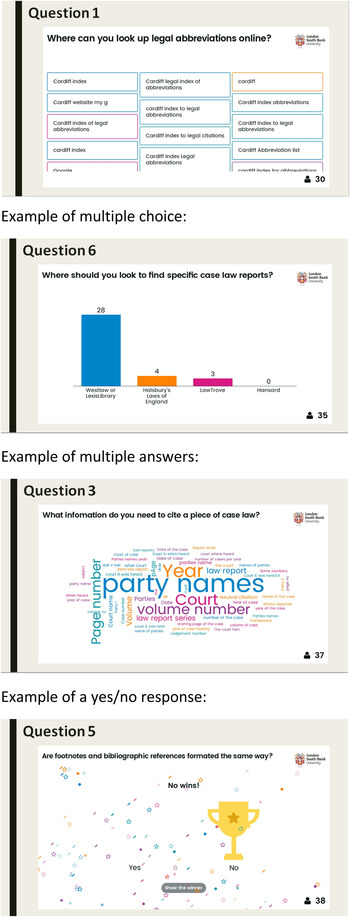
We decided to adapt our original PowerPoint, but instead of the quiz at the end of the lecture, we would intersperse Mentimeter questions throughout the presentation. We positioned the questions so that they were one section after the material they referred to – so the students had to pay attention! This also reinforced the learning they had experienced, and encouraged deeper learning to help with knowledge retention. Mentimeter allowed us to devise different kinds of questions, so that students had to think about the answers they gave, as they would be in a different format each time.
We hoped that this approach would break up the lecture, so that it was not just a didactic experience for the students. We also hoped that this approach would encourage more engagement and conversation, as the students could see for themselves how the room responded to what they were learning.
Mentimeter allows the teacher and the rest of the room to see how many people have responded to the question. We could immediately see that nearly two thirds of the students were actively engaging with the technology. Some students were sharing devices, so that number can be confidently increased. This was a significant increase compared to the previous lecture where Mentimeter was not used.
Examples of Mentimeter questions.

WHAT WE LEARNED: THE POSITIVES
Using the real-time questions and polls meant that we, as teachers, could immediately see if students understood the concepts. This gave us the opportunity to see where they were struggling and gave us time to course-correct or open up discussion to the larger lecture.
The law lecturers involved with this session were very positive about the re-design. They recognised that it encouraged more engagement from the students, which would lead to deeper learning and less need for refresher sessions on referencing. The senior lecturer in the session participated herself, which encouraged the students to do so. She used her module virtual learning environment (VLE) site to let students know they should bring their own devices to the lecture. She is keen to use this new approach for incoming first year students in the next academic year.
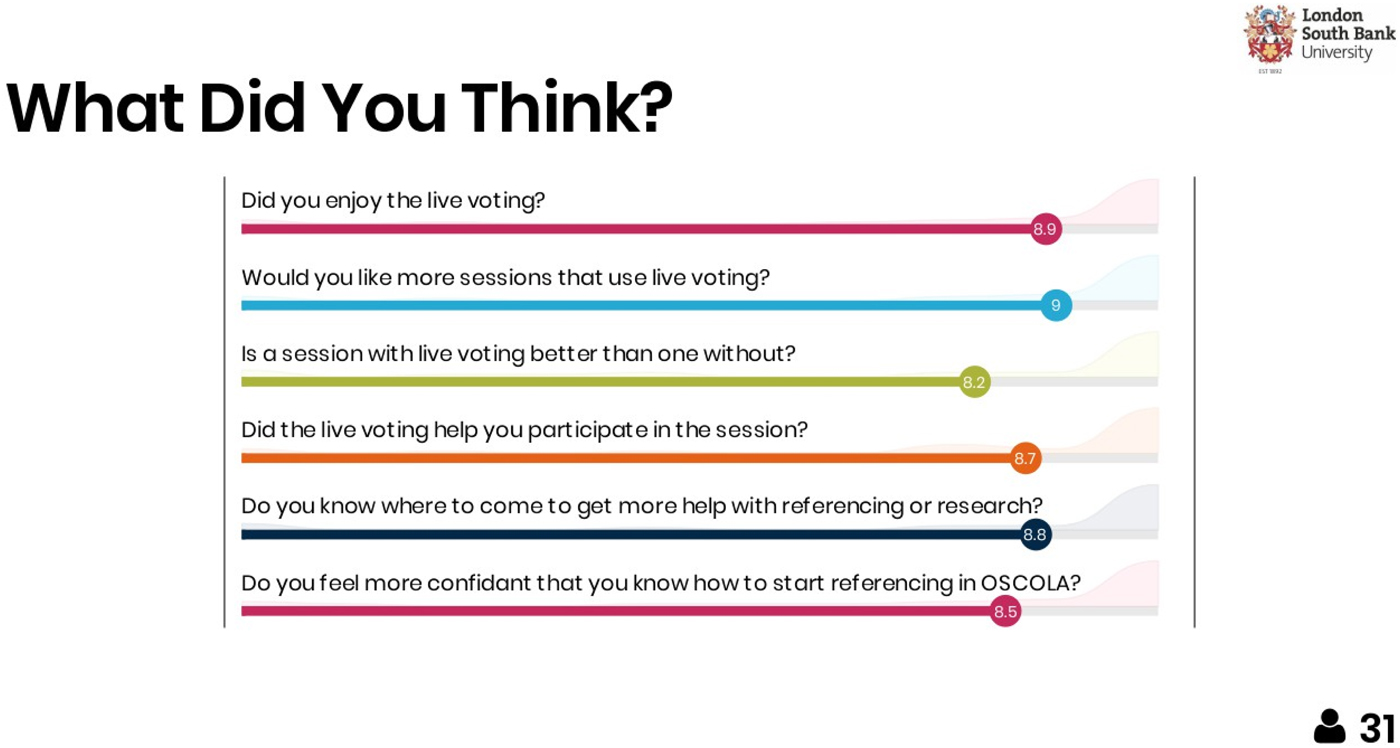
It was useful to get these students’ perspectives on the use of the technology, as they had experienced the original OSCOLA lecture in their first year. They were very positive about the Mentimeter. They enjoyed the live polling and felt that they had participated more throughout the lecture.
Selecting and using this technology also provided us, the trainers, with a greater awareness of the tools that were available, and encouraged us to learn new digital skills. It also prompted us to re-think the way we delivered sessions with regards to student engagement, assessment, and what tools and technology the students were using.
THE LEARNING CURVE
We did initially have concerns over whether every student would have their own device. The lecture could have excluded students who were late adopters of mobile technology. In the session itself, most students did have their own devices and access to the university's Wi-Fi, and those that did not paired up with another student so they could still participate. We discovered that even if students chose not to, or were unable to engage with Mentimeter, they benefited from seeing the results of the polls and questions on the main screen, and from the discussions that came out of examining the responses from their peers.
The character limitations on some of the questions can cause issues. We had to match the style of answer to the question so that it was appropriate. For example, we initially did not leave enough characters to create a reference for one of the questions.
Because we were using different styles of questions, we had to explain how each variant worked. This was time we had to factor into the lesson plan, along with the possibility that some students would need further explanation. Even then, we discovered that the scales questions for the best law report series was not understood by all the students, and we ended up with a nonsensical response!
Like all technology, Mentimeter is susceptible to bugs and glitches. There were a couple of hiccups with regards to beta features as we were planning the lesson. The Mentimeter Support Team were very timely in their response. However, we did learn the necessity of having a back-up PowerPoint and lesson plan just in case the technology failed.
Feedback results from the pilot session.

WHAT WOULD WE CHANGE?
To help with accurate lesson planning, and to keep the lecture moving forward, we plan to make use of the timed answer feature in Mentimeter in the future. This will give the students a fixed amount of time in which to respond. To aid with familiarising students with Mentimeter we intend to add in some pre-assessment questions at the start of the lecture so that everyone is participating from the first minute.
The plan is to roll out this lecture to all LLB students and any referencing lecture (for any subject area) the Information Skills Advisers might be called upon to deliver. In order to do this, students will need to be reminded to bring their devices to the lecture. We will need to contact their module leader to either ask for an email to be sent to the cohort, or for a message to be put on to their VLE site; this will have to be incorporated into lesson plan.
Mentimeter is always upgrading and improving, and there are new features we will definitely make use of in the next lectures. This continual improvement gives us more tools to use in sessions, as well as reducing the risk of students becoming over-familiar with the question formats. Recently they have introduced interactive symbols for static slides (slides with no questions on them), which allow students to flag if they have a question or need clarification on a point without interrupting the lecture. This allows the lecture to check student understanding or repeat a point for further explanation.
We could also use Mentimeter to gather immediate feedback on the lecture, although this would not replace post-training surveys, as the questions would be quite limited, and it would exclude students without their own devices.
IN CONCLUSION
Using Mentimeter enabled us to re-work an OSCOLA lecture to be more engaging for the students. Instead of just talking at the students for forty minutes and then having a quiz that most of them did not engage with at the end, we were able to make the lecture more interactive and inclusive. While our pilot test of using a digital audience response system showed that was not fully endorsed by all attendees, the majority of students who participated felt it added value and from a teaching perspective, the ability to see how many students were engaged in the room throughout the session was invaluable to our assessments. It enabled us to introduce formative assessment into the lecture and respond to students’ queries and comments as the lecture was in progress. It also enabled the students to make use of their digital tools and explore a new way to engage with the content they were learning. We would highly recommend anyone thinking about using web-based audience response systems in a law classroom setting, to read Habel and Stubbs’ action research, the scope of which encompassed more than our small pilot project allowed and inspired us to make further use of audience response systems with our law students.Footnote 14
Special thanks to Kim Silver, Senior Lecturer in Law at LSBU for collaborating with us for this pilot project and for her continued support in furthering digitally enhanced learning in her classroom.