

1. INTRODUCTION
Virtual three-dimensional (3-D) environments are paradoxically difficult for humans to interact with, given our countless daily interactions with a variety of real-world 3-D environments. Users can feel disoriented, confused, and even lost if they are no longer able to recognize what they are viewing, which in turn makes recovering to a familiar or understandable view difficult. Although this is particularly true for users who are new to virtual 3-D environments (Fitzmaurice et al., Reference Fitzmaurice, Matejka, Mordatch, Khan and Kurtenbach2008), even experienced users can feel disoriented when faced with a loss of context. In addition, exposure to virtual environments is no longer restricted to highly trained individuals in high-end engineering, industrial design, entertainment, and visualization industries. Untrained casual users not only have access to but are also being encouraged to use 3-D applications on portable and hand-held devices in addition to desktop computers. They are quickly becoming the tools of medical, urban planning, and design specialists. Moreover, these virtual 3-D environments are growing in richness of data and complexity of geometry as we attempt to capture and represent more and more of the human experience digitally. In short, virtual 3-D environments are not becoming any easier for their users to experience.
A user's experiences within virtual 3-D environments can be broken down into many conceivable interactions, such as inspecting geometry, navigating through scenes, and authoring content. To provide a basis for discussion in this paper, we define and focus on two types of interaction: intellection and navigation. First, we mean intellection to refer to the process by which a user reasons about the scene they are experiencing. For example, this reasoning could take the form of questions like “where am I?,” “what am I looking at?,” and “why does it look like that?” We can describe intellection as a two-part process. A user, represented by a virtual camera, is required to first decipher their own position, orientation, and most difficultly, estimate their own size, within the 3-D environment. Then that user must apply this information to understand the position, orientation, and relative sizes of other objects within the scene, with respect to not only themselves, but also other objects in the scene, including those outside the user's current field of view. Second, we mean navigation to describe the general process by which a user changes the position and orientation of the virtual camera used to render their point of view. Although there has been considerable research in the field of human–computer interaction into both the intellection and navigation of virtual 3-D environments, existing paradigms do not focus on navigation as a method of reasoning. We believe that intellection and navigation are intrinsically connected and form an iterative cycle. To understand a virtual environment, one must navigate through it; but in order to navigate effectively, one must also understand what is seen. This cycle of intellection and navigation is directly responsible for supporting the development of a user's mental representation of the virtual environment.
Tversky (Reference Tversky, Frank and Campari1993) describes the mental representation we develop as we explore an environment as a cognitive collage, a partially complete mish-mash of information from many different points of view. She goes on to suggest that as an environment becomes well known, and a user's cognitive collage becomes more complete, it can be said that a user has developed a spatial mental model. The incoherent nature of cognitive collages can lead to distorted judgments, whereas spatial mental models support highly accurate spatial inferences. It would be ideal if all users were armed with a complete and accurate spatial mental model of a virtual environment. Unfortunately, this is far from the case. If anything, lack of feedback and context in virtual environments leads to the development of distorted and inaccurate cognitive collages. If we wish to foster the development of accurate cognitive collages, then it is critical to ensure that we minimize ambiguities impeding a user's intellection and minimize confusion and disorientation resulting from navigation.
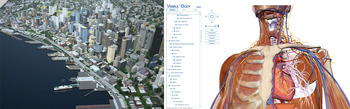
The difficulty a user experiences when understanding and navigating a scene is directly a result of the complexity of the scene and the geometry. Given a single object, such as a cube, there are a limited number of viewpoints and intermediary transitions necessary to accurately understand its shape (Bingham & Lind, Reference Bingham and Lind2008). This, in turn, limits the navigation required to simple orbit operations around the object. However, consider a detailed model of a multifloor factory, filled with rooms, stairs, machinery, tools, ventilation ducts, and plumbing systems, among others. In this example, a user might be interested in inspecting the exterior envelope of the structure, perhaps exploring the interior space of the building, or even examining a specific machine on the factory floor. In an extreme case, consider a complete anatomical model of a human body, down to the cellular level. There are countless conceivable ways in which one might interact with this virtual environment. These are what we call multiscale virtual 3-D environments, where geometry of interest exists at multiple exclusive scales (see Fig. 1). Multiscale environments are starting to become more prevalent. Consider Google Earth and Microsoft Live Earth, services that provide users with interactive multiscale representations of geography and cartography with simple 3-D models of buildings, or take the growing urban planning requirements of detailed digital models, such as building information models (Eastman et al., Reference Eastman, Teicholz, Sacks and Liston2007), prior to accepting new construction developments. This trend is even apparent in games, such as Infinity (n.d.), where the game designers claim players will be able explore cities, planets, and galaxies; seamlessly traveling from one scale to another.
Examples of multiscale virtual three-dimensional environments. (Left) A digital model of Seattle combining geographic information system (GIS), computer-aided design (CAD), and building information modeling data (Parsons Brinckerhoff). (Right) A screenshot of the Visible Body interactive Website (http://www.visiblebody.com). [A color version of this figure can be viewed online at journals.cambridge.org/aie]

It is through these complex multiscale scenes that we are best able to elucidate many of the inherent, but often unnoticed, difficulties in traditional virtual 3-D environments that impact intellection and navigation. We will consider interactions typical on desktop computer systems and in virtual environments composed of surface-based models. We present an abstract model that forms the basis of the discussion presented in this paper. By providing background on the role of projection types, depth cues, frames of reference, and existing navigation techniques in supporting intellection and navigation, we illustrate how ambiguities related to position, orientation, and perceived size encumber interactions in multiscale environments. Finally, we present future research directions and strategies that may help to alleviate these problems.
2. AN ABSTRACT MODEL OF INTELLECTION AND NAVIGATION
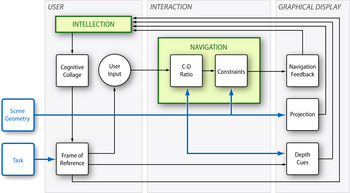
Fostering the development of an accurate cognitive collage of a virtual 3-D environment should be at the core of designing effective interaction techniques. Here, we present a novel abstract model to illustrate the cyclic relationship between intellection and navigation in developing an accurate cognitive collage (see Fig. 2).
The interrelation of intellection and navigation in a virtual three-dimensional (3-D) environment is dependent on many contributing factors. In virtual 3-D environments, intellection requires a user to assimilate information from several concurrent sources. The user task and scene geometry can be seen as inputs into this system. A user experiences a virtual environment through a graphical display, on which a 2-D projection of scene geometry is shown. Along with artificial depth cues, this rendering communicates the spatial layout of the scene geometry. The user's frame of reference can be either egocentric, in the first person, or exocentric, in the third person. This frame of reference, along with feedback from navigation, is used to combine this information into a cognitive collage of the virtual environment. Modifying navigation by changing the control display, or C-D ratio, in addition to applying constraints can prevent users from arriving at confusing and disorientating points of view. [A color version of this figure can be viewed online at journals.cambridge.org/aie]

In virtual 3-D environments, intellection requires a user to assimilate information from several concurrent sources. The user task and scene geometry can be seen as inputs into this system. A user experiences a virtual environment through a graphical display, on which a two-dimensional (2-D) projection of scene geometry is shown. Along with artificial depth cues, this rendering communicates the spatial layout of the scene geometry. The user's frame of reference can be either egocentric, in the first person, or exocentric, in the third person. This frame of reference, along with feedback from navigation, is used to combine this information into a cognitive collage of the virtual environment. Modifying navigation by changing the control display, or C-D ratio, in addition to applying constraints can prevent users from arriving at confusing and disorientating points of view.
The cognitive collage is essentially the abstract mental 3-D reconstruction of the 3-D scene geometry, interpreted by way of a 2-D projection. It is through this process of compression to two dimensions and then reconstruction back to three dimensions where much room for ambiguity lies. This is also where the most gains can be made in supporting accurate intellection by providing sufficient cues and feedback to minimize reconstruction errors.
In this way, intellection and navigation complete an iterative cycle through which the cognitive collage of the user is continually built upon and improved as more information becomes available. It also highlights the importance of preventing reconstruction errors, as these misinterpretations can pathologically impede future accurate reconstruction. We will now provide some background for this model, and discuss the components in greater detail.
3. FACTORS AFFECTING INTELLECTION AND NAVIGATION IN VIRTUAL ENVIRONMENTS
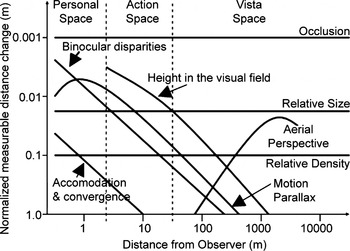
The mechanisms that allow us to decipher 3-D in real-world environments have been well studied in the field of psychology. Our human visual system uses depth cues based on both the interaction between elements in our visual field, such as occlusion and texture gradients, and assumptions based on learned expectations, such as height in the visual field and relative size. Cutting and Vishton (Reference Cutting, Vishton, Epstein and Rogers1995) examine and rank the most salient visual depth cues and the relative impact each has on our perception of depth (see Fig. 3). It should be noted that even in the real world, our perception of depth is not absolute, and instead it has been shown that our judgments follow a probabilistic model (Yang & Purves, Reference Yang and Purves2003). Furthermore, it should be noted that the underlying basis for these observations is that they are from the point of view of the real-world human experience (for a human-sized observer).
A graph depicting the effectiveness of real-world depth cues. Adapted from J.E. Cutting and P.M. Vishton, Perceiving layout and knowing distances: the integration, relative potency, and contextual use of different information about depth. In Handbook of Perception and Cognition. Volume 5: Perception of Space and Motion (Epstein, W., & Rogers, S., Eds.), 1995. Copyright 1995 Academic Press. Adapted with permission.

“Understanding 3-D is difficult” (Brooks, Reference Brooks and O'Hare1988). There are many specific factors that make 3-D intellection and navigation difficult. Apart from occlusion and motion, most depth cues are not inherent in virtual 3-D environments. In addition, research has shown 3-D scenes are perceived as flatter when viewed through a frame regardless of depth cue salience (Eby & Braunstein, Reference Eby and Braunstein1995), a finding that might be applicable to 3-D scenes viewed on a desktop monitor. For example, it has been shown that users perform 3-D navigation tasks more effectively on large displays even when the scene is displayed at the same resolution as a smaller display (Tan et al., Reference Tan, Gergle, Scupelli and Pausch2006). A contributing factor might be that the framing of a large display is not as apparent. Moreover, the objects represented in virtual environments are often unfamiliar or novel and not governed by physics or gravity, which limits our ability to make assumptions based on learned expectations. As we explore virtual environments of growing complexity, our visual system is presented with an increasing number of ambiguous situations, where the distance, position, and size of objects might not be immediately apparent. In addition, when the complexity of scenes extends across multiple scales, geometry may not even be perceptible, either too small or too far away to represent, or too large to distinguish its shape. Durand (Reference Durand2002) stresses that depiction is not a unidirectional projection—the user also works back from the perceived projection of a virtual environment to what it represents. If the ultimate goal of intellection, as we have described it, is to work toward developing a cognitive collage into a complete and accurate spatial mental model of a given virtual environment, then it is vitally important to support a user in minimizing their experience of ambiguity and maximizing their understanding of the configuration of the virtual environment.
Although understanding and navigating virtual environments are intrinsically connected, navigation as a task is usually studied in isolation. Traditionally, methods of navigation have been evaluated solely on the ability of a user to correctly change the position and orientation of the virtual camera from one point to another. This has led to the predominance of navigation tools that work from a technical standpoint but may not adequately support a user's understanding of a scene. In fact, it has been noted that often navigation tools require a user to know which specific tool is appropriate for a given task and that these tools generally do not support recovery of navigation errors (Fitzmaurice et al., Reference Fitzmaurice, Matejka, Mordatch, Khan and Kurtenbach2008). Although navigation tools must be evaluated in how effective they are at moving the virtual camera, we believe it is just as important to evaluate these tools in terms of how useful they are, that is to say, how well they allow a user to not only maintain but also build upon their cognitive collage of the virtual environment in a consistent manner.
There are many factors that contribute to a user's ability to understand and navigate virtual 3-D environments. We will now introduce these factors, which are first presented in our abstract model, in greater detail.
3.1. Frames of reference
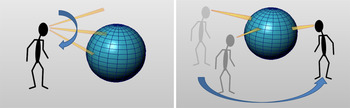
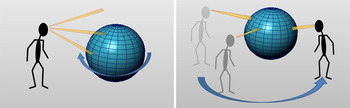
Egocentric navigation techniques, such as looking and walking, have exocentric analogs, such as orbiting and panning or zooming (see Fig. 4). In a scene with a single object without surrounding context, the results of navigation can be interpreted ambiguously. For example, orbiting around the object can be seen as either the user changing their position (egocentric), or simply the orientation of the object being manipulated (exocentric; see Fig. 5). It has been shown that the availability of depth cues affect whether users reason about a scene egocentrically or exocentrically (Mintz et al., Reference Mintz, Trafton, Marsh and Perzanowski2004). When a scene lacks sufficient depth cues to allow users to judge their position in relation to objects in the scene, such as shadows on a ground plane, egocentric reasoning about the virtual environment is encumbered. In these situations, Mintz et al. (Reference Mintz, Trafton, Marsh and Perzanowski2004) suggest that the user has no choice but to attempt to understand the environment exocentrically. Thus, it is important to supply adequate feedback to a user to support selection of the frame of reference congruent with the navigation technique used, ensuring the development of a consistent cognitive collage.
Frames of reference. (Left) Egocentric navigation, such as looking. (Right) Exocentric navigation, such as orbiting. [A color version of this figure can be viewed online at journals.cambridge.org/aie]

Without a surrounding context, a turntable view of an object can be interpreted ambiguously. (Left) The object is perceived as moving while the observer is stationary. (Right) The object is seen as stationary, while the observer moves around the object. [A color version of this figure can be viewed online at journals.cambridge.org/aie]

3.2. Projection types
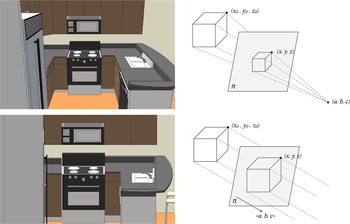
Two common planar–geometric projections are used to transform scene geometry into a form that may be represented on a 2-D display: perspective and parallel projection (see Fig. 6). Perspective projection seeks to simulate the effects of viewing objects in the real world, but is mathematically based on a simplified pin-hole camera model. Perspective projection distorts the image by foreshortening and forelengthening lines moving away from and towards the user's point of view. This adds a sense of depth to the rendering, making farther objects of the same size appear smaller. Parallel projection sacrifices this sense of depth for geometric constancy. All objects of the same size appear to be the same size, regardless of their distance from the camera. This characteristic makes parallel projections very useful for tasks where precise comparisons of size and shape between objects are necessary, regardless of their spatial position. The choice of projection is highly task specific. For example, perspective projection is used primarily in entertainment and visualization industries, whereas parallel projection is preferred in industrial design and architecture industries. Carlbom and Paciorek (Reference Carlbom and Paciorek1978) provide a detailed explanation of the various types of planar geometric projections. The type of projection used alters how a user experiences a virtual environment, and thus affects how they understand the scene and how they build a cognitive collage.
Schematic and visual comparison of projection types. (Top) In perspective projection, a point (x 0, y 0, z 0) in three-dimensional (3-D) space is projected onto plane π as (x, y, z) when viewed from camera position (a, b, c). (Bottom) In parallel projection, a point (x 0, y 0, z 0) in 3-D space is projected onto plane π as (x, y, z) when viewed from direction <a, b, c>. [A color version of this figure can be viewed online at journals.cambridge.org/aie]

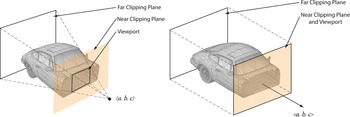
Most 3-D camera implementations make use of clipping planes to limit the rendered geometry to those objects that are in front of the camera. Because perspective projection is based on a pin-hole camera, the viewing angle limits the view of close geometry, giving the sense that the user is standing inside a space. Perspective projection is suited to both egocentric and exocentric frames of reference, but in both cases the user is conceptually infinitely small, because their position is represented by an infinitesimally small point in space. On the other hand, parallel projections are best used to convey exocentric information to a user, for example, a 2-D overhead map view of a given environment. Conceptually, the user is infinitely large in a parallel projection because the user is equally distant from everything in the scene. Currently, many applications loosely define the difference between the two types of projections and leave it up to the user to decide how to position a camera. It is possible to switch from one projection mode to another, but this can lead to confusing situations, especially because they can be considered to be extreme opposites of user size (see Fig. 7). Experiencing a scene egocentrically in parallel projection is a very confusing experience, because depth cannot be conveyed. For example, navigating within a building in parallel projection has the effect of geometry appearing and disappearing almost at random as the camera's clipping plane intersects scene geometry based on specific parameters (see Fig. 8). Parallel projections must use additional clipping-planes to remove geometry for a given view, such as the roof if a 2-D overhead view of an interior space is represented, or to provide a cross section view of geometry. These views are most effective when the orientation of the camera is limited to canonical directions in relation to the environment or to a specific object. Tory et al. (Reference Tory, Kirkpatrick, Atkins and Moller2006) evaluate the effectiveness of mixed perspective and parallel visualizations.
The trouble of switching projections. Example of a model of a car in perspective, moving inside the car in perspective, a possible confusing view of the car after switching to parallel projection, and moving “outside” in parallel projection. [A color version of this figure can be viewed online at journals.cambridge.org/aie]

Clipping planes are used to see “inside” geometry shells. (Left) A perspective projection can give the user a sense that they are fully inside a model, the closer the viewport is to the camera position (a, b, c). (Right) A parallel projection cannot provide the user with the same effect due to the lack of foreshortening. [A color version of this figure can be viewed online at journals.cambridge.org/aie]

3.3. Depth cues
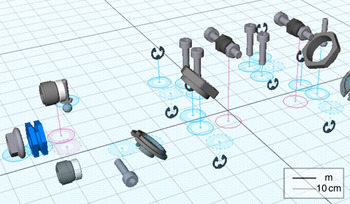
To minimize ambiguity, we require additional cues to aid in our intellection of the configuration of these scenes. The geometries presented in these virtual scenes are based on simple mathematical representations, and replicating real-world phenomena requires additional processing, which in some cases can be quite computationally expensive. An early study into the use of depth cues in computer graphics highlighted that different cues are suited to different tasks (Wanger, Reference Wanger1992). Thus, it is not necessary to represent all depth cues all the time, but rather apply additional cues selectively given a specific task. Glueck et al. (Reference Glueck, Crane, Anderson, Rutnik and Khan2009) proposed a multiscale grid that is visible at any scale, as a foundation for a variety of cues (see Fig. 9). The grid was augmented with visualizations that anchored all scene geometry to the common ground plane. This visualization scheme allowed users to better make global judgments of the distance, position, and relative size of objects represented in the scene. However, there are limits to the disambiguating power of depth cues. The complexity of a virtual 3-D environment in and of itself can also lead to confusion as the represented geometries begin to visually interfere with one another.
A multiscale grid can be used to anchor scene geometry to a common reference plane. Reprinted from M. Glueck, K. Crane, S. Anderson, A. Rutnik, and A. Khan, Multiscale 3D reference visualization. Proc. 2009 Symp. Interactive 3D Graphics and Games, I3D '09, 2009. Copyright 2009 ACM. Reprinted with permission. [A color version of this figure can be viewed online at journals.cambridge.org/aie]

In the case of too much occlusion, Elmqvist and Tsigas (Reference Elmqvist and Tsigas2008) propose a classification taxonomy for occlusion-based interferences and provide an exhaustive comparison of 50 techniques for managing occlusion. With similar goals in mind, McCrae et al. (Reference McCrae, Glueck, Grossman, Khan, Singh and Santucci2010) developed a series of visualization techniques to represent the spatial relationship between the virtual position of a user and the geometry in the scene, creating a spatially based hierarchical partitioning of the scene. In evaluating the benefits and weaknesses of different design configurations, McCrae et al. (Reference McCrae, Glueck, Grossman, Khan, Singh and Santucci2010) stress that selecting one technique over another is a highly task-dependent choice. These visualizations can be seen as a kind of normalized abstraction, where the context of the scene is removed in favor of an examination of the structure of the spatial layout across multiple scales. All of this research indicates that in virtual environments, it is critical to consider a user's task and frame of reference when applying aids, such as additional depth cues, projection type, and alternate representations of the environment, to new tools to help explore the space, with the goal of making it easier for a user to understand the environment.
3.4. Intelligent navigation
Christie et al. (Reference Christie, Olivier and Normand2008) present a comprehensive review of 3-D navigation techniques, which highlights the transition from direct control and assisted control to more complex automated and constraint- and/or optimization-based techniques. The benefits of limiting or constraining a user's navigation technique, in a manner to support the goal of their task, have been documented (Jul, Reference Jul2003; Fitzmaurice et al., Reference Fitzmaurice, Matejka, Mordatch, Khan and Kurtenbach2008). Specifically, Fitzmaurice highlights the importance of both error prevention, as well as error recovery. One such technique, for exocentric navigation, Navidget (Hachet et al., Reference Hachet, Decle, Knödel and Guitton2009), presents users with an interactive preview of their destination point of view before initializing a smooth transition animation. This allows users to avoid making errors and arriving at confusing destinations. Fitzmaurice et al. (Reference Fitzmaurice, Matejka, Mordatch, Khan and Kurtenbach2008) provides a navigation widget with a rewind metaphor to help users more easily recover from unexpected navigation results. Moreover, techniques such as ShowMotion (Burtnyk et al., Reference Burtnyk, Khan, Fitzmaurice and Kurtenbach2006) allow for simple authoring of interactive storyboards, allowing users to view and navigate authored views of a virtual environment, by not only preventing errors from occurring but also avoiding loss of context if an error were to occur.
Egocentric flying has been supported by automatically adjusting the flying speed based on the nearness of geometry and collision detection (McCrae et al., Reference McCrae, Mordatch, Glueck and Khan2009). Egocentric navigation has also been addressed through interactive path planning-based navigation techniques. By leveraging knowledge of the location of scene geometry, an optimal path can be planned through an environment that ensures transitions maintain scene context, minimizes the occlusion of geometry, and prevents collisions with scene geometry (Salomon et al., Reference Salomon, Garber, Lin and Manocha2003; Oskam et al., Reference Oskam, Sumner, Thuerey, Gross, Fellner and Spencer2009; Burelli & Yannakikis, Reference Burelli and Yannakakis2010). Ensuring that at least one object is always visible prevents the effect of Desert Fog, where a user becomes disoriented because they are not viewing any geometry and lose sense of their position in a virtual environment (Jul & Furnas Reference Jul and Furnas1998). These more sophisticated navigation techniques are in line with the concept put forth in this paper, that navigation should support intellection whenever possible.
Although a significant amount of research has gone into understanding and addressing the complexities of 3-D, the current state of the art has only begun to touch on multiscale interaction. There are a range of difficulties inherent in virtual environments that are not readily apparent in single-scale interactions, and oftentimes do not impact the user in a noticeable way. In multiscale environments these difficulties are not only brought to the surface, but can greatly impede the ability of a user to effectively interact with the virtual environment. We now turn to highlight some of the difficulties hidden in traditional virtual environments, but critical to interacting in multiscale virtual 3-D environments.
4. PROBLEMS OF INTELLECTION AND NAVIGATION IN MULTISCALE VIRTUAL 3-D ENVIRONMENTS
In comparison to traditional virtual environments, multiscale virtual environments are more difficult to understand and to navigate. In many ways, we can describe these difficulties in terms of an overconstrained problem, in that there does not exist a solution that will simultaneously satisfy all conditions optimally. In particular, we consider problems relating to the ability of a user in building upon and maintaining a consistent cognitive collage of the virtual environment. In multiscale virtual environments, this process can be encumbered by confusion relating to the current position and orientation of the user, moving between scales, C-D ratios, perception of size, and whether the user is inside or outside of geometry.
4.1. Position and orientation
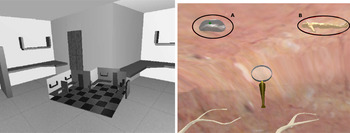
Effectively communicating the position and orientation of a user becomes a more difficult task in multiscale virtual environments. The ability of a user to integrate this information depends again on their cognitive collage of the environment. As previously mentioned, the construction of this map relates to the user's frame of reference and task, and the technique of communicating orientation and position must be congruent to the frame of reference. Egocentric representations for multiscale 3-D environments, such as the spatial abstractions presented by McCrae et al. (Reference McCrae, Glueck, Grossman, Khan, Singh and Santucci2010), are only starting to be explored in research, drawing on previous work in 2-D multiscale environments. The full extent of this design space is not yet well understood. Exocentric representations, such as the use of auxiliary views (Plumlee & Ware, Reference Plumlee and Ware2006; Tory et al., Reference Tory, Kirkpatrick, Atkins and Moller2006) or worlds in miniature (Stoakley et al., Reference Stoakley, Conway, Pausch, Katz, Mack, Marks, Rosson and Nielsen1995), are more common. However, exocentric representations suffer from additional complexity as multiscale environments may exhibit multiple local contexts within the larger global context. Deciding which discrete local contexts to make available to a user is highly dependent on the user's task and knowledge of the environment. For example, in an interface to support exploration of an anatomical human body, Kopper et al. (Reference Kopper, Ni, Bowman and Pinho2006) provide users with two world in miniature views to show the location of the user both within the local context of the organ being explored, but also within the global context of the human body (see Fig. 10).
Overview techniques provide context. (Left) A world in miniature overview in a traditional virtual environment provides global context. Reprinted from R. Stoakley, M.J. Conway, and R. Pausch, Virtual reality on a WIM: interactive worlds in miniature. Proc. SIGCHI Conf. Human Factors in Computing Systems (Katz, I.R., Mack, R., Marks, L., Rosson, M.B., & Nielsen, J., Eds.), 1995. Copyright 1995 ACM Press/Addison–Wesley. Reprinted with permission.
(Right) Multiscale environments can have multiple relevant contexts at different scales; point A, the local context of an organ and, point B, the global context of the human body. Reprinted from R. Kopper, T. Ni, D.A. Bowman, and M. Pinho, Design and evaluation of navigation techniques for multiscale virtual environments. Proc. IEEE Conf. Virtual Reality, VR, 2006. Copyright 2006 IEEE Computer Society. Reprinted with permission. [A color version of this figure can be viewed online at journals.cambridge.org/aie]

An ideal system can be imagined that dynamically extracts relevant features at different scales such that a minimum number of exocentric overviews are required to communicate position and orientation. But this is not a trivial problem, nor can it be guaranteed that meaningful local contexts will always exist in every multiscale virtual environment. As the number of scales represented in a given multiscale environment increases, maintaining coherence from a global context across any number of intermediary local contexts through worlds in miniature is likely not scalable. Zhang (Reference Zhang2005) communicates the spatial relationship between components in a multiscale environment by animating a transition between the two that travels up and back down through the scales to provide global context. Thus, as we move into multiscale environments, additional research is necessary to discover new ways of representing the spatial layout to the user, and communicating their position within these environments.
4.2. Moving between scales
Navigation in multiscale virtual 3-D environments has added complexity over navigation in traditional virtual 3-D environments because not only must they support users in moving through 3-D space, but must also support users in choosing which scale to view. One area that has not yet received much research attention is how to best support transitions between scales. Some research presents different scales as discrete layers, fading from one to the next (Zhang Reference Zhang2005), whereas others show continuous transitions from one scale to another, based on distance to an object (Kopper et al., Reference Kopper, Ni, Bowman and Pinho2006; McCrae et al., Reference McCrae, Mordatch, Glueck and Khan2009). It is unclear which is more natural, and likely is dependent on the user's task and on the properties of the data set. Discrete scale changes better communicate the precise moment a change in scale occurs, which might be suited to environments where a user might want to directly control at which scale they interact with an environment, such as anatomical models where one user might wish to experience the environment at the scale of organs, whereas another might interact at the cellular level. Continuous scale changes, in contrast, might be better suited to environments, such as exploring a city and buildings within it, where a more natural transition between scales is expected, and explicit scales are not beneficial to a user's task.
Another point of interest is the relationship between the common operations of zooming and dollying. In traditional environments, the visual effect of each is almost identical; both bring you closer or farther from geometry of interest. Technically, the former changes the field of view of the camera, whereas the latter displaces the camera position. When navigating in multiscale environments, the distinction between them is clarified in the sense that both tools are needed to effectively navigate. Dollying is needed to move the camera closer to an object, while zooming changes the scale or level of detail under which that object is viewed.
4.3. C-D ratios
The C-D ratio refers to the amount of change one unit of change in the input device causes on the virtual environment. Depending on the task, different C-D ratio schemes can be used, either to support precise fine-grain input (low C-D ratio) or quick coarse-grain input (high C-D ratio). In terms of multiscale navigation, it is important to be aware that as a user switches between scales, it is important to maintain the same feeling of C-D ratio as in any other scale, which means the C-D ratio must change continuously and automatically depending on the current scale being viewed. McCrae et al. (Reference McCrae, Mordatch, Glueck and Khan2009) present such a navigation system where the C-D ratio is changed based on the proximity of scene geometry. For example, this allows a user to fly through a maze at one scale and follow a mouse-hole into a smaller version of the same maze, one-tenth the size, all while still experiencing the same level of control flying through this smaller space. Milgram and Colquhoun (Reference Milgram and Colquhoun1999) present a detailed survey of literature related to C-D ratios and congruence with task and frame of reference. Further research is needed to integrate zooming with the dynamic C-D ratio during dollying of McCrae et al. (Reference McCrae, Mordatch, Glueck and Khan2009).
4.4. Relative and absolute size
The natural feeling a user experiences while flying from a room at one scale to one-tenth of the size underlines one of the most ill-defined problems in virtual 3-D environments: the user has no absolute size within the environment. Mathematically speaking, in perspective projection the user is represented by an infinitesimally small point in 3-D space, whereas in parallel projection the user is infinitely far away from the model. Moreover, the user cannot physically put their hands into the virtual environment. Thus, the perception of size within a virtual environment is entirely relative, based on deductive reasoning and judgments (see Fig. 11).
The scale in a scene is all relative to how large a user believes they are. [A color version of this figure can be viewed online at journals.cambridge.org/aie]

Virtual 3-D environments do not engage us the same way that the real world does. An outstanding problem that remains is how to communicate absolute size to a user exploring a virtual environment. In a physical environment, a person can roughly judge the absolute scale of objects due to the grounding of knowing their own physical size, and while feedback to a user in virtual environments, through depth cues, visualizations, and projection type, provides them with the ability to make strong judgments and decisions about the relative size, relative shape, and relative position of geometry, the grounding knowledge of their own exact virtual size is not available. In this sense, the human experience of interacting with a physical 3-D environment does not assist users in reasoning about absolute scale in a virtual environment.
Although the use of a grid in a scene representing real-world units (Glueck et al., Reference Glueck, Crane, Anderson, Rutnik and Khan2009) is a first step, this method is very indirect. Just like looking through a microscope, with a ruler next to the specimen, the size can only be understood as a relative comparison. Large-screen displays and immersive environments can induce varying degrees of presence within the virtual environment (Donath et al., Reference Donath, Kruijff and Regenbrecht1999), but judgments of absolute size are still ambiguous, because a user inherently has no size. An anecdote about a digital prototype design that went directly to manufacture holds that the final product was about 10% larger than any of the designers had anticipated, despite using the latest technology in design reviews using large displays. Thus, it may be that strict judgments of absolute size are simply not possible in virtual environments.
4.5. Inside or outside?
Another ill-defined problem relates to whether a user believes they are inside or outside of geometry. In traditional virtual environments, users are typically exclusively outside of an object or group of objects, operating with an exocentric frame of reference. However, in complex multiscale environments, users might find themselves inside some geometry, such as a building, and experiencing the objects inside that space. In this case, they simultaneously switch frames of reference from egocentric exploration of the interior of the building, to exocentric exploration of the objects in that building. In such environments, it becomes more difficult to design a single navigation technique to cater to both modes of reasoning about the scene, especially because it is near impossible to infer which frame of reference a user is engaged in at any given moment (see Fig. 12).
Depending on a user's task, they can see themselves as outside an object, inside an object, or both inside and outside different objects. [A color version of this figure can be viewed online at journals.cambridge.org/aie]

5. POSSIBLE SOLUTIONS
In the following section we speculate on possible strategies to tackle some of the difficult problems we have identified to be inherent in multiscale virtual 3-D environments. We propose using depth of field to help instill in users a sense of their size within a scene. We suggest the explicit addition of context to aid judgments of relative size for traditional virtual environments. We set forth supporting parallel projection navigation through automatic clipping volumes. We also weigh the trade-offs of hiding or showing users details of system implementation. Finally, we reiterate the benefits of constraining user navigation based on domain and task.
5.1. Depth of field
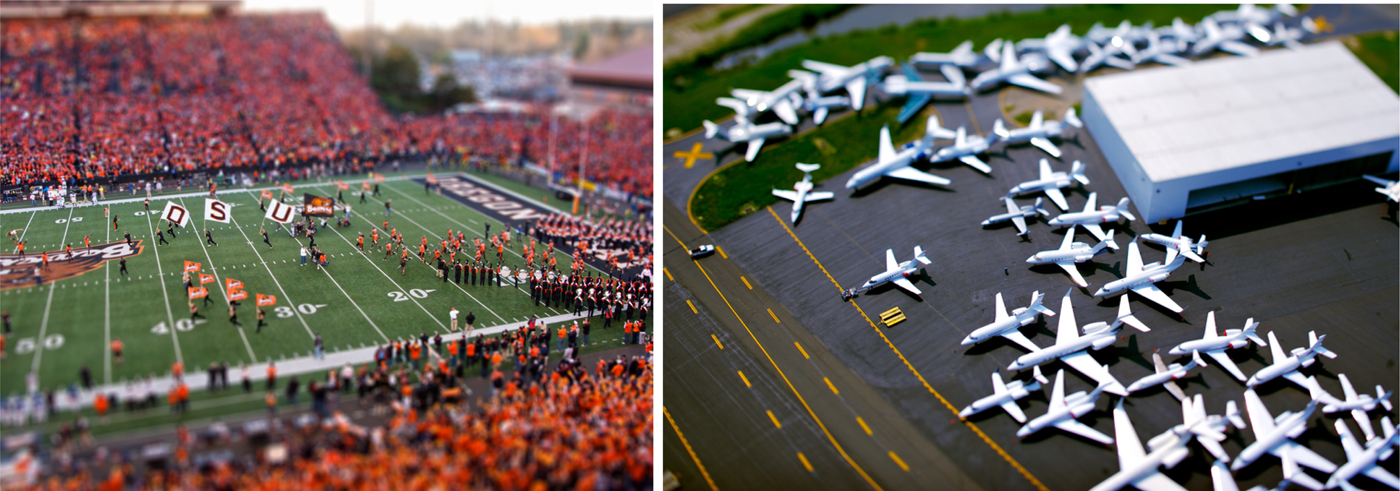
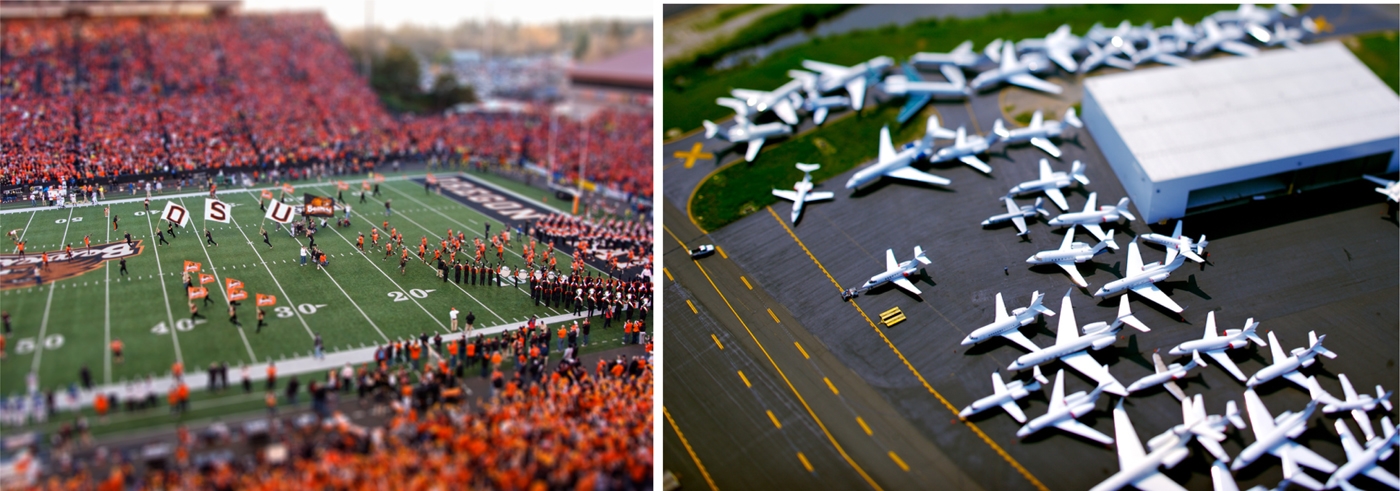
The depth of field effect is a very powerful visual cue that has many possible applications to multiscale virtual 3-D environments. Depth of field is an optical effect that causes very near and very far objects to appear blurred. Beyond aesthetic appeal, depth of field can greatly add to a sense of distance and relative size between the subject and the observer. For example, depth of field manipulations are popular in photography where, through the use of a tilt-shift lens, a photographer has precise control over both the distance and plane on which focus falls. One possible effect that can be achieved is miniaturization, where distances and subjects appear relatively smaller in scale (see Fig. 13). Taking advantage of depth of field effects might implicitly communicate a user's size within the scene, which would allow for stronger relative size judgments to be made. In addition, blurring of the periphery might help increase the feeling of presence within a virtual environment, as well as help highlight subjects of focus, implicitly allowing users to gauge the proper distance to view objects in a scene. As evaluated by Juricevic and Kennedy (Reference Juricevic and Kennedy2006), the accuracy of spatial judgments in perspective is strongly affected by the viewing angle, height of observer, and the orientation of the object. Depth of field blurring could be used to implicitly drive users' focus and attention toward these “sweet spots” where their perceptual judgments will be most accurate. These types of cues may also be useful in helping users to learn how to properly use navigation tools such as zooming and walking and help in building a more accurate cognitive collage of the environment. An explicit depth of field tool may also serve as means for the user to explicitly tell the system whether an egocentric or exocentric condition is being considered. Although depth of field has long been used in computer graphics for aesthetic and cinematographic effects, we suggest that it may also find a use as an explicit tool to aid user understanding of multiscale virtual 3-D environments.
Examples of the depth of field miniaturization effect (left: Gregkeene, Wikimedia commons; right: Vincent Laforet, www.vincentlaforet.com). [A color version of this figure can be viewed online at journals.cambridge.org/aie]
Although complex camera models approximating lenses have been presented (Potmesil & Chakravarty Reference Potmesil and Chakravarty1981), the additional computational overhead has prevented mass adoption over the fairly light-weight pin-hole model in popular use. However, recent advances in approximating depth of field in real-time (Lee et al., Reference Lee, Eisemann, Seidel and Hoppe2010) might allow depth of field to find adoption in real-time interactive virtual environments.
Functional fidelity (Herndon et al., Reference Herndon, van Dam and Gleicher1994) refers to the level of realism required in a virtual scene for it to be visually useful. Although Herndon et al. (Reference Herndon, van Dam and Gleicher1994) state that functional fidelity need not seek photorealism, approximations to photorealism that communicate spatial features of a virtual environment should not be overlooked. Hailemariam et al. (Reference Hailemariam, Glueck, Attar, Tessier, McCrae and Khan2010) purposefully present a detailed model of a building rendered with ambient occlusion alone, as a lighting-neutral method of communicating both the shape of objects and also their relative distance from each other to aid in understanding the virtual space. These kinds of cues are even more important when considering multiscale environments, where accurate judgments of relative size and position become more crucial to the intellection of a scene's layout and building an accurate cognitive collage.
5.2. Context for traditional environments
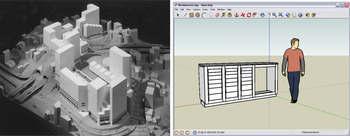
Multiscale virtual 3-D environments inherently portray many objects within a shared context. This context can help a user in making certain judgments, such as the relative size of objects. Many traditional virtual 3-D environments represent objects in isolation, outside of a meaningful context, which can make it more difficult to inspect and make sense of the scene. Although the addition of visualization aids, such as a grid (Glueck et al., Reference Glueck, Crane, Anderson, Rutnik and Khan2009), can help provide spatial context, they may not be sufficiently domain specific. But perhaps we can learn from the domain of architecture. Unlike automotive and industrial design, where full-size physical prototypes can be evaluated, architects must make decisions based solely on the relative proportions of their designs. In support of this, a scale model of not only the new building, but the entire surrounding context might be built. Just as Google SketchUp, a consumer 3-D design application, presents a human-sized cutout as the default geometry within a scene, default proxy geometry should be made available to place objects in virtual 3-D environments into a domain-specific context. For example, a parametric hand could be added to a scene with a prototype of a new hand-held device, or even a parametric human to help in designing a new vehicle. The automation of these kinds of geometric contextual aids will help users in making judgments and in understanding the virtual environments (see Fig. 14).
Explicit contexts help indicate relative size. (Left) Scale models in architecture (GPI Models, Boston and Desroches Photography, Boston). (Right) Default “human-sized” geometry in Google SketchUp. [A color version of this figure can be viewed online at journals.cambridge.org/aie]

5.3. Parallel projection in multiscale
The use of parallel projection in multiscale virtual 3-D environments presents several difficulties. Because the point of view of the user is infinitely far away, occlusion effects will limit what a user can see, for example, like viewing the skyline of a city. Taken with the absence of depth, it becomes impossible for a user to “explore” this environment in a manner similar to that afforded by perspective projection. In traditional virtual 3-D environments, the effects of occlusion in parallel projection are managed through the use of clipping planes or volumes, which remove intersected geometry, allowing the inspection of cross-sections. Efforts in the related field of volume rendering have developed advanced clipping plane and volume techniques (Weiskopf et al., Reference Weiskopf, Engel and Ertl2003; McInerney & Broughton, Reference McInerney and Broughton2006). Although these tools are effective, they must be manually controlled, which requires a strong understanding of the virtual environment. In addition, it is unclear how these tools can be appropriately applied to multiscale applications, where the ideal clipping plane or volume may be dynamic and differ in configuration from one scale to the next. If anything, the application of clipping planes to multiscale environments is too complex to be controlled manually. Recent research has moved toward finer-grain control over clipping planes. For example, Trapp and Doellner (Reference Trapp and Doellner2008) present a technique for rendering nonplanar clipping planes in real time. However, more sophisticated navigation techniques must be developed, that allow a user to explore multiscale environments in parallel projection, leveraging knowledge of scene geometry to automatically position clipping planes and volumes. In this way it might be possible to simulate a semblance of egocentric navigation experience within parallel projection.
5.4. Transparency of underlying model
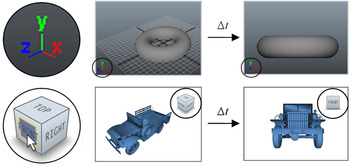
Although often the goal of a virtual 3-D environment is to provide a realistic experience to a user, it has been shown that users can benefit from an awareness of the underlying mechanics. Fitzmaurice et al. (Reference Fitzmaurice, Matejka, Mordatch, Khan and Kurtenbach2008) explicitly rendered the pivot ball, a point around which navigation operations such as orbiting occur. Seeing the pivot ball allowed users to better conceptualize the results of their input, reducing the number of errors and confusion while interacting with the environment (see Fig. 15). A related example comes from anecdotal evidence following the addition of the ViewCube (Khan et al., Reference Khan, Mordatch, Fitzmaurice, Matejka and Kurtenbach2008) to Autodesk software. The ViewCube is a user orientation widget that uses natural language to label the six canonical directions in a scene. Prior to the addition of the ViewCube, when receiving customer 3-D scenes, models were often lying on their sides or upside down. However, the number of these incorrectly oriented models decreased drastically once the ViewCube was integrated into the software, and have all but disappeared since. Although this information was always available to users by means of an abstract x–y–z axis visualization, this representation was too terse to be assimilated. It seems that simply providing a concrete indication of orientation implicitly caused users to model within these constraints (see Fig. 16). Especially in scenes of growing complexity, such as multiscale environments, it is important to consider which underlying implementations to expose to users, and which ones to obfuscate, in order to benefit user understanding.
Transparency versus obfuscation. Displaying a normally hidden Pivot ball allows users to better conceptualize navigation tools, such as orbit. Reprinted from G. Fitzmaurice, J. Matejka, I. Mordatch, A. Khan, and G. Kurtenbach, Safe 3D navigation. Proc. 2008 Symp. Interactive 3D Graphics and Games, I3D '08, 2008. Copyright 2008 ACM. Reprinted with permission. (Left to right) The pivot ball in front of scene geometry, on the surface of scene geometry, and inside scene geometry. [A color version of this figure can be viewed online at journals.cambridge.org/aie]

(Top) An x–y–z axis triad may be too abstract for users to leverage. (Bottom) The ViewCube makes the same information more accessible. Reprinted from A. Khan, I. Mordatch, G. Fitzmaurice, J. Matejka, and G. Kurtenbach, ViewCube: a 3D orientation indicator and controller. Proc. 2008 Symp. Interactive 3D Graphics and Games, I3D '08, 2008. Copyright 2008 ACM. Reprinted with permission. Clicking on the ViewCube animates the camera position to the selected orientation. [A color version of this figure can be viewed online at journals.cambridge.org/aie]

5.5. Domain and task specificity
Providing users with total freedom generally leads to more confusion as it is allows them to get into strange situations from which recovery is difficult. This is only further compounded in multiscale environments, where users need more control over how their navigation tools function. We believe automatic and constrained navigation tools should be preferred over free-form navigation. Aspects of navigation, such as the C-D ratio and collision detection, should be automatically and intelligently determined by the tool and the context of use. Only navigation techniques relevant to the current task at hand should be provided, and these methods should provide enough feedback to help minimize user error. Fitzmaurice et al. (Reference Fitzmaurice, Matejka, Mordatch, Khan and Kurtenbach2008) highlight the importance of task specificity in navigation tools, presenting an exocentric toolset for the inspection of objects, and an egocentric toolset for the exploration of building interiors. Additional support of domain specific knowledge will further benefit users.
In the preceding discussion of future directions we have presented some possible strategies to approach the difficulties inherent in multiscale virtual 3-D environments that hinder effective intellection and navigation. We call for a reevaluation of the functional fidelity we require in interactive applications, suggesting that additional realistic rendering techniques might benefit understanding in virtual environments. We suggest approaches to implicitly communicate scale and a sense of size to users in both multiscale and traditional virtual environments. In addition, we highlight the need to develop advanced navigation techniques that explicitly support understanding, in particular, to support parallel projection in multiscale environments. Finally, we draw attention to the benefits of constraining the freedom of user navigation and the visibility of navigation implementation, depending on the domain and user's task, to minimize errors and confusion.
6. CONCLUSIONS
By considering multiscale virtual 3-D environments, we have highlighted the inherent, but often unnoticed, difficulties in traditional virtual 3-D environments. In particular, the difficulties of ensuring user awareness of their position and orientation within an environment, and communicating an implicit sense of scale are two areas that require additional research focus. Although research has addressed some of the issues related to the former, there has yet to be a unified method presented. In contrast, the latter has received little attention. We suggest that by drawing on realistic rendering techniques, novel uses for optical cues, such as depth of field, can be applied to multiscale virtual 3-D environments to provide users with an implicit sense of scale and size. Going forward, we may need to reevaluate what we consider to be a reasonable functional fidelity for interactive applications.
In addition, we have presented an abstract model to illustrate the cyclic relationship between intellection and navigation in virtual 3-D environments. Navigating an environment is intrinsically linked with understanding that environment. This relationship is critical to consider when developing cues to aid understanding, but especially when developing navigation techniques. Navigating cannot be studied in isolation. The role of navigation must be considered as a method of reasoning for both the user and tools themselves. Navigating and understanding must be evaluated simultaneously, to develop navigation techniques that are both effective and useful. There are a tremendous number of considerations to take into account: the user's frame of reference, dynamically changing the C-D ratio, and which projection types to support. We believe that ensuring users have access to sufficient cues and feedback will allow for the development of more accurate cognitive collages of environments, resulting in spatial judgments with fewer errors. This is particularly important as the virtual 3-D environments we encounter increase in complexity of geometry and scale. Understanding 3-D need not be difficult.
ACKNOWLEDGMENTS
Special thanks to Ramtin Attar, Ebenezer Hailemariam, Ryan Schmidt, Rhys Goldstein, Rob Aitchison, and Gord Kurtenbach for their helpful suggestions, insights, and feedback.
Michael Glueck is a Researcher within the Environment & Ergonomics Research Group at Autodesk Research. Coupling his fascination for both psychology and computer science, Glueck specialized in human–computer interaction at the University of Toronto. Although his primary research focus has been investigating user context in multiscale data sets and navigation techniques in 3-D virtual space, he is also interested in interactive data visualization strategies, applications of eye and head tracking, and augmented reality.
Azam Khan is the Head of the Environment & Ergonomics Research Group at Autodesk Research. His research focus is sustainability in the context of building efficiency, exploring modeling and simulation including physics-based generative design, air flow, and occupant flow in an architectural context; and simulation visualization and validation. Khan founded SimAUD, the Symposium on Simulation for Architecture and Urban Design to foster cross-pollination between the simulation and architecture research communities. He is also the Principal Investigator of the Parametric Human Project and was a founding member of the International Society of Human Simulation in 2010.