

1. INTRODUCTION
Computer-based educational systems can help students understand new material (by increased practice opportunities with immediate feedback), alleviate some of the stresses of difficult coursework via differentiated pacing, and help to engage students about compulsory exercises through gamelike formats. In short, the main benefit for students is an efficient learning environment. If students quickly learn that their work is incorrect and exactly what parts of their solution are wrong, they can learn the concepts corresponding to their coursework more easily, and they will need less help. The main benefits for instructors are increased student feedback with reduced grading demands. Instructors can also teach their coursework more efficiently by using educational systems as an instructional support, and they can focus their attention on instructional design rather than grading. However, because of the limits of technology, certain types of homework problems, such as solving problems with complex diagrams, are continually assigned and completed by hand with pen and paper. However, as the format of higher education is changing, in large classrooms of 100+ students and massive open online courses, assigning even one diagram per student may require days of grading for the instructor or teaching assistant.
We researchers need to consider how educational systems might alleviate some of the grading complexity while at the same time allowing students to master the concepts vital to their future careers. The educational system should have the following benefits: provide an interactive experience similar to the traditional pen-and-paper technique, provide educational feedback, be easy to use, and provide a simple grading mechanism. This educational system should also mimic the way that students effectively learn in the classroom. In short, we aim to translate best practices of traditional engineering education into an online environment and allow students to move seamlessly between online support systems and face-to-face classrooms. For example, research has long indicated the benefits of student sketching and visual spatial thinking for solving scientific problems (Mathewson, Reference Mathewson1999). Many researchers have attempted to design such systems, but they have fallen short of reaching all of these goals. Such systems tend to provide partially completed diagrams, constrain sketches to a particular order using finite state machines, or use complicated drag-and-drop techniques. Almost none of these systems provide a grading mechanism.
We discuss a pen-based educational system called Mechanix, intended for use in introductory mechanical and civil engineering courses. Mechanix meets and excels at all the requirements listed above for a robust and interactive online education system. One of the main advantages of Mechanix is the free-sketch feature, which allows students to create their own sketches and free-body diagrams (FBDs). As noted earlier, a linkage between freehand drawing and ordered thinking has been shown to reflect an understanding of underlying conceptual structures (Tversky, Reference Tversky, Gero and Tversky1999). Sketching has other verifiable benefits to engineering education as well. Research has shown that the closer a training tool matches a real-world scenario, the more a student learns (Mestre, Reference Mestre2005). For scientific and engineering innovation, visual and spatial thoughts are essential (Ferguson, Reference Ferguson1977). In teaching science and engineering, visual and verbal coordination is also essential. According to the dual coding theory of cognition (Sadoski, Reference Sadoski2001; Ouyang & Davis, Reference Ouyang and Davis2011), the coordination of verbal and nonverbal information facilitates learning because there are separate complementary cognitive channels for each type of representation. Therefore, when instruction is coordinated between verbal and nonverbal, a learner can process more information simultaneously because the size of one's working memory is typically the limiting factor in learning (Baddeley, Reference Baddeley1986); effective instruction must not overload cognitive capacity. Exploiting two channels of cognition (e.g., verbal and visual) reduces the cognitive load and therefore increases learning (Sweller & Chandler, Reference Sweller and Chandler1994). When the intrinsic cognitive load of instruction is large (i.e., a very hard task), as is often the case with engineering concepts, it is critical that the presentation format of material, or extrinsic cognitive load, be well designed. In this case, the visual sketching exploits two nonverbal channels (Ouyang & Davis, Reference Ouyang and Davis2011): visual learning via the actual sketches and kinesthetic learning via the process of sketching. This will theoretically maximize learning.
Engineers are notorious for not being able to think without making “back-of-the-envelope” sketches of rough ideas (Ullman et al., Reference Ullman, Wood and Craig1990). These quick sketches cannot be done with traditional computer-aided design (CAD) systems because they are not fast and may not be readily accessible compared to simply using pen and paper. Sketches are a natural way for engineers not only to communicate ideas to others or archive concepts, but also to help an idea or problem take shape in the mind as it is transferred to paper. As sketches are being made, the details left to be designed become apparent to the designer (Ullman et al., Reference Ullman, Wood and Craig1990), and this is also true for students when they sketch mathematical or geometric representations of engineering problems (i.e., sketching allows students to be able to establish a plan or agenda of the tasks needed to be completed to solve the problem). Sketching is advantageous over CAD systems because sketching is a more rapid mode of representing designs. Selecting dropdown menus and icons to create line segments, input lengths, and angles adds to the user's cognitive load (Ullman et al., Reference Ullman, Wood and Craig1990).
Existing engineering texts and curriculum certainly use visual aids in the form of diagrams, pictures, and other multimedia, but having students actively construct visual representations rather than having them passively view visual representations requires higher levels of thought. The task of freehand sketching encourages and demands that learners are actively constructing their knowledge. This type of “forced active processing” ensures attention to visual information (Kozma, Reference Kozma1994) and helps learners attend to key elements of the visual system (Stern et al., Reference Stern, Aprea and Ebner2003). When learners have to coordinate multiple representation systems, verbal, visual, and symbolic (e.g., math problems), they need to make analogies between such representations, leading to an increase in long-term learning (Schnotz & Bannert, Reference Schnotz and Bannert2003). According to the select–organize–integrate model of multimedia learning (Mayer, Reference Mayer1996), learners should actively engage in the process to reach the highest levels of comprehension. However, it is necessary to note that hypermedia tools have been found to function most effectively as a supplement (rather than as a substitute) to high-quality teaching.
This current system provides key instructional advantages over current sketching software. The use of natural drawing techniques, rather than a tool palette, ensures that there will be little instructional time wasted on teaching the technology, which allows for seamless integration into the classroom. The goal is to teach engineering, not technology. The feedback capabilities also ensure that students receive immediate and essential response regarding their learning (Goldman, Reference Goldman2003). Educational research consistently demonstrates the power of feedback for student learning and motivation, while also documenting an unfortunate lack of feedback in many learning environments. For example, Black and Wiliam's (Reference Black and Wiliam1998) classic meta-analysis found strong effect sizes of feedback for learning and identified key principles of effective feedback. However, more recently, Nicol and Macfarlane-Dick (Reference Nicol and Macfarlane2006) note a continued lack of use of timely and formative feedback in higher education, despite greater advances in educational technology and understanding.
In this paper, we provide a tour of Mechanix from the points of view of the student and the instructor regarding the various problem types supported by the software. Then we provide a description of the artificial intelligence behind the sketch recognition, answer checking, and truss analysis created for and used by Mechanix. Next we compare Mechanix with some of the other truss and FBD programs to highlight the benefits and advantages of Mechanix over these existing systems. These programs include WinTruss (Sutton & Jong, Reference Sutton and Jong2000), Carnegie Mellon University's Open Learning Initiative (CMU, 2001), Andes (Vanlehn et al., Reference Vanlehn, Lynch, Schulze, Shapiro, Shelby, Taylor, Treacy, Weinstein and Wintersgill2005), VaNTH ERC free-body diagram assistant (Roselli, Reference Roselli2013), InTEL (Rosser, Reference Rosser2007), Newton's Pen (Lee et al., Reference Lee, de Silva, Peterson, Calfee and Stahovich2008), and M-MODEL8 (Anderson, Reference Anderson2011). Finally, we describe experiments to evaluate the effectiveness of Mechanix within authentic classroom settings, and we also present and discuss the results.
2. A TOUR THROUGH MECHANIX
Mechanix is a sketch recognition computational program developed through a collaboration of researchers in the Mechanical Engineering Department at the Georgia Institute of Technology, as well as the Computer Science and Engineering Department, and the Curriculum and Instruction Department of Texas A&M University. Mechanix provides a computer-based interface for students, which helps them to solve their truss and FBD problems on their own with optional (i.e., by request) step-by-step feedback from the interface. With Mechanix, students can directly sketch a truss FBD onto a computer tablet using a smart pen; they can also sketch the FBD with a mouse and a standard computer monitor. Mechanix recognizes a correctly drawn FBD sketch, automatically labels nodes, and provides intelligent feedback as the student requests it; Mechanix also grades the problem. Engineering instructors can also create their own problems in Mechanix and enter their own solutions. The Mechanix software and tutorial are available at http://www.sketchmechanix.com.
2.1. How Mechanix works: The student interface
When students use Mechanix, they sketch the FBD into the program; Mechanix then automatically detects and labels the nodes of the truss as the instructor entered it. The student then draws an axis and proceeds to solve the problem as he/she would by hand (i.e., labeling the FBD with input and reaction forces, etc.). The student's ability to draw his/her own sketch mimics the same procedure that he/she takes when drawing a sketch on paper, which is the traditional way of solving truss problems. Thus, it is easy for the student to transition back and forth between Mechanix and traditional truss solving methods. Figure 1 shows a student using Mechanix.
(Color online) A student sketches a truss free-body diagram into the Mechanix program.

Mechanix provides instant feedback to the students through a drop-down feedback message bar that appears when a student asks for feedback by clicking on the green checkmark (this also serves as the submit button) at the upper right-hand corner of the Mechanix window (see Fig. 2). The drop-down feedback message bar will indicate and display if the student has made a mistake in the solution and will state what exactly the error is; in this case, the message bar is bright orange. When the student has successfully solved the problem, the message bar will display as such and will be green in color.
(Color online) A sample problem in Mechanix showing the drop-down feedback message bar and where students can enter their solutions to the truss problem.
The instant feedback feature of Mechanix is one of its most critical features. Figure 2 also shows an example of the view in Mechanix as the student is solving the problem; here the student has asked for feedback by clicking on the green checkmark. As shown, the student has forgotten to label the input force at node C as 1 kN, and Mechanix has alerted the student with the drop-down feedback message that is in orange at the top of the screen. Mechanix does not provide the answers to the students, but it informs students if their problem solving steps are correct or incorrect.
With this type of formative feedback, the student can correct his/her mistakes within the problem-solving process, rather than continuing on an inaccurate pathway. After the appropriate corrections are made, the student can continue solving the problem by labeling the reaction forces at nodes A and E. As the student labels these reaction forces, input boxes at the bottom of the Mechanix window will appear where the student can enter the force value and select units. Figure 2 shows the answer boxes for the reaction forces. The student can also enter the force summation and moment equations at the bottom of the Mechanix window. After the student has solved and entered the values for the reactions forces, he/she can check the solution again by asking for feedback or submitting the solutions. Figure 3 displays the screen that the student sees when he/she has successfully and correctly solved the problem.
(Color online) A correctly solved problem in Mechanix.
Another advantage of Mechanix over existing truss and statics software is that each time the students check their answers by clicking the submit button, Mechanix saves the submitted drawing along with the feedback message generated by the system at that point in time. While only the student's last click on the green checkmark or submit button is counted as the student's final solution, all the interim “checks” by the student provide invaluable data. This data is beneficial to both the student and the instructor, because when the instructor reviews assignments, he or she can determine where and with what aspects of the problem the students are having the most trouble. Therefore, instructors can conclude if there are patterns of errors for a particular student as well as across students. Using such information, the instructor is able to teach more responsively by reviewing difficult concepts or steps within a problem that, through traditional binary (i.e., right/wrong) grading, could remain unknown.
In addition, to create more practice problems, the instructor can also create a completely new problem set without the need of any programming skill. He/she will use an interface similar to that of the student, where the instructor can input the text and images of the problem set, draw the expected sketched solution, and fill in the correct solution values. Finally, unlike available systems, the instructor can also create creative design problems in Mechanix, which are open-ended truss problems to which there is no one right answer; the instructor gives certain minimum design specifications for the truss, and the students design a truss in Mechanix to meet these minimum requirements. Giving instructors the tools they need to review the students' progress and create new content based on that, the overall system provides a means to optimize the instructional needs of the classroom.
2.2. How Mechanix works: The classic instructor interface
The instructor interface looks intentionally similar to the student interface. In Figure 4, an instructor has begun defining a nontruss FBD question using Mechanix's instructor interface. To create a problem, the instructor enters the problem text, and then selects an image from his/her local file system for the students to reference. The question image displays at the top right corner of the screen. The student sees this image when attempting to solve the question. The student does not see the instructor's solution FBD. The textbook publishing company often provides these images, but they can also be created by instructors using image or document creation software. Next, the instructor draws an example solution to the given problem. Instructors draw the solutions to the problems in exactly the same way that students do. Instructors can choose which properties about the sketch will be required for the student to enter and can either manually enter the value of the properties or allow Mechanix to solve for those values automatically. An instructor may wish to ask the students to provide, for example, the value of some reaction force or the value of all member forces.
(Color online) The Mechanix instructor interface.
2.3. How Mechanix works: The creative design instructor interface
Creative design questions require different instructor specifications. Because creative design questions can have infinite solutions, instructors cannot simply draw an example solution against which the system will compare all student solutions. Instead, the instructor must specify a set of constraints and required properties for the student's truss design. As shown in Figure 5, the current checklist allows instructors to indicate that
• students need to enter member forces
• students need to enter reaction forces
• the truss needs to support a maximum load of some value
• the truss needs to be of a length shorter than some value and longer than some other value
• students need to enter a safety factor
• the truss must cost less than some monetary amount
• the truss must only include a certain number of beams
• students need to enter a maximum compression strength and value
• students need to enter a maximum tension strength and value
(Color online) Creating new design problems.
3. MECHANIX BACKSTAGE: THE AI BEHIND THE SCENES
3.1. Related work of sketch recognition and sketch-based software
3.1.1. Sketch recognition
Ivan E. Sutherland first introduced sketch recognition technology when he created a man–machine graphical communication system called Sketchpad. This system introduced a new way to draw graphics with a computer. Users could draw shapes by using special equipment, though the equipment was difficult to use for a novice (Sutherland, Reference Sutherland1964). Since then, sketch recognition research has been vitalized. Sketch recognition systems typically fall into three categories: gesture recognition (Rubine, Reference Rubine1991; Wobbrock et al., Reference Wobbrock, Wilson and Yang2007), vision-based recognition (Kara & Stahovich, Reference Kara and Stahovich2005; Ouyang & Davis, Reference Ouyang and Davis2009), and geometric recognition (Hammond & Davis, Reference Hammond and Davis2005). Gesture recognition focuses on how a shape is drawn. Important features in gesture recognition include locations of endpoints, curvature, and angles between various points on the stroke (Rubine, Reference Rubine1991). Vision-based recognition focuses on the position of black pixels in a bitmap. This category of sketch recognition uses features such as Hausdorff distances (how close is a point in one shape to any point in the other shape?) and the Tanimoto coefficient (what proportion of pixels in one shape overlap the pixels of the other?; Kara & Stahovich, Reference Kara and Stahovich2005). Geometric recognition focuses on shapes and their geometric relationships to one another. Other important features in geometric recognition include hierarchic construction of shapes (shapes can be components in the building of other shapes), relative distance of one shape to other component shapes, and relative component–shape size (Hammond & Davis, Reference Hammond and Davis2005).
For nontruss shapes like axes, forces, and supports, Mechanix uses a geometric recognition approach that is closely related to LADDER (Hammond & Davis, Reference Hammond and Davis2005). LADDER describes complex shapes that abide by geometric constraints. LADDER implements a domain-specific language for specifying the relationship between subcomponents in a shape. For example, a student may draw an arrow as a combination of three lines that share a single point or intersection.
There exists other research focused on drawing mathematical expressions using a sketch-based education tool. LaViola and Zelenik (Reference LaViola and Zeleznik2007) introduced MathPad2, which uses sketch recognition to recognize mathematical expressions and diagrams.
3.1.2. Other sketch-based software
CogSketch (Forbus et al., Reference Forbus, Usher, Lovett, Lockwood and Wetzel2008) is a sketch-based software built on the nuSketch (Forbus et al., Reference Forbus, Lockwood, Klenk, Tomai and Usher2004) architecture that supports the goal of incorporating sketch-based software into every classroom in America by 2018. CogSketch is not sketch recognition based, so students need to label sketches for identification. This system is more geared toward idea generation exercises such as product design than toward right versus wrong answers. However, the system has a similar approach to Mechanix in that it allows free-form sketch interaction.
iCanDraw, another sketch-based tutoring software, provides tailored feedback based on a user's sketched input in order to teach him or her how to draw realistic human faces. The feedback of iCanDraw is controlled from interactions conducted in a step-by-step manner, and additional feedback is provided when the system detects that the user has completed the sketch; if a user is stuck in a particular step of the sketching process, the system also provides helpful feedback for accomplishing that step before moving on (Dixon et al., Reference Dixon, Prasad and Hammond2010).
Additional sketch-based learning tools include SetPad (Cossairt & LaViola, Reference Cossairt and LaViola2012), CSTutor (Buchanan et al., Reference Buchanan, Ochs and LaViola2012), LogicPad (Kang & LaViola, Reference Kang and LaViola2012), and PhysicsBook (Cheema & LaViola, Reference Cheema and LaViola2012).
3.2. Sketch recognition in Mechanix
Figure 6 depicts a simple diagram of the processes the software uses to recognize shapes, provide feedback when requested, and submit instructor solutions. When a student or instructor draws a diagram on the sketch surface, each stroke is instantly sent to our set of geometric shape recognizers. Mechanix adds newly recognized Shape objects to the Sketch container object. When a student requests feedback on his/her diagram, Mechanix transforms the Sketch object into a Solution object called an FBD. Mechanix sends the student's FBD to the answer checker component, which in turn compares the instructor's and the student's FBDs. Feedback flows from the answer checker back to the student.
(Color online) A Mechanix system diagram.
The inner workings of Mechanix and the artificial intelligence behind the scenes have been documented in detail in Field et al. (Reference Field, Valentine, Linsey and Hammond2011) and Kebodeaux et al. (Reference Kebodeaux, Field and Hammond2011) and most completely in Valentine et al. (Reference Valentine, Vides, Lucchese, Turner, Kim, Li, Linsey and Hammond2012, Reference Valentine, Vides, Lucchese, Turner, Kim, Li, Linsey and Hammond2013). Because the details of the Mechanix software have already been documented in detail, we provide summaries of these aspects in the following subsections.
3.2.1. Shape recognizers
The sketch recognition process in Mechanix is divided into two steps: low-level recognition and high-level recognition. We use PaleoSketch (Paulson & Hammond, Reference Paulson and Hammond2008) as our low-level recognizer. PaleoSketch recognizes primitive shapes such as lines, circles, and dots. Primitive shapes are the simplest of shapes in that they are drawn in a single stroke and are not made up of any smaller shapes. Mechanix passes each stroke (i.e., the points collected from pen down to pen up) through PaleoSketch to recognize primitive shapes. Then Mechanix adds the recognized primitive shapes to the Sketch data structure. The Sketch data structure acts as a container for all drawn shapes. The vocabulary of primitive shapes recognized by PaleoSketch for Mechanix includes Lines, Dots, and Polylines. Polylines are split into individual line segments before moving on to the next steps of recognition.
Next, Mechanix applies a series of high-level recognizers to recognize complex shapes. The full vocabulary of complex shapes recognized by our high-level recognizers include Triangles, Circles, Lines (if a line was drawn slightly bent and recognized as a polyline), Arrows (six configurations), Double-Ended Arrows, Clamped Supports (three configurations), Fixed-Pin Supports (three configurations), Roller Supports (three configurations), Closed Shapes, the character X, the character Y, Tick Marks, Angle Marks, Scribbles, and Axes (two configurations). Our high-level recognizer system is similar to LADDER (Hammond & Davis, Reference Hammond and Davis2005), a system that defines domain-specific language for specifying the relationship between subcomponents in a shape. For example, a triangle has three lines, and all of the lines should be coincident at the endpoints. Particularly, the triangle in Figure 7 is an isosceles triangle, meaning that the bottom-most of the three lines must be horizontal, and the x value of the intersection point of the other two lines must bisect the bottom-most line. These constraints are defined in a class called a recognizer. Each recognizer takes as the input a set of required subshapes. In the Triangle recognizer, there are three required subshapes: the three individual lines that make up the triangle. The order in which the lines are sent to the recognizer is irrelevant.
(Color online) A triangle shape.
Mechanix uses a brute-force grouping approach to form the sets of subshapes sent to the recognizers. Every set of two shapes in the Sketch will be sent to the recognizers that accept two subshapes, every set of three shapes in the Sketch will be sent to the recognizers that accept three subshapes, and so on, until a new shape is recognized or until all groupings have been exhausted. If a new shape is recognized, its subshapes are removed from the Sketch and added to the new Shape, which is then added to the Sketch. Then the brute-force recognizer cycles through all groupings of subshapes again until no more complex shapes can be found.
This process enables recursive recognition of shapes. For example, our line recognizer recognizes lines made from two strokes or line segments. This complex recognizer returns a recognition result of line if the following two conditions are met: the two lines are nearly coincident and the stroke directions have a difference of no more than 10 degrees. It is possible to recognize a line made from three strokes by recognizing the first two, and recognize a line made from the newly combined line shape and the third line. More detail regarding our novel recognition algorithms can be found in Valentine et al. (Reference Valentine, Vides, Lucchese, Turner, Kim, Li, Linsey and Hammond2012, Reference Valentine, Vides, Lucchese, Turner, Kim, Li, Linsey and Hammond2013).
The benefit of our high-level recognition system is that new complex shapes can be added to the repertoire of recognizable shapes easily by simply adding a new class of constraints that describe the new shape. The drawback of our high-level recognizer (specifically our brute-force mechanism) is its time complexity. Because we use the power-set, brute-force grouping approach, many comparisons could be made unnecessarily. To resolve this time complexity issue, the sketches must not only have the number of required subshapes but also the subshapes must be of the correct type. For example, the triangle needs exactly three lines. If a circle is provided as a subshape in the triangle recognizer, the recognizer will immediately return a null result, indicating that no new shape was created.
3.2.2. Truss recognition
Trusses, which are often one of the first FBDs student learn in the statics domain, can be drawn in an infinite number of configurations. Figure 8 shows some example trusses. We define a truss as a set of polygons, where each polygon in the set shares an edge with at least one other polygon in the set. The corners of the polygons are called nodes, and the edges are called beams. An infinite number of valid truss configurations exist. Rather than attempt to define each truss configuration individually using geometric constraints, we use a custom graph-building algorithm to identify a truss shape from multiple line shapes. In this algorithm, Mechanix loops through each beam shape (beam shapes are wrappers of line shapes) and attempts to find nodes (node shapes are wrappers of point shapes that keep a list of connecting beams) near enough to its endpoints. If no near-enough node is found, the endpoint itself becomes a node. If a near-enough node is found, we add the beam to that node. We define our near-enough threshold as min (15, 1/PHI3 × the stroke length of all beams previously added to the node), where PHI is the golden ratio constant, 1.6180339887. Because we designed Mechanix to tutor method of joints truss analysis for statically determinate trusses, all nodes (joints of the truss) are pin joints.
(Color online) Examples of trusses recognized in Mechanix.
Often users draw trusses in multiple strokes. Perhaps the user draws a single-stroke triangle first (recognized as a polyline by PaleoSketch, split into individual line segments, then combined into a triangle by a complex shape recognizer), and then he/she draws individual line segments to complete the truss shape. To overcome the effects of the incremental recognition, the truss recognizer has the ability to break up previously recognized shapes. These shapes must contain only lines (such as triangles, closed shapes, arrows), and can be sent to the Truss recognizer as possible components. This process is quite expensive, so once Mechanix finds the correct truss (the truss drawn in the answer key), Mechanix disables the truss recognizer. Note also that the truss recognizer runs prior to any other recognizer.
When Mechanix corrects a problem for which a professor has provided an answer key with a small discrete number of solutions, it uses simple graph isomorphism to compare the trusses to the solutions given. For example, the leftmost node in both sketches must have the same number of connecting beams. The full algorithm for recognizing and comparing trusses can be found in Field et al. (Reference Field, Valentine, Linsey and Hammond2011). Once the truss structure has been determined, the students can add the remaining diagram components to the solution. For example, forces attach to the truss at specific nodes.
The process used for correcting problems for which a professor provided only constraints that need to be satisfied by the drawn truss (these are called creative design problems), as opposed to a single truss answer, can be found in Section 3.3.
3.2.3. Free-body recognition
Although drawing trusses as the focus of the diagram is common, sometimes diagrams consist of arbitrary nontruss objects. Many simply depict “bodies,” drawn as irregular polygons, or bubbly, hollow shapes that we have termed closed shapes. Figure 9 shows examples of closed shapes that might be used in FBDs. These closed shapes can also have an infinite number of configurations, so a generalized recognizer was necessary. We recognize a closed shape by making a graph from component line shapes. If the graph contains a cycle that uses each edge and node exactly once, then we form a closed shape from the lines. A closed shape requires a minimum of two line shapes, but it has no maximum. In addition, because we segment polylines into line segments anyway, the number of original strokes used to draw the closed shape and the order in which the user drew the strokes is irrelevant. A student's closed shape and the instructor's closed shape must be perceptually similar for the student's answer to be correct. Therefore, to enable a scale- and device-invariant comparison, Mechanix resizes, resamples, and translates the two shapes to a 40 × 40 coordinate plane. Next, for each point in each shape, the algorithm finds the minimum distance to any point in the other shape. Using these measurements, we compute three calculations (originally found in Kara & Stahovich, Reference Kara and Stahovich2005): the Hausdorff distance (the maximum of the shortest distances), the modified Hausdorff distance (the average of the shortest distances), and the Tanimoto coefficient (the ratio of points that have shortest distances less than or equal to 4, which is 10% of the width of the coordinate plane). We combine these three calculations to form a similarity confidence value between 0 (not similar at all) and 1 (perfect match). If the confidence is above an empirically defined threshold of 0.65, then we deem the two shapes similar. The algorithm intentionally does not allow for rotational invariance, because any major rotation would inherently change the way forces react on the depicted body. However, slight rotational variations are allowed, so long as the confidence threshold is met. The full algorithm to recognize and compare closed shapes can be found in Field et al. (Reference Field, Valentine, Linsey and Hammond2011).
(Color online) Examples of closed shapes that might appear in nontruss free-body diagram (FBD) problems.
We use this functionality for truss problems where the truss is too simple to be recognized by our algorithm. For example, a simple truss made from a single triangle does not meet the requirements for recognition as a truss (multiple polygons that share edges). Instructors can still assign a problem with such a truss, but Mechanix treats it like a ClosedShape problem. This difference is invisible and indistinguishable to the student.
3.3. Creative design problems
For each of the problem types listed above, an instructor provides a truss or body and his/her students are required to determine properties of the forces acting on that structure. These types of problems are beneficial when students first learn the concepts, but once the students master those concepts, they can apply their knowledge to more open-ended problems. These open-ended problems are called creative design problems. Creative design problems require students to design and draw a truss based on the constraints provided in the question prompt. For example, the prompt for the sample problem described earlier in the creative design instructor interface section could read, “Create a mini pedestrian bridge; the bridge should span between 4.30 and 5.30 inches as measured from the end supports and should be able to carry a load of 3 pounds force applied to the center top of the span. The maximum load for each member is 1 pound force.”
To include creative design problems in the set of problem types supported by Mechanix, Mechanix needs to solve the truss the same way a student would. Mechanix performs the calculations for the unique truss provided by the student, but these calculations require more information about the truss that was not necessary in the above-described problem types, such as beam lengths, beam angles, and so on.
3.3.1. Annotating diagrams: Tick marks, beam lengths, and angle specification
In order for Mechanix to perform the static truss analysis rather than rote comparison to the instructor key, Mechanix needs to know more about the structure of the truss in a diagram. For example, Mechanix needs to know the length of every beam and the angle each beam makes with its neighboring beams.
We will begin by discussing beam length specification. Often in such diagrams, sketchers will add tick marks to show which beams are of the same length (so a beam with one tick mark is the same length as every other beam with one tick mark, and a beam with two tick marks is the same as every other beam with two tick marks, etc.). Mechanix users can draw tick marks on their trusses as they would on paper. Mechanix recognizes a tick mark with the following features:
• A tick mark is a line.
• The line is drawn perpendicularly across the center of a beam.
• A tick mark should have a length less than some threshold (as determined by the length of the beam it intersects).
Users can draw tick marks manually or Mechanix can draw the tick marks automatically, based on the lengths of the strokes in the truss. Figure 10 shows an example of a truss in Mechanix with appropriate automatic tick marks. Figure 11 shows an example of when this automatic length determination fails owing to an imperfect truss. In this example, all of the diagonal beams should be of the same length, and all horizontal beams should also be of the same length. In the case that Mechanix fails to correctly infer the number of tick marks to give a beam, students can add or remove tick marks very easily. To add a tick mark, the student simply draws it. To remove an unwanted tick mark, the student can right-click on it and delete it using the pop-up menu, or he or she can alternatively delete it with the eraser tool. More in-depth descriptions of our measurement algorithms can be found in Kebodeaux et al. (Reference Kebodeaux, Field and Hammond2011).
(Color online) Automatic tick marks generated by Mechanix.
(Color online) Mechanix fails to infer the correct beam lengths.
Even with tick marks, users still need to specify the measurement of the beam (tick marks allow users to enter this value only once, and it is automatically assumed that every other similar beam has the same measurement). Our interface provides an easier way to solve this problem than drawing a double-ended-arrow measurement, as required in Kebodeaux et al. (Reference Kebodeaux, Field and Hammond2011). Now, a user can initialize beam length and angle by selecting the beam and right clicking the mouse. This right-click gesture causes the pop-up menu to appear, which displays value and angle buttons as shown in Figure 12. If a beam with tick marks is initialized with a length, all other beams with the same number of tick marks will also be given that length. If Mechanix has enough information to infer the length of a beam or the angle of a joint (the angle at the intersection point of two beams, i.e., Mechanix knows the lengths of two beams in a triangle), then Mechanix will automatically update the diagram with that information.
(Color online) Mechanix provides an easy way to specify beam's length and angle.
3.3.2. Understanding and correcting creative design problems
Now that Mechanix has all of the information about the diagram needed to solve creative design problems, Mechanix must perform statics and truss analysis. Answer-checking in the previously mentioned problem types (truss and nontruss FBDs) requires only a pairwise comparison of the student's solution and the instructor's key. Creative design problems, however, require Mechanix to analyze whether student solutions satisfy the question's requirements. Mechanix performs this analysis using the same methods that a student would use.
3.3.3. Calculating force values
The very nature of creative design problems encourages different solutions from each student. Any or all of these answers could be correct. Mechanix must determine whether a solution given by the student adheres to the constraints specified by the instructor. Therefore, Mechanix needs to be able to use artificial intelligence to understand the drawn diagram. We created a method to generate the equation of motion force values automatically. Mechanix can score the assignments by comparing the equation of force values with the instructor's constraints.
Using the example truss in Figure 2, the computer generates a system of linear equations:
 $$\hskip -26pt\sum Fx\ {=}\ 0\colon\ \hbox{the summation of the forces along the} \ x \ \hbox{axis}$$
 $$\hskip -26pt\sum Fy\ {=}\ 0\colon \ \hbox{the summation of the forces along the} \ y \ \hbox{axis}$$
 $$\eqalign{& \sum M\ {=}\ 0\colon \ \hbox{the summation of the cross product between forces} \cr &\, \hbox{and their respective perpendicular distance to the node}}$$
After Mechanix generates system of linear equations, Mechanix solves them using a custom math package to find the values of the reaction forces. The custom math package handles parenthesis, functions like sin() and cos(), and the order of operations using a syntax tree. Mechanix also must solve for the member forces that show the compression or tension of each beam. Then Mechanix generates and solves a system of equations for each node in the truss. The summations below represent all of the external forces plus the addition of the member forces separated into its axis, which is done by taking the sine and cosine of the angle that the beam makes with the axis:
 $$\sum Fx\ {=}\ 0\colon \ \hbox{the forces along the} \ x \ \hbox{axis using cosine}$$
 $$\hskip -9pt\sum Fy\ {=}\ 0\colon \ \hbox{the forces along the} \ y \ \hbox{axis using sine}$$
It is assumed that all external forces are directed in either the y axis or the x axis.
With all of this information gained about the truss, Mechanix determines whether the constraints of the problem were met. More in-depth information about truss analysis can be found in Valentine et al. (Reference Valentine, Vides, Lucchese, Turner, Kim, Li, Linsey and Hammond2012, Reference Valentine, Vides, Lucchese, Turner, Kim, Li, Linsey and Hammond2013).
4. STATICS, FBD, AND TRUSS SOFTWARE
4.1. Comparing Mechanix with prior FBD and truss software
Other existing applications that act as teaching aids for learning truss analysis, FBDs, and other statics problems include WinTruss (Sutton & Jong, Reference Sutton and Jong2000), Carnegie Mellon University's Open Learning Initiative (CMU, 2001), Andes-physics tutoring system (Vanlehn et al., Reference Vanlehn, Lynch, Schulze, Shapiro, Shelby, Taylor, Treacy, Weinstein and Wintersgill2005), VaNTH ERC Free-Body Diagram Assistant (Roselli, Reference Roselli2013), InTEL (Rosser, Reference Rosser2007), Newton's Pen (Lee et al., Reference Lee, de Silva, Peterson, Calfee and Stahovich2008), Interactive Physics (DST, 2013), and M-MODEL8 (Anderson, Reference Anderson2011). All of these tools help students solve their problems and provide them with feedback about their steps. At the same time, none of them offer an opportunity for students to solve the complete problem by themselves; they provide the students with partial solutions and ask them to determine some missing values, force directions, or calculate the failure point. They also provide feedback whether the students' answer for the missing part is correct or not. None evaluate the student's sketch of the FBD.
1. WinTruss: WinTruss (Sutton & Jong, Reference Sutton and Jong2000) allows students to draw trusses using a set of pallet tools; it solves for external and member forces and shows truss deformation under a load. Mechanix, in contrast, offers an interface for the students to draw their own FBDs, place the input and reaction forces at the required locations, and solve the problems completely by themselves, just as they would on paper. Mechanix tells students if their answers are right or wrong, while WinTruss actually provides the answers to the students. Mechanix provides feedback for the students' answers so that it maximizes their learning experience. Instructors can also control how much feedback and guidance Mechanix provides.
2. The Open Learning Initiative: The Open Learning Initiative at Carnegie Mellon University (CMU, 2001) offers online courses to students at Carnegie Mellon and also to the general public for free. The engineering statics course offered on the website includes an FBD section where the basics of drawing FBDs are covered. The course also offers problems that ask students to draw an FBD; however, the system offers a drawn FBD for the student. The interface only allows students to interact with the FBD and answer questions; students cannot sketch or create their own drawings.
3. Andes: The Andes physics tutoring system (Vanlehn et al., Reference Vanlehn, Lynch, Schulze, Shapiro, Shelby, Taylor, Treacy, Weinstein and Wintersgill2005) was designed with similar goals to Mechanix. The Andes interface mimics pen-and-paper homework while providing extra features like immediate feedback. Similar to Mechanix, the intended use for Andes was as a drop-in replacement for pen-and-paper homework to support the current physics curriculum. Andes is not a sketching application; instead, students use a palette of tools to place graphical objects on the screen with the mouse. Once the student places a graphical object, the system prompts and presents the student with a dialog box that they must fill out to provide extra information about the object. Mechanix improves on the Andes system by letting users sketch shapes instead of selecting them from a palette and dragging them around with a mouse.
4. VaNTH ERC Free Body Diagram Assistant: The VaNTH ERC Free-Body Diagram (FBD) Assistant (Roselli, Reference Roselli2013) provides instant feedback to students practicing FBD and statics problems. The FBD Assistant was designed to be integrated into the courseware suite at Vanderbilt University, which makes it very easy for professors to incorporate into the curriculum. The VaNTH ERC FBD Assistant, like Andes, provides a tool- and dialog-based diagram-creation environment that the student must first learn how to use before they can attempt to solve a problem. The aim of Mechanix's sketch recognition design is that students do not need to learn how to use the software; they can focus on learning the engineering concepts required to solve the problems.
5. InTEL: InTEL (Rosser, Reference Rosser2007) features in-built 2-D sketches or 3-D models of real-world examples on which students are able to place their forces and couples, and determine their values. This interface is good for allowing students to connect diagramming of problems to procedural models of the physical world (Rosser, Reference Rosser2007); however, the interface does not allow for students to sketch their own FBDs as in Mechanix.
6. Newton's Pen: Newton's Pen is a pen-based tutoring system for statics (Lee et al., Reference Lee, de Silva, Peterson, Calfee and Stahovich2008). Newton's Pen runs on the FLY pentop computer based on the Anoto digital pen-and-paper technology (Anoto, 2013). Newton's Pen uses a vision-based sketch recognition algorithm (Lee et al., Reference Lee, de Silva, Peterson, Calfee and Stahovich2008) to recognize simple FBDs (such as the FBD for a single node of a truss) and provides constructive feedback about the diagram and the governing equations. The recognition capability of Newton's Pen is limited by the hardware in the FLY pentop computer. Therefore, Newton's Pen requires the user to draw the FBD components in a very specific order, whereas Mechanix does not. For example, in Newton's Pen, to specify a force, the user must first draw the arrow, label it, draw a leader line, then draw an arc to denote the internal angle created by the force and leader line, and finally, label the angle. If users deviate from the prescribed order, recognition fails. Newton's Pen understands simple single-node FBDs (these diagrams consist of a single node and the forces acting on it) and governing equations, but it cannot recognize a full truss problem or a complicated FBD like Mechanix can. Mechanix also allows the students to draw the truss FBD in whatever order they like (i.e., the students can draw the lines making up the FBD in any order).
7. M-MODEL8: M-MODEL8 (Anderson, Reference Anderson2011) is a program that provides an online simulation of mechanical engineering problems and solutions, including FBDs. M-MODEL8 utilizes an open-ended system where students can solve a problem by creating an FBD; the program gives hints, checks errors, and grades the solution. The program does not allow students to sketch their own FBDs; rather, they select various parts and models from an existing library (as in Andes and VaNTH ERC). M-MODEL8 also does not allow instructors to create their own problems in the program.
4.2. Advantages of Mechanix over prior FBD and truss software
Mechanix offers an abundance of advantages over existing programs. Mechanix is able to evaluate the FBD that the student sketches, whereas other programs (i.e., Andes and Intel) either already have the FBD sketched or do not evaluate the FBD, that is, they do not offer feedback as to whether the FBD has been correctly drawn or not. It is important that students understand and know the proper techniques for sketching (truss) FBDs, because this knowledge is essential to properly solving a problem. Instructors using Mechanix can create new problems for the students. Other programs already have the problems set or offer limited options for creating new truss problems.
Learning Mechanix is relatively easy, there are limited buttons, and the interface is self-explanatory. All the needed buttons are on the screen, and there is little to no need to use the drop-down menus. All lengths and units can be automatically assigned to each problem individually. There is no need to bother with units, unlike in WinTruss, where you need to assign units for the FBD. Students using Mechanix also do not need to bother with measuring angles and line segments; Mechanix automatically recognizes the truss based on the problem they are solving. The system also labels the nodes of the truss and recognizes what unit system the students are using. Students do not measure out angles when sketching a truss on paper but take an educated guess when drawing a line on an incline. In addition, Mechanix allows the students simply to draw the reaction forces at the support nodes, and Mechanix will recognize them. For programs like WinTruss, the students actually place a support node icon on the FBD. This is not wise, because FBDs should not have the supports drawn on them; this can confuse the students as to the proper way of drawing and solving FBDs.
Mechanix is the only FBD and/or truss program that offers both sketch recognition and instant feedback; possessing both of these capabilities adds to the advantages that Mechanix has over the rest of the program discussed in this section. Mechanix also does not provide answers but rather guides students to the correct answer, making it a true tutoring program. The sketch-based paradigm, which mimics pen and paper, also allows the program to be used at a fast pace compared with non-sketch-based programs. Using a sketch recognition system like Mechanix saves time and allows students to learn in a familiar and comfortable style.
5. EVALUATING MECHANIX
In order to evaluate the effectiveness of Mechanix as a truss and statics teaching/tutoring tool, we conducted multiple studies within an authentic classroom setting at various stages of development. We based each iteration of Mechanix evaluations on previous findings from student outcomes, instructor feedback, and student focus groups.
Summaries of the first three early evaluations of the educational benefit of Mechanix have been documented previously (Brooke, Reference Brooke, Jordan, Thomas, McClelland and Weerdmeester1996; Atilola, Field, Linsey, Hammond, et al., Reference Atilola, Field, Linsey, Hammond and McTigue2011; Atilola, Field, Linsey, McTigue, et al., Reference Atilola, Field, Linsey, McTigue and Hammond2011; Field et al., Reference Field, Valentine, Linsey and Hammond2011; Atilola et al., Reference Atilola, Osterman, Vides, McTigue, Linsey and Hammond2012, Reference Atilola, McTigue, Hammond and Linsey2013; Valentine et al., Reference Valentine, Vides, Lucchese, Turner, Kim, Li, Linsey and Hammond2012, Reference Valentine, Vides, Lucchese, Turner, Kim, Li, Linsey and Hammond2013). In this manuscript, we provide detailed descriptions of the last three Mechanix evaluations that have been performed. The most recent and accurate evaluation of Mechanix, where Mechanix was at its most robust state, was completed in Fall 2012. In this study, Mechanix was directly compared with another FBD and open-ended program, WinTruss (Atilola et al., Reference Atilola, McTigue, Hammond and Linsey2013). The results from this evaluation have not appeared in any archival publications. We discuss them in detail below.
Three experiments performed during different semesters (Spring 2011, Fall 2011, and Fall 2012) are presented in this section. In these experiments, short-term and long-term learning gains were measured with homework scores, standardized concept inventories, and exam questions. We recruited students from the same class with the same instructor. In addition, the collection of qualitative data in the form of focus groups supplemented quantitative results and provided for a more thorough interpretation of quantitative results. We performed these experiments a using freshman engineering course at Texas A&M University.
5.1. Research conditions
We randomly assigned the recruited students to experimental conditions. Owing to limitations on tablet monitors for the Mechanix condition and the limited number of participants in Fall 2012, the condition group sizes were not matched. The limitation to the Mechanix condition for the Spring 2011 and Fall 2012 groups was 20 students, and the WinTruss condition was limited to 11 students in the Fall 2012 semester. We assigned the students to each of the conditions until the limit was reached, and then the remaining students were again randomly assigned to the other conditions.
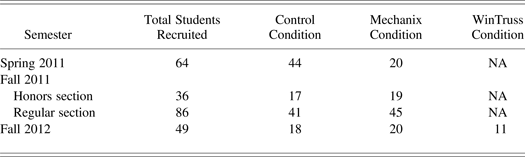
The results from the preliminary semester of testing (Spring 2011) and the full semesters of testing (Fall 2011 and Fall 2012) are presented in this paper. This summary of results shows consistent findings for Mechanix and opportunities to explore its impact further. The Spring 2011 and Fall 2012 semesters each involved only one regular section of the freshman class. The Fall 2011 semester engaged two sections, an honors and a regular section. For Spring 2011 and Fall 2011, two experimental conditions were used (Mechanix and control), and for the third semester presented (Fall 2012), a third condition, WinTruss, was introduced. The WinTruss condition directly evaluated Mechanix against an existing and truss-specific instructional program. Table 1 shows the breakdown of the participants in the various conditions for the three semesters of testing. We removed students who dropped the class or did not complete both pre and posttests from the data for analysis. None of the students in the experiment dropped for the Spring 2011 semester. In Fall 2012, one Mechanix and two control students dropped from the study in the honors section, along with two Mechanix and two control participants in the regular section. One student in the Mechanix condition dropped the class in the Fall 2012 semester.
Participants by semester
Students participated in one of three conditions: control, Mechanix, or WinTruss. We did not expose the students in the control condition to any intervention software (Mechanix or WinTruss). They completed and submitted their homework on paper. They studied for their exams with their notes and/or textbooks. In the Mechanix condition, the students used Mechanix to complete and submit their homework. We also encouraged the students to use Mechanix to study for exams. Mechanix was available to students outside of class via a link to download Mechanix. They also had the option to come to a computer lab where Mechanix was already installed. The option to use Mechanix at home was available in Fall 2011 and Fall 2012 only. This allowed the students the flexibility to complete their homework assignments on or off campus, just as they would if they completed these assignments on paper. In the WinTruss condition, students were encouraged to use the program to assist them in checking their homework and for studying. The students in this condition also submitted their homework on paper, because WinTruss does not have an online submission tool. We also made WinTruss available for the students to download on their personal computers.
5.2. Participants
Recruitment for the three experiments occurred from sections of a freshman engineering class (typical ages 18–19) at Texas A&M University. Typical class sizes are 70–100 for regular sections and 30–40 for honors sections; the class meets twice a week for 2 h each time. This engineering class introduces students to Newton's laws, statistics, basic graphics skills, and CAD tools. In order to minimize the impact of different instructors, we recruited students from the same class taught by one instructor. Students were informed that they were participating in a study to evaluate teaching techniques; however, they did not receive information about the individual techniques. Participation was voluntary. Participating students received extra credit for their participation (which amounted to three extra homework grades), which is standard procedure in educational research. The course had more than 15 homework assignments, so the extra credit counted for only a small percentage of the grade.
It is important to note that the students who typically take this course in the spring semester were retaking the course after failing it in the Fall or were not adequately prepared by their high schools to take the required corequisite physics and calculus courses. These differences in the student populations in the Spring and Fall semesters could possibly account for differences in their performance in the class. We unfortunately were unable to collect further data during the Spring semesters owing to changes in the curriculum and faculty availability.
5.3. Method
The same instructor (an assistant professor of mechanical engineering) presented lecture materials for all sections for all three semesters of testing to eliminate teacher effects, and the instructor assigned all students the same homework problem sets and exams. Three class sessions were dedicated to the experiment. During the 3 days of the instruction on trusses, all students started class together and learned course-related materials for roughly the first hour from a common lecture. During the time left in the 2-h lecture, the students in the different conditions were split up. The students in the control condition were taken to another classroom with no computers and were accompanied by mechanical engineering graduate students for support. The students in the Mechanix condition remained in the classroom with tablet computer monitors; the instructor and mechanical and computer science graduate students stayed with them in the Spring 2011 and Fall 2011 semesters. In Fall 2012, the instructor was present at different conditions for different sessions. For the Fall 2012 semester, when the WinTruss condition was included, the WinTruss students were taken to a computer lab, with graduate mechanical and computer science students. The computer science graduate students, who stayed with the Mechanix condition, were students who helped to create the program; they were available for any trouble shooting or software/computer-related issues. The mechanical engineering graduate students were fully trained in Mechanix and/or WinTruss and were proficient in statics.
The students in the control condition worked individually on their homework during this time. The students wrote out their answers while manually drawing necessary diagrams for the solutions. They received feedback and guidance from the graduate students monitoring them. In the Mechanix condition, the instructor provided a 25-min tutorial in which the students were shown how to download Mechanix and log in with the username and password provided. The instructor demonstrated all the features of Mechanix and then provided a walk-through of a few problems as the students followed along. Graduate students were present in the room to answer questions from the students and to help them along. After the first problem walk-through by the instructor, the instructor assigned the students additional problems to solve in Mechanix so that they would become more familiar with the program. While they were solving additional problems, they drew their solutions on tablet monitors and received immediate feedback on their solutions from the system. Mechanix captured and recorded each student's attempts, feedback, and solutions as the students worked through the process toward a solution. The instructor offered students in the Mechanix condition the option of turning in their homework by hand if they did not want to use the program. In total, the instructor provided the students approximately 30 min of instruction on Mechanix and another 30 min working on problems for each of the three intervention sessions; the students received assistance from graduate students and the instructor if they had any questions.
A graduate student demonstrated the features of the WinTruss program to the students in the WinTruss condition in a tutorial that lasted for approximately 25 min. The students then worked through their homework problems using WinTruss.
5.4. Measures
We used the following measures to measure and compare Mechanix to other methods of learning truss and statics topics.
Homework scores: All students submitted the same set of homework problems, either on paper or via Mechanix. The homework topics were related to trusses and measured their knowledge on drawing FBDs, determining external forces, internal member forces, the maximum load a truss can hold, and determining safety factors.
Standardized concept inventory: A standardized statics concept inventory (Steif & Dantzler, Reference Steif and Dantzler2005) was given to the students before and after they learned about trusses (i.e., a pretest and a posttest). This was done to measure learning gains for the Fall 2012 semester. The statics concepts inventory questions were designed to probe the students' ability to use fundamental engineering statics concepts in isolation and to identify typical student conceptual errors (Steif & Dantzler, Reference Steif and Dantzler2005). This inventory tests nine concepts in statics: separating bodies/FBDs, Newton's third law, static equivalence of combinations of forces and couples, direction of forces at rollers, direction of forces at pin-in-slot joints, directions of forces between frictionless and contacting bodies, representing a range of forces using variables and vectors, limit on the friction force and its trade-off with equilibrium conditions, and equilibrium conditions. The students received a truncated statics concept inventory in Fall 2012 with only the questions that were relevant to trusses and statics. The inventory questions served as both a pre- and a posttest to measure learning gains. The time given to complete the inventory questions was 15 min. All students submitted their answers within this time.
Open-ended exam problems: On the course final exam, open-ended problems measured long-term learning gains. We included both short- and long-term measures because research indicates that the benefits of visual-aided learning may differ when measured in short- and long-term learning conditions (Bera & Robinson, Reference Bera and Robinson2004).
Focus groups: After the in-class sessions were completed, we conducted focus groups to fully explore the students' perspectives on Mechanix and WinTruss. Students were invited to participate in a focus group to discuss their experiences in Mechanix (and WinTruss, in Fall 2012). There were separate focus groups for each condition. We also conducted a focus group for students in the control condition (and those who did not volunteer to be in the experiment) to discuss their thoughts and impressions about the course. Students received extra credit for participating. A researcher trained in qualitative interview techniques, and who was not associated with the students' engineering course, facilitated the focus groups. The focus groups lasted 40–60 min. Using feedback from the research team, we developed a semistructured interview frame that was developed for the focus groups. Focus group interviews were audiorecorded, and the facilitator took field notes. We derived common themes from the data using grounded theory.
6. RESULTS AND DISCUSSION
6.1. Homework results
The homework results are shown in Figures 13–16. The caption “Before Mechanix” on the graphs indicates that the students completed these homework sets before the start of the experiment and before the intervention sessions were done in the classroom, that is, before Mechanix was introduced to the students. “Using Mechanix” indicates the students completed the homework sets after the in-class intervention.
(Color online) Homework results from the Spring 2001 semester; all error bars show (±1) standard error.
(Color online) Homework results from the regular section of the Fall 2011 semester; all error bars show (±1) standard error.
(Color online) Homework results from the honors section of the Fall 2011 semester; all error bars show (±1) standard error.
(Color online) Homework results from the Fall 2012 semester; all error bars show (±1) standard error.
We generally see that homework scores are very similar for the Mechanix, control, and WinTruss conditions, except for Spring 2011. In Spring 2011, once Mechanix has been implemented, students in the Mechanix condition performed better. As mentioned earlier, the students in the Spring 2011 class tend to be at a high risk of leaving engineering. Most of the students who populated the Spring course were students who failed the class the first time (in the Fall), were not adequately prepared by their high schools to take the course, or were transfer students. This data indicates that Mechanix may have a differential effect for at-risk students, and this warrants further investigation. Unfortunately, due to instructor availability and curriculum changes, we could not investigate this finding further.
From the graph (Fig. 13), we can see that there is no statistically significant difference in the scores of the Mechanix and control groups before Mechanix was introduced. One-way analysis of variance (ANOVA) for Spring 2011, F (1, 63) = 0.18, p = 0.28, and F (1, 63) = 0.77, p = 0.37 for homework sets 1 and 2, respectively; for Fall 2011 honors, F (2, 36) = 2.08, p = 0.14; F (2, 36) = 0.83, p = 0.44; and for Fall 2011 regular, F (2, 85) = 1.32, p = 0.27; F (2, 85) = 0.64, p = 0.53. With Mechanix implemented, the Mechanix group performed significantly better than the students in the control group for Spring 2011. There is a statistically significant difference between the homework scores of these two groups (p < 0.001 for homework sets 3, 4, and 5).
For Fall 2011 and 2012, there were no significant improvements for the students who used Mechanix. Figure 14 and Figure 15 show the results from the honors and regular sections of the Fall 2011 semester, respectively. During this semester of testing, we experienced some server issues that caused Mechanix to crash multiple times. Because of this, the students were not able to use Mechanix to submit all of their homework, and they were allowed to submit their homework on paper. We created a subset to indicate students who used Mechanix for more than 50% of their homework; this group is denoted as “Mechanix - 50%” in the graphs. The graphs show that there were no significant improvements for the students who used Mechanix. The ANOVA results for the honors section are F (2, 36) = 1.09, p = 0.35; F (2, 36) = 1.18, p = 0.32; and F (2, 36) = 0.63, p = 0.54 for homework sets 3 through 5, respectively. The ANOVA results for the regular section are F (2, 85) = 10.64, p < 0.001; F (2, 85) = 1.26, p = 0.29; and F (2, 85) = 3.94, p = 0.02 for homework sets 3 through 5, respectively.
The results for the homework sets for the Fall 2012 semester are shown in Figure 16. The course was restructured for this semester, and homework sets 1 and 2 were removed; the first three homework sets for this semester were the same homework sets 3, 4, and 5 in the previous semesters, and they have been labeled in this manner for clarity. The graph shows that the students in all three conditions (Mechanix, WinTruss, and control) scored similarly in their homework performance. The ANOVA results confirm that there are no statistically significant different among conditions, F (2, 37) = 2.610, p = 0.008; F (2, 37) = 0.44, p = 0.65; and F (2, 37) = 11.26, p < 0.001 for homework sets 3, 4, and 5, respectively.
6.2. Statics concepts inventory results
Figure 17 shows the data for the Fall 2012 semester (there was no statics concept inventory for the Spring 2011 semester, and the Fall 2011 semester show similar results to the Fall 2012 semester). To compare pre- and posttests scores for each group we conducted individual t tests. There is a significant difference in the pre- and postscores for the Mechanix group [t (36) = –2.127, p = 0.04]. The other conditions did not demonstrate significant gains when comparing the pre- and postscores [WinTruss, t (20) = –0.958, p = 0.35; control, t (32) = –0.938, p = 0.36].
(Color online) Statics concepts inventory from the Fall 2012 semester; all error bars show (±1) standard error.
6.3. Open-ended exam results
In general, the open-ended exam results demonstrate Mechanix is as effective as pen and paper or WinTruss across the three semesters of testing (Figs. 18–20). Three open-ended problems were created to measure truss and nontruss FBDs, reaction forces, and member forces in the Spring 2011 semester; the results are shown in Figure 18. The graph shows that there were no significant differences when comparing the performance of the students in the Mechanix condition and the control condition. The one-way ANOVA results are F (1, 63) = 1.09, p = 0.3; F (1, 63) = 0.16, p = 0.69; and F (1, 63) = 0.03, p = 0.87 for problems 23, 24, and 25, respectively.
(Color online) Open-ended exam results from the Spring 2011 semester; all error bars show (±1) standard error.
(Color online) Open-ended exam results for the honors and regular sections of the Fall 2011 semester; all error bars show (±1) standard error.
(Color online) Exam open-ended results from the Fall 2012 semester; all error bars show (±1) standard error.
The exam results for the Fall 2011 semester are shown in Figure 19. Though it appears that the Mechanix - 50% group performed significantly better than did the control and Mechanix conditions in the honors section, the ANOVA results show that there were no significant differences. The sample size for the Mechanix - 50% group is small (four students), and this is likely the reason for the outcome of the graphs. The regular section also shows similar results: no significant differences in all three groups. The ANOVA results for the honors and regular sections are F (2, 34) = 1.26, p = 0.30; and F (2, 85) = 0.65, p = 0.52, respectively.
One open-ended exam problem was created for the Fall 2012 semester; the problem was based on drawing the FBD of a truss and finding the external and internal reaction forces of a truss. The results (Fig. 20) show that there is no significant difference [ANOVA results: F (2, 44) = 0.91, p = 0.41 comparing all three conditions] in the scores when we compare the Mechanix condition to both the WinTruss and control groups.
6.4. Discussion of results
The results of the homework performance for the Spring 2011 semester demonstrate statistically significant higher scores for students in the Mechanix group when compared to the control. However, this trend does not follow into the Fall 2011 and Fall 2012 semesters. In these semesters, we see that the students in the Mechanix group are doing just as well as the control group. One explanation for this difference in the groups could be due to the students populating the Spring class. As discussed earlier, the Spring semester is mostly populated with students who are taking the class again or were not ready to take it in the Fall. These students may have been more motivated to do well in class, thereby working much harder and using Mechanix more. This explanation would account for the students in Mechanix condition Spring semester performing better than the students in both Fall semesters. There were also significant differences made to the software through the semesters. However, we would expect to see trends in the results over time, not one semester being significantly different. The results of the open-ended exam problems show no significant differences when comparing the control groups to the Mechanix groups or to the WinTruss group. In total, the homework and exam results show that students who use Mechanix will perform better than or as well as students who do not use Mechanix. Fall 2012 results also show that Mechanix is just as effective as WinTruss as an FBD and statics learning tool.
The results of the statics concepts inventory showed that the students who used Mechanix had a statistically significant improvement in their scores when comparing their performance before and after they used Mechanix. The WinTruss and control groups did not show a significant improvement [t (36) = –2.127, p = 0.04 for the Mechanix condition, t (20) = –0.958, p = 0.35 for the WinTruss condition, and t (32) = –0.938, p = 0.36 for the control condition]. While this result is interesting, it is not certain if this improvement in scores is due to their use of Mechanix becuase all three groups started out at different levels (in regard to the percentage increase in average scores, the students in the Mechanix condition improved their score by 52.7% and the students in the WinTruss and control conditions showed an improvement of 25% and 24.4%, respectively), though the groups were randomly assigned. However, because there is an increase in the scores, and even if we do not attribute this to Mechanix, it shows that Mechanix did not negatively affect the students' scores.
One of the limitations in the evaluation of Mechanix is that we performed all the evaluations in one class taught by the same instructor for all three semesters at the same university. We designed Mechanix to solve truss problems with a specific type of notation and with the method that instructors at Texas A&M University teach students how to solve them. Other limitations are that the experiments were quasicontrolled; while we asked the students to report how much time they spent using Mechanix and on their homework, this was not an accurate measure. In addition, the Mechanix program still had minor bugs in terms of truss and arrow recognition when these evaluations took place. The feedback that the students receive has to be improved (the Focus group Section has more details). Mechanix also needs an improved user interface because students just learning truss analysis sometimes have difficulty knowing if the problem that they are experiencing is due to Mechanix not recognizing their truss and/or solution properly, or if they have made a mistake in their sketch.
In the Fall 2012 semester, an instructor at Letourneau University introduced Mechanix into a statics course. However, the evaluations from this class are not included in this paper because the class size was small and the course was taught with considerably different notation than the ones used at Texas A&M and thus also in Mechanix. While the instructor was willing to include Mechanix in his class, he emphasized that he would prefer that Mechanix support his own notation. Thus, we are currently incorporating alternate notations into Mechanix. Mechanix will again be tested in the Letourneau classroom when the instructor teaches the course again.
6.5. Focus groups
The purpose of the focus groups was to gather the students' initial impression of the benefits and challenges of using Mechanix for truss diagrams and homework assignments. We aimed the focus groups at diagnosing potential problems that the students encountered while using the program. This feedback is essential for future improvements of Mechanix. We conducted the focus groups for all three semesters. For the students in the WinTruss group, in the Fall 2012 semester, their time was broken up into two segments. In the first segment, they discussed questions regarding their experience with WinTruss. In the second segment, we gave them a tutorial where we showed them Mechanix and allowed them to use it to solve a few truss problems. This way they could directly compare their experiences using WinTruss with their experience of using Mechanix.
Attendance for the focus groups was voluntary, and the students received extra credit for their participation. Five out of the 20 students from the Mechanix condition attended in the Spring 2011 semester, 27 out of 64 students attended for the Fall 2011 semester, and for the Fall 2012 semester, 10 out of 20 students attended the Mechanix focus group. Nine out of 11 students attended the WinTruss focus group in Fall 2012. The focus group was moderated by a trained facilitator (a professor/coauthor in education) and two graduate students with expertise in engineering and computer science. The class teaching assistant was not present so as to encourage the students to speak freely and without concern that negative feedback would influence their grades. The facilitator presented questions to the students and encouraged discussion in six main areas; the results of these discussions from the Spring 2011, Fall 2011, and Fall 2012 semesters are presented in this section.
6.5.1. Mechanix focus group
1. What did they feel was the purpose of the Mechanix software?
Summary of feedback: Most of the students recognized the purpose of the software as a learning tool. They highly valued the immediate feedback that they received about what they did right and what they needed to correct. They said that “it feels like having someone [a tutor] right there” and that it was a great way to practice truss problems and not “learn it wrong.” The students also appreciated that they did not have to physically hand in their homework and wait to receive their scores a week later.
Our interpretation: Based on the feedback received, there was an overall appreciation for the fact that Mechanix provided them with feedback in real time as mentioned by most of the students. They felt that it was progressive and moving toward a more interactive, electronic, instant feedback model in education.
2. What was it like using Mechanix for the first time?
Summary of feedback: Most students reported that it took some time initially and it was not immediately clear how to use all the functions. The most successful users spent about half an hour attempting to use and understand the program first and then proceeded to actually doing the work and solving problems. The least successful users tried to solve the problems while learning the program simultaneously. One student reported that the first time he solved a problem with Mechanix, it took approximately 90% of his attention to use the program. However, after he had learned to use it, it was very quick and easy (only approximately 10%–20% of his attention). The other students made further comments emphasizing agreement with the approximation. Others reported that they switched back and forth between paper and Mechanix, and used Mechanix as an input checker.
Our interpretation: The feedback from the students showed that they were able to become comfortable with Mechanix after a short amount of time (half an hour). Mechanix has a very quick learning curve, and with little practice, students become proficient in it.
3. What was the most beneficial thing about using Mechanix?
Summary of feedback: The students unanimously agreed that the instant feedback was the most beneficial part of Mechanix. They appreciated the nondelay/on-demand type of feedback for learning. The students reported that the feedback was specific and easy to interpret. They also expressed that they would like the feedback to tell them all the mistakes that they had made all at once, instead of one at a time; this way they can fix all their mistakes at one time, which limits the amount of times they ask for feedback.
Our interpretation: The feedback that Mechanix gives is very well liked and beneficial to their learning. The amount of feedback given at once may need to be increased as per the students' request.
4. How did they feel about the monitoring steps built into Mechanix?
Summary of feedback: There were a few students who were a little embarrassed and self-conscious when they realized that the class instructor or the teaching assistant would be able to see all their steps while using Mechanix and all the mistakes that they made before they reached the correct solution. However, when we explained to them that this was a way for the instructor to effectively teach concepts that the students did poorly on, they felt a little better and understood the purpose of this feature. There were a few students who already understood the purpose of this feature without any explanation.
Our interpretation: The students appreciated that Mechanix collected data that helped the teaching and learning process work for their benefit.
5. What was the most frustrating thing about using Mechanix?
Summary of feedback: The students mentioned that they encountered a few bugs while using Mechanix. Examples of bugs that were mentioned were that they would sometimes lose their work while using the program and have to start from scratch, and that their axes were not recognized immediately, which caused them to draw an axis a few times.
Our interpretation: Mechanix has some bugs that need to be addressed. It is important to note that the number of bugs in the current version of Mechanix has drastically decreased from the previous experiment carried out last year.
6.5.2. WinTruss focus group
The students in the WinTruss focus group stated that the benefits of using WinTruss were that because WinTruss gave them the correct answers, they had an assurance that their submitted homework answers were correct. They said that WinTruss was reliable and that if they were clueless as to how to solve a problem, they could just put it in WinTruss, get the answers, and then work backward to show their work when they submitted their homework.
According to the students, the cons of WinTruss were that it took a long time (about 3+ min) to setup the problem in WinTruss (i.e., draw the truss, label nodes, add input forces), while it would only take about 30 s to draw on paper. They stated that WinTruss did not teach anything on the conceptual level, that changing the letters associated with a node was very time consuming, that making the truss member lengths correct was also time consuming, and that the process of using WinTruss and taking an exam were not very similar.
6.5.3. Comparing WinTruss to Mechanix
After the students in the WinTruss condition had been shown how to use Mechanix and had some time to solve a truss problem, they were asked to compare their experiences using WinTruss with Mechanix.
The students stated that they really liked how they could draw the truss quickly in Mechanix and how it automatically recognized and labeled the nodes. They said that drawing the truss in Mechanix was a lot faster than in WinTruss. They liked the Mechanix interface better and appreciated the similarity to drawing on a piece of paper. A few claimed that Mechanix was “better for teaching purposes” because it did not directly give them the solutions like WinTruss did but instead guided them to the solutions with feedback messages and hints. They liked how they were able to get step-by-step feedback by asking for it. There were some students who stated that they liked WinTruss better for the sole reason that it gave them the correct answer right away. It appeared that those who supported WinTruss were interested in a quick and easy way to get the solution, so they could apply this to their written homework (and solve to reach this solution without the aid of the software). It also appeared that those who supported Mechanix were interested in a more efficient and complete learning tool, so they could solve the problems step-by-step and learn from their mistakes. There seemed to be an overall impression that Mechanix would be preferred in a learning environment.
7. CONCLUSIONS AND FUTURE WORK
Mechanix has proven to be an exciting new program to teach students statics while also getting them excited about learning. Mechanix leverages new technologies in artificial intelligence to support engineering statics education, provide immediate feedback, and offer automatic grading. This paper summarizes our efforts to evaluate Mechanix in a classroom setting over multiple semesters and in comparison to another freely available software tool for trusses, WinTruss.
This paper has presented Mechanix, a sketch-based tool for teaching FBD and truss concepts to engineering students. The main advantage of Mechanix over existing software is the instant and descriptive feedback that Mechanix provides to students. Another advantage is that Mechanix allows students to sketch the FBD as they naturally would on paper. Mechanix is also able to grade the problems, which saves time for the instructor and teaching assistants. This feature is particularly beneficial when they teach large class sizes and the increasingly popular massive open online courses.
This paper provides a clear demonstration that Mechanix is as effective for teaching truss analysis and instructor-graded homework. The results from the evaluation of Mechanix in an authentic classroom showed that Mechanix is as effective as traditional homework methods, but it requires less teacher resources for grading. Mechanix may be more effective for students at high risk of not finishing their engineering degrees, but this finding requires further data. The statics concepts inventory results showed statistically significant higher scores for Mechanix compared to WinTruss.
The focus groups helped to shed light on the students' impressions of Mechanix. The students appreciated the instant feedback and the ease of using Mechanix. The students in the WinTruss condition enjoyed using WinTruss, but they complained about the time it took to set up the truss and label all the parts. They also stated that trying to get the lengths correct was tedious and time consuming. After being introduced to Mechanix, the WinTruss students appreciated the simple interface and ease of setup in Mechanix. They said Mechanix helped them to learn from their mistakes through instant feedback, instead of giving them the answers like WinTruss did. In future studies, and in addition to the focus groups, we will make use of a System Usability Scale (SUS; Brooke, Reference Brooke, Jordan, Thomas, McClelland and Weerdmeester1996; Fuccella et al., Reference Fuccella, Isokoski and Martin2013) to gather a more formal comparison of Mechanix and WinTruss (or any other program with which we compare Mechanix). The SUS is simply a questionnaire where students can record and indicate their perceived usability of the two programs. Similar to the method used in a study by Ouyang and Davis (Reference Ouyang and Davis2011) where they compared a new program, ChemInk (a natural real-time recognition system for chemical drawings), with ChemDraw (a popular CAD-based tool for authoring chemical diagrams), we will ask the students to use both programs (WinTruss and Mechanix) during the focus groups, instead of just using Mechanix. We will directly measure the time differences in using both programs. The data from the recorded time along with the self-reported data from the SUS scores will allow us to more robustly measure the benefits and ease of use of Mechanix.
Mechanix is currently being updated and improved for future evaluations in statics classes, as opposed to freshman classes not completely devoted to statics. One of the biggest changes that has been made to Mechanix since the last evaluation is a major update to the arrow recognizer. Work on forcing recognition of axes is also currently being done. Future evaluations will again focus on homework problems, statics concepts inventories, and exam problems. Our goal is to have Mechanix distributed as an open-source software to universities once it has been fully tested and updated.
The results from the evaluation have shown that Mechanix is just as effective as learning trusses using pen and paper. When Mechanix has been fully developed, it will serve as a much cheaper tool to implement in the classroom. It will eliminate the time it takes to grade homework and test problems, as well as give students feedback while also allowing students to sketch trusses as they would on paper.
Olufunmilola Atilola is a PhD candidate in the Department of Mechanical Engineering at the Georgia Institute of Technology. Her faculty advisor is Dr. Julie Linsey. She received her BS from Georgia Tech and her MS from the University of South Carolina, both in mechanical engineering. Her current research is on exploring how different design representations affect engineering idea generation and creativity. Her other research interests include product development, cognitive design methods, and engineering education.
Stephanie Valentine is a PhD candidate in the Department of Computer Science and Engineering at Texas A&M University. She is a researcher in the Sketch Recognition Lab and works under the guidance of Dr. Tracy Hammond. Stephanie received a BA in computer science from Saint Mary's University of Minnesota in 2011 and has research interests including sketch-based educational software, artificially intelligent systems, child–computer interaction, and prevention of cyberbullying.
Hong-Hoe Kim is a PhD student in the Sketch Recognition Lab at Texas A&M University under the supervision of Dr. Tracy Hammond. He holds a master's degree in computer science from Texas A&M University and a bachelor's degree from Soongsil University in Korea. His research is in the area of human–computer interaction and artificial intelligence, including the design of pervasive computing applications, sketch-based educational applications, and pattern analysis of human drawings.
David Turner is a junior undergraduate student at Texas A&M University studying computer engineering. He has been working on Mechanix in the Sketch Recognition Lab since his freshman year.
Erin McTigue is a former public school teacher and an Associate Professor of curriculum and instruction in the College of Education and Human Development at Texas A&M University. Her areas of research interest include how students integrate visual and verbal information during learning, particularly in science. She has studied the effectiveness of different types of visual representations and their effectiveness for enhancing learning in science and engineering as well as students interpretations of science diagrams.
Tracy Hammond is an Associate Professor in the Department of Computer Science and Engineering and is the Director of the Sketch Recognition Lab at Texas A&M University. She has a PhD in computer science and a finance technology option from MIT and four degrees from Columbia University (MS in anthropology, MS in computer science, BA in mathematics, and BS in applied mathematics). Dr. Hammond is an international leader in sketch recognition research.
Julie S. Linsey is an Assistant Professor at the Georgia Institute of Technology in the Woodruff School of Mechanical Engineering and is the Director of the Innovation, Design Reasoning, Engineering Education and Methods Lab. Her research focus is on systematic methods and tools for innovative design with a particular focus on concept generation and design-by-analogy. Her research seeks to understand designers' cognitive processes with the goal of creating better tools and approaches to enhance innovation. She has coauthored over 50 technical publications, including five book chapters, and she holds two patents. Dr. Linsey's current work is developing a new computational approach for analogy retrieval, measuring the impact of different representations on idea generation, and measuring the effectiveness of various bioinspired design approaches.