


Newspapers are a goldmine of information about music and musical culture.Footnote 1 The diligent musicologist can uncover an extraordinary abundance of diverse information from the pages of these serials, including concert programmes, announcements, reviews, gossip, reports of visiting artists, letters to the editor, advertisements, even fiction and poems that refer to music – all within a rich context of contemporary political, social and cultural affairs. The major problem with using such material, however, has always been the overwhelming magnitude of the information available. Newspapers were the primary medium for the dissemination of information during the nineteenth century, and although it is impossible to ascertain with any certainty the number of newspapers published in the United States, the best guesses of scholars is that some 50,000 titles (dailies, weeklies and those that appeared two or three times per week) circulated during the period.Footnote 2 In the past, rational scholars who confronted such a mountain of material either seriously constrained the geographical or chronological coverage of their study or threw up their hands in despair and chose to rely instead on information from music periodicals, a smaller, more manageable and more music-specific resource.
In the last 10 or 15 years, however, the situation has changed dramatically, with a proliferation of digitized newspaper databases that are now available for use by scholars. The emergence of these online digitized archives has made it possible to search for information about compositions, performances, publications, composers, audiences and artists across long (or short) periods of time and large (or constrained) geographical areas. Most of the major archives are subscription-based (similar to RIPM or Musical Periodicals, 1781–1879, which is part of the American Antiquarian Society’s Historical Periodicals Collection and searchable through EBSCO host). Nor are these newspaper archives either discipline- or site-specific; rather, they seek to make available to scholars (and other interested persons) the contents of English-language newspapers published in the eighteenth, nineteenth and twentieth centuries all over the United States and elsewhere. For this article I will review in some detail four such databases: Chronicling America. Historic American Newspapers (http://chroniclingamerica.loc.gov/), a partnership between the Library of Congress and the National Endowment for the Humanities, which is available free of charge, and three subscription-based resources, Proquest Historical Newspapers (www.proquest.com/products-services/pq-hist-news.html), the Gale-Cengage Historical Newspaper Collections (http://gale.cengage.co.uk/product-highlights/general-reference/gale-historical-newspapers.aspx) (which includes Nineteenth-Century U. S. Newspapers and the 19 th Century British Library Newspapers databases) and the Readex collection America’s Historical Newspapers (http://www.readex.com/content/americas-historical-newspapers). Since the vast majority of my own research is limited to the nineteenth century, I will use examples specific to that time period, but musicologists working in other eras can easily extrapolate from my samples.
An excellent example of the type of research that is possible with such tools – and the changed circumstances that their emergence presents to the scholar – is my own work over the last decade or so on the topic of English-language opera companies active in the United States during the second half of the nineteenth century.Footnote 3 This is a project for which there is almost no secondary literature, so most of the information I have collected over the years is from primary documents in archives and libraries all over the country, including music and theatre periodicals published in the United States between 1860 and 1900, letters, diaries, playbills, photographs, memoirs, financial records and various types of theatrical ephemera. When I first undertook this project I decided not to rely heavily on newspaper information except in special circumstances (e.g., looking for reviews for specific performances), for I intended to cover English-opera activity over nearly four decades and across the entire country, which would have made newspaper research both overwhelming and unending. Between the time that I started the project and when I finished my primary-source research, however, the digitized databases had come online, and I realized both that keyword searching was manageable and that inclusion of information from newspapers would greatly enrich the book, especially in the realm of reception history. So I put the writing/revising process temporarily on hold and turned my attention to the available digitized newspapers. I searched all of the major databases, using the names of companies on which I was focusing; I also searched for opera titles and the names of singers, conductors, impresarios, business managers, press agents and others. Once I knew that a company was in a particular town during a specific span of time, I browsed issues of the local newspapers for information that did not show up in the broader searches because of misspellings, imprecise typography or other imperfections in the optical scanner process. Advertisements for and other data on the companies yielded information as diverse as repertory (including, occasionally, names of translators), the identity of company personnel, and ticket prices. Reviews of performances, critiques of particular singers, interviews with artists or managers, letters to the editor, snippets of gossip about particular companies or performers, images of individuals, theatres, or performances (in newspapers later in the century), complaints and controversies all contributed immensely to my conclusions about reception history, audience reaction, the use of public-relations techniques by singers and managers for marketing purposes, attempts by some stars to create and sustain particular public personae and the general ubiquity of operatic performance in American society during the second half of the nineteenth century.
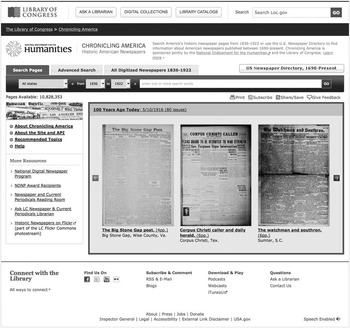
For this research I relied heavily on all four of the databases that are reviewed below. The most comprehensive in terms of broad coverage is Chronicling America. Historic American Newspapers, which commenced in 2005. The website is produced by the National Digital Newspaper Program (NDNP), a partnership between the Library of Congress and the National Endowment for the Humanities. The published goal of this project is ‘to develop an Internet-based, searchable database of U. S. newspapers with descriptive information and select digitization of historic pages’.Footnote 4 The list of newspaper titles was developed by the United States Newspaper Program (www.neh.gov/projects/usnp.html), an NEH-funded project (1980–2007) that sought to locate, catalogue and selectively preserve historic newspaper collections in each state. The project resulted in the addition of some 140,000 title entries to the Newspaper Union List of OCLC (Online Computer Library Center), resulting in a greatly expanded list of extant newspapers, now titled U. S. Newspaper Directory, 1690–Present, which can be accessed from the Chronicling America homepage (see Fig. 1).
Home page of Chronicling America. The ‘Advanced Search’ tab is at the top; next to it are a tab for ‘All Digitized Newspapers 1836–1922’ and a link to the union list of serials, ‘US Newspaper Directory, 1690–Present.’

The newspapers that have been digitized for this site are listed under ‘All Digitized Newspapers 1836–1922’. One can search for titles of newspapers using such constraints as state and city of publication, date, language, ethnicity and format (e.g., online, original, microform). For example, a search for all English-language digitized newspapers from Maryland during the inclusive period results in a list of eight titles. There is an option to browse the paper; furthermore, other information such as the number of issues digitized, the earliest and latest issues included, and historical information about the serial (editor, location, dates of publication, alternate titles, etc.) is also included. This list of ‘all digitized newspapers’, however, includes only those serials digitized for Chronicling America; there has been no attempt to include information about newspapers digitized by the commercial historic newspaper databases.Footnote 5
The temporal range of Chronicling America is 1836–1922, so the focus is primarily the nineteenth and early twentieth centuries. Titles are constantly being added to the database. A scholar can either browse an issue of a particular serial or conduct a search from the homepage. The Advanced Search option is the most useful, and allows such limiters as date, state of publication or newspaper title, and language. There are various options for search terms (individual words, phrases, words within close proximity, etc.), but there is no way to limit the search based on particular sections of the newspaper (advertisements, editorials, obituaries, etc.). It is furthermore impossible to determine from this interface whether or not there is a digitized newspaper in the database for the chosen place and dates used in the search, so a failed search for a name or term might be due to the absence in the database of a searchable document. A scholar, however, has to look elsewhere to ascertain whether or not a particular digitized issue is part of the database (this can be done by clicking ‘all digitized newspapers’ from the homepage, then either choosing ‘show all digitized papers 1836–1922’ or limiting the search by state and chronological range). This particular weakness in the search process, and the rather random-seeming choice of titles (Chronicling America relies on authorities in each state to choose which newspapers are digitized), makes this database not as easy to use nor as useful as some of the commercial products.
The Proquest Historical Newspapers tm Archive describes itself as ‘the definitive newspaper digital archive offering full-text and full-image articles for significant newspapers dating back to the eighteenth century’.Footnote 6 This commercial archive includes digitized full runs of 22 select American newspapers, including the Baltimore Afro-American (1893–1988), Baltimore Sun (1837–1989), Boston Globe (1872–1983), Chicago Tribune (1849–1991), Cincinnati Enquirer (1841–1922), Los Angeles Times (1881–1991), New York Times (1851–2011), New York Tribune/Herald-Tribune (1841–1962), San Francisco Chronicle (1865–1922), St. Louis Post-Dispatch (1874–1922), Washington Post (1877–1998) and others. Proquest also has two specialized collections – African-American and Jewish newspapers in the United States. The newspaper titles were chosen on the basis of historical importance, marketability and whether or not the title had already been digitized (three of the newspapers listed above, however, are included in at least one of the other commercial collections, although the extent of coverage is different). Since many important American newspapers have now been digitized, Proquest is increasingly turning its attention to international English-language serials in the UK, China, India, Canada, Israel and elsewhere.Footnote 7 Libraries purchase subscriptions to individual titles of newspapers.
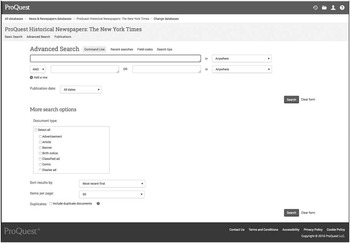
The search interface for each of the titles in the Proquest Historical Newspapers tm collection is the same. Newspaper titles owned by any particular library can be searched either individually or collectively (for the latter, click on ‘news and newspapers’ under ‘search subject areas’ on the opening webpage, and all the titles owned by the library where the scholar is working will be searched). The limiters in an advanced search are date and newspaper section (advertisements, article, review, obituary, etc.); results are displayed by relevance or publication date (oldest or newest first). The search results can be viewed by article or whole page (as either full text PDF or a clickable page view); when viewing the full page, one also has access to the rest of the issue, which can be examined one page a time. Results can also be emailed, printed, exported to a bibliography management program or saved to a ‘My Research’ file within Proquest. The interface is fairly user-friendly and clearly designed (see Fig. 2).
Advanced search interface for the Proquest newspapers. It is possible to limit the search to one title (this shot shows the New York Times), or to add other newspaper titles owned by the library by clicking on ‘News & Newspaper Databases’.

Gale Cengage started to publish historical newspapers around 2003 with the Times of London Digital Archive 1785–1985 and subsequently embarked on a larger-scale publishing programme that in 2006 expanded to Nineteenth Century U. S. Newspapers (http://gdc.gale.com/products/19th-century-u.s.-newspapers/), a collection of some 700 titles chosen by an editorial team of media scholars and historians. This database has been static since its launch, and Gale has no plans to add more titles. More recently, however, the publisher has added British Newspapers, parts 1–4, the Illustrated London News Historical Archive (1842–2003), Punch Historical Archive (1841–1992) and several other databases more specific to twentieth-century research, all of which can be searched by means of the Gale NewsVault or Artemis: Primary Sources (for a complete list, see http://gdc.gale.com/products/gale-newsvault/). The collections mentioned above are of particular interest to scholars of nineteenth-century music in the United States and Great Britain; other nineteenth-century virtual libraries also in the Gale portfolio include Artemis: Primary Sources and Nineteenth Century Collections Online (in addition to newspapers, the latter contains digitized monographs, pamphlets, manuscripts, and ephemera as well as a specific archive devoted to British theatre and music, including the archives of the Royal Philharmonic Society).
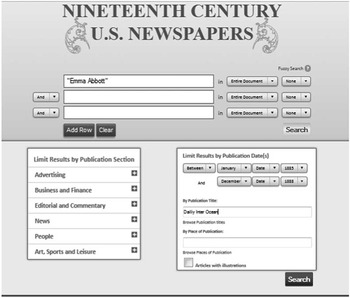
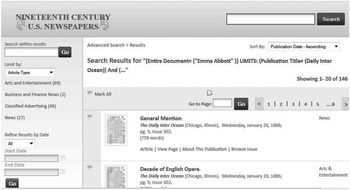
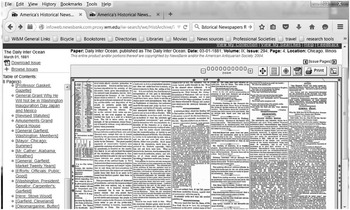
The number of titles available in Nineteenth Century U. S. Newspapers is large, but the coverage is by no means comprehensive – nor was it meant to be. Several criteria were used for selection: the significance of the paper, the level to which it represented the press and the nation, and whether or not it was already available online. The aggregate list was intended to represent the American nation broadly speaking, so the collection includes papers from rural and urban areas over the entire country as well as examples from minority populations. Furthermore, it was deemed more important to include issues that illustrate particularly important historical periods (e.g., gold-rush era California, the Civil War, the period of industrialization in the Northeast) than to try to digitize entire runs. As a result, events of importance in American history may be well represented, but comprehensive coverage (of particular decades, for example) is sometimes rather scattershot. For example, the database includes nearly 100 titles each from the 1870s and 1880s, but in terms of extended coverage (of multiple years and numerous issues digitized), the number of titles from the former decade is only 13 and from the latter 16. This makes any attempt to track the activities of a particular itinerant musical performer or the nationwide reception of a particular composition or composer almost impossible. Some of the newspapers that are well represented in this archive, however, are quite valuable. They include the Philadelphia North American, Frank Leslie’s Illustrated Newspaper, Boston Daily Advertiser, Rocky Mountain News (Denver), St. Louis Globe-Democrat, and Chicago Daily Inter Ocean. An advanced search allows the scholar to explore by the usual means (author, title, keyword, etc.), and can be limited by newspaper sections, dates, publication title and place of publication. One can read the article itself (extracted from the newspaper), view the page on which it appears, or browse the entire issue; there are various options for printing, emailing, exporting to a bibliography management program or bookmarking the URL of the page (see Figs 3a and 3b). It was once possible to download a list (in PDF) of all the newspapers included in this database (arranged alphabetically by state). That feature has been discontinued, but according to the publisher it may be reinstated in the future.Footnote 8 It is still possible, however, to determine what titles are available for each city or state by clicking ‘Publications List’ from the home page, browsing ‘place of publication’, then clicking on ‘view detailed information’ of an individual title to ascertain the range of issues that has been digitized. From within an advanced search, one can enter a date range, limit by state, then browse publication titles; this will result in a list that includes the number of issues digitized.
Advanced search page for Nineteenth-Century US Newspapers, with search terms, newspaper title, and date range indicated.

Results of the search (146 hits), which can be further refined at this point via a search within the results, or by limiting by article type and date. This results page shows the article title, bibliographic information, and a thumbnail image of the page on which the article appears. At the next step the scholar can view the article, the entire page, or a file of information on the serial. One can also browse the issue

America’s Historical Newspapers, published by Readex (a division of NewsBank, Inc.), is probably the most comprehensive of the commercial databases, for it currently has digitized over 3,200 historical US newspapers; of these there are 1,592 titles from the period 1800–1900.Footnote 9 The other collections in the series are 20 th -Century American Newspapers, American Ethnic Newspapers, America’s Historical Newspapers Select and American Newspaper Archives; the last includes full-run titles (such as the Washington Evening Star, New Orleans Daily Times-Picayune, Cleveland Plain Dealer and Augusta Chronicle) that expand the reach of the Historical Newspaper collection, but that must be purchased independently. The series was created as a partnership with the American Antiquarian Society, the Library of Congress and many other American libraries, archives and historical societies. Newspaper titles were chosen based on the significance of the paper and how well it contributed to representation of the diverse political positions of the United States during the period.
The digitization of newspapers started in 2004 with the microfilm collection Early American Newspapers, Series 1, 1690–1876. The success of this series led to the creation of America’s Historical Newspapers, which now includes Early American Newspapers, series 1–11 (the various series represent different historical time periods or political events), Twentieth-Century American Newspapers, series 1–3, 1923-forward, and American Ethnic Newspapers. The published collections are complete, but Readex continues to create additional series to which new titles are added. Different configurations of the collections can be customized for specific time periods or regions (allowing a particular library to purchase a set of databases that is geographically or chronologically specific); the comprehensiveness of a search depends on the extent of the holdings in the library where a scholar is working.
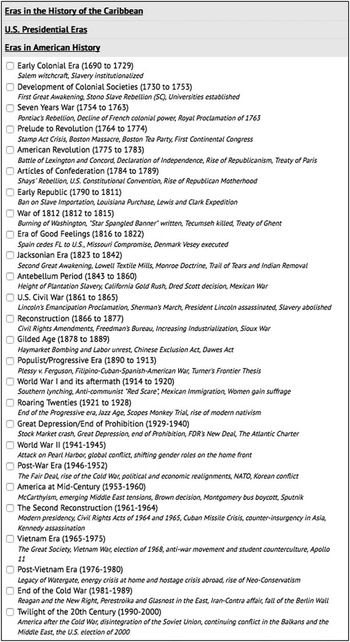
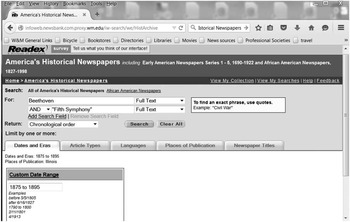
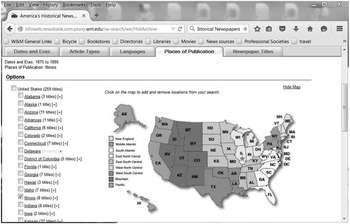
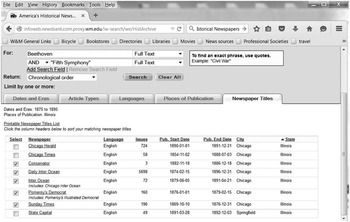
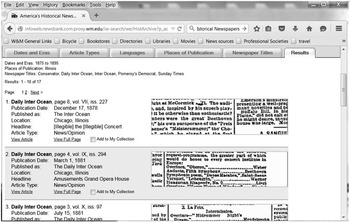
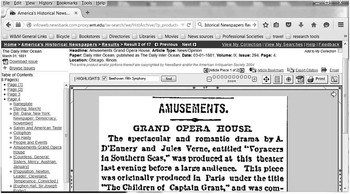
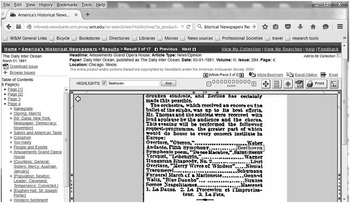
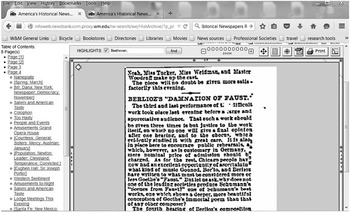
Like the other commercial databases, the search function for America’s Historical Newspapers can be limited by date, article types, language, place of publication and newspaper title. The search engine also allows for explorations within particular eras in American history (see Fig. 4). One can furthermore conduct either a global search or one that is limited to a particular state, city or newspaper. If one wishes to search, for example, for performances of a particular work (Beethoven’s Fifth Symphony) in a specific city (Chicago), during a particular time period (1875–1895), that type of search is fairly simple. The ease with which one can determine what newspapers are available for which cities is a particularly useful function of this database; it is also very easy to ascertain the extent of the digitized run. (See the sequence of images in Fig. 5.) Images can be printed, downloaded as PDFs or emailed; one can also export the citation or save the article’s specific URL. The entire issue can also be downloaded as a PDF, and individual pages of an issue can be examined. Sometimes, however, an article is spread over several pages (occasionally as many as five), which is cumbersome and time-consuming. Otherwise, the resource is fairly user-friendly and valuable.
Partial list of the ‘Eras in American History’ that can be searched from the homepage of America’s Historical Newspapers.

On the advanced search page for America’s Historical Newspapers, type in several search terms (Beethoven and “Fifth Symphony” – the latter in quotation marks to ensure that the terms are treated as a unit), and set a temporal range (1875 to 1895).

To choose a particular city, click on ‘Places of Publication’, and both a map and a list of states will appear. Check the chosen state (a star will appear on the map), and double-click on the link.

A list of newspapers from that state will appear. The list includes language, number of issues digitized, beginning and ending dates of digitization, city and state of publication. Check the boxes next to the desired city, then hit search.

The total list of hits for this search is 17; information about each result (including bibliographic information, headline of the article, and article type) appears, as does a thumbnail image of the search term in the article.

In a column titled ‘Amusements. Grand Opera House’ there is an account of a performance of Berlioz’s Damnation of Faust by the Orchestra of Theodore Thomas. The same concert included a performance of the second movement Andante from Beethoven’s Symphony No. 5.

By clicking on the article and checking the ‘highlights’ function, the search terms will be highlighted in the article for ease of searching.

One can also look at the article in context by clicking on the page in the left-hand column. Under the page number there is a convenient list of the contents of the page, which can be used for scanning.

Clicking on a page number displays the entire page. This can be magnified, or individual articles can be extracted, by clicking either on the heading to the left or on the article itself.

It is important to realize that each of the four databases has its own quirks, which can gradually be learned as one becomes more familiar with each interface. It is also essential that the diligent scholar utilize, if possible, all of the various digital archives because (as mentioned) the editorial boards of each database have deliberately attempted to avoid duplication of newspapers that are already available online. In fact, despite the thousands of titles (and millions of pages) that have been digitized, what is available is still but a drop in the bucket – and there continue to exist holes in the coverage (sometimes the result of libraries’ financial inability to subscribe to everything available). In my recent research I encountered more than a few American cities for which digitized newspapers were unavailable for the particular week or month that I needed; in such cases, I turned to microform and Interlibrary Loan in order to obtain the information I was seeking. For example, in 1887 the Emma Abbott Opera Company opened a new theatre in Nashville, and during the engagement the prima donna publically confronted a minister who condemned women on the stage as immoral. The altercation became national news. But neither the Readex, Gale Cengage nor Chronicling America databases have any 1887 coverage of newspapers from Nashville. Proquest has digitized the Nashville Tennessean (1812–1922), but my library does not subscribe to that title, so I requested a microfilm copy of the issues through Interlibrary Loan. A different example illustrates some of the limitations of optically scanned images. In one of the commercial databases, I located a revealing review for a performance by Marie Aimée in Cincinnati in June 1871. There were several words, however, that were simply indecipherable because of blurriness in the scanned image. None of the other databases had digitized that newspaper, so I solved the mystery by requesting a digital scan of that page of the issue through ILL.
Another option in such situations is to search online for other newspaper databases, for many are maintained by individual newspapers, state historical archives and universities; many of these, in fact, are free to users. One useful site is the United States Newspaper Program (USNP) (www.neh.gov/us-newspaper-program) an NEH-funded project that ceased operations when the National Digital Newspaper Project was established (see Chronicling America, above). The NEH still supports the USNP webpage, however, and scholars can easily link to the newspaper program of each state to determine what serials have been either microfilmed or digitized. Another particularly helpful list is ‘Historical U. S. Newspapers Online: Home’ (http://libguides.bgsu.edu/c.php?g=227435), created by Prof. Carol Singer and maintained by the Library at Bowling Green State University in Ohio.Footnote 10 This is a guide to free digitized historical newspapers published in the United States, arranged alphabetically by state.
When using any of these databases, it is imperative to search in many different configurations, including alternate spellings. There are furthermore obvious limitations inherent in the optical scanner software used for searching, for many titles were digitized from microfilm, which sometimes results in indistinct or blurry typescript that is unreadable mechanically. Wrinkles, smudges, tears or dirt on the original page also interfere with accurate optical reading. Finally, it is important to remember that although lifting a particular story or review from the newspaper is convenient, the extraction itself simultaneously diminishes the value of the document as a cultural artefact. By reading only the information for which one is searching, the scholar can completely miss the surrounding stories, editorials, letters and advertisements that provide an invaluable cultural context and that would invariably be absorbed if one were sitting, skimming, and turning the pages of the original document. It is important for scholars sometimes to ignore the convenience of neatly extracting the bits of data that show up as hits in a search, and take the time to scan the headlines and even read some of the surrounding stories and advertisements – which still can be done from the comfort of one’s office. Regardless of how scholars use these invaluable tools, however, there is no question that they have completely revolutionized – and will continue to change – the process of historical research.