

1. INTRODUCTION
Handwritten documents and sketches have been the primary means of human communication for thousands of years. Paper-and-pencil based user interface is a simple, intuitive, and highly effective for creating and storing hand-drawn sketches, alphabets, symbols, and drawings. There have been significant efforts in recent years to enable digital design methods that leverage humans’ sketching skills. Modern-day electronic sketching interfaces based on sketching typically provide digital means of storing and displaying sketches. They can be broadly classified into three categories (Sutherland, Reference Sutherland1964).
-
• Drawing pads: These sketchers allow basic sketching for general-purpose drawings, especially in the graphic design arts. They smooth the input strokes and provide many other graphic tools, but do not attempt to interpret the drawing.
-
• Two-dimensional (2-D) sketchers: In 2-D sketchers, sketch strokes are smoothed and classified into 2-D primitives, such as lines, arcs, and splines. Some automatically infer constraints and relationships among the entities.
-
• Projection-based sketchers [retrieving three-dimensional (3-D) information from 2-D sketches]: Sketches are analyzed as representing rough projections of 3-D scenes. The sketcher is still required to identify the sketch strokes as basic geometrical shapes, such as lines, arcs, and corners. However, because the analyzed sketch represents a rough projection of a 3-D scene, some of the sketch strokes do not necessarily represent what they appear to be.
The systems mentioned above have been developed, tested, and proven to a great extent. However, they are all built for touch-based interfaces that accept data in 2-D coordinates (x–y). The work outlined in this paper is focused on developing a screenless sketching interface. The proposed system is screenless and allows the user to draw 3-D sketches with bare hands in the air. The key objective of this work is to develop a novel user-dependent sketch beautification system for beautifying sketches drawn using a screenless interface system. The developed system requires a noncontact depth-sensing device such as an RGB-D camera for user input, beautifies (using geometric primitives) and aligns strokes drawn by the user, has fast training capabilities, and is adaptable for symbols and sketches of any shape, size, and orientation. The three key contributions in this paper are as follows:
-
1. Creation of a novel screenless interface for user interaction.
-
2. Use of computational methods to beautify 3-D strokes enabled by screenless interfaces.
-
3. Use of a novel “s” metric that is simple yet very useful for a 3-D sketch segment classification task.
There can be varied potential usage of a screenless (in the air) sketch interfaces. First and foremost, screenless sketching interfaces represent the next-generation computer-aided design (CAD) sketching interface in which 3-D models can be generated directly using 3-D sketches. Such interfaces can also be augmented with existing CAD software to perform procedural operations such as lofting, extruding, and revolving. Another domain where the use of screenless sketching interfaces is viable is texting/chatting. Alphanumeric characters written by a user in the air can be used as a novel modality for next-generation texting/chatting engines. A more advanced application in this regard would be signature authentication of users (bioauthentication). In the entertainment industry, the use of screenless interfaces can be significant. For example, next-generation remoteless televisions can be enabled through the use of depth-sensing cameras to accept inputs (such as play and pause symbols drawn in the air) from the user.
Section 2 discusses the related work on the symbol and sketch recognition, and beautification. Section 3 describes the basic architecture of the system and the steps proposed for the beautification method. Section 4 presents user study results to assess the robustness of the system. Conclusions and future work are discussed in Section 5.
2. RELATED WORK
This section will review the pertinent literature related to the objective of the work presented. Specifically, the related work pertaining to existing sketching interfaces and beautification schemes is discussed.
2.1. Sketching interfaces
Ivan Sutherland created the seminal SKETCHPAD system in 1963 (Sutherland, Reference Sutherland1964). Since the original work of Sutherland, the interaction between human and computer has been accepted as a concise and highly efficient means of constructing geometric shapes. The SketchIT system of Stahovich (Reference Stahovich1996) is capable of producing multiple families of designs from a single sketch. Later, the SKETCH system of Zeleznik et al. (Reference Zeleznik, Herndon and Hughes2007) introduced a gesture-based interface for rapidly conceptualizing and editing approximate 3-D scenes. Artifice's Design Workshop (http://artifice.com/dw.html) allows constructing cubes, walls, and constructive solid geometry operations directly in the 3-D environment.
The projective sketch system of Tolba et al. (Reference Tolba, Dorsey and McMillan1999) utilizes a projective representation of points to project a 2-D drawing. Similarly, the Teddy system by Igarashi et al. (Reference Igarashi, Matsuoka and Tanaka2007) presents a sketching interface to design freedom models quickly and easily. Eggli et al. (Reference Eggli, Hsu, Bruederlin and Elber1997) created a system that allows the user to sketch directly on the screen of a pen-based PC. The exact shapes and geometric relationships are interpreted from the sketch. The Phoenix sketching system by Schneider and DeRose (Reference Schneider and DeRose1998) uses Gaussian filters to smooth sketching data to reduce the noise. However, the system proposed by Schneider and DeRose was inefficient in the vertex determination task, and very often it became necessary for the user to specify the vertices manually.
Sezgin et al. (Reference Sezgin, Stahovich and Davis2006) derived inspiration from the Phoenix system and created a system that combined multiple sources of knowledge to provide robust early processing for freehand sketching. Pegasus is another rapid sketching tool for line drawings (Deelman et al., Reference Deelman, Singh, Su, Blythe, Gil, Kesselman and Laity2005). It interactively infers seven kinds of constraints: connection, parallelism, perpendicularity, alignment, congruence, symmetry, and interval equality. Murugappan and Ramani (Reference Murugappan and Ramani2009) used a similar approach to create a suggestive interface for the constraint-driven beautification of freehand sketches. The suggestive interface provides multiple interpretations of the freehand input, from which the user can choose the intended result. Another approach toward tackling this issue is through the use of augmented reality (Langlotz et al., Reference Langlotz, Mooslechner, Zollmann, Degendorfer, Reitmayr and Schmalstieg2012), where desired content is directly extracted from photos rather than going through the sketching process. The major limitation of this approach is the lack of content available immediately for a particular purpose.
All the above-mentioned works mainly deal with sketching in 2-D geared toward different applications. There is recent work in the domain of 3-D sketching. Israel et al. (Reference Israel, Wiese, Mateescu, Zöllner and Stark2009) use a hybrid pen-based interface for 3-D sketching. This requires a user to mount wearable electronics to do sketching and can be obstructive. Just Drawit 3-D sketching system (Grimm & Joshi, Reference Grimm and Joshi2012) aims at freeform sketching. Both works (Israel et al., Reference Israel, Wiese, Mateescu, Zöllner and Stark2009; Grimm & Joshi, Reference Grimm and Joshi2012) do not present any sketch classification and beautification schemes to classify the strokes as being specific geometric primitives or beautify the created sketches.
2.2. Beautification
Beautification of freehand sketches is the process of transforming informal and ambiguous freehand input to more formal and structured representations (Murugappan & Ramani, Reference Murugappan and Ramani2009). To implement beautification techniques, several efforts have focused on developing fundamental segmentation and fitting techniques. Herold and Stahovich (Reference Herold and Stahovich2011) introduced a method for segmenting pen strokes into lines and arcs. Kim and Kim (Reference Kim and Kim2006) outlined a curvature estimation method that operates simply in angle space to segment pen markings. Connell and Jain (Reference Connell and Jain2001) present a template-based approach to divide strokes points into perceptually salient fragments based on geometric features.
A conic section fitting method based on linear least squares fitting has been proposed for sketch stroke beautification (Shpitalni & Lipson, Reference Shpitalni and Lipson1997). In this approach, a conic equation's natural classification property is used for beautification. Domain-specific knowledge has been used to create a parser that automatically locates symbols by looking for areas of high ink density (Gennari et al., Reference Gennari, Kara, Stahovich and Shimada2005). In addition, the work of Pavlidis and VanWyk (Reference Pavlidis and Van Wyk1985) develops automatic techniques to beautify geometric drawings by implementing various relations, such as approximate equality of the slope or length of sides. Fluid Sketches system uses a dictionary of predefined basic shapes to transform a user's drawings into ideal geometric shapes (Arvo & Novins, Reference Arvo and Novins2000). Igarashi et al. (Reference Igarashi, Matsuoka, Kawachiya and Tanaka1997) introduced a beautification scheme in which each input stroke is converted into straightline segments using a number of visual constraints. Fuge et al. (Reference Fuge, Yumer, Orbay and Kara2012) recently proposed a new sketch parsing and beautification method that converts digitally created design sketches into beautified line drawings. Baran et al. (Reference Baran, Lehtinen and Popović2010) proposed methods to smooth drawn curves while maintaining detail.
Arvo and Novins (Reference Arvo and Novins2000) create regular geometric shapes using instantaneous morphing of stylus input. The work by Lindeberg (Reference Lindeberg1998) describes a system for generating real-time spline curves from interactively sketched data. Zeleznik utilizes simple rules for detecting the drawing mode and builds a mode-based stroke approximation system (Cohen et al., Reference Cohen, Markosian, Zeleznik, Hughes and Barzel1999).
Summarizing the literature survey, there exist several methods to carry out individual tasks such as data refinement, segmentation, and classification to enable the beautification of 2-D sketches. However, methods to conduct these different tasks and a beautification scheme for a 3-D sketch do not exist in the literature. The presented work captures the essence of beautification approaches for 2-D sketching and brings them forth into the 3-D realm. The research outlined in this paper combines data refinement, segmentation, and classification (with modifications suited to 3-D sketching) to enable 3-D stroke beautification. Another crucial distinction between the presented work and existing prior work is that we primarily segment and beautify truly 3-D sketches generated from screenless RGB-D camera interfaces instead of 2-D pen strokes drawn on touch-based systems. At its current level of development, this work focuses on segmentation and beautification of 3-D sketches and not on freeform sketching.
3. BEAUTIFICATION OF STROKE
This section discusses details related to screenless sketching and the beautification scheme used in the presented work. Beautification involves data collection, data refinement, segmentation of strokes, primitive fitting, and spatial alignment of strokes.
3.1. Screenless sketching interface
To identify the sketch drawn by the user one needs to digitally capture the sketch data. In a screenless system, we capture data pertaining to the user's hand movement. Data capture is enabled using the 3-D depth-sensing camera, Soft Kinetic DepthSense 311 (DS311). The output from the camera is a gray-scale image containing information about the depth of each pixel in the scene.
Reliably capturing the index finger tip location from a noisy data stream of depth image of the hand is hard. Inability to correctly classify the fingers of the hand may lead to fluctuating index finger tip location, leading to poor sketch data. Furthermore, presence of incomplete information for the tip location in the intermediate frames calls for approximating its location using complex and unreliable techniques like hidden Markov models. Instead, it was found that the Softkinetic camera can capture the hand palm center location much more accurately and robustly, avoiding many of these issues. The large area of the hand palm makes it difficult for missing the data in intermediate frames. In addition, by using the mean of data points on the hand surface, much of the noise is averaged out.
Because of the lack of a reliable sensor system, capturing the index finger tip location precisely in every frame of the camera was not possible. The preliminary experiments revealed that tracked palm center position results in sketches that closely mimic the user's intended trajectory. Therefore, the option of tracking index finger tip location was not explored further. However, the proposed computational technique of analyzing 3-D sketches is indifferent to the feature of the hand that was tracked. With a more reliable sensor system that can track fingertips accurately, such as marker-based systems, the sketches traced by the finger tips in 3-D space can also be analyzed using our approach.
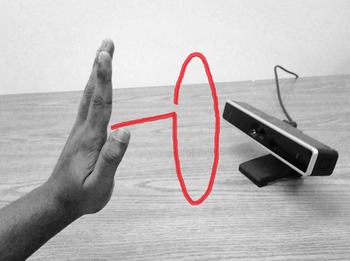
An inbuilt API is used to record and store the users’ palm center position in a 3-D Cartesian coordinate system (Fig. 1). The starting and stopping of the sketching process is enabled through the use of two modes (more details in Section 4).
System setup: sketching in 3-D.

3.2. Sketching interface data processing pipeline
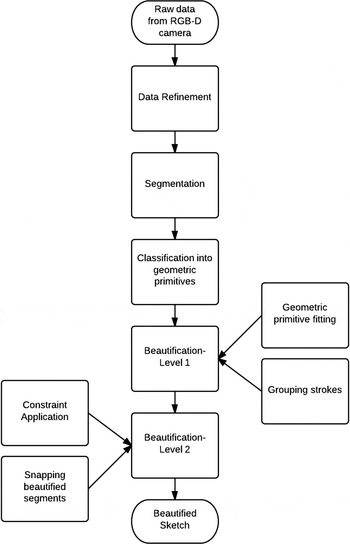
Figure 2 shows the basic architecture of the beautification scheme presented in this work. In contrast to data obtained from conventional touch-based interfaces, data collected using noncontact depth sensing cameras is noisier. Hence, to avoid difficulties in later stages, the input data is refined. Based on the classification results, the entire sketch is beautified in two steps. The first step beautifies individual strokes, and the second step pertains to the spatial alignment of different strokes with respect to one another. The final result is a beautified version of the input sketch.
Main components of the beautification procedure.

3.3. Data refinement
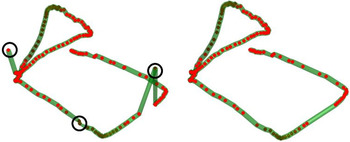
Raw data from the RGB-D DepthSense camera is extremely noisy. Artifacts are mainly present in the form of outliers and unwanted self-intersections that are created at the beginning of a stroke when users unknowingly draw over initial stroke points. Two steps are implemented to eliminate such artifacts. The first step involves “dehooking” the stroke by eliminating the first three points. The second step involves the elimination of outliers using an exponentially decreasing weighted approach. Figure 3 shows a sample sketch before and after refining.
Sketch refinement.

3.4. Segmentation
The first step toward beautifying a sketch is to break it down into its component segments. An important distinction between strokes and segments is addressed here. A stroke may comprise multiple segments. Hence, the number of strokes is equal to or less than the number of segments. The initial set of candidate segment points is determined using the speed of sketching as a measure. Each recorded point is time stamped, and speed at each point is calculated as follows (Stahovich, Reference Stahovich2004):
 $$S_i = \displaystyle{{d_{i + 1} - d_{i - 1}} \over {t_{i + 1} - t_{i - 1}}}\comma $$
where t i is the time stamp of the ith point and d i is given by
 $$d_i = \sum\limits_{\,j = 1}^i { \vert \vert P_j} - P_{\,j - 1} \vert \vert, $$
where P i is the coordinates of the ith point.
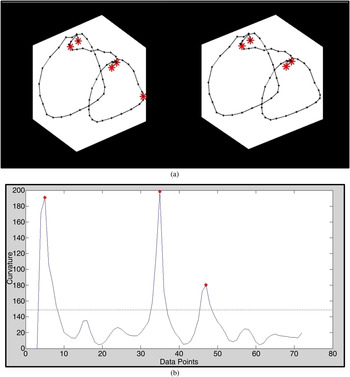
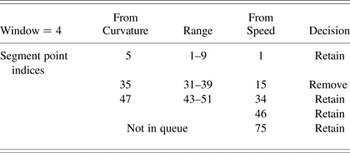
Speed metric sometimes yields extra segment points in 3-D sketches. Initial testing of the computational pipeline revealed that extra segment points were generated by speed metric especially in cases where the user draws arc and circles. To mitigate this issue, curvature is used as an additional filtering measure to remove extra segment point (Stahovich, Reference Stahovich2004). Curvature for each point is calculated by carrying out principal component analysis (PCA) on a window of points centered on the candidate point. PCA operation projects the points in 2-D space. Here the points are used to fit a best-fit circle. The curvature at the point is calculated to be the inverse of the radius of the best-fit circle. Figure 4 shows the application of curvature data in eliminating unwanted segment points. Selection of segment points is further illustrated in Table 1.
Segment point detection: (a) without curvature data (left) and with curvature data (right); (b) curvature distribution for data points.

Selection of segment points for a cylinder

Note: The first and last point are always retained.
The thresholds for both speed and curvature are user dependent and are tuned to the user during testing. Once all the segment points have been detected, the segments are passed through the merging stage. The merging phase is initiated to account for small segments that are created due to extra segment points that may not have been filtered even by the curvature metric. Merging is initiated if the length of the segment is found to be smaller than 0.05 times that of its neighboring segment.
3.5. Classification of segments
Segmentation is followed by classification of segments into appropriate geometric primitives. For this work, two geometric primitives have been used: the line and the circular arc. A new metric is outlined to carry out the classification of basic geometric primitives in screenless interfaces. This new metric is termed as the “s” measure. The “s” measure is determined for each segment point as follows:
 $$s_i = \displaystyle{{d(x_i\comma \;x_{n + 1 - i} )} \over {\sum\nolimits_{\,j = 1}^{n - i} {d(x_j\comma \;x_{\,j + 1} )}}} \quad 1 \le i \le \displaystyle{n \over 2}\comma$$
where n is the number of points in the segment and d(x
i
,xn
+1−i
) represents the Euclidean distance between two points x
i
and x
n
+ 1 –i
and
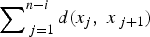 $\sum\nolimits_{\,j = 1}^{n - i} {d(x_j\comma \;x_{\,j + 1} )} $
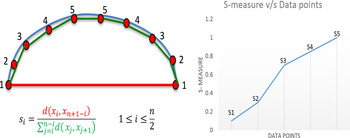
represents the path length along the sketch. Figure 5 shows a pictorial representation of “s” measure calculation. The Euclidean distance is depicted as a straight line and the path length along the sketch is depicted as the set of secant lines.
Calculation of the “s” measure.

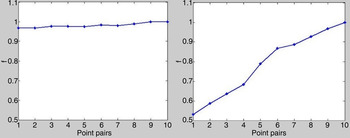
The “s” measure is essentially the ratio of the Euclidean distance to the arc length measured through a set of secant lines. Figure 6 shows variations in the s value across all the data points for a line and an arc. The decision on whether the segment is a line, or an arc, is made based on the slope of the resulting plot. Hence, the metric is termed as “s” measure. The “s” measure is robust in making accurate classification of segments in 3-D sketching environment.
Variation in s value with point pairs for (left) a line and (right) an arc. The line yields a plot with a slope 0.004, and the arc yields a plot with a slope of 0.05. Notice the order of magnitude difference in slope values of line and arc.

Once the segments have been classified, another round of merging is carried out to reduce the total number of segments to the least possible number. There are two primary conditions under which the second round of segment merging is initiated.
-
1. If there is a very short segment adjacent to a long one, heuristically the short one was unintended. The overall segment type (line or arc) is decided by determining which of the two segments is longer. The combined data set is then used to determine a new “s” value. If the calculated “s” value results in a slope that is within the threshold of the parent type, a new segment is created. Otherwise, merging is stopped.
-
2. If two segments of the same type are adjacent to each other, the process attempts to merge them.
3.6. Beautification: Level 1
The first level of beautification deals with fitting geometric primitives based on the classification information and grouping the primitives in a manner that would make the most sense for a 3-D sketch. Fitting of primitives is discussed below.
-
• Line fitting: When a user sketches a line, particular importance has to be given to the initial and final points of the line segment. Hence, in our beautification scheme, simply joining the first and last point in the segment creates the line.
-
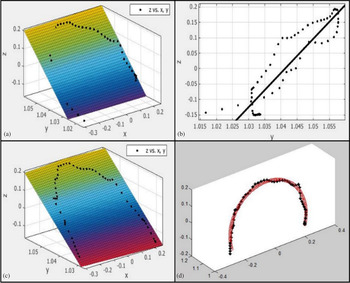
• Arc fitting: The first step toward arc fitting is to find the best-fit plane (least square error) for the 3-D point cloud of the segment. The points are then projected onto this plane, after which PCA is carried out to map the data onto the place. The least square approach is then used to fit a suitable circular arc. Minimizing the total least square error results in the regression equation:
(4)where (−a, −b) represents the center of the arc of radius $$\left[ {\matrix{ {2\sum {x_i^2}} & {2\sum {x_i y_i}} & {\sum {x_i}} \cr {2\sum {x_i y_i}} & {\sum {y_i^2}} & {\sum {y_i}} \cr {2\sum {x_i}} & {2\sum {y_i}} & n \cr}} \right]\left[ {\matrix{ a \cr b \cr c \cr}} \right] = \left[ {\matrix{ {\sum { - (x_i^2 + y_i^2 )x_i}} \cr {\sum { - (x_i^2 + y_i^2 )y_i}} \cr {\!\!\!\!\!\sum { - (x_i^2 + y_i^2 )}} \cr}} \right]\comma$$
$r = \sqrt {(a^2 + b^2 - c)} $
. Once the new arc has been fit, it is returned to the original plane by carrying out inverse PCA, producing an accurate representation of the best- fit segment in 3-D. Figure 7 illustrates this process.


(a) Raw data and best-fit plane, (b) z–y view of raw data, (c) points projected on best-fit plane, and (d) best-fit arc (red) after principal components analysis.

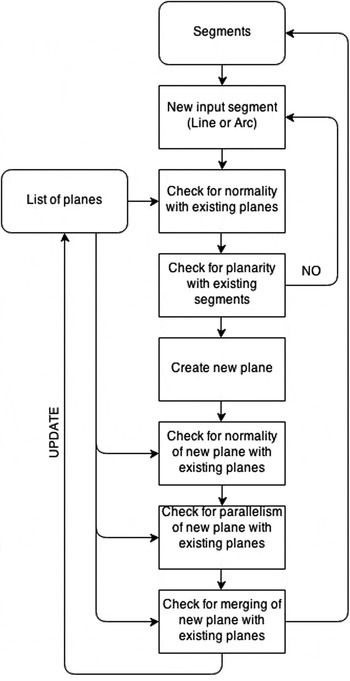
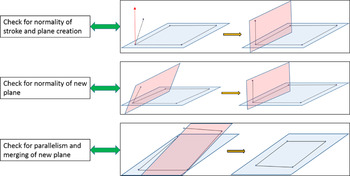
Once the segments have been fitted, the first level of beautification is carried out. Figures 8 and 9 present schematic and pictorial representations of the steps involved. The first level of beautification begins with queuing the segments (lines or arcs) and passing them one at a time through the computational pipeline in the order they were sketched. The first two segments are directly accepted to create a best-fit plane.
Beautification for Level 1.

Pictorial representation of beautification for Level 1.

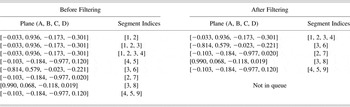
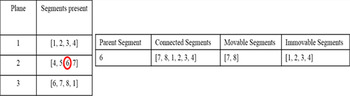
Consequently, the next segment is checked initially for normality with an existing plane. If it falls within a particular angle (75–105°) of the normal to the plane, the segment is snapped in that direction, that is, perpendicular to the plane, followed by checking whether the current segment can form a plane with any of the preexisting segments. If a segment cannot form a plane, it is sent back to the queue, and the next segment in the queue is processed. If a new plane is created at any time, it is checked for normality and parallelism with existing planes. If the new plane is found to be parallel and their perpendicular distance is within a certain threshold to any existing plane, they are merged into a single plane followed by updating the list of planes. Any segment that could not form a plane initially is brought back and processed again using the steps mentioned above. Table 2 shows the output before and after filtering.
Creation of planes for a sample sketch before and after filtering

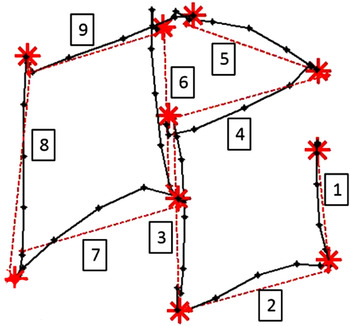
The next step is to project the segments onto the corresponding planes. If a segment is present in more than one plane (Table 2, segment 3), it has been assumed that the segment lies on the line of intersection of these planes. In such cases, the segment is projected onto the intersection line. Figure 10 shows the output after the first level of beautification for a sample sketch.
Beautification: Level 1 of sample sketch. Dotted lines indicate beautified segments. Segments are numbered in the order they were sketched.

3.7. Beautification: Level 2
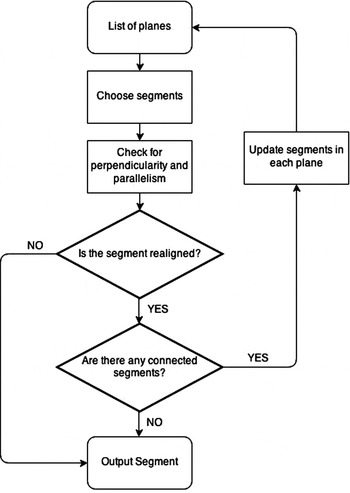
The second level of beautification operates on strokes grouped in planes. Figure 11 shows the steps followed at this juncture. In beautification level 2, applying perpendicularity and parallelism constraints modifies the segments.
Beautification for Level 2.

As in the case before, the first segment in each plane is assumed to be a reference, based on which the other segments are aligned. The segments are progressively subjected to perpendicularity and parallelism constraints, and if they fall within the threshold, they are aligned accordingly. Rotations of the segments are performed about the normal of the plane being used. Rotation of the segments is done using the Rodrigues rotation formula (Belongie, Reference Belongie2012). If v is a vector in 3-D space and k is a unit vector describing an axis of rotation about which we want to rotate v by an angle θ according to the right-hand rule, then the Rodrigues formula is
 $$v_{{\rm rot}} = v\cos {\rm \theta} + (k \times v)\!\sin {\rm \theta} + k(k\,.\,v)(1 - \cos{\rm \theta ).}$$
An important factor to consider when rotating the segments in one plane is that it affects the planarity of segments in other planes. For example, consider two planes with segments [1, 2, 3] and [3, 4, 5]. While carrying out beautification, if segment 3 is rotated with respect to segments 1 or 2, it may no longer be in the same plane as segments 4 and 5. Hence, to address this issue, it becomes essential to determine all the strokes connected to the rotated segment. A recursive algorithm is used to determine all the connected strokes present in different planes. These segments are then rotated by the same angle about the same axis as the parent segment (normal to the plane under consideration). Furthermore, the algorithm uses a top-down approach, where all the segments for a plane that has already passed through the second level of beautification cannot be rotated again due to the rotation of successive segments (Fig. 12).
Recursive algorithm implementation example (top-down approach).

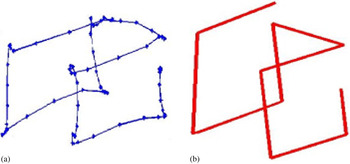
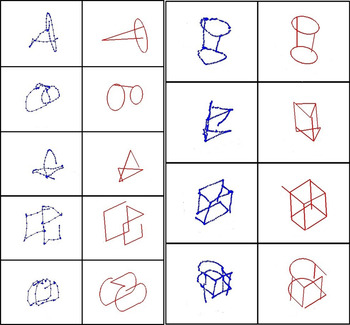
The final step in the beautification process is the snapping of segments together based on their proximity with one another. In a multistroke scenario, where more than one stroke is present, segments in each stroke are grouped together. This is followed by grouping the strokes in the order the user sketched them. Figure 13 shows the final beautified sketch before and after beautification. Figure 14 shows sample beautified sketches used in the user study for both single stroke and multistroke scenarios.
(a) Raw sketch and (b) final beautified sketch.

Beautified sketches.

4. USER STUDY
4.1. Study subjects
To obtain an objective assessment of the system, an institutional review board approved formal user study was conducted. The study involved four participants with an average age of 25 (SD = 1.41) having an engineering background and reasonable sketching experience. All of them signed an informed consent form after a full explanation about the study procedures.
4.2. Procedure
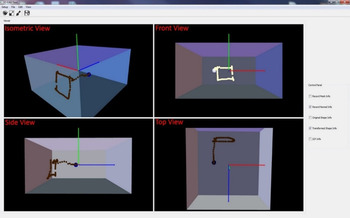
The commercially available SoftKinetic DS311 depth sensing camera was used to track and record data pertaining to sketches drawn by the users in 3-D space. The interface used in the user studies is shown in Figure 15. When a user moves his or her hand in front of the DS311, point data referencing the users’ palm are recorded and plotted in the OpenGL interface. The box indicates the workspace within which the camera can detect the user's hand. The interface supports both single-stroke and multistroke sketching, with the user being provided perspective views of the sketch being drawn.
User interface.

The interface incorporates the following features and operates in two modes: not recording and recording. In the not recording mode, the user is free to move and position the cursor (blue dot) for drawing different strokes. In this mode, the points are not recorded, and the interface only displays the movement of the cursor. In the recording mode, points are recorded and plotted (orange) as the user moves his or her hand in the workspace. Switching between the two modes enables data collection from the beginning to the end of a stroke. Each mode is initiated using predefined keystrokes.
The system was evaluated for both single-stoke and multistroke sketching scenarios using five and four sketches, respectively. Figure 16 shows the sketches used to assess the sketch beautification scheme. The sketches have been selected in accordance with increasing geometrical and time complexity. Geometric complexity relates to the number of segments present in the sketch, whereas the time complexity deals with the time associated with the sketching process.
Single-stroke sketches: (a) cone, (b) cylinder, (c) pyramid, (d) cube, and (e) cube modified. Multistroke sketches: (a) cone, (b) cylinder, (c) cube, and (d) cube modified.

4.3. Data collection
As the participants in our user studies had little experience using a DepthSense camera, they were supervised while sketching the first symbol for each class. In addition, they were also given 15 min to get acquainted with the system and to figure out the best way to sketch the test sketches. The collection of data from each user was spread over 5 days to account for variability. Users were tasked to sketch five samples for each of the nine classes of sketch (Fig. 15). In total, we analyzed 180 sketches from four users.
4.4. Results: Single-stroke sketching
The most important aspect in single-stroke beautification is the determination of the correct number of segments, which in turn depends on the identification of the right segment points. Hence, it becomes necessary to define metrics suitable for assessing the segmentation accuracy. In this regard, true positives, false positives, and false negatives are defined. A true positive case occurs when a correct segment point is identified. False negatives can occur for one of two reasons: no candidate segment point was found, or a candidate was found but was later eliminated by merging of the two adjacent segments. False positives are points that were not intended as segment points, but which were labeled as such by the computational pipeline, and true negatives are points that are correctly identified as not being segment points.
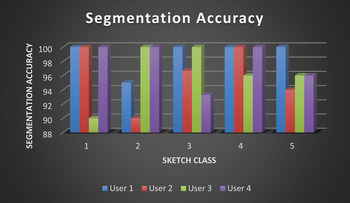
The overall segmentation accuracy is characterized in terms of precision, recall, and f measure. Figure 17 shows the variation in segmentation accuracy for four users across all the sketches. For this study, the presence of false positive or false negative segment points is considered as misclassifications of segment points. Therefore, segmentation accuracy is defined as the ratio of misclassified segment points to the actual number of segment points in the sketch.
Variation in segmentation accuracy (single stroke).

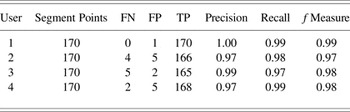
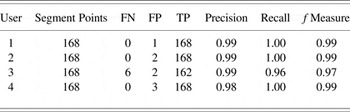
The values presented above reflect the segmentation accuracy for all the sketches drawn by the user for that particular class. As each user provided five samples for each class, the data points in Figure 16 correspond to the average segmentation accuracy for each class for the user. It can be observed that the segmentation accuracy varies from 90% to 100% for all the sketches with no decrease in accuracy with the increase in geometric and time complexity of the sketches. It must be noted that the segmentation is a user-dependent process, and hence the results presented above are for different threshold values for speed and curvature. Table 3 details the variation in precision, recall, and f measure across all the users. The average f measure across the four participants was 0.98. This signifies that the segmentation approach is robust.
Evaluation of segmentation accuracy across users for all classes for single stroke

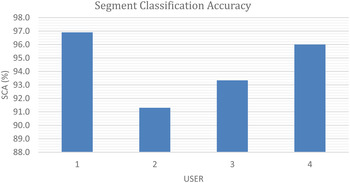
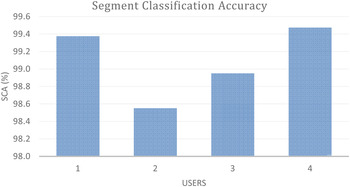
To assess the effectiveness of the “s” measure, the segment classification accuracy (SCA) has been defined. SCA is defined as the accuracy of classifying a stroke as being a line, arc, or circle. As in the case of segmentation, the SCA is determined by averaging the accuracies drawn by the user for each class. Figure 18 shows the variation in SCA across four users for all the sketch classes. SCA is closely related to the segmentation accuracy. For example, if a single segment point is missed or found as an extra, it would lead to SCA error.
Variation in segment classification accuracy (single stroke).

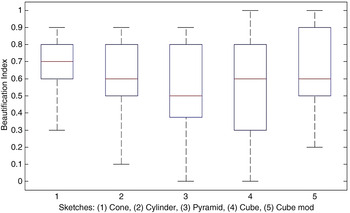
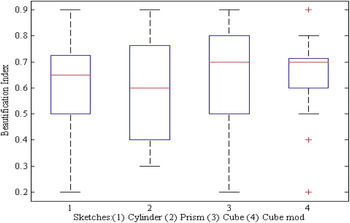
The ultimate aim of any form of sketching is to convey an idea, thought, or expression. Hence, it becomes paramount that others understand the sketch. Therefore, it becomes essential to evaluate the level of beautification achieved by the outlined system. As sketches can be diverse and have different levels of complexity, it is difficult to create a metric capable of measuring beautification based on geometrical features. Hence, a subjective metric called “beautification index” (BI) has been defined to evaluate the level of beautification. BI is a rated score provided by the user that signifies the level of satisfaction the user has with the beautified sketch. BI values range from 0 to 1, with “0” assigned for poor beautification and “1” assigned for perfect beautification. To get a subjective assessment of the level of beautification, all the sketches (100 sketches) were presented to the participants in a random order. They were then asked to rate the sketches from 0 to 1. Figure 19 shows a box-and-whisker plot of the distribution of BI values for different sketch classes.
Variation in beautification index across all sketch classes (single stroke).

One key observation is that the level of beautification or BI remains relatively the same despite the increase in geometric and time complexity. Relative invariance of BI indicates that the system is adaptable for complex sketches.
4.5. Results: Multistroke sketching
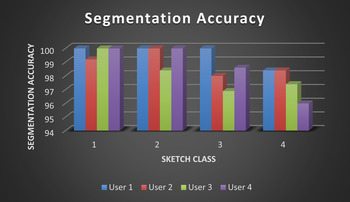
Multistroke sketching is used in cases when a sketch cannot be drawn using a single stroke. The same evaluations used for the single-stroke study is also carried out for multistroke sketching. Figure 20 shows the variation in segmentation accuracy in the multistroke scenario.
Variation in segmentation accuracy (multistroke).

It is observed that the segmentation accuracy, in this case, is substantially higher than for single-stroke sketching. High accuracy in the multistroke case can be attributed to the fact that sketches drawn in different strokes very often have segment points that are defined by default (first and last point for strokes corresponding to single segments). In other words, for a large portion of the strokes, no segmentation needs to be carried out. Segmentation accuracy varies from 96% to 100%, where each point in the plot corresponds to the mean of segmentation accuracies of all the sketches drawn by the user for that particular class. Another observation is a gradual reduction in accuracy as the complexity of the sketch class increases. Reduction in accuracy is expected as the number of segments increases the chances of them being erroneously segmented. Table 4 details the variation in precision, recall, and f measure across all the users for the multistroke beautification experiment.
Evaluation of segmentation accuracy across users for all classes for multistroke

Figure 21 shows the variation in SCA. As in the case of segmentation accuracy, SCA for multistroke sketching is high compared to SCA for single-stroke sketching. The increase in accuracy can be attributed to the freedom the users have during the sketching process. In a single-stroke scenario, the users are forced to draw the entire sketch in one stroke, and hence they do not have sufficient time or feedback to alter a sketch midway. These uncertainties are reflected in the sketch, making it prone to distortions. In other words, single strokes are less intuitive. Using multiple strokes while sketching gives the users freedom to create a sketch in a more intuitive manner.
Variation in segment classification accuracy (multistroke).

To assess the level of beautification, the beautification indices for different sketch classes were determined as before. Figure 22 shows the distribution of the BI scores for different sketch classes across all the users.
Variation in beautification index across all sketch classes (multistroke).

The distribution of BI values is lower than its counterpart in the single-stroke scenario. The lower values can be attributed to the reduced continuity between segments for multistroke sketching. For simple sketches, this effect is negligible; however, for more complicated sketches, it becomes more prominent. Reduced continuity occurs because after segments are individually beautified, they are snapped together based on their Euclidean distance with other segments. Occasionally, this creates gaps between segments in different strokes and results in misalignment of segments, thereby distorting the overall sketch.
5. CONCLUSIONS AND FUTURE WORK
The primary objective of this work was to develop a novel user-dependent sketch beautification system for sketching in 3-D. To realize this objective, a screenless interface based on an RGB-D Depth Sense 311 camera was created in OpenGL. This interface allowed users to provide effective and expressive input without needing to rely on a touch-based physical device, and tracking the users’ palm position captured relevant data. 3-D sketch data collected from the user is passed through a series of processing steps, and the final output of the computation pipeline is a beautified sketch. User studies were conducted to gauge the robustness of the presented system for single-stroke and multistroke sketching scenarios. The studies focused on beautification of sketches and its impact on classification accuracy. Studies reported a segmentation accuracy of 90–100% (for single stroke) and 96–100% (for multistroke) and a SCA of 82–100% (for single stroke) and 95–100% (for multistroke). Both the segmentation and the SCA for users did not change drastically as the complexity of the sketches increased. SCA results indicate that the system is robust. The beautification index as judged by the users also remained relatively unchanged for the sketches. For single-stroke sketches, BI varied from 0.6 to 0.8 for the simplest sketch to 0.5 to 0.9 for the most complex sketch. In the case of multistroke sketches, BI values were observed to vary from 0.5 to 0.7 for the simplest sketch to 0.6 to 0.7 for the most complex sketch. From these results, it can be concluded that the level of beautification remains relatively the same and is invariant to the complexity of the sketches.
This work introduces a novel concept of directly sketching in the air and explores the feasibility of such a concept. However, the work also exposes certain areas that have scope for improvement. Sketching primitives cannot always be classified as being a line or an arc, and in most cases they are freeform curves. An extension of the current work would be to incorporate additional segmentation classes like splines and Bezier curves. This would require added functionalities like smoothening the curves using conditions like C1, C2 continuity. Snapping strokes together after beautification is currently based on the order in which the strokes are drawn. Snapping can prove to be ineffective especially in the case of multistroke sketches where more strokes are involved. In such instances, the sketches can get distorted. Therefore, developing a new snapping method can significantly increase the level of beautification of 3-D sketches. The incorporation of suggestions, that is interactive interfaces, can also improve the effectiveness of the beautification in the case of more complicated sketches. Sketching is an incremental and very often lengthy process. Hence, an important issue that comes into the light is the fatigue associated with continuous arm movement in a 3-D environment. A suitable way to address this would be to reduce the workspace and improve the accuracy of data collection by means of which more accurate sketches may be drawn in lesser time. In this regard, a detailed human factors study into this aspect could be extremely beneficial for improving the system setup.
Sree Shankar is a Graduate Researcher in the Manufacturing and Design Lab (MADLab) at the University at Buffalo, SUNY, where he received his MS degree in mechanical and aerospace engineering. His research focuses on creating novel interaction modalities for next-generation CAD and sketching systems.
Rahul Rai is an Associate Professor of mechanical and aerospace engineering at the University at Buffalo, SUNY. He received his PhD from the University of Texas at Austin in 2006. Dr. Rai has focused on computational research in the manufacturing and design domain for more than 15 years, making him a world-class expert in a variety of fields, such as machine learning, computational geometry, and numerical optimization. Rahul has over 75 published articles in his area of expertise.