


1. INTRODUCTION
The global approach and organisation of this spatial performance tool were officially presented during the Journées d’Informatique Musicale (Lengelé Reference Lengelé2017) and in the ICMC conference (Lengelé Reference Lengelé2018), along with a review and a classification of some techniques for spatial composition. Whereas my paper in the 2021 ICMC proceedings (Lengelé Reference Lengelé2021) details the compositional structure of the tool by describing how a series of values from different modules are combined together to compose the parameters of spatialised sound events, this article is more focused on the performative aspect and explains my conception of comprovisation (the composition of a performance tool) and more specifically the word ‘imposition’. After summarising the objectives for this research and composition methods in the spatial audio context, the tool is here explained and illustrated through three spatial concerts, by describing in detail how the parameters (especially playback speeds) of numerous spatialised sound events are modified in real time via a combination of different controllers.
2. COMPOSING A SPATIAL PERFORMANCE TOOL
2.1. Spatial audio context
As Ott, Tutescu, Wienboker, Rosenbauer and Gorne (Reference Ott, Tutescu, Wienboker, Rosenbauer and Gorne2019) remark on the production of spatial audio content:
in conventional music, audio drama or sound design productions it is very common to think of sound production and ‘spatialization’ (typically in form of a stereo or surround mix) as independent production steps. However, from our experience this does not apply to spatial audio, as the spatialization here becomes a substantial part of the artistic process. There is a remarkable difference between a workflow where the sounds are produced in a conventional studio and then ‘mixed’ in the loudspeaker dome, and a workflow where the composition is made in and for the immersive environment. (Ott etal. Reference Ott, Tutescu, Wienboker, Rosenbauer and Gorne2019: 185)
Moreover, a lot of spatial tools only think space in terms of trajectories. Some extend this concept by integrating dynamic spatialisation linked to gravity, velocity or acceleration (Penha and Oliveira Reference Penha and Oliveira2013) or a new graphical design (Dilger Reference Dilger2013). But only a few libraries offer new ways to play with space via decorrelation and parameter distribution of syntheses or effects (Negrao Reference Negrao2014; Bonardi and Guillot Reference Bonardi and Guillot2015; Sédes Reference Sédes2015; Nyström Reference Nyström2018), which require a closer integration of sound and space, of the sound engine and of the rendering algorithm.
2.2. Objectives of the tool
This global composition and performance tool (made up of a live sequencer with samplers and synthesisers integrated) has the following objectives:
-
1. To create (poly-)rhythmic sequences or chaotic, granular sound masses in real time.
-
2. To play in a quick and dynamic space, making possible:
-
a) different loudspeaker configurations (e.g., stereo, quad, octophonic configurations, domes of 16 or 32 channels);
-
b) different abstract and concrete spatialisation techniques (Lengelé Reference Lengelé2017, Reference Lengelé2018) and rendering algorithms to be used on every sound object (where abstract spatialisation refers to a specific spatial trajectory applied to a sound, while concrete spatialisation takes more into account the spectral characteristics and parameters of the sound, either with correlation by linking a spectral parameter to a spatial dimension, or with micro/macro decorrelation – for example, on time, playback speeds, transposition or distortion – to create a diffuse/contrasted space);
-
c) to perform not only (direct) data (e.g., a 3D trajectory) but more global, abstract, high-level (indirect) control strategies, by swinging among scenes of spatialised events.
-
-
3. To have the possibility to transpose and visualise each sound element on another medium via open sound control (OSC) (e.g., light, laser, images, videos).Footnote 1
2.3. Interactive composing, comprovisation or imposition?
This tool belongs to the category of ‘interactive composing’ instruments ‘introducing the concept of shared, symbiotic control of a musical process wherein the instrument’s generation of ideas and the performer’s musical judgment worked together to shape the overall flow of the music’ (Chadabe Reference Chadabe1997: 291). My vision of comprovisation, combining composition and improvisation, focuses on the composition of an instrument to improvise in performance; I almost never use the second approach (Dudas Reference Dudas2010: 29), by improvising with a tool in order to create pre-composed material for the final composition. I tend to prefer the word ‘imposition’ to describe my improvisations. Even though this term has already been employed by James Tenney as a joke to reveal his ambivalence about musical improvisation (Stewart Reference Stewart2013), it can also express another meaning to me. Jesse Stewart provides deeper explanation within a personal correspondence:
Like the neologism ‘comprovisation’, the word ‘imposition’ is a combination of ‘IMProvisation’ and ‘compOSITION’. But the word ‘imposition’ can also mean something unwanted that is imposed on someone else. That was his joke because he was not particularly interested in improvisation. Much like John Cage, Tenney felt that an improviser can only play what he or she knows whereas he was primarily interested in composition as a process of exploring the musical unknown.Footnote 2
In the spirit of expressing life within my improvisations, I find the word ‘imposition’ well adapted to my vision of life, of real time and particularly of improvisation with a machine. Although I strive to realise the (sound) world or interactions of my dreams, I no longer make real choices, I just take what life (the machine) is willing to offer or imposes on me, like a dead leaf, which is transported according to the wind. I therefore no longer have any position or strong opinions or expectations with regard to life, as with regard to sound. I just try to navigate or sink with the machine in the same way I would do with life, exploring all possible combinations. The french term ‘imposition’ also has another sense: in printing, it is one of the pre-press stages, which consists in placing on a large sheet (the form) the pages of a work in order to obtain a notebook during its folding. It illustrates well the freedom and constraints of this creation process, as a composition in the making/hearing to be shaped by real-time experience, playing from memory and intuition (see sections 3.3 and 4.1). I share the thought of George Lewis when he says:
perhaps our improvising computers can teach us how to live in a world marked by agency, indeterminacy, analysis of conditions, and the apparent ineffability of choice. Through improvisation, with and without machines, and within or outside the purview of the arts, we learn to celebrate our vulnerability, as part of a continuous transformation of both Other and Self. (Lewis Reference Lewis, Dean and McLean2018: 128)
2.4. Composing parameter sequences modified in real time
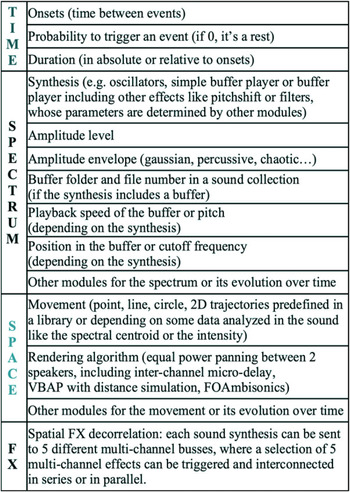
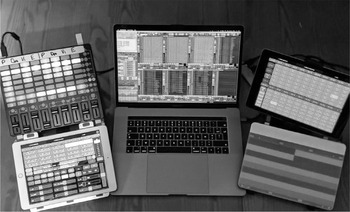
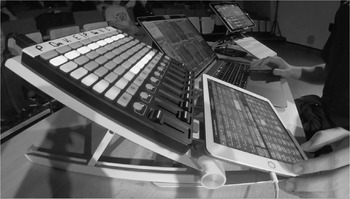
During the composition process, fixed or more or less random patterns from four main groups of parameter modules (Lengelé Reference Lengelé2017, Reference Lengelé2018, Reference Lengelé2021), consisting of Time, Spectrum, Space and FX (Figure 1), can be recorded as a sequence. Parameter sequences are akin to parameter envelopes or automation for a specific number of events within a track or channel. Presets, which gather patterns for all the parameters for a series of spatialised sound events, are then chosen by playing with the tool with a trial-and-error approach, by combining and randomising default parameters of several pre-composed libraries (sound files, synthesis types, amplitude envelope types, spatial algorithms or trajectories – see Figure 1). During the final improvisation, several sequences with different parameter behaviours in different tracks can then be called, played, looped and modified in real time with different mappings according to several controllers (Figures 2 and 3).
Parameter structure listing modules to create sequences of spatialised sound events. This list is summarised here and detailed in the ICMC paper (Lengelé Reference Lengelé2021).

View of the spatial performance tool with all its controllers in 2019: 1) in the centre, the Global view of the SuperCollider programme with eight tracks containing numerous presets of sequences, and the computer keyboard shortcuts to control different algorithmic functions on effects, buffer folders, and mainly playback speeds acting globally on all the events with glissando; 2) at the bottom left and at the top right, two Lemur input devices to select from among hundreds of sequences and parameter controls for future events; 3) at the top left an Akai APC mini to control the montage and playback of eight tracks; and 4) at the bottom right, the Sensel Morph to control the playback speeds of playing events, with different mappings on different tracks.

View of the spatial performance tool at a concert during the Journées d’Informatique Musicale in May 2019.

In the spirit of spatial controllerism, the structure of the tool can be associated with block-thinking theoryFootnote 3 and is relatively visible by looking at the controllers in Figure 2. Instead of audio blocks, the tool plays loopable blocks of parameters. Block-thinking is also very much used in the game audio industry to create a lot of variations with limited data due to technical constraints of memory or bandwidth. For example, instead of having several variations of the same sound, the sound files are separated into three or four frequency bands and all of the bands are played back randomly at the same time to recreate a composite sound (Gagnon Reference Gagnon2018). Although this technique is particularly adapted for noisy sounds, since it may sometimes cause phase problems, it allows the making of infinite variations and avoids ear fatigue from always hearing the same variations. In a way I adopt block-thinking by combining together different synthesis modules, spatial libraries of trajectories or algorithms, buffers, envelopes and values. For instance, for my performance Parmegiani meets SuperCollider (Movie example 1), the buffer module (Figure 1) gathered more than 2 hours of Parmegiani recordings, which have been manually cut in more than 1,700 sound samples and hierarchically organised by category in dozens of folders and subfolders. During the composition process, particular attention should be given to the building of the buffer library and sequences in order to navigate easily and quickly through buffers during improvisations.
3. IMPROVISING WITH SPACE AND PLAYBACK SPEEDS
3.1. Playback speeds: a core parameter to change articulation and to link space and real time
In the same way as ‘relativistic physics has broadened the question about how spacetime is related to the matter (sound object) and energy (playback speed) that inhabits it’ (Rohrhuber Reference Rohrhuber, Dean and McLean2018: 20), the mapping of space and real time is mostly realised through playback speeds. Moreover, as Vincent Gagnon (Reference Gagnon2018) remarks, playing with this parameter, which is a core parameter module in the tool, is also an efficient way to generate new sound materials:
I happened to separate music into three frequency bands, take the middle band and then play it backwards, the treble and bass go right and the middle upside down, which gives a really interesting effect. (Gagnon Reference Gagnon2018)
Pitch shifting via changes in playback speeds can have a dramatic effect on the articulation and rhythmic and agogic montage of sound images. This common operation, which developed with the emergence of magnetic tape recorders and then turntables, was first used by Pierre Henry in 1951 to symbolise the tearing of Orpheus’ veil (Vande Gorne Reference Vande Gorne2017). The effects of this treatment are all the more important if the variations of reading speeds are applied slightly differently to dozens of sound objects at the same time. My own latest spatial performances Parmegiani meets SuperCollider (Movie example 1) and Free parties will survive (Movie examples 2 and 3) illustrate different examples.Footnote 4
Modifying playback speeds has a direct effect:
-
1. On tempo to shorten or extend sounds, depending on the looping flag and durations of events in the tool. I often use this technique to change quickly to a new section or shorten the sounds at the end of my performance (Movie example 2: 12′40″).
-
2. On pitch to darken (Movie example 1: 3′31″ and 3′51″) or lighten (Movie example 1: 3′15″, 3′46″, 3′54″, 4′02″ and 6′51″) the textures via transposition.
Depending on the way of changing playback speeds, in a fixed or variable way through different glissandi or dynamic profiles, it can also alternatively give the illusion of:
-
1. A break/fracture in the sound materials (Movie example 3: 3′11″ or 12′01″ for hard breaks, and 3′55″, 4′14″ or 4′33″ for soft breaks), which can look like a scene break in a movie.
-
2. A change of scale (Movie example 1: from 2′12″ to 2′30″): while slow playback speeds give the feeling of a dive into the material, as would a microscope, where the smallest attack or grain is magnified, quick playback speeds allow a compressed time effect, micro-montage and a morphological overview of the global structure with its variations and repetitions (Vande Gorne Reference Vande Gorne2017).
-
3. A feeling of acceleration/deceleration via glissando (Movie example 1: from 1′56″ to 2′04″ and from 7′13″ to 7′33″).
-
4. A comic/dramatic effect (Movie example 1: from 4′55″ to 5′16″ and from 8′22″ to 8′45″): while high playback speeds on some sound materials, which are very recognisable such as voices or some instruments such as saxophone (Movie example 1: from 9′12″ to 9′32″) produce a comic ‘Mickey Mouse’ effect, lower speeds can create a frightening ‘Darth Vader’ effect.
Although this processing could be considered as a poor man’s technique in comparison with real transposition without changing time, it has the advantage of having a low central processing unit (CPU) usage, and is therefore able to act easily on hundreds of sound objects. Another reason why I chose to focus on this treatment was the simplicity of implementation within my program. In addition, performing several simultaneous readings in the same loop, fixed or moving, such as the GRM player, allows one to reproduce or approach many sound effects, such as freeze, transposition, timestretch, harmonizer or flanger (Lefevre 2017). Even though the concept of several readers in a moving loop is not yet implemented, the tool allows the rhythmic montage of hundreds of readers, with different positions and durations within a buffer, or different inter-channel playback speeds, sent to a fixed or moving zone in space.
3.2. The various ways to change spatial playback speeds
Pre-composed playback speeds of dozens or hundreds of instances of sound synthesis can be changed in real time in various ways depending on the controllers:
-
1. (Who?) Acting globally on all tracks, or on a specific track or server where the events are played.
-
2. (When?) Acting on playing or future events: whereas the keyboard and the 3D pressure input device (see Sections 4.2.1 and 4.2.4) immediately change the parameters of all playing sounds, physical knobs and the 2D touch input device (see Sections 4.2.3 and 4.2.2) only act on future events, by multiplying the series of values of the parameter, which allows smooth transitions since a lot of events may overlap.
-
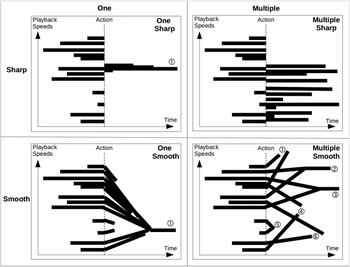
3. (Where?) Towards one fixed, precise value for all events of a track, or with six random values, within a specific range, applied to six different equal groups of events of a track (Figure 4).
Figure 4.Four different ways to interact with playback speeds within a sequence of 12 sound events with different onsets and durations. Depending on the action type and interface, playback speeds can converge sharply or with different interpolation times towards a fixed value or be spread randomly within a specific range.

-
4. (How?) Either abruptly (sharply) or with a glissando (smoothly) with different interpolation times.Footnote 5 Interpolations of 30 seconds are often used to contrast slow parameter transitions with the speed with which the events are triggered.Footnote 6
-
5. (Why?) To create global/local, smooth/sharp, precise/random variations or transitions, that can be surprises or accidents.

By punctuating the action and the discursive energy with expansions, accelerations, suspensions or interruptions of the internal vibration of sound materials, these breaks or glissandi can also be applied to the space of numerous sounds, if the spatialisation depends on concrete signal analyses, such as the spectral centroid or the intensity. Moreover, timbral changes via playback speeds have a great impact on our sense of spatial location in terms of distance and precision, depending on low or high frequencies. In a way similar to Henry Brant’s approach, my spatially organised compositional framework places ‘space as another secondary component on equal footing with time in the service of the frequency domain’ (Boren and Musick Reference Boren and Musick2018: 34). Although the performer has direct control of spatial locations and distributions, during my improvisations space is also indirectly controlled by playback speeds or at a higher level with the selection and association of different sequences of spatialised events in different tracks.
Another strategy to improvise with playback speeds is to play with spatialised polyrhythms (Movie example 1: from 9′57″ to 12′57″). In this example, five polyrhythms are duplicated several times in different tracks to be able to make some variations on each instance of the polyrhythm, and each polyrhythmic event is sent in circular movements to a specific loudspeaker or zone in space. Then, several parameters are modified in real time: not only changes in playback speeds and buffer folders in each instance of polyrhythms but also accelerated global tempo and extended durations of sound events. This results in baroque and frenetic spatial polyrhythms, which can be slightly desynchronised and resynchronised by modifying the tempo. As recognised by Xenakis and Horacio Vaggione, a balance is necessary between algorithmic composition and direct intervention, by acting on singularities (discontinuities, figures and contrasts) in order ‘to acticulate a highly stratified musical flux by statistical means’ (Roads Reference Roads2005: 307).
3.3. Spatialisation in the moment
A varied and dynamic space is created by spatialising simultaneously a large number of overlapping sounds, which may last between a fraction of one second and a few dozen seconds, with a quick selection for each event among a broad range of spatialisation techniques and algorithms, organised on two levels: spatialised sound particles sent to a multichannel effects environment with decorrelated parameters. A block-thinking approach is also used here to allow dynamic spatial variations by decomposing and recombining spatial aspects in three main groups of parameter modules (at the bottom of Figure 1): movement, rendering algorithm and spatial FX decorrelation.
One of the modules allows for the selection of each sound event between all kinds of spatial algorithms (both channel-based or object-based paradigms: concrete position of the loudspeaker or abstract position in space). By analogy, ‘choosing between spatialization algorithms is like choosing between different microphones’ (Bolles Reference Bolles2019): all of them have their strengths and their weaknesses in terms of coloration, accuracy of location or presence – from the blur of First Order Ambisonics to the very localised Vector Base Amplitude Panning, or the presence when sending to only one loudspeaker, or the greater diffusion of equal-power or spectral panning between two or several loudspeakers. This module also includes concrete techniques, which allow to broaden apparent source width and spaciousness or generate movements, such as inter-channel micro-delays (Vaggione Reference Vaggione2001: 3) and/or small pitch shifts, dynamic filtering (Boesch Reference Boesch, Barrière and Bennett1998: 222), or variations in playback speeds in one of the channels. Spatial concrete techniques acting on the internal space and parameters of each sound event are also present in other modules either for movement, by linking the data from the sound analysis (e.g., the spectral centroid) to a spatial dimension (e.g., the azimuth, elevation or horizontal axis), or for the possible sending to a layer of multichannel effects, by decorrelating effect parameters with different interpolation times, to get different effect parameter distributions and transitions across all the channels or loudspeakers.Footnote 7 Although the standardisation of spatialisation with an object-based audio production paradigm helps in rendering spatial works accurately and easily in arbitrary loudspeaker configurations, this approach of separating the sound source from the information describing its spatial attributes can also have some drawbacks. It can therefore be important to take account of some concrete spatial techniques, acting indirectly on space by spreading multiple instances of a sound or effect and changing its internal parameters on other loudspeaker channels in order to easily create some other kinds of spatial diffusions and articulations.
Last but not least, spatialisation is not only pre-composed and focused on the rhythm of each event but also improvised and based on intuition and body reaction from the experience of playing with the tool. Since space perception is very dependent on the concert place in terms of size, reverberation, number of loudspeakers, layout or number of rings in elevation, spatial composition should not be set in stone, but adapted to the present place and time and open to real-time adaptation. Owing to my lack of interest in the fixity of fixed media music, the very moment decides what is going to happen during my improvisations. Although the performance is structured in hundreds of sequences and dozens of presets of associations of sequences, the performer is primarily engaged in the ‘now’ and determines the spatial rhythm to open or break the sound and space. Simple triggers on keysFootnote 8 allow our body to be instinctly embedded in the reactive process of sound creation and to set the space and the pace of change in the same way as a conductor. Pre-composed spatialisation is then cut, changed and disordered by intuitive instants, which take priority over the intellect thanks to triggers on controllers.
4. PLAYING AND PERPETUATING THE EPHEMERAL
4.1. Control the uncontrollable
Many (sometimes surprising) errors or unforeseen events may occur during my improvisations, by playing with the ephemeral and the hazardous with drastic changes in playback speeds or sound materials and trying to control (via GUI and different interface controls as in Figures 2 and 3) the uncontrollable (via more or less random algorithms and functions on parameters). As Rainer Boesch said, it is important to remember to play with the ephemeral in one’s creations, instruments or tools:
Because of the innate experimental nature of electroacoustic music, and because the composition process lies somewhere between abstraction and the direct command of the instrument, the composer of electroacoustic music often feels the need to build new instruments and to give the word ‘play’ its true meaning, thus reminding us that music is by nature ephemeral. Instead of preserving a status quo, the composer feels the need to explore unknown regions of our perceptive faculties and of our comprehension (for example, the human faculty of generating inner images from sensory input). The ‘new art of instrument making’ is particularly suited to the latter function (i.e. learning how to discover the ‘unheard’ and the ‘incomprehensible’). (Boesch Reference Boesch, Barrière and Bennett1998: 222)
My improvisations are ephemeral for several reasons. First, algorithms of parameter sequences may be more or less random. In contrast to the art of fixed sounds from Pierre Schaeffer, only parameters and algorithms are recorded as presets and the sound is always modified according to the gesture of the performer. Second, if the multichannel effect layer is activated, the number of loudspeakers has a direct consequence on the number of sound events that can be produced in a place. Chance is also involved because of what I call ‘breathing CPU’ or ‘the breath of the machine’, which prevents the triggering of new events beyond a certain CPU threshold to avoid clicks. Then, the SuperCollider language requests via OSC the CPU of the audio servers, which are spread on different cores of the computer, to know if it can send messages for the creation of new syntheses in the servers. Unfortunately, owing partly to this separation between the language and the server in the SuperCollider architecture, some CPU bursts and clicks may sometimes occur in my program if the response time is too long to avoid the generation of new syntheses.
Live performance is a music of relationships, actions and reactions, with a confrontation between the imaginary and the form, the sound desired or dreamed and what is actually achieved. It is necessary to feed the music constantly and to endlessly catch up with mistakes. This struggle with the machine within a playing structure, which in my mode of improvisation could be qualified as ‘improvising in discomfort’, which Sandeep Bhagwati distinguishes very well from improvising in comfort:
Improvising in comfort happens as an ornament, a variation on a habit, a permutation within a well-mastered set of conditions. Most improvisations are such comfortable improvisations. One could also call them teleological improvisations – the goal is clear, but the path towards it is improvised. In sharp distinction, a different need for improvisation arises insituations of discomfort: one is forced to improvise because the conditions have mutated, or because the rules are unclear, or because our habits would lead to disaster. This type of improvisation could be called ontological, as it addresses the very nature of the condition in which improvisation arises. (Bhagwati Reference Bhagwati2018)
My improvisations are also ephemeral due to the nature of the tool, which is in continuous development and improvement. With time, some bugs are solved, new functions and controllers are introduced, producing possibly new bugs, mappings of interfaces are changed and fine-tuned. Since the tool lives and grows, a past performance can never be really re-created in the same way. Even though the essence of a performance is preserved, its realisation always varies. The spatial performance tool is getting closer to some stability, but it is also as ephemeral (Goudard Reference Goudard2019) as improvisations, due to its dependency on technology updates (SuperCollider platform, external libraries, availability of controllers) and the coding time of the author. It tries to move beyond illusions of spatial controllerism towards exploration systems, by gathering dreams of absolute control and chaos, the idea of power and virtuosity and the desire for inefficiency and unpredictability (Sonami Reference Sonami2014). Even though I try to stick to one instrument, such as Laetitia Sonami with the Lady’s Glove, Eliane Radigue with the ARP 2500 or Michel Waisvisz with his Hands (maybe to contradict its ephemeral nature and the fragility of the tool), I have not yet resisted the appeal of adding more buttons and modules:
Take the time to stick to one instrument! It’s like a relationship, going to the ups and downs and just sticking with it or trying to, and really knowing it! … Resist to the temptation of adding buttons, foot pedals or starting a new instrument, with new modules! Learn to play with boundaries! It takes very long to come to an understanding of the kind of interfacing between gestures and the software … People like buttons. But, from the point of view of performances, the idea of buttons doing something specific, it is not the kind of interface I want … I want to be surprised,Footnote 9 but it’s a fine line how much surprise you want. You still have to know what you’re doing. (Sonami Reference Sonami2017)
4.2. Improvising via the combination of different controllers and mappings in practice
4.2.1. The trackpad and computer keyboard
The computer was and still is my first main basic controller. With modifier keys, a lot of shortcuts for different functions are available within a very small space for everyday use. For instance, 27 keys are mapped to change the playback speeds towards a fixed value. And, by pressing shift, the behaviour is altered and several random speeds with different ranges depending on the key are spread among groups of playing events (see Figure 4). Moreover, the free MIDI Touchbar,Footnote 10 which has recently included 14-bit resolution and OSC support, now allows one to get some very convenient tactile buttons and sliders on Mac keyboards, to control; for example, different volumes (global, FX, tracks).
4.2.2. The Lemur (2D Touch Input)
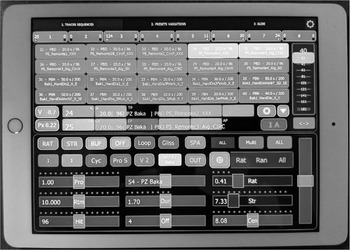
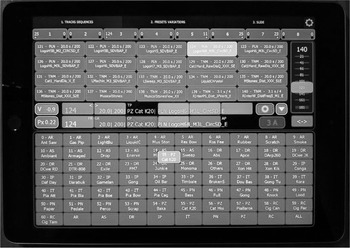
Although the keyboard is convenient, I needed a way to select many controls at one time. Despite the lack of support and feedback from the company and the connectivity problems with bluetooth controllers, I chose the Lemur App,Footnote 11 since it allows the building of complex interfaces with OSC communication. As shown in Figure 5, the Lemur allows me not only to select a sequence among hundreds of presets for each of the eight tracks, through the combination of a pad and a slider (at the top of the screen), or to randomise through different sequence types (organised with my own classification, e.g., soft, hard, atmospheric or rhythmic sequences) but also to control discretely the main parameters of future events, such as by multiplying onsets, durations or playback speeds via sliders (at the bottom of Figure 5), or by navigating through dozens of buffer folders (at the bottom of Figure 6). Screen gazing, unpleasant touch and the lack of haptic feedback makes me, however, integrate more classical and physical controllers with knobs, buttons and sliders.
One of the Lemur views showing the controls of the Global view of the computer for each track. While at the top, a preset can be chosen among hundreds of sequences, at the bottom, the main parameters of the sequence, like playback speeds, can be changed for future events.

Alternate Lemur view showing particularly at the bottom a pad to choose amongst dozens of buffer folders.

4.2.3. The Akai APC Mini and Midi Fighter Twister (more real knobs and buttons)
The Akai APC MiniFootnote 12 and the Midi Fighter TwisterFootnote 13 were chosen not only because they were relatively cheap but also because the availability of external libraries customised for the SuperCollider language. While the Akai APC Mini is mapped to control – for example, the kinds of playback (continuous or reset) of sequence parameters for each track or the triggering of the sounds in the sequence one by one or indefinitely – the Midi Fighter Twister has recently been added to control in a continuous manner and with a high resolution the parameters for future events such as playback speed, rhythm or duration of buffers. To solve the very limited size of sliders of the Akai APC Mini, causing low resolution and jumps in the volume of tracks, an interpolation of a few seconds was added in the mapping of the sliders.
4.2.4. The Sensel Morph (3D Pressure Input)
The Sensel MorphFootnote 14 allows one to build one’s own interface of controls with different forms for 3D control (X, Y and pressure) with 14-bit resolution and pleasant touch. Although the use of squares seems logical, I decided to divide the interface into several bands, by privileging the resolution of one parameter X over Y, in order to get more types of control over one parameter. The different bands are mainly mapped to immediately change playback speeds for specific tracks with different ranges and curves and act in contrast with computer keyboard keys, which generally control the speeds in a different way, via glissando with interpolation times from 1 to 30 seconds and globally on all playing events. This interface allows me to develop specific gestures, such as the sweep (Movie example 1: 4′02″), the pinch (Movie example 2: 7′23″ or 12′40″) or the slide (movie example 2: 9′19″). This last gesture is also used for the Lemur at 9′48″ to navigate through a 2D pad. A Lightpad Block ROLIFootnote 15 could be added to also get visual feedback with colours or text, even if it is less sensitive. The large 21-inch touchpad EmbodmeFootnote 16 might be also a good choice in the future.
5. CONCLUSIONS AND FUTURE WORK
The spatial performance tool Live 4 Life, which is in constant development under the Mac platform, aims to simplify the creation and control in real time of mass of spatialised sound objects on various kinds of loudspeaker configurations (particularly stereo and octophonic setups, as well as domes of 16 and 32 loudspeakers).
Although the code will be freely available at the end of my doctorate, the interface and the setup are relatively complex, as it is not meant to be a simple graphic user interface (GUI) for a casual, untrained user, but focused to allow the creation of a lot of combinations tailored to my creative dreams. It is first designed to respond to my performance needs in terms of possibilities of (spatial, spectral, temporal) parameter modification, reaction time and reference points in the structure of the improvisation. Moreover, it is designed for a specific screen size (1920×1200) and an AZERTY keyboard.
In this article, the ephemeral nature of the tool and spatial improvisations have been explained. The structure of the tool was presented by focusing mainly on parameter sequences and their modifications, particularly on one of the core parameters: the playback speeds. The effects of modifying numerous playback speeds were illustrated through excerpts from my spatial improvisations. This parameter is (un-)controlled via the combination of several interfaces with different kinds of mappings: playing/future events, break/glissando, globally/locally on some syntheses, in a fixed or more or less random way.
Future work will not only focus on polyrhythmic spatialisations, mapping between rhythm and space and spatial algorithms but I am also considering using in parallel live coding languages such as TidalCycles (McLean Reference McLean2020), with pre-composed coding controlled by different interfaces. This might be more flexible for describing and interacting with patterns or behaviours of sequences for the different parameters. Concerning the interfaces, more physical knobs will be added, such as the Midi Fighter Twister, particularly to control playback speeds differently for another context, or the Xone:K2Footnote 17 for dynamic filtering. The objective is to set up new controllers and gestures with mappings adapted to each kind of sequence and to extend the tool towards a multiuser performance interface by spreading the ‘game’ by track or by kind of parameters (rhythm, spectrum, space). Two players can already improvise together, if the other player were to use the second Lemur input device to choose a sequence on a different track and control its parameters. In terms of synthesis, the goal is also to go deeper into the sound material, by decomposing the event either temporally (attack/resonance) or spectrally (low/high frequencies). A more complex decomposition of the event would require the addition of several new modules to control and spatialise internal parameters for each sound.
The technical approaches of working with sounds as blocks and focusing on playback speed and space, as well as the use of Parmegiani’s repertoire, have roots in musique concrète; however, this project departs from the fixity of acousmatic music by focusing on sound play structures and the performance of ephemeral open works. One of my main interests is in exploring the possibilities of creation and interaction with this hybrid tool between composition and improvisation, since ‘musical ideas are prisoners, more than one might believe, of musical devices.’ (Schaeffer Reference Schaeffer1966: 16–17)
SUPPLEMENTARY MATERIAL
To view supplementary material for this article, please visit https://doi.org/10.1017/S135577182100008X