

1 Introduction
With the development of web-based technology and the explosion of language resources available online, the learning and teaching of languages is constantly evolving. On one side of the spectrum, content and graphic designers are eager to offer better, faster, ‘cooler’ applications, and on the other side, many instructors are desperately trying to hang on to their traditional views of the way in which languages should be taught and learned. Indeed, it sometimes seems like educators work in a confusion of contrasting and conflicting currents. One approach to attempting to merge sound (albeit somewhat traditional) pedagogical principles with the exponential development of internet-based systems, is to rethink the role played by the computer in today's society. First, we need to adopt the view that computers have become cultural artefacts with which (and not from which) individuals interact naturally and regularly to perform common and daily tasks (e.g., Rabardel, Reference Rabardel1995; Verillon & Rabardel, Reference Verillon and Rabardel1995; Selber, Reference Selber2004). Secondly, we need to appreciate the fact that nowadays both teachers and students rely increasingly on web-based learning environments for language learning (Jonassen et al., Reference Jonassen, Howland, Marra and Crismond2008). As explained by Hémard (Reference Hémard2006), creating web pages has become easy and popular, hypermedia interactivity is everywhere, and “the seeming and attractive simplicity of creating web pages with the available range of dedicated authoring tools, the now easy and fast access to online information and the low learning curve for using a web browser have all been important contributory factors in making the web successful” (op. cit.: 25). Lastly, being able to read, write, and communicate effectively in electronic environments is a pressing need in today's global knowledge economy (e.g. Kern, Reference Kern2000; Warschauer, Reference Warschauer2000), more so in a second language.
Based on these premises, this article examines a design-based research project that seeks to analyse and understand the dynamics of user interactions with a specific web-based CALL tool in the context of a FSL course. We initially highlight the theoretical framework and the context in which our study takes place, before presenting the tool, and the experimentation that followed its development. Our analysis focuses on the behavioural nature of the interactions and discusses them in the light of mediated activity theory while commenting on the components of the results that need to be recycled into the tool re-design to improve its effectiveness.
2 Context of the study
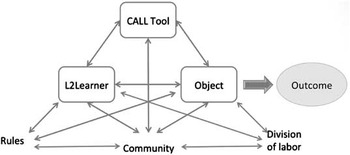
Studying the relationships that exist between humans and their physical surroundings, in particular any tools that mediate daily life, has been the subject of research in several disciplines and for many decades. The early works of Vygotsky (Reference Vygotsky1978) then Leont'ev (Reference Leont'ev1981) suggested that cultural artefacts enhanced or transformed human abilities, and that a clear relationship established itself between a being, a tool and an object. Engeström (Reference Engeström1987) expanded on this metaphor to include other social and cultural elements to the human activity system, such as the community in which human beings live, or the rules under which they interact or work. Adapted from his structure of human activity system (op. cit.: 78), the figure 1 below represents the role played by various social and cultural elements in a context of learning with CALL:
A CALL mediated activity.

Arguing that there was a lack of research taking the artefacts as point of departure and focusing on how their design affects both the user and the task, Norman (Reference Norman1991) remarked that a better understanding of the role played by artefacts was critical to the improvement of their design. He claimed:
Every artefact has both a system and a personal view, and they are often very different in appearance. From the system view, the artefact appears to expand some functional capacity of the task performer. From the personal view, the artefact has replaced the original task with a different task, one that may have radically different cognitive requirements and use radically different cognitive capacities than the original task. (Norman, Reference Norman1991: 22)
This is an important concept for the development of a CALL tool; clearly, we can hardly ignore the cognitive and functional effects that new systems, and new e-learning tasks may have on human cognition and behaviours. Along the same line of thought, Félix (Reference Felix2005) stated that research in CALL should focus on the “processes of learning rather than outcomes alone” (op. cit.: 3). She pointed out the need to record what is happening during an intervention as being as essential as studying the effectiveness of the tool itself (upon reaching a learning outcome):
Technologies, settings and teaching methods have not only become more complex but inextricably linked and outcomes therefore even more difficult to measure. […] What remains interesting to investigate is how technologies are impacting learning processes and as a consequence might improve learning outcomes. (ibid: 16)
While E-learning is fast expanding, understanding the mediation that happens between a CALL tool, a learner and a task, becomes even more critical. Rejecting the assumption that “availability [of technology] equates to actual use”, Fisher (Reference Fisher2007) surveyed research on computer-tracking in CALL and concluded that computer-tracking, used as a method to obtain direct and objective feedback on learner behaviours while at task (namely, interacting with a CALL system), constituted a valid “ethnographic method” (op. cit.: 40) to better understand how students use software (as opposed to how we think that they are using it).
Likewise, research in human-computer interaction relies on cognitive theories to explain phenomena such as disorientation or lack of retention experienced by users working with web-based systems. Chalmers (Reference Chalmers2003) explained that while the “business of educating the public via the World Wide Web” (op. cit.: 594) was booming, questions concerning equal usability to all users remained critical. She stated: “before developing software user interfaces, it makes sense to research the effect of learning theories, retention theories, organizational theories, and individual difference theories in computer assisted instruction” (ibid: 605). Hémard (Reference Hémard2003) also warned CALL developers against putting too much focus on the “perceived technological potential” of the design (op. cit.: 21); he further called for adopting a conceptual approach to CALL design, namely to develop very user-friendly systems that motivated users to “interact productively and voluntarily instead of simply acting and reacting” (ibid: 23). In sum, calling on the participation of all actors involved in the learning processes should offer an attractive solution to CALL tool and task development (Colpaert Reference Colpaert2006, Hémard Reference Hémard2003, Levy Reference Levy2002).
Similarly, web-based task design needs careful attention. Colaric and Jonassen (Reference Colaric and Jonassen2001) explained that asking learners to perform tasks that are too simple results in fast clicking with no possibility for learning; hence the requirement that learners “articulate an intention for seeking information in the first place” (op. cit.: 163). While living, working and interacting with computers in higher education has become a ‘natural’ activity for learners, greater focus should go towards “meaningful learning”. Jonassen et al. (Reference Jonassen, Howland, Marra and Crismond2008) stated that reflecting upon the activities in which they were engaged helped learners construct meaning (critical literacy). Similarly to Selber's (Reference Selber2004) ideas of rhetorical literacy, Jonassen et al. added: “if technologies are used to foster meaningful learning, then they will not be used as delivery vehicles. Rather, technologies should be used as engagers and facilitators of thinking” (op cit.: 7).
Adopting an educational ergonomic approach to analyse the ‘learner-task-tool’ interactions, is one method that favours a learner-centred, i.e., an anthropocentric approach to the design and development of CALL resources (e.g., Rabardel, Reference Rabardel1995). Educational ergonomics implies that a symbiotic relationship between human beings and tools is analysed within a psychological framework, namely, artefacts take their meaning within a social and cultural practice (e.g., Rabardel, Reference Rabardel1995; Raby, Reference Raby2007). Used as an evaluation mechanism, the educational ergonomic approach is framed within a mediated-activity theory (see supra) and suggests that instruments play a fundamental role in mediating the learning process.
While evaluation in CALL has taken many forms (e.g., Chapelle, Reference Chapelle2001) and may be motivated by various aspects (e.g., Levy and Stockwell, Reference Levy and Stockwell2006), we relied heavily on assessing the tool in relation to the learner, and vice-versa. As will be further explained in the next section, this study is framed by educational ergonomics principles to help us better understand and evaluate users’ behaviours while they interact with one specific web CALL tool.
3 The study
3.1 Method
The pedagogical context of this study is related to the use of corpora for language learning, and more particularly the exploration of short videos of francophone speakers (see section 2 for a description of the tool). Web-based corpora provide several advantages to learners by showing language in use and using authentic material, hence providing good evidence of language patterns (Bernardini, Reference Bernardini2004; Braun, Reference Braun2005). Yet, because ready-made corpora are typically not designed with a pedagogical outcome in view, they are not commonly used in L2 learning and teaching (Braun, Reference Braun2005). Francotoile, the system used for this study, was developed for pedagogical purposes and to meet specific learning outcomes. One outcome was to develop students’ cultural literacy, through an appreciation of cultural and socio-linguistic variations and diversity and a tolerance towards authentic discourses that often diverge from the norm that prevails in the classroom context.
Our research goal was to investigate L2 learners’ practices when they are interacting with FrancoToile, and analyse how these practices can inform us on the design and development of the tool.
The research questions that guided our study were the following:
(1) What are the instrumental behaviours shown by learners?
(2) To what extent are the behaviours contributing to their development of critical and electronic literacies?
In order to reach our research objectives, we analysed a “work situation” (e.g., Raby, Reference Raby2007), that is, “an association of a subject and a task in set conditions” (op. cit.: 184), using FrancoToile. Following educational ergonomics principles, we focused on the following aspects: (1) what learners do with the instrument while immersed in a task (the process); (2) their achievement score (the performance) and (3) their perceptions of the task and of their interactions, after the fact. The advantage of using an educational ergonomics approach is that it places the user at the centre of the analysis (Rabardel, Reference Rabardel1995; Raby, Reference Raby2007), and requires close observation and analysis with the goal of improving the process (Bertin & Gravé, Reference Bertin and Gravé2010).
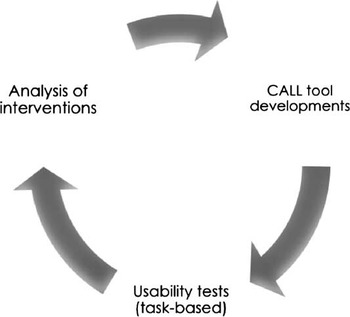
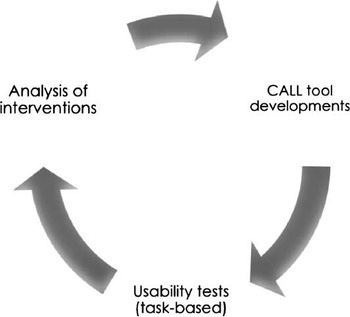
We adopted a research method based in part on the Analysis-Design-Development-Implementation-Evaluation (ADDIE) methodology (e.g., Strickland, Reference Strickland2006; Colpaert, Reference Colpaert2006). ADDIE is an instructional system design (ISD) that is particularly well suited to guide developers in the creation and evaluation of language software or other language-related computer systems. Colpaert explains that one of the advantages of the ADDIE model is that “each stage delivers output which serves as input for the next stage” (op. cit.: 115). By executing an iteration of studies (as shown in Figure 2), results can be compared and recycled back into the design process (Colpaert, Reference Colpaert2006; Hémard, Reference Hémard2006). This comparison allows for replication, which is akin to the notion of generalization in quasi-experimental studies.
Cycle of development and evaluation of CALL tool
3.2 The CALL tool
FrancoToile Footnote 1 is a digital library of videos and transcripts of French-speaking individuals from around the world. It was created in order to let students of FSL explore key concepts of the francophone culture through the testimonials of francophone people who currently live or who have lived in a francophone environment. Its pedagogical purpose was to bridge the gap between the classroom contexts of learning French (namely interacting with other FSL learners), and the full immersion context where learners find themselves interacting with native speakers on a daily basis. Another pedagogical goal was to develop learners’ cultural skills, more specifically to increase awareness of the concept of francophonie in today's global society, thereby dissolving issues of linguistic dominance, or bias. Most of the speakers in the corpus discuss culture-related issues, such as the mere meaning of being a francophone today. As argued by Braun (Reference Braun2005), in order to comply with pedagogical needs, a corpus needs to include a specific context to help users authenticate its content; this goal can be achieved by pre-selecting a theme that permeates the entire corpus. Coherence of theme “will enable learners and teachers to establish a relationship to the materials in the corpus that would hardly be achievable with any of the ‘traditional’ corpora” (op. cit.: 54).
FrancoToile currently includes about forty video clips, shot with digital video cameras. The data for each recording is stored as an mp4 and an ogv file on the media server. Users can view videos, display or hide subtitles, generate indexed returns based on key-word searches of one or all videos, and bookmark any sentence within a video. The system uses a bilingual French/English web-based interface written in xhtml.
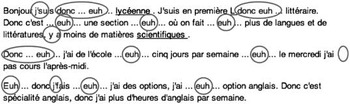
A transcript that displays word for word the discourse of the speaker accompanies each video clip. The transcripts also include any pragmatic and socio-linguistic markers that characterize them, in most cases, as informal or familiar oral discourses. In Figure 3 we show a coded text, extracted from a transcript, to indicate these markers of informal oral discourse.
Coded transcript in the FrancoToile database

Transcripts are annotated to highlight particular aspects of the speech that may reveal cultural, linguistic or socio-linguistic aspects. In order to be consistent in our annotation practices, we created a set of criteria based on learners’ needs and requests. Compliant with instructional system design protocols, the categories that we pre-selected are based on (1) our own observation of the kind of questions or information learners tend to seek, and (2) on the feedback that we collected from users through our various interventions while developing the tool. They include the following:
(1) Word denotations and connotations;
(2) Collocations and idiomatic expressions;
(3) Links to visual and/or auditory documents;
(4) Notes on pronunciation;
(5) Contrastive analysis of speech;
(6) Linguistic notes on speech register.
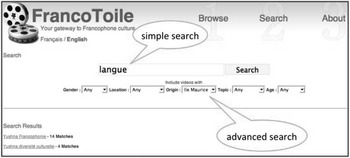
Finally, the system was developed to be user-friendly in order to respond to any learners irrespective of their computer skills. It contains three main pages: a browse page, a display page and a search page. The present article reports on data collected with the system's previous interface. As we will discuss later on, results of our data analysis were recycled into an extensive re-design of the original prototype. However, neither the content, nor the basic page structure was changed. At the time of the current experiment, the browse page displayed a list of all the videos contained in the database; the list used the video title for recognition. The search page allowed the user to search the entire collection of videos, and to filter by various fields of information about the user (e.g., gender, age, location). The query returned a list of video titles with the number of instances of search string in that video (see Figure 4). When the user clicked on an item in the list, the player page opened and the list of timestamps appeared in the search tab.
Search page in former prototype

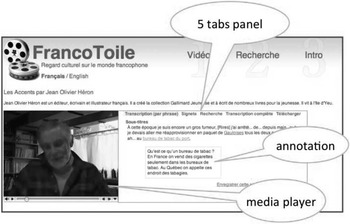
The display page displayed both the video and the transcript (see Figure 5). This page also contained five tabbed panels allowing user to access the full transcript, bookmark specific occurrences of the video, download the entire transcript in an TEI XML or XHTML format, or search within the page.
Display page in former prototype

3.3 Participants
Previous evaluations and experimentation with the system (e.g., Caws, Reference Caws2009; Hamel & Caws, Reference Hamel and Caws2010) helped us identify the target user group that was the most likely to benefit from the system. In addition, because we had already experimented with the system in lower level courses, we had to ensure that our target group had not had formal exposure to the system in order to control the variables relating to system familiarity. The initial cycles of evaluation gave us an insight into users’ experience of and/or apprehension towards the system; in addition, it also helped to clarify the tasks to be performed by users (e.g., Hémard, Reference Hémard2003).
We selected a group of thirteen FSL students enrolled in an intermediate/advanced course focused on oral communication and the development of cultural knowledge of the francophone world. The course is taught at third-year level and also seeks to develop students’ ability to communicate orally using a sophisticated language, thus being able to understand socio-linguistic nuances and register variations of speech. To that effect, FrancoToile would potentially provide a good tool to analyse these language distinctions.
A pre-task survey was administered to collect information of an ethnographic nature on participants. Twelve out of the thirteen participants completed all surveys and tasks related to the experiment. We had eleven female and two male students (the non-participant being a female); eleven were aged between 18 and 25, two were more than 26. Twelve participants had English as a first language, one had Mandarin, one was bilingual (English/French). Eleven spoke English at home, one Mandarin, and one spoke either English or French. Seven participants had been educated in an immersion program, four had taken French as a Second Language, and two had learnt French in other circumstances.
Using a 1–7 point Likert scale, we collected basic information on participants’ perceived level of technical knowledge. Participants stated that they were most proficient at using email, followed by word-processing, internet searching and social networking. All four categories received a rating above 6. Despite what we might expect, not all students felt proficient using social networking, with ratings ranking from 4 to 7, while emailing ranking remained between 6 and 7. Only one student claimed to be very proficient at website design (rating him/herself at 7) while other participants rated themselves between 1 and 5 (5 at 1) for an overall score of 2.92. In sum, most participants had little experience with website design. All participants used Google as a search engine and spent between three and ten hours on the internet, mostly for personal activities. Subjects were not novices in CALL, having had the chance to use various programs in other languages courses. Subjects were given a brief technical training session before being launched into the experiment (see section 3.4.2).
3.4 Instruments and procedure
3.4.1 Data collected
In order to increase the reliability of our study, we collected data from multiple sources: pre- and post-activity online questionnaires, activity sheets (used by participants during interventions), computer screen video captures using Camstasia Studio, and recorded focus group interviews. These data (in particular the screen-captures) allowed us to monitor students’ ‘processes’ within the site, and understand any difficulties that the user may encounter to complete a task due to design ‘error’. The task completion sheets were used to correlate participants’ responses with the screen video captures, hence they gave us an insight into the system's performance. In addition, these data informed us of the users’ degree of electronic literacy.
Similar to research in human-computer interaction, our interventions can be compared to usability tests designed to test the efficiency and efficacy of the tool interface. In the present study, participants (the ‘users’) were involved in authentic learning tasks that were measured and/or observed. The actions (recorded with the screen video capture software) and the reactions of the users (recorded through online questionnaires and interviews) were used to define the degree to which the interface was conducive (or not) to performing the task(s).
3.4.2 Procedure
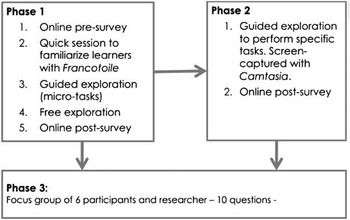
The intervention was organized around three main sessions as summarized in Figure 6.
Summary of procedure

During session I, the intervention took place in a laboratory under the guidance of both instructor and researcher. First, students completed an online questionnaire to inform us on their ethnographic background, their knowledge of French, and their perceived degree of technical expertise. After a brief introduction by the researcher, to familiarize participants with the interface and content of the tool, students were each given a one-page activity sheet describing three specific micro-tasks. The tasks focused on users’ search and reading strategies and required participants to identify and/or locate videos using lexical cues and extracting lexical items (T1a, T1b, T1c, T2a), and using thematic cues or focusing on the context of the video content (T2b). Once the task-based exploration was completed, students were required to spend time exploring the website freely, selecting the content that most interested them. At the end of session I, they completed an online post-experiment questionnaire that solicited their opinions about the system's content, quality, and usability. Questions included a combination of short text, yes/no, check-box and Likert scale answers.
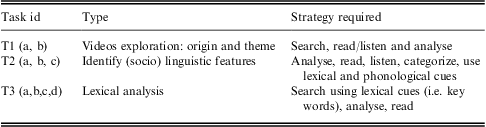
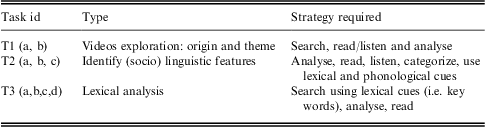
For session II, each participant spent an hour working on specific micro-tasks, using FrancoToile as their main CALL tool. The tasks and videos had been pre-selected by the researcher in collaboration with the instructor to ensure that they were consistent with the pedagogical intention of the course. The intervention was organized outside of class time, as an assignment, in order to preserve precious time in class to work on oral/aural activities. In addition, to create an authentic learning task, the recorded sessions in the lab were followed by a class in-depth discussion and a follow-up homework assignment meant to assess learners’ level of critical understanding. Session II could be equated with a “cognitive walkthrough” (Scapin & Bastien, Reference Scapin and Bastien1997: 220). The micro-tasks were based on four videos of speakers from various origins. Participants used an activity sheet to record their answers to the micro-tasks that were divided into three main components:Table 1
Taxonomy of tasks (Session II)
The third phase of our intervention involved a semi-structured interview with six of the thirteen students who volunteered to participate further in the experiment and share their experience. The interviews sought to elicit additional insights into students’ perceptions of the tool, their interaction with the tool, and the learning tasks performed during the two interventions. The open-ended questions (such as, Could you explain the objective of the second exploration of Francotoile? Or, What task(s) was/were the most useful to you?) were carefully crafted in order to refer back to key aspects of the intervention, and thus to allow us to extract valuable information for our future interventions as well as for the re-design of the tool. During this intervention, the researcher did not intervene unless participants required further direction or did not expand enough on their answers.
4 Results and discussions
The qualitative data, collected through the online questionnaires and the focus group interviews to assess the experience with the CALL tool, in terms of both task and tool design, were analysed using a discourse analysis approach. After all data were transcribed, the researcher and two research assistants individually coded the transcripts to look for trends (in particular by identifying keywords), and compared their results. Using more than two coders per dataset has the advantage of increasing the reliability of the results, especially when the sample of participants is limited. The same process was used to analyse the qualitative data that pertained to content and were collected during both sessions through paper or online questionnaires. Whenever the task involved the identification of specific items (either lexical or phonological) within the videos, we assessed the results in terms of both accuracy and completeness.
Lastly, to analyse the data obtained through video-screen capture technology, we looked at each task and evaluated the accuracy of the responses (for tasks requiring a specific answer) and the level of completeness, the scope of proposed answer (for tasks eliciting users’ interpretation such as lexical identification), the time taken for each task (in order to evaluate users’ variance in the effort required to complete a task), and the interactive path (number and type of keystrokes, location and type of clicking, search strategies).
4.1 Guided and free exploration I
During session I, participants were first involved in a semi-structured activity followed by a post-activity online questionnaire. Both sets of data are meant to give us an insight into their degree of critical and functional literacy.
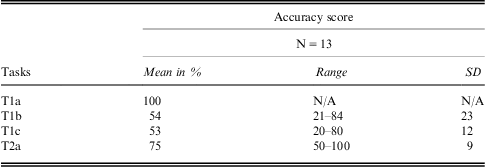
The following table summarizes the results in terms of accuracy for the tasks that required specific answers. Table 2
Accuracy scores of semi-structured activity I
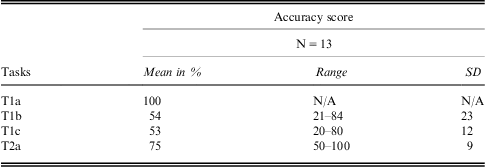
All participants completed the five tasks with varied degrees of accuracy and with varied effort, as shown by the time spent for the overall activity. The mean time to complete all five micro-tasks was 28 minutes with a range of effort going from 17 minutes to 39 minutes. The participant who was the fastest at completing the tasks was not the most successful in terms of accuracy, obtaining some of the lowest score. When comparing these results with the analysis of her/his screen-capture recording (session II), we note that this user also appeared to be lacking functional skills, as well as meta-cognitive strategies (such as guessing or inferring) to offset the lack of feedback offered by the system. For task 2a, although the SD is the lowest (due to the nature of the task), some users omitted to explore all areas of the page while watching the video and thus did not find the “origin” of the speaker. As a user commented later on, the legibility of some of the information was marginal; hence it would have been easy to miss key elements of the text.
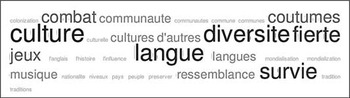
For task 2b, participants analysed two videos to find the main themes expressed by each speakers. The word cloud below (figure 7) illustrates the recurrent themes, centred on notions of culture, diversity, and language survival. Without accurate interaction recording, we cannot make any assumptions on any of the tool functions that may have helped users to perform the task. However, in their feedback, users commented on the transcripts and most of them selected the full transcript option to read the discourse and find the themes. Figure 7
Word cloud summarizing answers to task2b session I

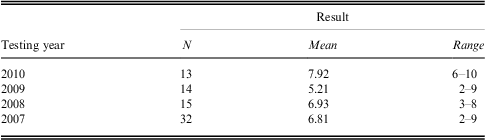
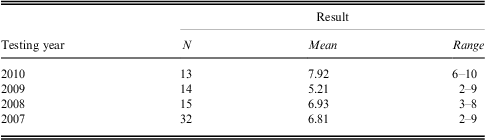
In the post-activity questionnaire, participants were asked to provide their initial feedback for using the tool. Commenting on their favourite feature, the use of transcripts (10/13) came in first place, followed by annotations (8/13). The fact that the database contained authentic video clips and speakers from a variety of origin and location was ranked equally (7/13), as number three. The initial mean rating of the site on a 1–10 Likert scale was 7.92, which represents a fairly clear increase compared to previous testing: Table 3
Initial Rating of site by students
4.2 Guided exploration II
During the second session of interaction, we collected data using screen-capture recordings, activity sheets and post-activity surveys. Tasks 1 (a, b), tasks 2 (a, b, and c) and task 3c were used to assess participants’ level of critical analysis and understanding of speech registers and variations and, as such, cannot be used to assess the tool's effectiveness in helping users perform their tasks. However, a few remarks are worth mentioning. For task 2b and 2c, we expected participants to spend time listening to the speakers in order to comment on their accent and discourse levels. However, because the system automatically featured the subtitle, users still relied on the transcript. For both tasks, which required users to assess four videos (a total of 7 min. 55sec.), the average time spent in performing the task was three minutes (with a range from 1 to 7 min.). It is clear that the system was not conducive to encouraging listening skills. In terms of ergonomic criteria (e.g., Scapin & Bastien, Reference Scapin and Bastien1997), the simple design of the tool was somewhat devalued by the lack of adaptability and user control. Without proper training before the task, and a follow-up activity after the task, users may feel slightly unclear about the outcome of such activity. In the case of the present study, the post-questionnaire helped contextualize the overall activity. Participants were required to comment on linguistic aspects of the four speakers, including comments on their accent. An analysis of the answers revealed a fairly good level of critical analysis; participants could make the distinction between the four speakers and relate the activity to their own experiences interacting with native speakers. The following are two unedited comments made by participants regarding the speakers’ accents:
I thought that Hugues and Sebastien has [sic] similar accents, but that could be because of age. Pierre was a bit different but I can't point out what… a bit caribbean/mediterannean maybe? and Jean-Gynse was very “perfect”, very eloquent like someone who is trying to learn and trying to pronounce everything with accuracy. (Participant # 7417)
I think their accents were all very different. Sébastien and Hugues’ accents sounded the best to me, again because I am used to them. The accent from the South was kind of amusing, for some reason, and the Haitian accent made it sound as if French wasn't his first language, at least to me. (Participant # 0457)
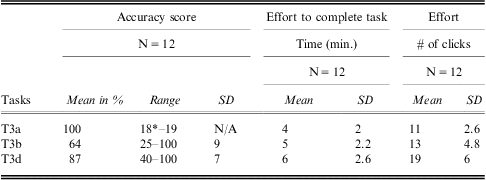
Tasks 3 (a, b and d) were designed to assess the tool functions. All three tasks focused on lexical items to be found in the discourses. Table 4
Accuracy and efficiency scores Tasks 3 (a,b,d) session II
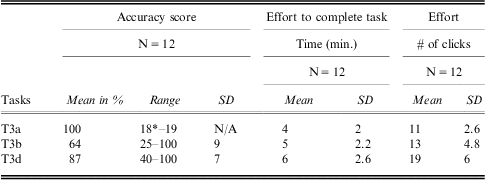
*One participant missed one item in the task
As shown above, task 3a was the easiest to complete; it obtained the highest score for accuracy, and naturally exhibited the lowest effort both in terms of time and keystroke. Participants used a variety of strategies to navigate within the site: key words in the search page, using CTRL +F with the full transcript, using the cursor to facilitate reading the transcript. For all three tasks, it appeared that the full transcript option acted like a “security blanket”; if participants did not find an item using the search page (which would be the most effective strategy), they would scrawl up and down the text and/or use the cursor as a reading help to locate the targeted lexical items.
Task 3b obtained the lowest score due to the system's lack of functionality (namely, utterances within a transcript were not listed as results, although the video containing the item appeared in the search result). One item was located within an annotation that appeared only if a user selected the word that was annotated. To circumvent this system's limitation, participants had to “remember” to read the transcript in its entirety (including the annotations that are associated to specific words). Likewise task 3d contained lexical items with characters (such as apostrophes) that the system would not register. Participants with lower functional skills ended up spending a lot of time going back and forth from the search page to the video page instead of trying to change their search input. Likewise most students omitted to use the search function within the video page, which was probably due to the fact that during the short training session this function was not targeted by the activity.
In sum, these results, although based on a limited number of participants, seemed to illustrate the fact that the system's usability needed to be enhanced in terms of guidance, for instance by providing feedback when a participant used a search input that cannot be recognized (such as omission of diacritic signs) or by providing a better error management scheme. While the system provided enough functions to allow users to reach their learning goals (albeit with varied levels of accuracy), it is clear that most participants developed their own strategies to circumvent the system errors or lack of functionality. The most prominent functional strategies used to complete tasks 3a, 3b and 3d were the following: reading/scanning the transcript using the cursor to highlight key areas in the text or to scrawl down the transcript, copying and pasting words or parts of words for faster search, opening multiple tabs to navigate faster from one video to another, CTRL+F function to find items within a transcript, “most visited” tabs in the web browser to navigate from one area to another or to retrieve key videos.
The post-activity questionnaire was used to assess participants’ critical and cultural literacy and perceived feedback in regard to their understanding of cultural and socio-linguistic variations. The focus of the present paper being on the interaction between the user and the tool, we will not analyse in detail the participants’ responses. Suffice it to say that after spending an average of 52 minutes performing a total of 9 micro-tasks, participants appeared to exhibit a fairly good level of critical thinking, reflecting on accents, citing specific features that they had learned (such as acronyms, new words, new ideas, new concepts), and relating their understanding to their own experience with the language. The following quote from one of the participant summarizes the learning experience:
An aspect of the francophonie that I learned about is that although the same language is used, and it [sic] what regroups these people together, each different location and city has its own interpretation and world that is impacted through and by their language, accents, terms and expressions. If that makes sense… (participant # 0639)
4.3 Focus group interview
Students stated that they regularly watched short videos and most of them use YouTube in English for pleasure for about 30 to 60 minutes a week and to watch between 15 to 30 minutes of videos for homework in French. Surprisingly, no students identified YouTube as being a good and accessible source of authentic documents in French. They seemed to be more inclined to watch films or long documentaries in French rather than spending leisure time watching YouTube in a language other than English. We can link this result to the lack of training given to L2 learners in using available media to enhance their language skills. In most courses, students watch movies or documentaries in traditional forms (i.e., not freely available on the internet); consequently, there seems to exist a gap between students’ current use of web-based media and what is promoted in language courses. This was the case for French in the context where the study occurred. In sum, we can infer that if students had been trained to analyse short videos in their course, it would have had an influence on the way they interpreted, analysed and viewed the videos included in the FrancoToile database.
When probed about the goals of sessions I and II, it appeared that most students recalled the functional outcomes of the tasks, i.e., being trained to use the website and providing feedback on its design and functionality to the researcher. Yet, both sessions had precise didactic goals that had been designed in collaboration with the instructor to best meet one of the themes of the course. However, after questioning both instructor and students, it appeared that the work done during both sessions was of limited value to the course. Although an activity occurred in the class to discuss socio-linguistic and cultural aspects evoked in the videos, the site was not used as a means of cognitive recall, and so the use of the database remained solely a “testing” activity.
Regarding the interface design, most students provided a good critical analysis of the level of impact (negative or positive) on their learning of some of the functions of the site. Although they experienced frustrations with the system while performing some of the tasks (particularly task 3b during session II), most students seemed to appreciate their outcomes in expanding lexical understanding; their comments demonstrated that the intervention had some positive learning outcomes.
While discussing the system functions, five out of six students stated that they had real difficulties with task 1a and tasks 3a and 3d (session II). At the functional level, these difficulties can be associated with the fact that the system was not “intelligent” enough to recognize users’ entry errors (that is, associate similar words even if misspelled). More importantly though, these comments revealed that the exploration (session I) was not successful in developing the necessary functional skills to navigate within the site and understand its setting. One student had the most difficulty with task 1b, a task that required a higher level of critical thinking and where none of the functions of the site could help. As indicated by Hubbard (Reference Hubbard2005), training to use CALL is one of the key factors in contributing to its success. Making the distinction between “technical training” and “pedagogical training” (op. cit.: 357), he adds that “training should be on-going rather than occurring just at the beginning,” otherwise “we lose the opportunity to see how students may learn with technology under the most favourable conditions that we can provide” (op. cit.: 363).
When asked about the features of the tool that they most highly rated, transcriptions and annotations were again the two favourites. During discussions and in both post-activity questionnaires, participants stated that these two features were the most likely to help them accomplish their learning tasks. Yet this result somewhat contradicts our analysis of their interaction with the system. After we coded the screen-capture videos, it appeared that participants hardly ever consulted the annotations, even when the tasks required it.
Participants provided constructive and critical feedback concerning the site interface and design. Their main concern regarding the browse page revealed a flaw in the “guiding” category. Referring to Scapin and Bastien's (Reference Scapin and Bastien1997) ergonomic criteria, it appeared that users were not properly guided (as per criteria 1) during their search, due in part to a lack of automatic feedback in case of improper input.
Overall, participants provided very worthwhile comments and analysing their behaviours while they interacted with the site was extremely valuable in reflecting on the use of such a tool in this context and the role played by the instructor. The study appears to demonstrate an impact on participants at three levels: (1) their interactions with the system gave us an insight into the process of learning, namely the “physical” behaviour of users, (2) their performance related to the micro-tasks informed us on their cognitive behaviours, and (3) their feedback revealed significant meta-cognitive behaviours.
5 Conclusion and further discussion
The present research attempted to analyse instrumental behaviours shown by learners (research question 1) while they were interacting with a web-based CALL tool to perform learning tasks. The small number of subjects, while justified by the extent of the data collected, shed some degree of uncertainty upon our results; however, when compared to previous studies (e.g., Caws, Reference Caws2009; Hamel & Caws, Reference Hamel and Caws2010), it also revealed some common threads. In addition, the analysis of individual navigation patterns within the tool added strength to the study and thus provided positive implications in the field of educational ergonomics.
After a comprehensive analysis of our multiple data, it became clear that users developed their own functional strategies (either in terms of search path or navigation pattern) to complete tasks. Feedback also indicated that most participants seemed motivated to reach their learning outcomes, namely to find the appropriate items in the site in order to complete the tasks. The recording of the navigation did not show any sign of further inquiry (such as using online dictionaries or reference tools for additional help), which was both a good sign in that participants expressed confidence vis-à-vis the site content, and a bad sign in that it might suggest a lack of curiosity towards the theme of the activity. Because the original site lacked some degree of functionality, participants exhibited a fairly good level of functional literacy. To assess their development of critical literacy, we also analysed the various cognitive and meta-cognitive patterns shown throughout the recordings and during the semi-structured interviews. The most noticeable strategies were the following: reading/scanning materials, inferring/guessing locations of items on the database after doing a pre-screening via an analysis of the task on their activity sheet (by underlining or highlighting keywords, or by reading aloud the instructions), and remembering/noticing theme, speaker or words. While these strategies helped participants in most cases, they also led them to errors. For instance, some participants assumed that if a task included four items, they automatically originated from the four different videos; hence, too much guessing meant time wasted on each video looking for items that did not exist. In sum, cognitive strategies were not always the most effective strategies, and at times might have blocked the development of functional strategies.
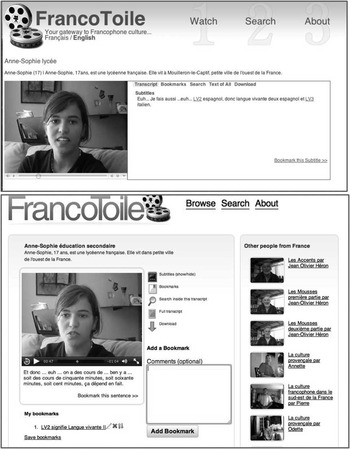
These results were helpful in regard to both the design of the CALL tool and its associated learning tasks. To respond to users’ feedback, we made some improvement to the site interface. We enhanced its guidance functions by (1) improving the legibility (type and size of character in transcripts and notes); (2) adding a feedback/comment capability within each video; (3) grouping the videos on a world map in the browse page, and according to location on the player page; (4) improving the graphics (terminology for tabs, adding icons, changing colours). Figure 8 shows the former prototype and the modified interface (player page) featuring some of these changes.
Former interface and re-designed interface (player page)

Our findings have implications for future research as well and, consequently, there are several other aspects of the overall experiment that could be modified in order to increase its reliability and its contribution to knowledge and learning. Regarding the development of cultural and electronic literacies, the present study reveals that technical, pedagogical and curricular requirements need to be considered as a whole. When designing a learning task to be performed with a CALL tool, both instructor and researcher (if the task is being empirically evaluated) should carefully craft the specifics of the course, learning outcomes and users’ functional abilities. This reinforces the idea that design is a multi-faceted concept, and that CALL design is very “context dependent” (e.g., Levy, Reference Levy2002). Likewise, as explained by Colpaert (Reference Colpaert2006) an ontological approach to courseware design is necessary to maximize its didactic-linguistic functionalities. Regarding language courseware, he states: “the more time spent before development (i.e., on analysis and design) the more effective the development and implementation process, the more intensive the use, and the greater probability of eventual effectiveness” (op. cit.: 111). Yet combining pedagogy and CALL tool methodology to create a symbiotic relationship that enhances users’ experience is often challenged by institutional or program related decisions. As illustrated by the present study, these challenges will need to be resolved, at least partially, before the next implementation of our CALL tool.
In addition, empowering users with a meta discourse to discuss, analyse and evaluate computer systems is yet another way to contribute to critical literacy and help students understand the cultural, political, social and psychological role played by computers, or the internet. Selber (Reference Selber2004) states that “students should [also] be able to function as reflective producers of computer technologies”(op. cit.: 134). An effective way to involve users in what he calls “rhetorical literacy” is to introduce a reflective piece that engages them in a “self-conscious and self-critical manner” (op. cit.: 160), such as reflecting on the usability of interface design in a context specific to their course or program. To go even further in this paradigm and adequately place their activity within the full spectrum of mediated activity, we might need to adapt systems so that users also become producers of knowledge. Any function that allows users to interact in a productive manner, such as facilitating the submission of annotation (in the case of our tool) or interacting with other users to reflect on any aspect of the system, will engage users in meaningful learning.
To better measure the performance of the tools developed, a layer of contextual inquiries should be added to the testing. The contextual inquiry would allow developers to better assess the performance of the tool in its real context of use. In a L2 learning context, there will be many variables that affect the environment depending on the learning tasks: for instance, an autonomous use within a lab or classroom setting will differ immensely from a controlled use during a task performing session, or an autonomous use directed solely by the user's will to seek knowledge independently. In sum, we propose a more holistic understanding of how contextual influences (at both a micro and macro levels) affect the learning and the learner, to answer some important questions: what skills do learners transfer from one context to the other? How does the design of the task affect the success of e-learning? What role does the instructor play in the success of the learning experience? How can we harness users’ functional skills (or lack of) to improve their interactive experience?
Acknowledgement
Special thanks to Stewart Arneil, University of Victoria, who was instrumental in designing Francotoile and provided the technical description of the tool. Thanks also to my research assistants, and to the anonymous reviewers for their feedback.